Solved How to swap primary drives after clone?

Kyafield

New member
Member
Local time
2:59 PM
Messages
24
I installed a new WD black 1TB hard and then cloned it. I would like for it to be my primary drive. Must I first rename my old drive something other than "C", then rename the new drive "C" ? Would that make my new drive primary or must I do some other process to get it to show as drive 0 and "C" ?
I want the WD to be the 0 drive. If I change the new drive to be "C" will that also make it disc 0 ???
 
Last edited:

My Computer My Computer

Computer type
PC/Desktop
Computer Manufacturer/Model Number
custom build
OS
windows 7 home premium 64 bit
CPU
Xeon X5460
Motherboard
Gigabyte GA-P43-ES3G
Memory
8gb
Graphics Card(s)
msi afterburner/GeForce GTX 650
Internet Speed
30
Antivirus
AVG
Browser
IE 11
Post a screenshot of Disk Management before making any changes.
http://www.sevenforums.com/tutorials/274797-disk-management-post-screen-capture-image.html

What program did you use to clone the Old HD to the New "WD black 1TB" ?

Disk 0 is determined by your motherboard Sata connectors.
It sounds like right now you have the Old HD plugged into the "Disk 0" motherboard Sata connector.

Also note:
Your specs show MBAM Pro as your anti-virus program.
MBAM is NOT an anti-virus program.
It is an anti-malware program designed to be run along side a real-time anti-virus program for additional security.
 

My Computer My Computer

Computer type
PC/Desktop
Computer Manufacturer/Model Number
home built
OS
Multi-Boot W7_Pro_x64 W8.1_Pro_x64 W10_Pro_x64 +Linux_VMs +Chromium_VM
CPU
AMD Athlon II x4 620
Motherboard
Gigabyte GA-MA785G-UD3H
Memory
6GB GSkill DDR2 800
Graphics Card(s)
AMD 4670 GPU + AMD 4200 IGP
Sound Card
on board Realtek ALC889A
Monitor(s) Displays
RCA 40" LCD TV, Insignia 32" LCD TV, HP 15" LCD monitor
Screen Resolution
1680 x 1050
Hard Drives
OCZ Vertex 3 120GB,
Samsung F3 1TB (3),
Several others - WD, Seagate, Hitachi, ...
PSU
Corsair 500 W
Case
Rosewill mid tower
Cooling
CM 90mm rifle
Keyboard
Gyration wireless, Logitech wireless, Dell USB wired
Mouse
Gyration wireless, Logitech wireless, V7 USB wired
Internet Speed
Spectrum - 100Mbps D / 10Mbps U
Antivirus
Avast, MBAM3, EMET, WinPatrol
Browser
Pale Moon, Firefox, IE
Other Info
2 multi-boot PC's
Mainly HTPC/Office/Gen purpose (no gaming).
Trendnet USB KVM.
LG DVD burner/Blue Ray Player.
Tray system for removable SATA backup drives.

Not currently OCd, under-volted.
I use Hybrid sleep, rarely re-boot or shutdown.

Hauppauge HD-PVR, Avermedia PCIe TV Tuner, Hauppauge PCI TV Tuner.
Thanks David. I used WD acronis for the clone.
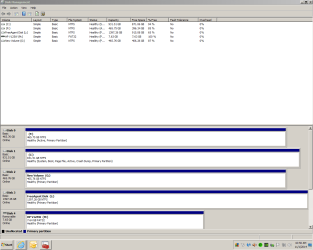
I have accomplished the move by just going into my bios and making the new drive the first boot selection. It is listed as disc 1 instead of 0 but that is OK, I don't want to swap the SATA cables around.

I will change my system info signature to reflect my antivirus as AVG.
 

Attachments

  • Capture.PNG
    Capture.PNG
    26.1 KB · Views: 5

My Computer My Computer

Computer type
PC/Desktop
Computer Manufacturer/Model Number
custom build
OS
windows 7 home premium 64 bit
CPU
Xeon X5460
Motherboard
Gigabyte GA-P43-ES3G
Memory
8gb
Graphics Card(s)
msi afterburner/GeForce GTX 650
Internet Speed
30
Antivirus
AVG
Browser
IE 11
Ok, understood.
It sounds like you have a good understanding of this.

If you want to boot from the OLD OS (HD) you can use the "One-Time" boot selection screen.
I have a Gigabyte MB and for me pressing F12 at bootup brings up that screen.

On my Primary Box, 99.9% of the time I want my preferred OS to automatically boot, so that works best for me.
If I always wanted to have a choice of which OS to boot, I would install EASYBCD to display a OS Boot choice screen.

There is no right or wrong answer, it's all personal preference...
On my TEST Box, I never know what I might want next, so I have the Boot OS choice displayed at every bootup...

More of my notes:
I always like to have a label on every HD/Partition so it's easy for me to know what it is.
Your and [F] partitons don't have labels ... I remove the Drive Letter for any "Other OS" HD/Partition so I don't see it listed in Windows (file) Explorer. Do you want to use your OLD HD OS for something else such as Data or Backup storage, or keep it as a "Backup bootable OS HD" ? What do you want to use the OLD HD for now, after cloning to the new HD ?
 

My Computer My Computer

Computer type
PC/Desktop
Computer Manufacturer/Model Number
home built
OS
Multi-Boot W7_Pro_x64 W8.1_Pro_x64 W10_Pro_x64 +Linux_VMs +Chromium_VM
CPU
AMD Athlon II x4 620
Motherboard
Gigabyte GA-MA785G-UD3H
Memory
6GB GSkill DDR2 800
Graphics Card(s)
AMD 4670 GPU + AMD 4200 IGP
Sound Card
on board Realtek ALC889A
Monitor(s) Displays
RCA 40" LCD TV, Insignia 32" LCD TV, HP 15" LCD monitor
Screen Resolution
1680 x 1050
Hard Drives
OCZ Vertex 3 120GB,
Samsung F3 1TB (3),
Several others - WD, Seagate, Hitachi, ...
PSU
Corsair 500 W
Case
Rosewill mid tower
Cooling
CM 90mm rifle
Keyboard
Gyration wireless, Logitech wireless, Dell USB wired
Mouse
Gyration wireless, Logitech wireless, V7 USB wired
Internet Speed
Spectrum - 100Mbps D / 10Mbps U
Antivirus
Avast, MBAM3, EMET, WinPatrol
Browser
Pale Moon, Firefox, IE
Other Info
2 multi-boot PC's
Mainly HTPC/Office/Gen purpose (no gaming).
Trendnet USB KVM.
LG DVD burner/Blue Ray Player.
Tray system for removable SATA backup drives.

Not currently OCd, under-volted.
I use Hybrid sleep, rarely re-boot or shutdown.

Hauppauge HD-PVR, Avermedia PCIe TV Tuner, Hauppauge PCI TV Tuner.
Do you want to use your OLD HD OS for something else such as Data or Backup storage, or keep it as a "Backup bootable OS HD" ?
What do you want to use the OLD HD for now, after cloning to the new HD ?


Good questions. I think for now I will leave the Disc 2 "G" as a back up bootable OS. At least for a couple of weeks to break in the new drive and watch the new drive for any problems. I like the idea of having several bootable back ups. If all goes well with the new drive then I may start using it as media storage. And again, thank you for your responses.
 

My Computer My Computer

Computer type
PC/Desktop
Computer Manufacturer/Model Number
custom build
OS
windows 7 home premium 64 bit
CPU
Xeon X5460
Motherboard
Gigabyte GA-P43-ES3G
Memory
8gb
Graphics Card(s)
msi afterburner/GeForce GTX 650
Internet Speed
30
Antivirus
AVG
Browser
IE 11
I don't know what your Disc 2 "G" is, but I don't think it is a backup bootable OS.
Your [F] and drives are ACTIVE, [G] is NOT active. You can't boot from a non active partition, without a "boot manager" ... :confused: Look in Windows (file) Explorer to see what you have on each of these disks/partitions ...
 

My Computer My Computer

Computer type
PC/Desktop
Computer Manufacturer/Model Number
home built
OS
Multi-Boot W7_Pro_x64 W8.1_Pro_x64 W10_Pro_x64 +Linux_VMs +Chromium_VM
CPU
AMD Athlon II x4 620
Motherboard
Gigabyte GA-MA785G-UD3H
Memory
6GB GSkill DDR2 800
Graphics Card(s)
AMD 4670 GPU + AMD 4200 IGP
Sound Card
on board Realtek ALC889A
Monitor(s) Displays
RCA 40" LCD TV, Insignia 32" LCD TV, HP 15" LCD monitor
Screen Resolution
1680 x 1050
Hard Drives
OCZ Vertex 3 120GB,
Samsung F3 1TB (3),
Several others - WD, Seagate, Hitachi, ...
PSU
Corsair 500 W
Case
Rosewill mid tower
Cooling
CM 90mm rifle
Keyboard
Gyration wireless, Logitech wireless, Dell USB wired
Mouse
Gyration wireless, Logitech wireless, V7 USB wired
Internet Speed
Spectrum - 100Mbps D / 10Mbps U
Antivirus
Avast, MBAM3, EMET, WinPatrol
Browser
Pale Moon, Firefox, IE
Other Info
2 multi-boot PC's
Mainly HTPC/Office/Gen purpose (no gaming).
Trendnet USB KVM.
LG DVD burner/Blue Ray Player.
Tray system for removable SATA backup drives.

Not currently OCd, under-volted.
I use Hybrid sleep, rarely re-boot or shutdown.

Hauppauge HD-PVR, Avermedia PCIe TV Tuner, Hauppauge PCI TV Tuner.
My fault. I stated it wrong. I am just keeping G drive around until I am satisfied that the new WD drive does not go belly up. I have a clone of C drive on it now. I thought it would use less resources if kept not active. Wrong assumption?
I also have the "free agent disc" L external back up and W7 repair CD disc bootable.
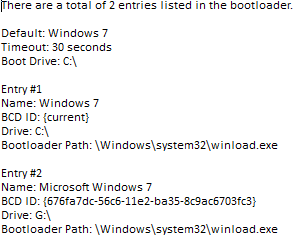
So.. if I wanted for the time being to be able to boot from G then I should activate it or do some research on boot managers?
 

My Computer My Computer

Computer type
PC/Desktop
Computer Manufacturer/Model Number
custom build
OS
windows 7 home premium 64 bit
CPU
Xeon X5460
Motherboard
Gigabyte GA-P43-ES3G
Memory
8gb
Graphics Card(s)
msi afterburner/GeForce GTX 650
Internet Speed
30
Antivirus
AVG
Browser
IE 11
You could try adding [G] as a bootable choice using EasyBCD.
There is a free version and you don't have to register to download it.
https://neosmart.net/EasyBCD/
 

My Computer My Computer

Computer type
PC/Desktop
Computer Manufacturer/Model Number
home built
OS
Multi-Boot W7_Pro_x64 W8.1_Pro_x64 W10_Pro_x64 +Linux_VMs +Chromium_VM
CPU
AMD Athlon II x4 620
Motherboard
Gigabyte GA-MA785G-UD3H
Memory
6GB GSkill DDR2 800
Graphics Card(s)
AMD 4670 GPU + AMD 4200 IGP
Sound Card
on board Realtek ALC889A
Monitor(s) Displays
RCA 40" LCD TV, Insignia 32" LCD TV, HP 15" LCD monitor
Screen Resolution
1680 x 1050
Hard Drives
OCZ Vertex 3 120GB,
Samsung F3 1TB (3),
Several others - WD, Seagate, Hitachi, ...
PSU
Corsair 500 W
Case
Rosewill mid tower
Cooling
CM 90mm rifle
Keyboard
Gyration wireless, Logitech wireless, Dell USB wired
Mouse
Gyration wireless, Logitech wireless, V7 USB wired
Internet Speed
Spectrum - 100Mbps D / 10Mbps U
Antivirus
Avast, MBAM3, EMET, WinPatrol
Browser
Pale Moon, Firefox, IE
Other Info
2 multi-boot PC's
Mainly HTPC/Office/Gen purpose (no gaming).
Trendnet USB KVM.
LG DVD burner/Blue Ray Player.
Tray system for removable SATA backup drives.

Not currently OCd, under-volted.
I use Hybrid sleep, rarely re-boot or shutdown.

Hauppauge HD-PVR, Avermedia PCIe TV Tuner, Hauppauge PCI TV Tuner.
Got it. Thanks again.
 

Attachments

  • boot.PNG
    boot.PNG
    3.6 KB · Views: 8

My Computer My Computer

Computer type
PC/Desktop
Computer Manufacturer/Model Number
custom build
OS
windows 7 home premium 64 bit
CPU
Xeon X5460
Motherboard
Gigabyte GA-P43-ES3G
Memory
8gb
Graphics Card(s)
msi afterburner/GeForce GTX 650
Internet Speed
30
Antivirus
AVG
Browser
IE 11
You're welcome !
:)
 

My Computer My Computer

Computer type
PC/Desktop
Computer Manufacturer/Model Number
home built
OS
Multi-Boot W7_Pro_x64 W8.1_Pro_x64 W10_Pro_x64 +Linux_VMs +Chromium_VM
CPU
AMD Athlon II x4 620
Motherboard
Gigabyte GA-MA785G-UD3H
Memory
6GB GSkill DDR2 800
Graphics Card(s)
AMD 4670 GPU + AMD 4200 IGP
Sound Card
on board Realtek ALC889A
Monitor(s) Displays
RCA 40" LCD TV, Insignia 32" LCD TV, HP 15" LCD monitor
Screen Resolution
1680 x 1050
Hard Drives
OCZ Vertex 3 120GB,
Samsung F3 1TB (3),
Several others - WD, Seagate, Hitachi, ...
PSU
Corsair 500 W
Case
Rosewill mid tower
Cooling
CM 90mm rifle
Keyboard
Gyration wireless, Logitech wireless, Dell USB wired
Mouse
Gyration wireless, Logitech wireless, V7 USB wired
Internet Speed
Spectrum - 100Mbps D / 10Mbps U
Antivirus
Avast, MBAM3, EMET, WinPatrol
Browser
Pale Moon, Firefox, IE
Other Info
2 multi-boot PC's
Mainly HTPC/Office/Gen purpose (no gaming).
Trendnet USB KVM.
LG DVD burner/Blue Ray Player.
Tray system for removable SATA backup drives.

Not currently OCd, under-volted.
I use Hybrid sleep, rarely re-boot or shutdown.

Hauppauge HD-PVR, Avermedia PCIe TV Tuner, Hauppauge PCI TV Tuner.
Back
Top