
How to tell if IE10 is 32 bit or 64 bit.

SeptimusFry

New member
Member
Local time
5:37 AM
Messages
26
I note from another thread, on subject of same question for IE9, that one only has to look at the Help>About where all is revealed. However, this is not the case with IE10.

The same advice is true, that one selects the 32 or 64 by using the appropriate value in the shortcut, that is to say the Program Files(x86) or just Program Files versions.

The Help>About says the same for both versions, only looking in to the Properties can one discern any differences. I hope this helps anyone unsure of what they are using. If in doubt, create a shortcut for whichever IE10 you want to use. You can have both, make sure they are named appropriately and if you have a problem with your default IE10, you can switch immediately to see if the problem is the same in both versions. This may help you, or others, to identify the source of the problem...
 

Attachments
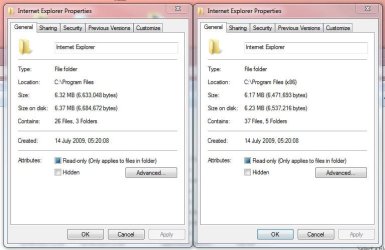
  • Capture IE 10 Differences.JPG
    Capture IE 10 Differences.JPG
    56.4 KB · Views: 3

My Computer My Computer

At a glance

Windows 7/64pro(SSD)i7 eXtreme 980, 3.33GHz, 6 Cores, 12 Logical ...24 GBNvidia GeForce GTX 285
Computer type
PC/Desktop
Computer Manufacturer/Model Number
PCSpecialist
OS
Windows 7/64pro(SSD)
CPU
i7 eXtreme 980, 3.33GHz, 6 Cores, 12 Logical Processors
Motherboard
Asus P6TD Deluxe, BIOS 0501
Memory
24 GB
Graphics Card(s)
Nvidia GeForce GTX 285
Sound Card
SoundMax Integrated Digital HD Audio
Monitor(s) Displays
NEC Multisync LCD2690wuxi2 Reference & NEC MultiSync EA232WM
Screen Resolution
1920x1200 & 1920x1080
Hard Drives
System Disk 256GB Samsung SSD, SATA-6, (OS only) +
300G WD3000 Velociraptor (weekly system Clone) +
2 x 1.5TB Seagate 315 Barracuda (in Mirror, RAID 1) (all data) +
2 x 2TB (ext USB3) WD Raid 1 (weekly backup).
Case
Cosmos 1000
Internet Speed
20Mbps
Other Info
APC Back-UPS BR1500GI

My Computer My Computer

At a glance

W7 Pro SP1 64biti78GBIntel HD Graphics
Computer type
Laptop
Computer Manufacturer/Model Number
Employer provided Dell Latitude
OS
W7 Pro SP1 64bit
CPU
i7
Memory
8GB
Graphics Card(s)
Intel HD Graphics
Hard Drives
crappy SSD
Antivirus
Employer mandated Symantec Endpoint Protection
Browser
Pale Moon 64bit, IE11 64bit & Chrome 64bit
However, there is another subtle point I have not been able to resolve to my satisfaction....

OK, I now have two shortcuts and can thus start, myself, a browser session in whichever I choose.

But, if I click on a URL, it will bring up my default browser, which is IE10 - but I can see no way to make sure that it will be IE10/32 or IE10/64.

Going into either of them, I can choose Internet Explorer as my default browser, but not which one.

(edit) Oh-oh... just seen UsernameIssues posting. If correct, that puts a different complexion on things. I might try renaming IE10-64, to be sure he is right.
 

My Computer My Computer

At a glance

Windows 7/64pro(SSD)i7 eXtreme 980, 3.33GHz, 6 Cores, 12 Logical ...24 GBNvidia GeForce GTX 285
Computer type
PC/Desktop
Computer Manufacturer/Model Number
PCSpecialist
OS
Windows 7/64pro(SSD)
CPU
i7 eXtreme 980, 3.33GHz, 6 Cores, 12 Logical Processors
Motherboard
Asus P6TD Deluxe, BIOS 0501
Memory
24 GB
Graphics Card(s)
Nvidia GeForce GTX 285
Sound Card
SoundMax Integrated Digital HD Audio
Monitor(s) Displays
NEC Multisync LCD2690wuxi2 Reference & NEC MultiSync EA232WM
Screen Resolution
1920x1200 & 1920x1080
Hard Drives
System Disk 256GB Samsung SSD, SATA-6, (OS only) +
300G WD3000 Velociraptor (weekly system Clone) +
2 x 1.5TB Seagate 315 Barracuda (in Mirror, RAID 1) (all data) +
2 x 2TB (ext USB3) WD Raid 1 (weekly backup).
Case
Cosmos 1000
Internet Speed
20Mbps
Other Info
APC Back-UPS BR1500GI
Task manager will show you if it is 64bit or 32 bit...
...and you can add a column to see the Command Line too:

IE10-64-32.png

From the menu bar, use View > Select Columns...
 

My Computer My Computer

At a glance

W7 Pro SP1 64biti78GBIntel HD Graphics
Computer type
Laptop
Computer Manufacturer/Model Number
Employer provided Dell Latitude
OS
W7 Pro SP1 64bit
CPU
i7
Memory
8GB
Graphics Card(s)
Intel HD Graphics
Hard Drives
crappy SSD
Antivirus
Employer mandated Symantec Endpoint Protection
Browser
Pale Moon 64bit, IE11 64bit & Chrome 64bit

My Computer My Computer

At a glance

Win-7-Pro64bit 7-H-Prem-64biti7-5930K 2nd i9-9940x both water blocked VRM'...Trident-z 3200C14 2nd Trident-z 3600C16EVGA 1080ti ftw3 2nd Titan Xp both water blocked
Computer type
PC/Desktop
Computer Manufacturer/Model Number
Custom assembled by me :}
OS
Win-7-Pro64bit 7-H-Prem-64bit
CPU
i7-5930K 2nd i9-9940x both water blocked VRM's too
Motherboard
ASUS SABERTOOTH X99 2nd ASUS x299 Apex
Memory
Trident-z 3200C14 2nd Trident-z 3600C16
Graphics Card(s)
EVGA 1080ti ftw3 2nd Titan Xp both water blocked
Sound Card
Built-in Realtek
Monitor(s) Displays
1-AOC G2460PG 24"G-Sync 144Hz/ 2nd 1-ASUS VG248QE 24" 144Hz
Screen Resolution
1920 x 1080 144Hz
Hard Drives
2-Samsung M.2 Evo & Evo Plus
2-Samsung 850 EVO 500GB SSD's/ 3-2.5 W.D. Black 1tb-&3-1tb/3-3.5 WD Black 1tb hdd's
PSU
EVGA SuperNOVA 1000-P2 2nd 1200-P2
Case
2-Corsair Obsidian Series 450D Black ATX Mid Tower
Cooling
Custom water loops
Keyboard
Logitech G710+/ 2nd Logitech G910
Mouse
2-RedDragon M901 Perdition 16400 dpi Gaming mouse = wired
Internet Speed
Comcast Ping 19ms 89.31mbps download speed 6.12mbps upload
Antivirus
Malwarebytes Pro/ Superantispyware Pro
Browser
FireFox & Pale moon
Other Info
2nd ASUS X299 Apex/Intel i9-9940x with Custom water loop/7H-Prem-x64/Corsair 450D case/Ram Trident-z 3600C16 4x8gb / Samsung970Evo plus 500gb SSD/Dual ssd EZ swap evo/PSU EVGA SuperNova 1200w-P2 80+Platinum/GPU Titan Xp /8-ML-140 on push-pull on 2-280GTX rads
~~~
(edit) Oh-oh... just seen UsernameIssues posting. If correct, that puts a different complexion on things....
By default, Process Monitor nests (indents) apps to show what app launched another app:


There is a setting within Process Monitor named "Difference Highlight Duration...". I set that to 9 seconds so that we can see apps exiting RAM. Once an app exits, the line representing that app within Process Monitor should turn red and stay that way for 9 seconds. [A green line means that an app just started.]

IE10 32bit spawns IE10 64bit and then leaves RAM too fast for me to see it in Task Manager.


~~~
I might try renaming IE10-64, to be sure he is right.
It is not a good idea to rename the EXE. You have to take ownership away from the account named Trusted Installer and if you rename the 64bit version, the 32bit version will not know what app to try and start:


Even with Process Monitor set to update every 0.5 seconds, Process Monitor had a hard time capturing the 32bit version because IE10-32bit starts, fails to launch the 64bit version and exits RAM too fast. In the video, I ended up holding down the enter key so that I could start lots of instances of IE10-32bit in the hopes that Process Monitor would eventually capture one of them. I'm not sure why Process Monitor fails to capture IE10-32bit leaving RAM, thus no red line.


If you leave the 64-bit version named correctly, you can sort of see the 32bit version launching it. I would have to repeat those steps many times to actually catch IE10-32bit within Process Monitor. I did that for the first video in this post... just not this last video. But you can see that I started the 32bit version and Process Monitor shows the 64bit version running.

The videos were taken of a Virtual Machine where I can do no harm; hence, my willingness to rename those EXE files. Once I exit the Virtual Machine any changes that I've made will go away too.
 

My Computer My Computer

At a glance

W7 Pro SP1 64biti78GBIntel HD Graphics
Computer type
Laptop
Computer Manufacturer/Model Number
Employer provided Dell Latitude
OS
W7 Pro SP1 64bit
CPU
i7
Memory
8GB
Graphics Card(s)
Intel HD Graphics
Hard Drives
crappy SSD
Antivirus
Employer mandated Symantec Endpoint Protection
Browser
Pale Moon 64bit, IE11 64bit & Chrome 64bit
This is a very useful thread of info. I also watched with Process Monitor and could see that there was certainly an interaction between IE10-64 and -32 after starting with -32. Your posting of Task Manager shows umpteen 32 bit IE processes running under the authority of a 64 bit IE. The URL given by ThrashZone is a bit puzzling as it is not clear what is the difference between a manager process and a content process. I have this picture synthesized from these two sources of a 64bit manager process in charge of security and umpteen 32bit manager processes associated with managing the html content of the page or asp. So the logic of the page is the business of the 32bit process and the security overseen by the 64bit. Since mention is made of Java, both 32 and 64, I would have expected Java to be part of the html content and thus not necessary for the IE10-32 content.

This may sound slightly jumbled, that is because I am only seeing the whole picture rather jumbly.
 

My Computer My Computer

At a glance

Windows 7/64pro(SSD)i7 eXtreme 980, 3.33GHz, 6 Cores, 12 Logical ...24 GBNvidia GeForce GTX 285
Computer type
PC/Desktop
Computer Manufacturer/Model Number
PCSpecialist
OS
Windows 7/64pro(SSD)
CPU
i7 eXtreme 980, 3.33GHz, 6 Cores, 12 Logical Processors
Motherboard
Asus P6TD Deluxe, BIOS 0501
Memory
24 GB
Graphics Card(s)
Nvidia GeForce GTX 285
Sound Card
SoundMax Integrated Digital HD Audio
Monitor(s) Displays
NEC Multisync LCD2690wuxi2 Reference & NEC MultiSync EA232WM
Screen Resolution
1920x1200 & 1920x1080
Hard Drives
System Disk 256GB Samsung SSD, SATA-6, (OS only) +
300G WD3000 Velociraptor (weekly system Clone) +
2 x 1.5TB Seagate 315 Barracuda (in Mirror, RAID 1) (all data) +
2 x 2TB (ext USB3) WD Raid 1 (weekly backup).
Case
Cosmos 1000
Internet Speed
20Mbps
Other Info
APC Back-UPS BR1500GI
I had read a website that stated there is a 30 tab limit on IE10. I read another website that mentioned that the max number of tabs within IE10 is only limited by the computer's resources. So, I decided to play around with ways to test/measure the number of tabs that I could open. The Task Manager screenshot showed a lot of 32bit instances of IE, but at the time, I had 879 tabs open - each with a different/unique/tiny webpage loaded. I eventually gave up after about 1200 tabs - as there really did not seem to be a limit.

I don't know how IE decides when to open a 32bit tab and when to open a 64bit tab. Process Monitor shows a 64bit Java version loading as a child of a 64bit tab when I visit keepvid.com. I've not seen the 32bit version of Java load yet... but I don't use Java too often. Maybe if something on a webpage made IE10 load a 32bit tab and that tab then called for Java, the Java would be 32bit.

I don't know what all the windowless 64bit manager process does. Maybe it handles crash recovery in addition to some security stuff.
 

My Computer My Computer

At a glance

W7 Pro SP1 64biti78GBIntel HD Graphics
Computer type
Laptop
Computer Manufacturer/Model Number
Employer provided Dell Latitude
OS
W7 Pro SP1 64bit
CPU
i7
Memory
8GB
Graphics Card(s)
Intel HD Graphics
Hard Drives
crappy SSD
Antivirus
Employer mandated Symantec Endpoint Protection
Browser
Pale Moon 64bit, IE11 64bit & Chrome 64bit
Strange Google page behaviour

Perhaps a little word of warning to anyone reading this thread. Experimentation can do you harm.

Before trying to force IE10/32 as my default browser and consequently having two icons on my taskbar/desktop, I started having a strange thing happening. I enter a search into Google and often it just flops back to an empty Google page. It seems to be (but not confirmed) restricted to cases where I hit the return or the seach button rather than accept one of the suggested searches from the autocomplete Google feature. It is totally new, and can only be associated with this IE10/32 playing about. I have returned IE10/64 as the only taskbar icon, but it still happens and I assume that somehow I am now invoking IE10/32 where I do not mean to. Later, if it is still a nuisance, I shall do a system restore to a couple of days ago.

I am sure I could investigate further, but I do have better things to do with my life.

I shall keep watching this thread. Good luck.
 

My Computer My Computer

At a glance

Windows 7/64pro(SSD)i7 eXtreme 980, 3.33GHz, 6 Cores, 12 Logical ...24 GBNvidia GeForce GTX 285
Computer type
PC/Desktop
Computer Manufacturer/Model Number
PCSpecialist
OS
Windows 7/64pro(SSD)
CPU
i7 eXtreme 980, 3.33GHz, 6 Cores, 12 Logical Processors
Motherboard
Asus P6TD Deluxe, BIOS 0501
Memory
24 GB
Graphics Card(s)
Nvidia GeForce GTX 285
Sound Card
SoundMax Integrated Digital HD Audio
Monitor(s) Displays
NEC Multisync LCD2690wuxi2 Reference & NEC MultiSync EA232WM
Screen Resolution
1920x1200 & 1920x1080
Hard Drives
System Disk 256GB Samsung SSD, SATA-6, (OS only) +
300G WD3000 Velociraptor (weekly system Clone) +
2 x 1.5TB Seagate 315 Barracuda (in Mirror, RAID 1) (all data) +
2 x 2TB (ext USB3) WD Raid 1 (weekly backup).
Case
Cosmos 1000
Internet Speed
20Mbps
Other Info
APC Back-UPS BR1500GI
Back
Top