So I was wandering - how can you tell in Windows what drivers you have installed on your PC, if they are the most up to date ones and how to remove old drivers that you don't use anymore - in order to remove conflicts and errors.
Thanks for your help
Aryan
My Computer
At a glance
Windows 7 Professional 64 bitIntel Core 2 Duo E8500OCZ 4GB DDR-II PC2-5400XFX GeForce 8600GT 512MB DDR3 PCI-E
1) You can check in device manager. Right click on each device and in properties check driver details and location. Alternatively, use something like double driver (freeware) to backup installed drivers. Double driver will clearly show all installed drivers, both MS and 3rd party.
2) To update drivers, you can either use windows update/device manager or use a 3rd party tool like driver magician or manually navigate to the manufacturer's website and download the latest drivers. The last method is recommended since the first two can throw up obsolete drivers or not show a new driver because it dosnt exist in their respective database.
3) Installing a new driver will automatically supersede the older one. You can also remove old drivers yourself.
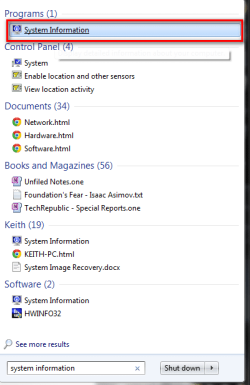
If you just want a list of drivers you can get it from System Information. Just type System Information in the windows search box. and open it.
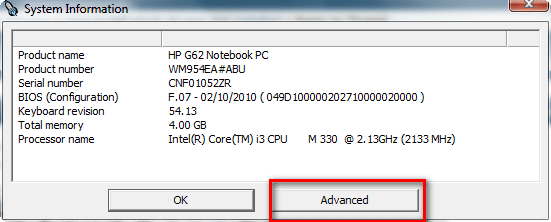
Press the Advanced button.
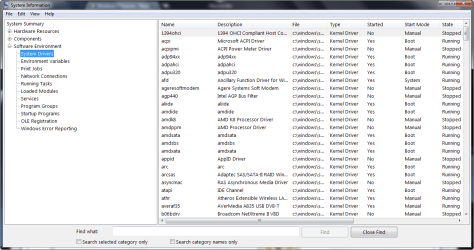
and expand the Software Environment->System Drivers
My Computer
At a glance
Microsoft Windows 7 Home Premium 64-bit Servi...Intel(R) Core(TM) i3 CPU M 330 @ 2.13GHz8 GB DDR3Intel(R) HD Graphics
Computer type
Laptop
Computer Manufacturer/Model Number
Hewlett-Packard/G62-107SA Notebook
OS
Microsoft Windows 7 Home Premium 64-bit Service Pack 1
CPU
Intel(R) Core(TM) i3 CPU M 330 @ 2.13GHz
Motherboard
Hewlett-Packard 1425
Memory
8 GB DDR3
Graphics Card(s)
Intel(R) HD Graphics
Sound Card
Realtek High Definition Audio
Monitor(s) Displays
Builtin
Screen Resolution
1366 x 768 x 32 bits (4294967296 colors) @ 60 Hz
Hard Drives
250 GB SATA Hard Disk Drive 7200 rpm
2TB Seagate GoFlex USB 2 Drive
1TB Iomega Prestige USB 2 Drive
1.5TB Iomega Prestige USB 2 Drive (Samsung)
2TB WD MyBook Live NAS.