Solved How to transfer Windows to a new Hard Drive

Usmaan

New member
Local time
2:22 PM
Messages
2
Dear Experts,

I have an Acer Aspire 5750 Laptop with pre-installed Windows 7. It has a 640GB HDD. I want to replace the existing HDD with a new 1TB HDD. In doing so can i

Transfer the Windows to the new HDD along with the Recovery partition?

Kindly help me by suggesting a solution. A comprehensive answer will be much appreciated.
 

My Computer My Computer

At a glance

Windows 7 Home Premium 64bitIntel(R) Core(TM) i3-2310M CPU @ 2.10GHz6GB DDR3Intel(R) HD Graphics 3000
Computer type
Laptop
Computer Manufacturer/Model Number
Acer 5750
OS
Windows 7 Home Premium 64bit
CPU
Intel(R) Core(TM) i3-2310M CPU @ 2.10GHz
Motherboard
Acer JE50_HR
Memory
6GB DDR3
Graphics Card(s)
Intel(R) HD Graphics 3000
Sound Card
Realtek High Definition Audio
Hard Drives
640GB HDD
Antivirus
360 Total Security
Browser
Chrome
You can try to clone your HDD which does not always work or use images which I prefer.

For imaging and restore refer to this tutorial. This program can also clone.
 

My Computer My Computer

At a glance

Vista, Windows7, Mint Mate, Zorin, Windows 8from 1.6GHz Duo to i7
Computer Manufacturer/Model Number
HP, Dell, Gateway, Toshiba - 4 laptops and 2 desktops
OS
Vista, Windows7, Mint Mate, Zorin, Windows 8
CPU
from 1.6GHz Duo to i7
Monitor(s) Displays
2x HP w2207
Hard Drives
5x HDD, 7x SSD, 12x Externals
Keyboard
with trackball - no mices
Mouse
Trackball mice
Internet Speed
DSL 6000
^This.
You can use Marcum reflect to make a backup image to the non-OS partition on the new drive, then restore it to the OS partition on the new drive.
 

My Computer My Computer

At a glance

Windows 10 Pro. EFI boot partition, full EFI ...i7 4770k 4.4GHz (44-44-43-43 turbo) @ 1.248V16GB (8GBx2) @2200 MHz G.skill Sniper 10-11-1...MSI GTX 970 Gaming 4G
Computer type
PC/Desktop
Computer Manufacturer/Model Number
Home built (GeneO industries)/Model 4
OS
Windows 10 Pro. EFI boot partition, full EFI boot
CPU
i7 4770k 4.4GHz (44-44-43-43 turbo) @ 1.248V
Motherboard
ASUS Maximus VI Hero
Memory
16GB (8GBx2) @2200 MHz G.skill Sniper 10-11-10-30-1, 1.6V
Graphics Card(s)
MSI GTX 970 Gaming 4G
Sound Card
Onboard SupremeFX Audio
Monitor(s) Displays
NEC Spectraview 2490WUXi-SV
Screen Resolution
1920 x 1200
Hard Drives
Samsung 850 Pro 256GB (OS), Samsung 2x 128GB 840 Pro SSD in RAID0, 3x WD Blue 6Gb/s 1TB RAID0, WD 2TB Black external USB 3.0, 2TB WD20EARS Green external USB 3.0, 2x 500GB Seagate and 1 750 GB external USB, 1x 350GB external USB3
PSU
Seasonic X-850 (2012 KM3 model)
Case
Fractal Design Define R4
Cooling
NH-D14, NF-F12, NF-A15; NF-P14, NF-P12,NF-A14, S12A PWM
Keyboard
Cooler Master Storm Quickfire Rapid - Brown
Mouse
Logitech G602
Internet Speed
126.4 Mb/s down, 24.3 Mb/s up
Other Info
USB 3.0 x8 , SATA III x8, eSATA, USB 2.0 x6. Samsung DVD R/W drive.

WEI: CPU 7.8, Memory 7.9, Graphics 7.9, Disk 7.9
Be careful how you deal with the left over (1TB - 640GB). This will depend on the data structure of your initial ACER 640GB HDD.
 

My Computer My Computer

At a glance

Windows 7x64 Home Premium SP1Intel i7 2600kG.Skill Ripjaws (DDR3-1600) 2x4GBNvidia GeForce GTS 450; Intel HD Graphics 300...
Computer type
PC/Desktop
Computer Manufacturer/Model Number
Own build
OS
Windows 7x64 Home Premium SP1
CPU
Intel i7 2600k
Motherboard
ASUS P8Z68 Deluxe
Memory
G.Skill Ripjaws (DDR3-1600) 2x4GB
Graphics Card(s)
Nvidia GeForce GTS 450; Intel HD Graphics 3000(GT2+)
Monitor(s) Displays
Dell Ultrasharp IPS panel U2311H, Samsung SyncMaster P2350
Screen Resolution
1920x1080
Hard Drives
Samsung 850 Pro SSD 256GB, Samsung SSD 840 120GB, Seagates 1TB Barracuda ST31000528AS x2
PSU
Seasonic M12II 520W
Case
Lian Li Lancool PC-K60
Cooling
Case: 1x120mm, 3x140mm CPU: Hyper 212+
Keyboard
Logitech MK520 (wireless)
Mouse
Logitech MK520
Internet Speed
6-7 Mbps
Antivirus
Norton Security Premium, Malwarebytes on 2 (MSE on 3rd PC)
Browser
FireFox
Other Info
Audio: Logitech Z523 2.1
Typically there are two methods used to move from an older/smaller drive to a new and larger drive:
The first is ‘Drive Cloning’ and the second is ‘Drive Imaging’. Disk cloning software may not be aware of the hidden partition and as a result only clone the Windows 7 partition, leaving you with an unbootable hard drive. Disk imaging will create an image of both partitions and restore both to the new hard drive.
Here are more details for you: How to move windows 7 to a new or larger hard drive using Backup and Restore
 

My Computer My Computer

At a glance

Windows 7 Home Premium 32bit
Computer type
PC/Desktop
OS
Windows 7 Home Premium 32bit
You can try to clone your HDD which does not always work or use images which I prefer.

For imaging and restore refer to this tutorial. This program can also clone.

Typically there are two methods used to move from an older/smaller drive to a new and larger drive:
The first is ‘Drive Cloning’ and the second is ‘Drive Imaging’. Disk cloning software may not be aware of the hidden partition and as a result only clone the Windows 7 partition, leaving you with an unbootable hard drive. Disk imaging will create an image of both partitions and restore both to the new hard drive.
Here are more details for you: How to move windows 7 to a new or larger hard drive using Backup and Restore

Thanks for the help guys. I now have a better idea of the task.

Just to have your views on some other things i have found out.

1) Acer support suggested me to use the recovery disks with the new HDD but it won't put the recovery partition in place.

2) Microsoft Help Desk told me to install Windows 7 on the new HDD and then try to activate it using the Key i got with the purchase of this laptop but they weren't particularly sure about this. It seems to be an easier option but somewhat uncertain.

Thanks again guys.
 

My Computer My Computer

At a glance

Windows 7 Home Premium 64bitIntel(R) Core(TM) i3-2310M CPU @ 2.10GHz6GB DDR3Intel(R) HD Graphics 3000
Computer type
Laptop
Computer Manufacturer/Model Number
Acer 5750
OS
Windows 7 Home Premium 64bit
CPU
Intel(R) Core(TM) i3-2310M CPU @ 2.10GHz
Motherboard
Acer JE50_HR
Memory
6GB DDR3
Graphics Card(s)
Intel(R) HD Graphics 3000
Sound Card
Realtek High Definition Audio
Hard Drives
640GB HDD
Antivirus
360 Total Security
Browser
Chrome
1. If you have the recovery disk, you do not really need the recovery partition. In addition I suggest you make some images right after the initial installation and when you have installed all your programs and settings. Then you can always fall back to that. It is easier than a reinstall. Frequent images thereafter are also recommended so that your fallbacks are not too old.

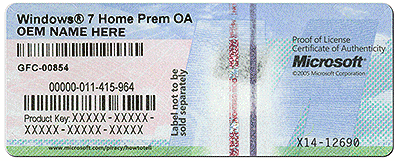
2. That recommendation is good. The Windows key that belongs to your PC is on the COA sticker which is on the back of a desktop or the bottom of the laptops (can also be inside the battery compartment). Here is a good tutorial for a clean install.

The COA sticker looks like this:
 

Attachments

  • coa-stickers.gif
    coa-stickers.gif
    495.9 KB · Views: 35

My Computer My Computer

At a glance

Vista, Windows7, Mint Mate, Zorin, Windows 8from 1.6GHz Duo to i7
Computer Manufacturer/Model Number
HP, Dell, Gateway, Toshiba - 4 laptops and 2 desktops
OS
Vista, Windows7, Mint Mate, Zorin, Windows 8
CPU
from 1.6GHz Duo to i7
Monitor(s) Displays
2x HP w2207
Hard Drives
5x HDD, 7x SSD, 12x Externals
Keyboard
with trackball - no mices
Mouse
Trackball mice
Internet Speed
DSL 6000
With the exception of one time, when the source disk had already become corrupted, I've had no problems cloning drives with Macrium Reflect Free (the SSD in the notebook computer I'm using right now as cloned from the original HDD). You can always try to clone the original drive to the new one (you may need to expand the partition on the destination disk after cloning but that is easily done with the free Mini Tool Partition Wizard).

If that fails, you can always image the original disk, again with Macrium Reflect Free, then "restore" the image to the new drive (whs linked an excellent tutorial he wrote on how to clone using Macrium Reflect. The problem with imaging is it involves two steps and an intermediary drive to park the image on during the cloning and restoration process (you will also need to make a rescue disk or USB stick). You should have a second 1TB drive anyway to backup the new one so needing another drive shouldn't be a problem.
 

My Computer My Computer

At a glance

Win 7 Ultimate 64 bitIntel i7-3930KKingston HyperX Genesis 32GB Kit (8x4GB Modul...MSI R7850 Twin Frozr 2GD5/OC Radeon HD 7850 2...
Computer type
PC/Desktop
Computer Manufacturer/Model Number
Custom Build
OS
Win 7 Ultimate 64 bit
CPU
Intel i7-3930K
Motherboard
ASUS P9X79 WS
Memory
Kingston HyperX Genesis 32GB Kit (8x4GB Modules) 1600MHz DDR
Graphics Card(s)
MSI R7850 Twin Frozr 2GD5/OC Radeon HD 7850 2GB 256-bit GDDR
Sound Card
Asus Xonar Essence STX
Monitor(s) Displays
3x Asus VG248QE 24", Vizio 32" TV
Screen Resolution
1920 x 1080, ?
Hard Drives
Samsung 128GB 840 Pro SSD (1),
Samsung 4TB 850 EVO SSDs (4)
Samsung 4TB 850 EVO SSDs (16) external backup drives used in 2.5" hot swap bays in the computer.
PSU
Corsair HX750w
Case
Antec Two Hundred v2 (modified)
Cooling
Cooler Master GeminII S524 120mm (fan replaced with a 140mm)
Keyboard
Logitech G510s
Mouse
Logitech M525 (two in use)
Internet Speed
=< 32Mbps down, 8Mbps up
Antivirus
AVAST!, MBAM, SAS, Spybot S&D (all but MBAM free) Glary Util
Browser
IE11
Other Info
LSI 9211-8i HBA card (8 SATA III ports), 2.5" & 3.5" Hot Swap Bays, HooToo HT-CR001 PCI-E to USB 3.0 Internal Hub + 6 Slot Card Reader, and LG Model CH12LS28 BD-ROM Optical Drive. Also, ScanSnap S1500 ADF duplexing scanner, Canon 9000F flat bed scanner, Corsair SP2500 2.1 speakers, Samsung CLP 415nw laser color printer, Cyberpower PP2200SW UPS
Back
Top