How to Uninstall W7 When In A Multi-Boot

Hi Smarteyeball,

Thanks for posting the screenshot - it's interesting.:geek:


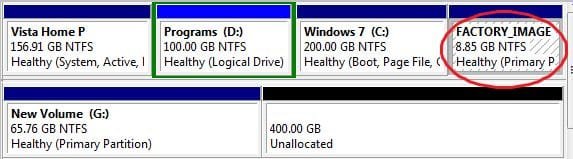
Was that a new hd that you partitioned with Win7 during the installation ?

It's a good thing as you can make an image of that 200mb partition to restore in an emergency. I have the Paragon Drive Backup, which lets you make a small bootable cd - so you can boot in , find the backup image and restore it - I assume Acronis etc are pretty much the same?

No worries :) and yep, it was a brand spanking new unformatted drive.

Funny you should mention backing up that boot partition. Last night I tried using the Vista back up and restore centre and it refused to work. Insufficient space errors due to Volume Shadow Copy. Since there was no option to deselect the 200MB partition in the GUI backup, I used the wbadmin cmd line to back up the Vista partition alone and it worked. I then tried it on the 200Mb partition with no success. I'm going to give Acronis a go later and see how it goes.

(BTW, the target drive had 298GB free space, so that's not an issue ;) )
 

My Computer My Computer

Computer type
PC/Desktop
Computer Manufacturer/Model Number
Systems by SmartEyeball
OS
8 Pro x64
CPU
i7 3770K 4.6GHz
Motherboard
ASUS P8Z77 WS
Memory
16GB G.Skill Trident X 2666mhz
Graphics Card(s)
x2 EVGA 780 Ti Superclocked SLI
Sound Card
SB X-FI Surround 5.1 PRO USB / ATH-AD900 Headphones
Monitor(s) Displays
x3 Dell U2410 / 58" Samsung
Screen Resolution
5760*1200/ 1920*1200
Hard Drives
2x Intel 520 240GB (RAID 0) * 2x WD Caviar Blacks 2TB (RAID 0) * 2TB WD Caviar Black * Sony Optirac DVD
PSU
Silverstone Strider Evolution 1200W
Case
Thermaltake Level 10 GT Snow Edition
Cooling
Noctua NH-D14
Keyboard
Topre Realforce // Ducky Shine MX Black // Filco Ninja TKL
Mouse
Thermaltake Theron (Highly Recommended) + Razer Imperator
Antivirus
MSE
Browser
IE, FF, WaterFox
Other Info
GT Extreme V2 Sim Racing Cockpit + 40" LCD and K/B Mouse stand ▼
Fanatec CSR Elite Wheel + Clubsport V1 Pedals + CSR shifter/7G-H ▼Saitek X52 Pro ▼ TrackIR 5 Pro
Buttkicker v2 Seat Rumbler with Dedicated 5.1 and Sub Woofer attached to frame ▼
=
Bloody Big Grin
Hi Smarteyeball,

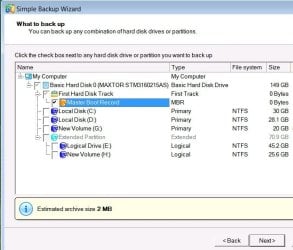
You probably will get that option with Acronis , I get the option to backup any partition with Drive Backup 9 Express

DRIVEBACKUP92008-11-27_040856.jpg

Though weirdly it lists the MBR as 0 bytes, then says est. backup size 2mb - go figure.

SIW2
 

My Computers My Computers

System One System Two

  • Computer type
    PC/Desktop
    OS
    7 X64
    CPU
    i5 8400
    Motherboard
    gigabyte b365m ds3h
    Memory
    2x8gb 3200mhz
    Hard Drives
    various
    PSU
    pure power 11 400w cm
    Case
    Coolermaster
    Cooling
    cryorig m9i
  • Computer type
    PC/Desktop
    OS
    7x64
    CPU
    g5400
    Motherboard
    ga b365m ds3h
    Memory
    8gb ddr4 2400
    PSU
    xfx pro 450w
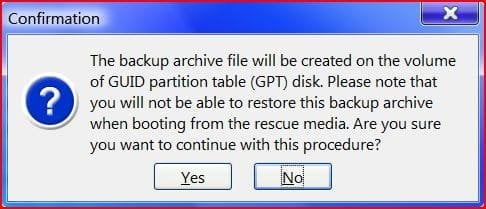
Just tried backing up the 200MB on it's own with Acronis. It worked. Sort of:

attachment.php


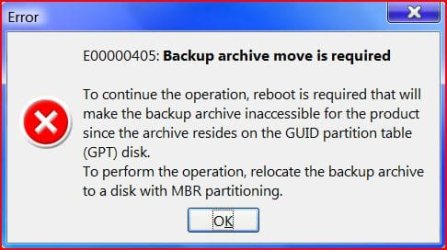
Trying to restore from within Vista:

attachment.php


When I added the second HD and split it into two, I was presented with either creating a MBR disk or a GPT disk. Guess which one I selected?;)
 

Attachments

  • acronis.JPG
    acronis.JPG
    29.3 KB · Views: 688
  • nono.JPG
    nono.JPG
    31.5 KB · Views: 692

My Computer My Computer

Computer type
PC/Desktop
Computer Manufacturer/Model Number
Systems by SmartEyeball
OS
8 Pro x64
CPU
i7 3770K 4.6GHz
Motherboard
ASUS P8Z77 WS
Memory
16GB G.Skill Trident X 2666mhz
Graphics Card(s)
x2 EVGA 780 Ti Superclocked SLI
Sound Card
SB X-FI Surround 5.1 PRO USB / ATH-AD900 Headphones
Monitor(s) Displays
x3 Dell U2410 / 58" Samsung
Screen Resolution
5760*1200/ 1920*1200
Hard Drives
2x Intel 520 240GB (RAID 0) * 2x WD Caviar Blacks 2TB (RAID 0) * 2TB WD Caviar Black * Sony Optirac DVD
PSU
Silverstone Strider Evolution 1200W
Case
Thermaltake Level 10 GT Snow Edition
Cooling
Noctua NH-D14
Keyboard
Topre Realforce // Ducky Shine MX Black // Filco Ninja TKL
Mouse
Thermaltake Theron (Highly Recommended) + Razer Imperator
Antivirus
MSE
Browser
IE, FF, WaterFox
Other Info
GT Extreme V2 Sim Racing Cockpit + 40" LCD and K/B Mouse stand ▼
Fanatec CSR Elite Wheel + Clubsport V1 Pedals + CSR shifter/7G-H ▼Saitek X52 Pro ▼ TrackIR 5 Pro
Buttkicker v2 Seat Rumbler with Dedicated 5.1 and Sub Woofer attached to frame ▼
=
Bloody Big Grin
Wait, so SIW2, what you're saying is (assume fresh install on a clean hard drive), if I had a 100GB HD and I (hd0,0) was a 200MB partition and the rest 99.8GB was (hd0,1), I can guide the 7 installer to install boot files to the 200MB partition?

Does that mean that when I get to the disk management page in the setup, that I select (hd0,0) as my installation partition? or will it automatically install the boot files to the first partition?

As for a backup of my boot record (not windows boot files), I use HD Hacker to create a raw image of my MBR just incase.

Also, just to clear something up with the 'active' partition thing. I recall when I installed OS X, I had to mark my 4th primary partition dedicated towards it as 'active' through the command line. I then decided to boot up GParted and check how the flags were re-associated, and my Vista partition was no longer the boot partition, (hd0,3) was. This insured that my MBR was not touched, and Darwin was installed to the bootsector of (hd0,3) - my question, does the same go for Windows?

Say I had GRUB on the MBR, can I tell Windows not to touch the MBR by flagging my second partition (or whichever partition I want to install it onto) as 'active'/boot?

Thanks for all the info so far everyone.

Hi Frankzappa,


Yes, if you set the first partition as Active on the boot drive HD0, then subsequent installs of Windows will place their boot files on it. You could point the Windows installer at any partition , on any HD, and it will still place it's boot files on that first Active partition.

That will be the only partition containing bootmgr, and each instance of Vista/ Win 7 will be started from there.

IMHO it's a good idea to set up a small 200mb partition as you suggest.

That way , the System partition will be separate from the Boot partitions containing the o/s's - so you could reformat/ reinstall one of them without messing up the ability to boot up the others.


Alternatively, you could set up each partition as Active before installing - then each partition would have it's own bootmgr -but you would need a 3rd party app. that could access the VBR at the start of each partition, which would then find the bootmgr on that partition and continue the process. I presume that's what Darwin did ?

SIW2
 
Last edited:

My Computers My Computers

System One System Two

  • Computer type
    PC/Desktop
    OS
    7 X64
    CPU
    i5 8400
    Motherboard
    gigabyte b365m ds3h
    Memory
    2x8gb 3200mhz
    Hard Drives
    various
    PSU
    pure power 11 400w cm
    Case
    Coolermaster
    Cooling
    cryorig m9i
  • Computer type
    PC/Desktop
    OS
    7x64
    CPU
    g5400
    Motherboard
    ga b365m ds3h
    Memory
    8gb ddr4 2400
    PSU
    xfx pro 450w
Hi Frankzappa,


Yes, if you set the first partition as Active on the boot drive HD0, then subsequent installs of Windows will place their boot files on it. You could point the Windows installer at any partition , on any HD, and it will still place it's boot files on that first Active partition.

That will be the only partition containing bootmgr, and each instance of Vista/ Win 7 will be started from there.

IMHO it's a good idea to set up a small 200mb partition as you suggest.

That way , the System partition will be separate from the Boot partitions containing the o/s's - so you could reformat/ reinstall one of them without messing up the ability to boot up the others.


Alternatively, you could set up each partition as Active before installing - then each partition would have it's own bootmgr -but you would need a 3rd party app. that could access the VBR at the start of each partition, which would then find the bootmgr on that partition and continue the process. I presume that's what Darwin did ?

SIW2
What I did with Darwin was install it to the bootsector of the partition (VBR? - volume boot record I assume) and chainloaded it with my Vista bootloader. I had to copy a 'chain0' file from the OS X installation DVD and place it in my C:\ drive and point Vista to use that file to access the hfs+ partition.

What's the minimum size of the partition that you can have for boot data? And would Windows store metadata on that partition too? I don't really know what metadata is, but I always see the option to defrag it at startup in PerfectDisk, so I assume it's related to boot files.

And just to clear up something (so I don't look like a fool in the future), is 'BCD' the name of Vista/7's bootloader or is it 'bootmgr'? I had a similar case of confusion with windows XP, where someone told me that the MBR contianed a program which would launch NTLDR on the windows partition, which would boot the OS (I thought that NTLDR was the bootloader).

Anyway, so let's say this is my HD layout:
(hd0,0) 200MB (so I'll put my boot files in here)
(hd0,1) 90GB (to install Vista onto)
First question, does it matter how the first partition is formatted? ntfs? fat32?

If I understood correctly, you said that no matter where I direct Windows to install the OS files onto, it will install the bootfiles onto the active partition? So is there a way to change the 'active' partition with the installation disc at that page? I remember that I used the command line in the Vista installation disc (on the first page, it says 'Install' or 'Repair' or something along those lines) and I selected 'Repair' and then 'command prompt' and used the diskpart command to reactivate the Vista partition.

Is this the same as booting up GParted before the installation and flagging (hd0,0) as 'boot'? If I did this and then chose (hd0,1) as my install partition, the bootfiles would automatically be placed on the first partition? Also, if I did this, would I still be able to use EasyBCD? Would it still detect the Vista boot files?

And my last question (I think), if I had GRUB on the MBR and then flagged my 200MB partition as active and installed windows, would it overwrite any files on the MBR, or would it not touch it at all?

I guess I'll take some time to try it out on a virtual machine to see how this fully works, but thanks for all the info so far.
 

My Computer My Computer

OS
Vista, XP, 7, Debian

My Computer My Computer

Computer Manufacturer/Model Number
* BFK Customs *
OS
W 7 64-bit Ultimate
CPU
Intel Q9550 Yorkfield
Motherboard
ASUS P5Q Pro
Memory
8GB Dominator 8500C5D
Graphics Card(s)
ATI : XFX 5870
Sound Card
Realtek HD Audio 7-1
Monitor(s) Displays
1x 47" LCD HDMI & 3x 26" LCD HDMI
Screen Resolution
1920x1080P & 1920x1200
Hard Drives
1x 80GB Intel X25-M G2 SSD : 1x 500GB & 1x 640GB WD Caviar Black(s)
PSU
Corsair 620HX
Case
Cooler Master RC-690
Cooling
Tuniq Tower 120, 2x 140mm and 3x 120mm case fans
Keyboard
Microsoft 500
Mouse
Razer Diamondback 3G
Internet Speed
14 Mb/s
Other Info
1x Koutech 3Gb/s SATA HDD Hot Swap Rack
Hello farnkzappa77.

I used to have everything he ever did. Are you still raising up your little dental floss?

Have a look at this.

Windows Vista startup process - Wikipedia, the free encyclopedia

Sorry I'm not much help with the rest of it; just wanted to say hello.


Later :shock: Ted
No problem, always a pleasure to meet a fellow Zappaphile.

I just read the bit on the wiki article; so is winload.exe the name of Vista's bootloader or is it bootmgr? Becuase here, in the second paragraph, first line, examples of bootloaders that are given are GRUB, LILO, BOOTMGR, and NTLDR.

Which is the one that is stored on the MBR of the hard drive?
 

My Computer My Computer

OS
Vista, XP, 7, Debian
Hi Frankzappa.,

Grub and Lilo are 2 Linux boot management programs.

Bootmgr is part of the Vista / Win7 boot process.

Ntldr is part of XP boot process.

Bootmgr reads the BCD file and then heads off to start the winload.exe on the appropriate boot partition. Winload.exe actually loads the o/s on the Boot partition. This is probably best described as the bootloader ?

Previous Windows o/s had both those functions rolled into one program called ntldr - which was referred to as the bootloader.


AFAIK, this is how it goes - please feel free to correct or add more detail , anyone.

The BIOS starts the Program Loader - any BIOS should find it as it is on the first sector of the HD.

In Windows o/s, the Program Loader only "sees" the Volume Boot Record on the first few sectors of the System, Active partition. (The Program Loader finds out which is the Active partition by looking at the Partition table).

The VBR is written during installation, so it "knows" where bootmgr is ( also on the System, Active partition ).

Bootmgr then reads the BCD file ( on the System, Active partition) to find out which partition has been selected to be booted.

Bootmgr then starts up winload.exe on the selected partition - the Boot partition. ( You can find winload.exe in C:\Windows \System32\Boot).

Winload.exe then starts ntoskrnl.exe and so on till, with any luck ;), you see the selected Windows o/s.:D

The MBR is the program loader and I believe, the partition table - I believe this is what will be imaged when you image the MBR.

Subsequent installs of Windows o/s will overwrite the bootmgr and make themselves the default, but list previous o/s as well. Unless you install XP afterwards , of course.:(

Hope it helps

SIW2
 
Last edited:

My Computers My Computers

System One System Two

  • Computer type
    PC/Desktop
    OS
    7 X64
    CPU
    i5 8400
    Motherboard
    gigabyte b365m ds3h
    Memory
    2x8gb 3200mhz
    Hard Drives
    various
    PSU
    pure power 11 400w cm
    Case
    Coolermaster
    Cooling
    cryorig m9i
  • Computer type
    PC/Desktop
    OS
    7x64
    CPU
    g5400
    Motherboard
    ga b365m ds3h
    Memory
    8gb ddr4 2400
    PSU
    xfx pro 450w
Hello SIW2.

Thanks; that helps me too.


Later :) Ted
 

My Computer My Computer

Computer Manufacturer/Model Number
* BFK Customs *
OS
W 7 64-bit Ultimate
CPU
Intel Q9550 Yorkfield
Motherboard
ASUS P5Q Pro
Memory
8GB Dominator 8500C5D
Graphics Card(s)
ATI : XFX 5870
Sound Card
Realtek HD Audio 7-1
Monitor(s) Displays
1x 47" LCD HDMI & 3x 26" LCD HDMI
Screen Resolution
1920x1080P & 1920x1200
Hard Drives
1x 80GB Intel X25-M G2 SSD : 1x 500GB & 1x 640GB WD Caviar Black(s)
PSU
Corsair 620HX
Case
Cooler Master RC-690
Cooling
Tuniq Tower 120, 2x 140mm and 3x 120mm case fans
Keyboard
Microsoft 500
Mouse
Razer Diamondback 3G
Internet Speed
14 Mb/s
Other Info
1x Koutech 3Gb/s SATA HDD Hot Swap Rack
Hi Ted,

Glad to be of help.

Now to figure out a way of creating a small active partition at the start of HD0 - without having to reinstall everything. LOL.

SIW2:D
 

My Computers My Computers

System One System Two

  • Computer type
    PC/Desktop
    OS
    7 X64
    CPU
    i5 8400
    Motherboard
    gigabyte b365m ds3h
    Memory
    2x8gb 3200mhz
    Hard Drives
    various
    PSU
    pure power 11 400w cm
    Case
    Coolermaster
    Cooling
    cryorig m9i
  • Computer type
    PC/Desktop
    OS
    7x64
    CPU
    g5400
    Motherboard
    ga b365m ds3h
    Memory
    8gb ddr4 2400
    PSU
    xfx pro 450w
Thanks SIW2. Helps me too.

On my dell, I have a 55 MB first partition. It is marked 'Healthy(OEM Partition). Anyone have any idea what that is about. I can't access it. It isn't marked active as my C: partition is active.

Gary
 

My Computer My Computer

Computer Manufacturer/Model Number
Dell XPS420
OS
Vista Ult 64 bit Seven Ult RTM x64
CPU
Intel Core2 Quad Q6600 2.40 gigahertz
Memory
Crucial Ballistix 4x2GB PC2 6400
Graphics Card(s)
NVIDIA GeForce 8600 GTS 256 MB
Sound Card
Creative SB X-Fi audio
Monitor(s) Displays
HP w2207 + HPvs15
Screen Resolution
1680x1050 + 1024x768
Hard Drives
2-WD5000AAKS-500 GB
WD5000AAV-500 GB external
Keyboard
Microsoft Comfort Curve
Mouse
MX Revolution
Other Info
Wacom Intuos 2 Graphics Tablet
Experience Index=5.5
Hi gary,

sounds like the OEM recovery partition - on computers from Dell and the like there is often an option in the POST boot to go into a recovery system, there will be an image of the original setup somewhere on the disk but the system tools to perform the restore will be kept of it's own small partition which is what you are seeing.
 

My Computers My Computers

System One System Two

  • Computer type
    PC/Desktop
    Computer Manufacturer/Model Number
    ChillBlast - Custom to my design
    OS
    Windows 11 Pro x64 [Latest Release and Release Preview]
    CPU
    Ryzen 9 5950X, 3.8 - 5.2 MHz
    Motherboard
    Asus Prime X570-Pro
    Memory
    64GB [2 x 32GB] DDR4 3200MHz
    Graphics Card(s)
    4GB NVIDIA GEFORCE GTX 1650 Ti
    Sound Card
    On-board SPDIF to 5.1 System + HDMI [5.1 system]
    Monitor(s) Displays
    32" UHD 32 Bit HDR Monitor + 43" UHD 4K 32Bit HDR TV
    Screen Resolution
    2 x 3840 x 2160 @60Hz
    Hard Drives
    1TB M2 SSD OS, 500GB Fast Access SSD, 2 x 8TB Data + Various Externals from 1TB to 4TB, 10TB NAS
    PSU
    NZXT C750 80 PLUS Gold 750W Modular PSU
    Case
    Workstation Case [Matt Black]
    Cooling
    NZXT Kraken X63 280mm CPU Cooler +2x Quiet Case fans
    Keyboard
    Logitech Wireless MX Keys & K400 + others
    Mouse
    Logitech Wireless MX Master 3S
    Internet Speed
    920 MB Down 50 MB Up
    Antivirus
    BitDefender Total Security Pro
    Browser
    Chrome (always run latest Non-Beta)
    Other Info
    Also run ...
    Laptop - Quad 8GB - Windows 10 Pro x64
    Nexus 7 Android tablet x2
    Samsung 10.2" tablet
    Blackview TAB 8 4G Android Tablet c/w Keyboard
    Wacom Intuos Pro Medium Pen Pad
    Wacom Intuos Pro Small Pen Pad
    Wacom Expresskeys Remote
    Loopdeck+ Graphics Controller
    Shuttle Pro v2 Control
  • Computer type
    Laptop
    System Manufacturer/Model Number
    Dell XPS 17 10750H
    OS
    Windows 11 Pro x64 Latest RP
    CPU
    Intel I7 10750H 5.0GHz
    Motherboard
    Dell XPS
    Memory
    32GB [2x16GB] DDR4 2933 MHz
    Graphics Card(s)
    nVidia GTX1650Ti 4 GB GDDR6
    Sound Card
    Stock [Realtek] 4 Speaker
    Monitor(s) Displays
    17" IPS UHD+ Infinity Edge Touchscreen
    Screen Resolution
    3840 x 2400
    Hard Drives
    2TB M2 NVMe, 4TB External + various 500GB & 1TB External NVMe (also have access to spinner HDD from
    PSU
    Stock
    Case
    Stock XPS Aluminium & Carbon Fibre
    Cooling
    Stock - Active Fan Control
    Keyboard
    Backlit + Various Logitech
    Mouse
    Stock Track Pad + Logitech MX Trackball
    Internet Speed
    72 MB Down 18MB Up
    Browser
    Chrome
    Other Info
    Also run ...
    Laptop - Quad 8GB - Windows 10 Pro x64
    Nexus 7 Android tablet x2
    10.2" tablet
    Sony Z3 Android Smartphone
    Wacom Intuos Pro Medium Pen Pad
    Wacom Intuos Pro Small Pen Pad
    Wacom Expresskeys Remote
    Loopdeck+ Graphics Controller
    Shuttle Pro v2 Control Pad
    10TB NAS
Thanks Nigel. Was wondering about that.

Gary
 

My Computer My Computer

Computer Manufacturer/Model Number
Dell XPS420
OS
Vista Ult 64 bit Seven Ult RTM x64
CPU
Intel Core2 Quad Q6600 2.40 gigahertz
Memory
Crucial Ballistix 4x2GB PC2 6400
Graphics Card(s)
NVIDIA GeForce 8600 GTS 256 MB
Sound Card
Creative SB X-Fi audio
Monitor(s) Displays
HP w2207 + HPvs15
Screen Resolution
1680x1050 + 1024x768
Hard Drives
2-WD5000AAKS-500 GB
WD5000AAV-500 GB external
Keyboard
Microsoft Comfort Curve
Mouse
MX Revolution
Other Info
Wacom Intuos 2 Graphics Tablet
Experience Index=5.5
Hello Guys....:)

I don't think 55MB is enough for a "whole" recovery partition; maybe something else related to the RP. As you'll see below, my HP RP is 8.35GB in total, and it's at the end of the disk not the beginning. I thought Dell gave you disks to recover with? What else could that one be?

I wonder if it could be the same "added boot partition" Smartey noticed?

Recovery_Partition2.JPG

Inquiring minds want to know.

Later :huh: Ted
 

My Computer My Computer

Computer Manufacturer/Model Number
* BFK Customs *
OS
W 7 64-bit Ultimate
CPU
Intel Q9550 Yorkfield
Motherboard
ASUS P5Q Pro
Memory
8GB Dominator 8500C5D
Graphics Card(s)
ATI : XFX 5870
Sound Card
Realtek HD Audio 7-1
Monitor(s) Displays
1x 47" LCD HDMI & 3x 26" LCD HDMI
Screen Resolution
1920x1080P & 1920x1200
Hard Drives
1x 80GB Intel X25-M G2 SSD : 1x 500GB & 1x 640GB WD Caviar Black(s)
PSU
Corsair 620HX
Case
Cooler Master RC-690
Cooling
Tuniq Tower 120, 2x 140mm and 3x 120mm case fans
Keyboard
Microsoft 500
Mouse
Razer Diamondback 3G
Internet Speed
14 Mb/s
Other Info
1x Koutech 3Gb/s SATA HDD Hot Swap Rack
Hi Ted,

I don't think I explained myself very well in the earlier post :o

In HP systems the Restore image and the software to manage it are in the same hidden partition which is probably the one that Smarty found,

In dells however they split the system into two parts one containing the Image which is several GB in size and a smaller (approx 10MB ) which contains the software to manage the restore process.

The thinking behind the Dell method is that if you make restore DVDs you can delete the image partition and still keep the small partition to retain the restore functionality (keypress at boot),using the DVDs while clearing the large amount of space used by the image.

With the HP method if you delete the image you delete the software as well so you are then reliant on the bootable dvd's created.

I think the dell system has merit as it gives you an extra option when the worst happens ( the dell dvds are also bootable) the downside is of course that you lose the 10MB for the partition but on a 160GB drive for example its a minor loss

Hope that explains my thoughts better ;):D:D
 

My Computers My Computers

System One System Two

  • Computer type
    PC/Desktop
    Computer Manufacturer/Model Number
    ChillBlast - Custom to my design
    OS
    Windows 11 Pro x64 [Latest Release and Release Preview]
    CPU
    Ryzen 9 5950X, 3.8 - 5.2 MHz
    Motherboard
    Asus Prime X570-Pro
    Memory
    64GB [2 x 32GB] DDR4 3200MHz
    Graphics Card(s)
    4GB NVIDIA GEFORCE GTX 1650 Ti
    Sound Card
    On-board SPDIF to 5.1 System + HDMI [5.1 system]
    Monitor(s) Displays
    32" UHD 32 Bit HDR Monitor + 43" UHD 4K 32Bit HDR TV
    Screen Resolution
    2 x 3840 x 2160 @60Hz
    Hard Drives
    1TB M2 SSD OS, 500GB Fast Access SSD, 2 x 8TB Data + Various Externals from 1TB to 4TB, 10TB NAS
    PSU
    NZXT C750 80 PLUS Gold 750W Modular PSU
    Case
    Workstation Case [Matt Black]
    Cooling
    NZXT Kraken X63 280mm CPU Cooler +2x Quiet Case fans
    Keyboard
    Logitech Wireless MX Keys & K400 + others
    Mouse
    Logitech Wireless MX Master 3S
    Internet Speed
    920 MB Down 50 MB Up
    Antivirus
    BitDefender Total Security Pro
    Browser
    Chrome (always run latest Non-Beta)
    Other Info
    Also run ...
    Laptop - Quad 8GB - Windows 10 Pro x64
    Nexus 7 Android tablet x2
    Samsung 10.2" tablet
    Blackview TAB 8 4G Android Tablet c/w Keyboard
    Wacom Intuos Pro Medium Pen Pad
    Wacom Intuos Pro Small Pen Pad
    Wacom Expresskeys Remote
    Loopdeck+ Graphics Controller
    Shuttle Pro v2 Control
  • Computer type
    Laptop
    System Manufacturer/Model Number
    Dell XPS 17 10750H
    OS
    Windows 11 Pro x64 Latest RP
    CPU
    Intel I7 10750H 5.0GHz
    Motherboard
    Dell XPS
    Memory
    32GB [2x16GB] DDR4 2933 MHz
    Graphics Card(s)
    nVidia GTX1650Ti 4 GB GDDR6
    Sound Card
    Stock [Realtek] 4 Speaker
    Monitor(s) Displays
    17" IPS UHD+ Infinity Edge Touchscreen
    Screen Resolution
    3840 x 2400
    Hard Drives
    2TB M2 NVMe, 4TB External + various 500GB & 1TB External NVMe (also have access to spinner HDD from
    PSU
    Stock
    Case
    Stock XPS Aluminium & Carbon Fibre
    Cooling
    Stock - Active Fan Control
    Keyboard
    Backlit + Various Logitech
    Mouse
    Stock Track Pad + Logitech MX Trackball
    Internet Speed
    72 MB Down 18MB Up
    Browser
    Chrome
    Other Info
    Also run ...
    Laptop - Quad 8GB - Windows 10 Pro x64
    Nexus 7 Android tablet x2
    10.2" tablet
    Sony Z3 Android Smartphone
    Wacom Intuos Pro Medium Pen Pad
    Wacom Intuos Pro Small Pen Pad
    Wacom Expresskeys Remote
    Loopdeck+ Graphics Controller
    Shuttle Pro v2 Control Pad
    10TB NAS
In dells however they split the system into two parts one containing the Image which is several GB in size and a smaller (approx 10MB ) which contains the software to manage the restore process.

The thinking behind the Dell method is that if you make restore DVDs you can delete the image partition and still keep the small partition to retain the restore functionality (keypress at boot),using the DVDs while clearing the large amount of space used by the image.

Yes. That's how I understood it. The recovery is on D: (15GB). The 55MB isn't worth the trouble to try and recover anyway. I just wondered why it was there. I do like that idea. Should I ever need the space used by D:, I now know I can safely delete it. With 2 internal and 1 external 500GB drives I don't see that happening anytime soon.

Gary
 

My Computer My Computer

Computer Manufacturer/Model Number
Dell XPS420
OS
Vista Ult 64 bit Seven Ult RTM x64
CPU
Intel Core2 Quad Q6600 2.40 gigahertz
Memory
Crucial Ballistix 4x2GB PC2 6400
Graphics Card(s)
NVIDIA GeForce 8600 GTS 256 MB
Sound Card
Creative SB X-Fi audio
Monitor(s) Displays
HP w2207 + HPvs15
Screen Resolution
1680x1050 + 1024x768
Hard Drives
2-WD5000AAKS-500 GB
WD5000AAV-500 GB external
Keyboard
Microsoft Comfort Curve
Mouse
MX Revolution
Other Info
Wacom Intuos 2 Graphics Tablet
Experience Index=5.5
Back
Top