How to unravel my mess with Windows Installation NTLDR

MADM

New member
Local time
7:57 AM
Messages
3
Hi
Its a long story with a bad ending (so far) but I will try to be as brief as possible.
Recently I got a secondhand laptop that was running Windows 7.
I also got a home made copy of Windows7.
Thinking I was clever, I decided to reinstall Windows from the disc to erase any left over stuff from the previous user.
The home made disc worked but when I went to register it with the HP activation code I got an error message and was unable to activate.
No probs, I decided to try to restore from Windows.old and just leave it as it was.
Now the really dumb thing - I had heaps of trouble trying to restore but I just happened to have a XP disc so decided to install that instead.
When trying to install that I got a blue screen saying something about possible virus or hard drive damage and restart.
So I went back to trying to recover from Windows.old.
This time with more success but when I went to restart I got an error message saying NTLDR is missing and now nothing happens.
I have tried rebooting with both the windows 7 and xp discs without success.
Yes, I know, I should have left it alone!
Any idea what to do next?
Can it be fixed from here (remembering I cannot get it to reboot at all)
Thanks
 
Last edited:

My Computer My Computer

At a glance

windows 7 64 bit home premium + xp
Computer type
Laptop
Computer Manufacturer/Model Number
hp
OS
windows 7 64 bit home premium + xp
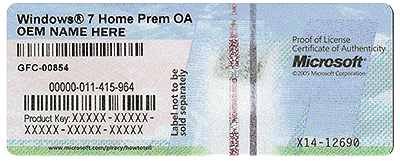
Are you saying the key on the COA will not work to activate windows ?

Did you install the same version that`s on the COA ?
 

Attachments

  • HardwareCOA.gif
    HardwareCOA.gif
    707.8 KB · Views: 26

My Computer My Computer

At a glance

Windows 10 Pro x64Intel Core i7 6700KGSkill TridentZ RGB 16GB 3600 16-16-16-36EVGA GTX 980 Ti SC x2
Computer type
PC/Desktop
Computer Manufacturer/Model Number
Skylake Special #666
OS
Windows 10 Pro x64
CPU
Intel Core i7 6700K
Motherboard
Asus Sabertooth Z170 Mark 1
Memory
GSkill TridentZ RGB 16GB 3600 16-16-16-36
Graphics Card(s)
EVGA GTX 980 Ti SC x2
Sound Card
Realtek High Definition
Monitor(s) Displays
AOC G2460PG
Screen Resolution
1920 x 1080 144Hz
Hard Drives
Samsung 860 Pro 256GB, Seagate Barracuda 4TB x2
PSU
EVGA 1000 P2, EVGA White Custom Braided Cables
Case
Corsair Vengeance C70 Gunmetal Black
Cooling
Corsair H100i v2, Corsair ML120 x2, Thermal Grizzly Kryonaut
Keyboard
Logitech G910 Orion Spectrum
Mouse
Logitech G700s
Internet Speed
Verizon Fios Quantum Gateway 75/75
Antivirus
Windows Defender, Malwarebytes Free 3.8.3
Browser
Chrome
Other Info
Corsair SP120 x4, LG Blu-ray Drive, Durabrand HT-395 100 Watt Dolby Digital Amp, Corsair H2100 Wireless 7.1 Headset
Thanks for the reply.
No, that's not what I'm saying.
I an saying I cannot boot into Windows,
When using Windows 7 disc (or no disc) I get an error saying NTLDR is missing.
When using the XP disc I get a blue screen saying Windows stopped to avoid doing damage etc..
 

My Computer My Computer

At a glance

windows 7 64 bit home premium + xp
Computer type
Laptop
Computer Manufacturer/Model Number
hp
OS
windows 7 64 bit home premium + xp
It seems that your "NTLDR is missing" was caused by you attempting to install XP as this error is associated with XP & not Windows 7.

You cannot reinstall Windows 7 from the Windows Old files that are on your computer, it is there so you can recover folders & files, but not the Operating System or any Software Applications. If you reformat the HDD all these will be erased.

To see if you can fix the current problem, hit the Delete key or one of the F keys repeatedly on starting the computer so you can access the BIOS. Make sure that the boot order shows the CD/DVD drive as the first boot option, Save that & then install your Windows 7 disc, restart the computer & see if it will start from that disc. If so you will have to carry on with the installation until it completes.

If it works check what AddRam said in his Post #2.
 

My Computer My Computer

At a glance

Windows 7 Home Premium 64 bit sp1Intel i5 3570 3.4Ghz Ivy Bridge SKT 1155 quad...G-Skill Rip Jaws 16Gb (8x2) DDR3 -1600 PC3 12...Gigabyte NVIDIA GT610 1Gb DDR3 810/1200 PCI-E...
Computer type
PC/Desktop
Computer Manufacturer/Model Number
Self built using existing case
OS
Windows 7 Home Premium 64 bit sp1
CPU
Intel i5 3570 3.4Ghz Ivy Bridge SKT 1155 quad core
Motherboard
Gigabyte Z77-HD3 SKT 1155 2xSata 3, 4x USB 3.0
Memory
G-Skill Rip Jaws 16Gb (8x2) DDR3 -1600 PC3 12800 CL 10 red
Graphics Card(s)
Gigabyte NVIDIA GT610 1Gb DDR3 810/1200 PCI-E 2.0 Silent
Sound Card
NVIDIA High Definition & Realtech High Definition Audio
Monitor(s) Displays
2 x Philips 226V4L 16:9 aspect ratio
Screen Resolution
1920 x 1080 HD
Hard Drives
Samsung 840 Pro 256gb SSD, SATA 3.
Hitachi Touro Portable 1tb, USB 3.0 HDD used for image b/ups.
PSU
Corsair VS450
Case
Codeng
Cooling
PSU fan & CPU fan
Keyboard
Logitech
Mouse
Logitech Wireless trackball M570
Internet Speed
Wireless 3G. 3mg down & 550kb up.
Antivirus
Bitdefender Internet Security 2020
Browser
Opera (Current Version) & Firefox
Other Info
MS Office 2013 Pro. Davis weather station software. MGE Nova 600 avr UPS.
thanks for the reply

I ended up wiping the hdd and doing a complete clean install of XP
problem now is that the computer is so slow I can make a cup of tea between clicks!
I am guessing its possibly a driver issue (?) so am trying to download all drivers from MS and HP
Difficulty is that that particular computer is not connected to the internet so I need to save everything to a thumb drive and load.
It would be nice if HP would bundle up ALL their drivers in one big download

thanks again for replying
 

My Computer My Computer

At a glance

windows 7 64 bit home premium + xp
Computer type
Laptop
Computer Manufacturer/Model Number
hp
OS
windows 7 64 bit home premium + xp
Have you downloaded & installed all 3, I think it was, service packs for XP. Not having that computer connected to the internet does make the job much harder & slower.

Anyway, have fun & good luck.
 

My Computer My Computer

At a glance

Windows 7 Home Premium 64 bit sp1Intel i5 3570 3.4Ghz Ivy Bridge SKT 1155 quad...G-Skill Rip Jaws 16Gb (8x2) DDR3 -1600 PC3 12...Gigabyte NVIDIA GT610 1Gb DDR3 810/1200 PCI-E...
Computer type
PC/Desktop
Computer Manufacturer/Model Number
Self built using existing case
OS
Windows 7 Home Premium 64 bit sp1
CPU
Intel i5 3570 3.4Ghz Ivy Bridge SKT 1155 quad core
Motherboard
Gigabyte Z77-HD3 SKT 1155 2xSata 3, 4x USB 3.0
Memory
G-Skill Rip Jaws 16Gb (8x2) DDR3 -1600 PC3 12800 CL 10 red
Graphics Card(s)
Gigabyte NVIDIA GT610 1Gb DDR3 810/1200 PCI-E 2.0 Silent
Sound Card
NVIDIA High Definition & Realtech High Definition Audio
Monitor(s) Displays
2 x Philips 226V4L 16:9 aspect ratio
Screen Resolution
1920 x 1080 HD
Hard Drives
Samsung 840 Pro 256gb SSD, SATA 3.
Hitachi Touro Portable 1tb, USB 3.0 HDD used for image b/ups.
PSU
Corsair VS450
Case
Codeng
Cooling
PSU fan & CPU fan
Keyboard
Logitech
Mouse
Logitech Wireless trackball M570
Internet Speed
Wireless 3G. 3mg down & 550kb up.
Antivirus
Bitdefender Internet Security 2020
Browser
Opera (Current Version) & Firefox
Other Info
MS Office 2013 Pro. Davis weather station software. MGE Nova 600 avr UPS.
Back
Top