How to upgrade memory RAM for WIN7?

Digitals

New member
Member
Local time
11:35 AM
Messages
28
Hi mates,

I have windows 7 and came with 8 GB Ram and would like to increase the RAM to 16GB since I run a lot of applications at the time.

I know so far the following about my Desktop:

Type: DDR3
Size: 8 GBytes
Manufacture: Samsung
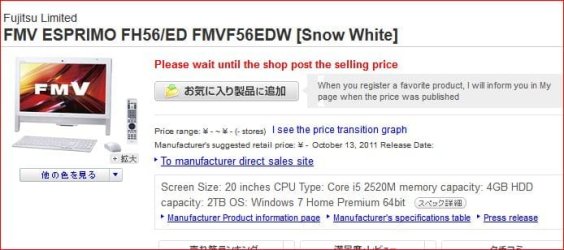
my Desktop model: FMVF56EDWZ
Max Ram: 16GBytes
Brand: Fujitsu

I got some information through running CPU-Z software, but not sure now how many pieces of RAMs in my computer... I mean I still don't know if the installed RAM is one piece og 8GB or 4GBx2....etc

Any idea how to figure this out and what I need to do the right thing to install the new RAM...

Do I need to open my desktop to know how many pieces of RAM installed?

P.S: I still didn't buy the new RAM because I need to know how many pieces I can install??

Any help would be appreciated!!

Thanks :)
 

My Computer My Computer

Computer type
PC/Desktop
Computer Manufacturer/Model Number
Fujitsu FMVF56EDW
OS
Windows 7 Home Premium x64
CPU
intel ® Core ™ i5-2520M processor (supports HT Technology)
Motherboard
FUJITSU FJNB04F
Memory
DDR3 Dual 8192 MBytes
Graphics Card(s)
Intel HD Graphics 3000 (GT2+)
Sound Card
High Definition Audio codec chipset built (192kHz/24 maximum
Monitor(s) Displays
442 × 249mm, 16.77 million colors 1600 × 900 dots
Screen Resolution
800 × 600 pixels, 1024 × 768 dots, 1600 × 900 dots
Keyboard
M#:Y-R0025-O, Wireless keyboard with one-touch button with b
Mouse
M#:M-R0029-O
Internet Speed
DW:71.90 Mbps, UP:30.5 Mbps
Antivirus
None
Browser
Chrome
Other Info
Chipset: Mobile Intel ® HM65 Express Chipset
Yeah just take the side off the PC and look at how many sticks of RAM are installed. You'll need to order an exact duplicate of what you already have (same manufacturer, same MHz) and you'll be good to go.
 

My Computer My Computer

Computer type
PC/Desktop
Computer Manufacturer/Model Number
Custom Build
OS
W7 Pro x64 SP1 | W10 Pro IP x64 | W8.1 Pro x64 VM | Linux Mint VM
CPU
i7-4790k @ 4GHz (4.4GHz Boost)
Motherboard
ASUS Sabertooth Z87 (BIOS Rev 2004)
Memory
16GB DDR3 Kingston HyperX Fury @ 1600MHz CL 9-9-9-27
Graphics Card(s)
EVGA GTX 980 Classified
Sound Card
Realtek Onboard
Monitor(s) Displays
Samsung S27D390
Screen Resolution
1920 x 1080
Hard Drives
240GB Intel 520 Series SSD |
Samsung 850 EVO 120GB SSD |
2TB WD Caviar Black |
2TB WD Caviar Green
PSU
Corsair HX850-80 Gold Modular
Case
Cooler Master Silencio 650
Cooling
Corsair H80i w/2 x Corsair SP120 | 2 x 120mm Noctua NF-S12B
Keyboard
Microsoft Sidewinder X4
Mouse
Gigabyte M6900 optical
Internet Speed
152mb
Antivirus
F-Secure
Browser
Firefox 38.0
Other Info
Backup Rig: Win 7 Pro 64-bit | AMD A10-5800k | ASUS F2A85-V Pro | 8GB Samsung DDR3 @1600MHz | 120GB Toshiba SDD | 2TB Seagate HDD | Cooler Master Silencio 550
Hi mates,

I have windows 7 and came with 8 GB Ram and would like to increase the RAM to 16GB since I run a lot of applications at the time..........
Are you sure that you are using all of the RAM that you have now?

If you are dead set on installing more RAM, run this scanner from Crucial. It should be able to tell you want you have now and what you can buy.
 

My Computer My Computer

Computer type
Laptop
Computer Manufacturer/Model Number
Employer provided Dell Latitude
OS
W7 Pro SP1 64bit
CPU
i7
Memory
8GB
Graphics Card(s)
Intel HD Graphics
Hard Drives
crappy SSD
Antivirus
Employer mandated Symantec Endpoint Protection
Browser
Pale Moon 64bit, IE11 64bit & Chrome 64bit
Well I tried looking up your model laptop but all the pages are Chinese or Klingon. I suspect you can put two RAM modules in it. I would strongly recommend just ordering a 16 GB, 2X8GB and install it and don't use what you now have. Even if it's the "same" it won't be matched to what you have.

there should be a panel on the bottom with one ro two screws to access the ram.
 

My Computer My Computer

Computer type
PC/Desktop
Computer Manufacturer/Model Number
Home Built Desktop By DataTech
OS
Windows 7 Ultimate X64 SP1
CPU
Intel i5-2550K, Differing ~4.4-4.8GHz No built in GPU
Motherboard
ASUS P8Z68-V PRO/GEN3
Memory
16GB G.Skill Sniper 1866MHz @ 2133MHz 2x8GB
Graphics Card(s)
ASUS GTX650TIB-DC2OC-2GD5, (650TI Boost)
Sound Card
Onboard Realtek 5-1
Monitor(s) Displays
Samsung P2570HD
Screen Resolution
1920x1080
Hard Drives
Samsung 840 Pro 256GB SSD for OS, 500GB Seagate Constellation (Enterprise drive) for Data
PSU
Corsair HX650W
Case
Inwin Dragon Rider
Cooling
Hyper 212 EVO w/two Noctua fans, push-pull, @1300 RPM
Keyboard
E-Z Eyes, bright yellow keys with large characters
Mouse
steelseries SENSEI Laser Pro Gaming
Internet Speed
48-51Mbs Mbs down, 11 Mbs up Xfinity Cable
Antivirus
Norton Internet Security 2013
Browser
IE 10, Opera, Pale Moon if needed
Other Info
4 case fans, LG BluRay-RE, ASUS DVD-RW, Mr. Fusion power supply, 1.21 gigawatts.
I thought the OP had a desktop, man I confuse easily.
 

My Computer My Computer

Computer type
PC/Desktop
Computer Manufacturer/Model Number
Custom Build
OS
W7 Pro x64 SP1 | W10 Pro IP x64 | W8.1 Pro x64 VM | Linux Mint VM
CPU
i7-4790k @ 4GHz (4.4GHz Boost)
Motherboard
ASUS Sabertooth Z87 (BIOS Rev 2004)
Memory
16GB DDR3 Kingston HyperX Fury @ 1600MHz CL 9-9-9-27
Graphics Card(s)
EVGA GTX 980 Classified
Sound Card
Realtek Onboard
Monitor(s) Displays
Samsung S27D390
Screen Resolution
1920 x 1080
Hard Drives
240GB Intel 520 Series SSD |
Samsung 850 EVO 120GB SSD |
2TB WD Caviar Black |
2TB WD Caviar Green
PSU
Corsair HX850-80 Gold Modular
Case
Cooler Master Silencio 650
Cooling
Corsair H80i w/2 x Corsair SP120 | 2 x 120mm Noctua NF-S12B
Keyboard
Microsoft Sidewinder X4
Mouse
Gigabyte M6900 optical
Internet Speed
152mb
Antivirus
F-Secure
Browser
Firefox 38.0
Other Info
Backup Rig: Win 7 Pro 64-bit | AMD A10-5800k | ASUS F2A85-V Pro | 8GB Samsung DDR3 @1600MHz | 120GB Toshiba SDD | 2TB Seagate HDD | Cooler Master Silencio 550
Hi mates,

I have windows 7 and came with 8 GB Ram and would like to increase the RAM to 16GB since I run a lot of applications at the time..........
Are you sure that you are using all of the RAM that you have now?

If you are dead set on installing more RAM, run this scanner from Crucial. It should be able to tell you want you have now and what you can buy.

Thanks @UsernameIssues for the comments.

well, what I understand is that whenever I run multiple programs at the time, the CPU goes high and consumption rate for memory ram reaches 61% or sometimes 72%. I'm wondering why that much anyways. When I purchased it at first it was fine to run multiple programs and barely reaches 40%, but not easily 60% and above...

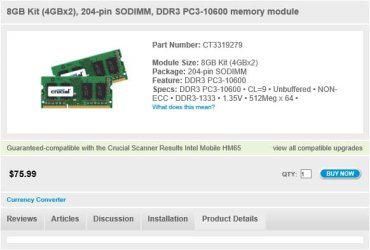
I run the crucial scanner and got the attached image,

Do I really need more RAM to my 8GB?? I believe so, but not sure till now whether it is 4GBx2 or 8GBx1. The crucial scanner result shows that I need 4GBx2...

what do you think??
 

Attachments

  • rams.jpg
    rams.jpg
    26.4 KB · Views: 6

My Computer My Computer

Computer type
PC/Desktop
Computer Manufacturer/Model Number
Fujitsu FMVF56EDW
OS
Windows 7 Home Premium x64
CPU
intel ® Core ™ i5-2520M processor (supports HT Technology)
Motherboard
FUJITSU FJNB04F
Memory
DDR3 Dual 8192 MBytes
Graphics Card(s)
Intel HD Graphics 3000 (GT2+)
Sound Card
High Definition Audio codec chipset built (192kHz/24 maximum
Monitor(s) Displays
442 × 249mm, 16.77 million colors 1600 × 900 dots
Screen Resolution
800 × 600 pixels, 1024 × 768 dots, 1600 × 900 dots
Keyboard
M#:Y-R0025-O, Wireless keyboard with one-touch button with b
Mouse
M#:M-R0029-O
Internet Speed
DW:71.90 Mbps, UP:30.5 Mbps
Antivirus
None
Browser
Chrome
Other Info
Chipset: Mobile Intel ® HM65 Express Chipset
I thought the OP had a desktop, man I confuse easily.
Maybe it's me. I've never heard of a Fujitsu desktop. I commented on what I found in Google previously but OP has declined to enlighten us. :huh:

The RAM shown is laptop RAM, maybe small from factor desktop, who knows?
 

My Computer My Computer

Computer type
PC/Desktop
Computer Manufacturer/Model Number
Home Built Desktop By DataTech
OS
Windows 7 Ultimate X64 SP1
CPU
Intel i5-2550K, Differing ~4.4-4.8GHz No built in GPU
Motherboard
ASUS P8Z68-V PRO/GEN3
Memory
16GB G.Skill Sniper 1866MHz @ 2133MHz 2x8GB
Graphics Card(s)
ASUS GTX650TIB-DC2OC-2GD5, (650TI Boost)
Sound Card
Onboard Realtek 5-1
Monitor(s) Displays
Samsung P2570HD
Screen Resolution
1920x1080
Hard Drives
Samsung 840 Pro 256GB SSD for OS, 500GB Seagate Constellation (Enterprise drive) for Data
PSU
Corsair HX650W
Case
Inwin Dragon Rider
Cooling
Hyper 212 EVO w/two Noctua fans, push-pull, @1300 RPM
Keyboard
E-Z Eyes, bright yellow keys with large characters
Mouse
steelseries SENSEI Laser Pro Gaming
Internet Speed
48-51Mbs Mbs down, 11 Mbs up Xfinity Cable
Antivirus
Norton Internet Security 2013
Browser
IE 10, Opera, Pale Moon if needed
Other Info
4 case fans, LG BluRay-RE, ASUS DVD-RW, Mr. Fusion power supply, 1.21 gigawatts.
The OP's system spec shows a Fujitsu FMVF56EDW desk top but he also shows a Mobile Intel ® HM65 Express Chipset. I'm too confused to continue.


Do I really need more RAM to my 8GB?? I believe so, but not sure till now whether it is 4GBx2 or 8GBx1. The crucial scanner result shows that I need 4GBx2...

what do you think??

Adding another 8gb of ram well have a minimal effect on system performance IMHO. I would think about a SSD drive to replace the spinner before a ram upgrade.
 

My Computer My Computer

Computer type
PC/Desktop
Computer Manufacturer/Model Number
Custom, Dell and Lenono LT's
OS
Win8/8.1,Win7-U64, Vista U64, uncounted Linux distor's
CPU
AMD and Intell, 9590, 8350, i5 3570k
Motherboard
CFVFZ, GA990FXA, Z77e-itx
Memory
Corsair G Skill
Graphics Card(s)
Crossfired Sapphire HD 7950 Vapor-X, ASUS R9 280X TOP
Sound Card
Realtek ALC889
Monitor(s) Displays
ViewSonic VX2770SMH 27" / ViewSonic VX2433 LCD 24"
Screen Resolution
1080i HD
Hard Drives
Samsung SSD 840 Pro
OCZ Agility 3's
OCZ Vector's
WD's Blue, red, green, Velociraptors
Seagate USB3 & Hybrid's
ASUS Blu-Ray
ASUS DVD
PSU
Corsair AX1200i, Seasonice 850 Gold
Case
Cooler Master HAF 922 & HAF 932, Lian Li Train case.
Cooling
Air, Glacer 240L expanded, custom EK loop with duel D5's
Keyboard
Microsoft SideWinder X4 USB Keyboard / Logitech 250 PS2
Mouse
Logitech G500 / MS wireless 5000
Internet Speed
Best of 5ms / 75+ dn / 12+ up More or less.
Antivirus
MS esentials-MalwareBytes
Browser
Firefox Chromebook
The OP's system spec shows a Fujitsu FMVF56EDW desk top but he also shows a Mobile Intel ® HM65 Express Chipset. I'm too confused to continue.


Do I really need more RAM to my 8GB?? I believe so, but not sure till now whether it is 4GBx2 or 8GBx1. The crucial scanner result shows that I need 4GBx2...

what do you think??

Adding another 8gb of ram well have a minimal effect on system performance IMHO. I would think about a SSD drive to replace the spinner before a ram upgrade.

ok, great to know. Thanks @madcratebuilder. I guess I will check the SSD first and then see how things go.

BTW, I just found out that I can't upgrade my RAM to 16GB because I reached the limit already, which is 8GB

I found this info here in the JP site:

PHP:
http://www.fmworld.net/fmv/pcpm1110/fh/spec/

Thanks
 

My Computer My Computer

Computer type
PC/Desktop
Computer Manufacturer/Model Number
Fujitsu FMVF56EDW
OS
Windows 7 Home Premium x64
CPU
intel ® Core ™ i5-2520M processor (supports HT Technology)
Motherboard
FUJITSU FJNB04F
Memory
DDR3 Dual 8192 MBytes
Graphics Card(s)
Intel HD Graphics 3000 (GT2+)
Sound Card
High Definition Audio codec chipset built (192kHz/24 maximum
Monitor(s) Displays
442 × 249mm, 16.77 million colors 1600 × 900 dots
Screen Resolution
800 × 600 pixels, 1024 × 768 dots, 1600 × 900 dots
Keyboard
M#:Y-R0025-O, Wireless keyboard with one-touch button with b
Mouse
M#:M-R0029-O
Internet Speed
DW:71.90 Mbps, UP:30.5 Mbps
Antivirus
None
Browser
Chrome
Other Info
Chipset: Mobile Intel ® HM65 Express Chipset
~~~
BTW, I just found out that I can't upgrade my RAM to 16GB because I reached the limit already, which is 8GB
~~~
The CRUCIAL scanner should have also shown that 8GB limit.

You will notice a big improvement using an SSD.
 

My Computer My Computer

Computer type
Laptop
Computer Manufacturer/Model Number
Employer provided Dell Latitude
OS
W7 Pro SP1 64bit
CPU
i7
Memory
8GB
Graphics Card(s)
Intel HD Graphics
Hard Drives
crappy SSD
Antivirus
Employer mandated Symantec Endpoint Protection
Browser
Pale Moon 64bit, IE11 64bit & Chrome 64bit
To help solve the confusion as to what type of computer Digitals has, it is one of those all-in-one desktops,

fmv.JPG

that is nothing more than a laptop motherboard built into a monitor. Despite being labeled as a desktop, it is still nothing more than a laptop (without the portability).
 

My Computer My Computer

Computer type
PC/Desktop
Computer Manufacturer/Model Number
Me
OS
Win 7 Ultimate x64
CPU
FX-8350 @ 4.6 GHz so far
Motherboard
Asus M5A97 EVO
Memory
ADATA XPG V1 Series Black 8GB DDR3 1600
Graphics Card(s)
Sapphire R9 270x Dual-X
Sound Card
Xonar DGX w/ Corsair Vengence 1300
Monitor(s) Displays
Acer S232HL Abid
Screen Resolution
1920x1080
Hard Drives
120 GB OCZ Vertex 3
500 GB Seagate 7200.12
PSU
Antec Earthwatts 650W Green
Case
Antec Three Hundred
Cooling
Cooler Master 212 EVO
Keyboard
Logitech G510
Mouse
Logitech G500s
Internet Speed
35000/3000
To help solve the confusion as to what type of computer Digitals has, it is one of those all-in-one desktops,

View attachment 284572

that is nothing more than a laptop motherboard built into a monitor. Despite being labeled as a desktop, it is still nothing more than a laptop (without the portability).

I am glad you cleared that up Stormy, I was going to ask the OP after many others were confused and he still didn't say "is your desktop a desktop or a laptop" turns out he has a lapdesk or is it a desklap :)
 

My Computer My Computer

OS
Windows 7 Professional 64 bit
Fujitsu`s are quite common for POS applications and backroom servers, I install em all the time. Just installed 4 registers and a backroom pc at a Hallmark last nite, all made by Fujitsu.
 

My Computer My Computer

Computer type
PC/Desktop
Computer Manufacturer/Model Number
Skylake Special #666
OS
Windows 10 Pro x64
CPU
Intel Core i7 6700K
Motherboard
Asus Sabertooth Z170 Mark 1
Memory
GSkill TridentZ RGB 16GB 3600 16-16-16-36
Graphics Card(s)
EVGA GTX 980 Ti SC x2
Sound Card
Realtek High Definition
Monitor(s) Displays
AOC G2460PG
Screen Resolution
1920 x 1080 144Hz
Hard Drives
Samsung 860 Pro 256GB, Seagate Barracuda 4TB x2
PSU
EVGA 1000 P2, EVGA White Custom Braided Cables
Case
Corsair Vengeance C70 Gunmetal Black
Cooling
Corsair H100i v2, Corsair ML120 x2, Thermal Grizzly Kryonaut
Keyboard
Logitech G910 Orion Spectrum
Mouse
Logitech G700s
Internet Speed
Verizon Fios Quantum Gateway 75/75
Antivirus
Windows Defender, Malwarebytes Free 3.8.3
Browser
Chrome
Other Info
Corsair SP120 x4, LG Blu-ray Drive, Durabrand HT-395 100 Watt Dolby Digital Amp, Corsair H2100 Wireless 7.1 Headset
Yeah just take the side off the PC and look at how many sticks of RAM are installed. You'll need to order an exact duplicate of what you already have (same manufacturer, same MHz) and you'll be good to go.

Most motherboards have a very wide range of ram that will work without any issues. Just about anything ddr3 of the same pin count is going to work, worst case scenario it will default to a lower speed than stock.
 

My Computer My Computer

Computer type
PC/Desktop
Computer Manufacturer/Model Number
Custom Build
OS
Windows 7 Professional x64
CPU
AMD Phenom II x4 955 @3.8GHz
Motherboard
Jetway HA07 Ultra
Memory
8GB DDR2 1066 5-5-5-15
Graphics Card(s)
2x XFX ATI Radeon 4850 1GB (share 16 lanes of PCIe)
Sound Card
Integrated 7.1, grado sr80i or hafler 220w amp and preamp
Monitor(s) Displays
Acer 23.6in @ 1920x1080, Dell 19in @ 1280x1024
Hard Drives
2x Western Digital Blue 320GB, 7200rpm, 16MB cache (RAID 0)
Scrap 100GB laptop hard drive for backup
120GB WD external
500GB WD external
PSU
OCZ 550watt
Case
NZXT Hades
Cooling
CM hyper 212+, 200mm front and side, 2x140mm top, 120mm back
Keyboard
HP PS2
Mouse
Logitech G9X
Internet Speed
1.5mbs
Antivirus
Scan very rarely with malwarebytes - never had a virus
Browser
Opera (browsing), Chrome (facebook, email), Firefox (media)
Other Info
Laptop: Lenovo x120e
Back
Top