How to use picture from a folder of a folder as wallpaper?

D4rkr4in

New member
Local time
12:30 PM
Messages
4
Location
California
Hi all,

I browse 4Chan's wallpaper site very often, and I have tons of walls saved up. I have categorized them in different folders. Because of this, Windows 7 will not let me use the general folder as the wallpaper source. I have to open a subfolder to have Windows 7 use the pictures as wallpaper. How can I have the general folder be the source and have Windows 7 look for the pictures itself? Thanks in advance.
 

My Computer My Computer

At a glance

Windows 7 Ultimate x64Intel Core i5 3570K8GB Samsung DDR3-1600EVGA GTX 570 HD DS
Computer Manufacturer/Model Number
Self Built
OS
Windows 7 Ultimate x64
CPU
Intel Core i5 3570K
Motherboard
ASRock Z77 Extreme4
Memory
8GB Samsung DDR3-1600
Graphics Card(s)
EVGA GTX 570 HD DS
Monitor(s) Displays
ViewSonic VA912b
Screen Resolution
1280x1024
Hard Drives
Mushkin Chronos 120GB
Seagate Barracuda 500 GB
PSU
Corsair CX600 V2
Case
CoolerMaster HAF 922
Keyboard
Logitech Deluxe 650 Cordless Desktop
Mouse
Dell OEM
Internet Speed
2 Mbps
Welcome to Seven Forums D4rkr4in. I'm unsure what you are referring to as the general folder? C:\windows\Web\Wallpaper ? If that is the loacation, but all it contains is folders, then it will not find any images. But you should be able to browser to any folder and add it to the drop down menu of locations for finding walls.

http://www.sevenforums.com/tutorials/281-desktop-background-change.html

You can of course also right click a picture and set it as wallpaper manually. Let us know if I am misunderstanding. Pictures always help ;)

http://www.sevenforums.com/tutorials/9733-screenshots-files-upload-post-seven-forums.html

A Guy
 

My Computer My Computer

At a glance

Windows 10 Home x64INTEL Core i5-750 Quad-Core 3.37GHzHyperX Fury Black Series 8GB (2 x 4GB) 1866MhzEVGA GeForce GTX 750 Superclocked 1GB 128-Bit...
Computer type
PC/Desktop
OS
Windows 10 Home x64
CPU
INTEL Core i5-750 Quad-Core 3.37GHz
Motherboard
ASUS P7P55D
Memory
HyperX Fury Black Series 8GB (2 x 4GB) 1866Mhz
Graphics Card(s)
EVGA GeForce GTX 750 Superclocked 1GB 128-Bit GDDR5
Monitor(s) Displays
LG 32MA68HY 32" IPS
Screen Resolution
1920 x 1080
Hard Drives
Samsung 840 Evo 120GB, SEAGATE 500GB Barracuda® 7200.12, SATA 3 Gb/s, 7200 RPM, 16MB cache
PSU
ANTEC TruePower New TP-550, 80 PLUS, 550W
Case
ANTEC Three Hundred Illusion
Cooling
COOLER MASTER Hyper 212 Plus, 4 x 120mm 1 x 140mm Noctua's
Internet Speed
85 + Mbps
Antivirus
Avast
Browser
Vivaldi
Welcome to Seven Forums D4rkr4in. I'm unsure what you are referring to as the general folder? C:\windows\Web\Wallpaper ? If that is the loacation, but all it contains is folders, then it will not find any images. But you should be able to browser to any folder and add it to the drop down menu of locations for finding walls.

http://www.sevenforums.com/tutorials/281-desktop-background-change.html

You can of course also right click a picture and set it as wallpaper manually. Let us know if I am misunderstanding. Pictures always help ;)

http://www.sevenforums.com/tutorials/9733-screenshots-files-upload-post-seven-forums.html

A Guy

I think i understand what OP means. I think OP has the wallpapers sorted so /wallpaper/games, wallpaper/landscapes, wallpapers, hot girls and Windows 7 will not let him just pick the wallpapers folder to get all the subfolders.
 

My Computer My Computer

At a glance

Windows 7 Pro X64AMD Phenom II X4 975 Black EditionCORSAIR Vengeance 8GB (2 x 4GB) 240-Pin DDR3 ...ASUS EN9800GT HB/HTDI/512M GeForce 9800 GT 51...
Computer Manufacturer/Model Number
custom build
OS
Windows 7 Pro X64
CPU
AMD Phenom II X4 975 Black Edition
Motherboard
MSI 870A-G54 (FX)
Memory
CORSAIR Vengeance 8GB (2 x 4GB) 240-Pin DDR3 SDRAM DDR3 1600
Graphics Card(s)
ASUS EN9800GT HB/HTDI/512M GeForce 9800 GT 512MB 256-bit GDD
Sound Card
Realtek ALC892
Monitor(s) Displays
Viewsonic 19' 16:10
Screen Resolution
1680X1050
Hard Drives
Western Digital Caviar Black WD6401AALS 640GB 7200 RPM SATA,
Western Digital Caviar Black 1TB 7200RPM SATA
PSU
Thermaltake Purepower W0100RU 500W ATX 12V
Case
COOLER MASTER Elite RC-331-KKN1-GP Black SECC ATX Mid Tower
Cooling
Nothing beyond what etch part came with
Keyboard
Logitech G11
Mouse
USB Logitech gaming mouse
Internet Speed
Cable
Other Info
New CPU, Motherboard, and Ram installed 02/2012

Logitech G35 Headset
Hi D4rkr4in
So far that I've known there are two ways doing it.

First option, you include those folder as part of Windows picture library. Right click on picture (not "my pictures") folder under desktop/library-> click property -> click add -> then add any folder you want.

Second option, Copy those all picture folders to picture library.

When done with one of the above, you can go to desktop screen -> right click -> personalize -> desktop background -> on pictures location, click pictures library -> it will show you all pictures across the library. -> you can put check mark on any picture you want it to be on desktop rotation.

Hope that helps. :)

Kevin
 

My Computers My Computers

  • At a glance

    Windows 11 PrereleaseCORE i5 1040016GBGTX 750Ti
    Computer type
    PC/Desktop
    Computer Manufacturer/Model Number
    MSI
    OS
    Windows 11 Prerelease
    CPU
    CORE i5 10400
    Motherboard
    MSI H510M Pro
    Memory
    16GB
    Graphics Card(s)
    GTX 750Ti
    Sound Card
    Realtek HD Integrated
    Monitor(s) Displays
    Samsung Curved 24"; Samsung TV 50"
    Screen Resolution
    1920 x 1080
    Hard Drives
    Vi-Gen NVMe 256GB
    WD 3 TB
    Seagate 2 TB
    Seagate 4TB
    PSU
    Power Striker
    Case
    VBR
    Cooling
    Conventional
    Keyboard
    Logitech Wireless
    Mouse
    Logitech Wireless
    Internet Speed
    2MBPs
  • At a glance

    BigSurCore i58 GB
    Computer type
    Laptop
    System Manufacturer/Model Number
    Apple MacBook
    OS
    BigSur
    CPU
    Core i5
    Memory
    8 GB
    Monitor(s) Displays
    13 "
    Screen Resolution
    1366 x 768
    Hard Drives
    SSD 256 GB
Welcome to Seven Forums D4rkr4in. I'm unsure what you are referring to as the general folder? C:\windows\Web\Wallpaper ? If that is the loacation, but all it contains is folders, then it will not find any images. But you should be able to browser to any folder and add it to the drop down menu of locations for finding walls.

http://www.sevenforums.com/tutorials/281-desktop-background-change.html

You can of course also right click a picture and set it as wallpaper manually. Let us know if I am misunderstanding. Pictures always help ;)

http://www.sevenforums.com/tutorials/9733-screenshots-files-upload-post-seven-forums.html

A Guy

I think i understand what OP means. I think OP has the wallpapers sorted so /wallpaper/games, wallpaper/landscapes, wallpapers, hot girls and Windows 7 will not let him just pick the wallpapers folder to get all the subfolders.

Hi D4rkr4in
So far that I've known there are two ways doing it.

First option, you include those folder as part of Windows picture library. Right click on picture (not "my pictures") folder under desktop/library-> click property -> click add -> then add any folder you want.

Second option, Copy those all picture folders to picture library.

When done with one of the above, you can go to desktop screen -> right click -> personalize -> desktop background -> on pictures location, click pictures library -> it will show you all pictures across the library. -> you can put check mark on any picture you want it to be on desktop rotation.

Hope that helps. :)

Kevin

smsff7, yes this is what I mean, except I do not have a hot girls folder ;)

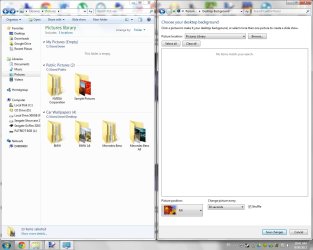
Kevin, thanks for the reply, I have added the folders to the Pictures under Library, but it does not work when I add a folder with subfolders of pictures, it has to be the folder with pictures in them. Is there a solution to just select multiple folders from desktop?
 

Attachments

  • f.jpg
    f.jpg
    96.5 KB · Views: 27

My Computer My Computer

At a glance

Windows 7 Ultimate x64Intel Core i5 3570K8GB Samsung DDR3-1600EVGA GTX 570 HD DS
Computer Manufacturer/Model Number
Self Built
OS
Windows 7 Ultimate x64
CPU
Intel Core i5 3570K
Motherboard
ASRock Z77 Extreme4
Memory
8GB Samsung DDR3-1600
Graphics Card(s)
EVGA GTX 570 HD DS
Monitor(s) Displays
ViewSonic VA912b
Screen Resolution
1280x1024
Hard Drives
Mushkin Chronos 120GB
Seagate Barracuda 500 GB
PSU
Corsair CX600 V2
Case
CoolerMaster HAF 922
Keyboard
Logitech Deluxe 650 Cordless Desktop
Mouse
Dell OEM
Internet Speed
2 Mbps
Well I haven't known any other way.
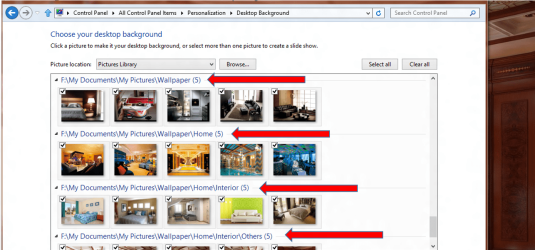
But here the sample with red arrow show how I was able to select from sub folder with pictures in each of it
Wallpaper.png

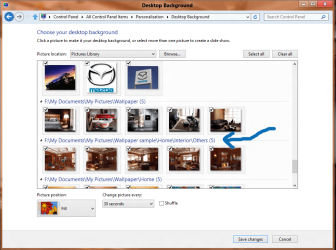
This is a sample which sub folder under some empty sub folders, and I put the pictures only in the last sub-sub folders.
Wallpaper2.png

It worked fine. ;)

Kevin
 

My Computers My Computers

  • At a glance

    Windows 11 PrereleaseCORE i5 1040016GBGTX 750Ti
    Computer type
    PC/Desktop
    Computer Manufacturer/Model Number
    MSI
    OS
    Windows 11 Prerelease
    CPU
    CORE i5 10400
    Motherboard
    MSI H510M Pro
    Memory
    16GB
    Graphics Card(s)
    GTX 750Ti
    Sound Card
    Realtek HD Integrated
    Monitor(s) Displays
    Samsung Curved 24"; Samsung TV 50"
    Screen Resolution
    1920 x 1080
    Hard Drives
    Vi-Gen NVMe 256GB
    WD 3 TB
    Seagate 2 TB
    Seagate 4TB
    PSU
    Power Striker
    Case
    VBR
    Cooling
    Conventional
    Keyboard
    Logitech Wireless
    Mouse
    Logitech Wireless
    Internet Speed
    2MBPs
  • At a glance

    BigSurCore i58 GB
    Computer type
    Laptop
    System Manufacturer/Model Number
    Apple MacBook
    OS
    BigSur
    CPU
    Core i5
    Memory
    8 GB
    Monitor(s) Displays
    13 "
    Screen Resolution
    1366 x 768
    Hard Drives
    SSD 256 GB
Well I haven't known any other way.
But here the sample with red arrow show how I was able to select from sub folder with pictures in each of it
View attachment 234499

This is a sample which sub folder under some empty sub folders, and I put the pictures only in the last sub-sub folders.
View attachment 234500

It worked fine. ;)

Kevin

I still have not managed to do that, perhaps I'm adding the photos to the Photo Library wrong? Could you show me how you added it?
 

My Computer My Computer

At a glance

Windows 7 Ultimate x64Intel Core i5 3570K8GB Samsung DDR3-1600EVGA GTX 570 HD DS
Computer Manufacturer/Model Number
Self Built
OS
Windows 7 Ultimate x64
CPU
Intel Core i5 3570K
Motherboard
ASRock Z77 Extreme4
Memory
8GB Samsung DDR3-1600
Graphics Card(s)
EVGA GTX 570 HD DS
Monitor(s) Displays
ViewSonic VA912b
Screen Resolution
1280x1024
Hard Drives
Mushkin Chronos 120GB
Seagate Barracuda 500 GB
PSU
Corsair CX600 V2
Case
CoolerMaster HAF 922
Keyboard
Logitech Deluxe 650 Cordless Desktop
Mouse
Dell OEM
Internet Speed
2 Mbps
Hi D4rkr4in

I think I owe you bid apology :( That above explanation work for my Windows 8.. :zip:

But for Windows 7 you can still do it but you should sacrifice some space on drive C
Put all picture "folders" you want it into one folder (means it is okay to have many folders in that folder). Then copy the folder to C:\Windows\Web\Wallpaper. Let's assume your folder is Cars, then you will have "C:\Windows\Web\Wallpaper\cars" with many sub folders in it.

When done with copying, go to desktop screen -> right click -> personalize -> desktop background -> on pictures location, click "Windows Desktop Background" -> it will show you all pictures in all copied folders and its sub folders. -> you can uncheck which you don't want and check mark on any picture you want it to be on desktop rotation.

Hope that pays my mistake. ;)

Kevin

Edit: Do not use browse as it won't read sub folders.
 
Last edited:

My Computers My Computers

  • At a glance

    Windows 11 PrereleaseCORE i5 1040016GBGTX 750Ti
    Computer type
    PC/Desktop
    Computer Manufacturer/Model Number
    MSI
    OS
    Windows 11 Prerelease
    CPU
    CORE i5 10400
    Motherboard
    MSI H510M Pro
    Memory
    16GB
    Graphics Card(s)
    GTX 750Ti
    Sound Card
    Realtek HD Integrated
    Monitor(s) Displays
    Samsung Curved 24"; Samsung TV 50"
    Screen Resolution
    1920 x 1080
    Hard Drives
    Vi-Gen NVMe 256GB
    WD 3 TB
    Seagate 2 TB
    Seagate 4TB
    PSU
    Power Striker
    Case
    VBR
    Cooling
    Conventional
    Keyboard
    Logitech Wireless
    Mouse
    Logitech Wireless
    Internet Speed
    2MBPs
  • At a glance

    BigSurCore i58 GB
    Computer type
    Laptop
    System Manufacturer/Model Number
    Apple MacBook
    OS
    BigSur
    CPU
    Core i5
    Memory
    8 GB
    Monitor(s) Displays
    13 "
    Screen Resolution
    1366 x 768
    Hard Drives
    SSD 256 GB
Hi D4rkr4in

I think I owe you bid apology :( That above explanation work for my Windows 8.. :zip:

But for Windows 7 you can still do it but you should sacrifice some space on drive C
Put all picture "folders" you want it into one folder (means it is okay to have many folders in that folder). Then copy the folder to C:\Windows\Web\Wallpaper. Let's assume your folder is Cars, then you will have "C:\Windows\Web\Wallpaper\cars" with many sub folders in it.

When done with copying, go to desktop screen -> right click -> personalize -> desktop background -> on pictures location, click "Windows Desktop Background" -> it will show you all pictures in all copied folders and its sub folders. -> you can uncheck which you don't want and check mark on any picture you want it to be on desktop rotation.

Hope that pays my mistake. ;)

Kevin

Edit: Do not use browse as it won't read sub folders.

Hi Kevin,

Sorry for the late reply, I just dumped it all into the default windows folder, linked a shortcut to my desktop for easy editing, and it works for now. Once I upgrade to windows 8, I hope it will be as easy as the way you have showed me earlier. Thanks for all your help!
 

My Computer My Computer

At a glance

Windows 7 Ultimate x64Intel Core i5 3570K8GB Samsung DDR3-1600EVGA GTX 570 HD DS
Computer Manufacturer/Model Number
Self Built
OS
Windows 7 Ultimate x64
CPU
Intel Core i5 3570K
Motherboard
ASRock Z77 Extreme4
Memory
8GB Samsung DDR3-1600
Graphics Card(s)
EVGA GTX 570 HD DS
Monitor(s) Displays
ViewSonic VA912b
Screen Resolution
1280x1024
Hard Drives
Mushkin Chronos 120GB
Seagate Barracuda 500 GB
PSU
Corsair CX600 V2
Case
CoolerMaster HAF 922
Keyboard
Logitech Deluxe 650 Cordless Desktop
Mouse
Dell OEM
Internet Speed
2 Mbps
No worries D4rk4in. Sure, more options are available when you turn to Win 8. :D
 

My Computers My Computers

  • At a glance

    Windows 11 PrereleaseCORE i5 1040016GBGTX 750Ti
    Computer type
    PC/Desktop
    Computer Manufacturer/Model Number
    MSI
    OS
    Windows 11 Prerelease
    CPU
    CORE i5 10400
    Motherboard
    MSI H510M Pro
    Memory
    16GB
    Graphics Card(s)
    GTX 750Ti
    Sound Card
    Realtek HD Integrated
    Monitor(s) Displays
    Samsung Curved 24"; Samsung TV 50"
    Screen Resolution
    1920 x 1080
    Hard Drives
    Vi-Gen NVMe 256GB
    WD 3 TB
    Seagate 2 TB
    Seagate 4TB
    PSU
    Power Striker
    Case
    VBR
    Cooling
    Conventional
    Keyboard
    Logitech Wireless
    Mouse
    Logitech Wireless
    Internet Speed
    2MBPs
  • At a glance

    BigSurCore i58 GB
    Computer type
    Laptop
    System Manufacturer/Model Number
    Apple MacBook
    OS
    BigSur
    CPU
    Core i5
    Memory
    8 GB
    Monitor(s) Displays
    13 "
    Screen Resolution
    1366 x 768
    Hard Drives
    SSD 256 GB
Back
Top