
Wingnut225
New member
- Local time
- 1:14 PM
- Messages
- 13
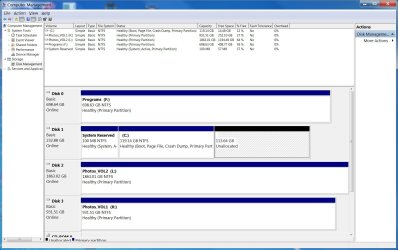
I recently upgraded from a 120gb SSD to a 250gb SSD as my primary system c: drive. I did this by using EaseUS Clone tool. It looks like it partitioned the 250gb as a 120gb and now I have 113gb left as unallocated. My goal here is to use the 250gb SSD as one partition as the primary system c: drive. How do I get rid of the unallocated files to have one partition at 250gb?
thank you for your time!
thank you for your time!
Attachments
My Computer
- Computer type
- PC/Desktop
- Computer Manufacturer/Model Number
- Home built w/ Asus P8z68-v pro MB
- OS
- Windows 7 home premium 64bit
- CPU
- Intel i5-2500 3.3GHz
- Motherboard
- Asus P8z68-v pro
- Memory
- 4-8GB corsair vengeance 1600mHz 9-9-9-24
- Graphics Card(s)
- Asus gtx650 ti
- Hard Drives
- Samsung SSD 840 EVO 250gb
Other storage drives
- Antivirus
- ESET smart security 6

