
- Local time
- 5:21 AM
- Messages
- 76
Hello
I needed to increase hard drive space on the mbr primary. The 1tb hard drive was insufficient. I bought a 4tb hard drive to replace the original. I then created a TIB file.However setting up the hard drive I ran into the 2tb Windows 10 limitation. I was allowed 2tb space for the TIB file to install.
I ran into an issue with Acronis. Acronis was unable to convert the unallocated area. I then downloaded MiniPartition. There is the ability to extend and I hesitated because of uncertainty. I do not want to make a mistake.
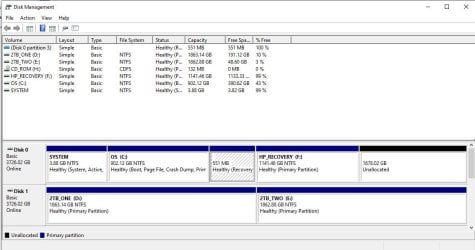
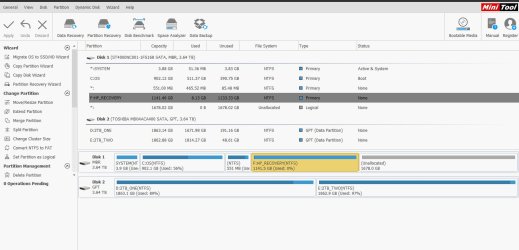
I see - F:HP_RECOVERY WITH 1145GB (used 0%) with 1141.5GB. I see next to F: the unallocated at 1678GB. (I attach a capture from disk management, windows; and a capture of minipartition)
If I am unable to make disk 1 the whole of the 4tb hard drive then I will settle for C: drive (OS) with 2 TB.
And if I can extend F: and the unallocated I should end up with another 2TB hard drive space.
Should I follow MiniPartition and extend F : and Unallocated? I am unclear how to proceed.
Appreciate any assistance.
Thanks
I needed to increase hard drive space on the mbr primary. The 1tb hard drive was insufficient. I bought a 4tb hard drive to replace the original. I then created a TIB file.However setting up the hard drive I ran into the 2tb Windows 10 limitation. I was allowed 2tb space for the TIB file to install.
I ran into an issue with Acronis. Acronis was unable to convert the unallocated area. I then downloaded MiniPartition. There is the ability to extend and I hesitated because of uncertainty. I do not want to make a mistake.
I see - F:HP_RECOVERY WITH 1145GB (used 0%) with 1141.5GB. I see next to F: the unallocated at 1678GB. (I attach a capture from disk management, windows; and a capture of minipartition)
If I am unable to make disk 1 the whole of the 4tb hard drive then I will settle for C: drive (OS) with 2 TB.
And if I can extend F: and the unallocated I should end up with another 2TB hard drive space.
Should I follow MiniPartition and extend F : and Unallocated? I am unclear how to proceed.
Appreciate any assistance.
Thanks
Attachments
My Computer
- Computer type
- PC/Desktop
- OS
- Microsoft Windows 7 Professional 64-bit 7601 Multiprocessor Free Service Pack 1
- CPU
- Intel(R) Xeon(R) CPU 5150 @ 2.66GHz
- Motherboard
- Hewlett-Packard 0A08h
- Memory
- 32.00 GB
- Graphics Card(s)
- (1) LogMeIn Mirror Driver (2) NVIDIA Quadro FX 1500
- Sound Card
- High Definition Audio Device
- Screen Resolution
- 1280 x 800 x 32 bits (4294967296 colors) @ 74 Hz
- Hard Drives
- (1) (2) (3)

