Howto upgrade my Toshiba laptop from Windows7 Professional 32to 64 bit

anil4mic

New member
Local time
9:11 PM
Messages
2
Hi,

I bought Toshiba satellite pro850 with Windows7 professional pre-installed laptop. Initially for the first time when I logged on my laptop, it asked to choose 32 bit or 64 bit.
So, at that due to lack of knowledge I selected 32 bit. My laptop is of 8GB RAM. later I came to know only 3 GB of RAM is using because of the 32bit and my application not running smooth with this 3GB RAM. So I need to upgrade to 64bit in order to use 8GB RAM.

So, Kindly help me how to upgrade my laptop from Windows7 Professional 32bit to 64bit. From internet I came to know we need reinstall the OS inorder to upgrade to 64bit.

But I didn't receive any OS DVD with my laptop.

Kindly help me how to reinstall/boot my C Drive to the Windows7 professional 64bit.
 

My Computer My Computer

At a glance

Windows 7 professional 32 bit
Computer type
PC/Desktop
Computer Manufacturer/Model Number
Toshiba
OS
Windows 7 professional 32 bit
1st you must buy or find someone who has Windows 7 Pro 64 bit and see if they will lend it to you for an hour or so, it takes 15 minutes to install windows.

Find a reputable dealer in your area.

Microsoft Windows 7 Professional SP1 64-bit - Operating Systems - Newegg.com

Read this Tutorial.

http://www.sevenforums.com/tutorials/1649-clean-install-windows-7-a.html

and this one.

http://www.sevenforums.com/tutorials/219487-clean-reinstall-factory-oem-windows-7-a.html

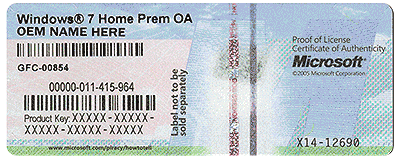
If you buy windows it will come with an activation key, if you borrow a disc, use the key on your Certificate of Authenticity to activate windows.

Ask any more questions you have.

COA
 

Attachments

  • HardwareCOA.gif
    HardwareCOA.gif
    707.8 KB · Views: 11

My Computer My Computer

At a glance

Windows 10 Pro x64Intel Core i7 6700KGSkill TridentZ RGB 16GB 3600 16-16-16-36EVGA GTX 980 Ti SC x2
Computer type
PC/Desktop
Computer Manufacturer/Model Number
Skylake Special #666
OS
Windows 10 Pro x64
CPU
Intel Core i7 6700K
Motherboard
Asus Sabertooth Z170 Mark 1
Memory
GSkill TridentZ RGB 16GB 3600 16-16-16-36
Graphics Card(s)
EVGA GTX 980 Ti SC x2
Sound Card
Realtek High Definition
Monitor(s) Displays
AOC G2460PG
Screen Resolution
1920 x 1080 144Hz
Hard Drives
Samsung 860 Pro 256GB, Seagate Barracuda 4TB x2
PSU
EVGA 1000 P2, EVGA White Custom Braided Cables
Case
Corsair Vengeance C70 Gunmetal Black
Cooling
Corsair H100i v2, Corsair ML120 x2, Thermal Grizzly Kryonaut
Keyboard
Logitech G910 Orion Spectrum
Mouse
Logitech G700s
Internet Speed
Verizon Fios Quantum Gateway 75/75
Antivirus
Windows Defender, Malwarebytes Free 3.8.3
Browser
Chrome
Other Info
Corsair SP120 x4, LG Blu-ray Drive, Durabrand HT-395 100 Watt Dolby Digital Amp, Corsair H2100 Wireless 7.1 Headset
When I open Toshiba Recovery Media Creator S/W, there it is showing as system recovery Media under this 4 check box's are there 1. Recovery DVD Disc1, 2. Recovery DVD Disc2, 3. Recovery DVD Disc3, 4. Windows Recovery Environment(64 bit). I have Burnt all these 4 into 4 DVD's. With these DVD's I cant get Windows 7 64 bit.
 

My Computer My Computer

At a glance

Windows 7 professional 32 bit
Computer type
PC/Desktop
Computer Manufacturer/Model Number
Toshiba
OS
Windows 7 professional 32 bit
Are you asking me or are you telling me ?

I have no knowledge of your Toshiba Recovery Media Creator.

Maybe there is some way to start the recovery process again.

Watch the screen when you turn on the PC.
 

My Computer My Computer

At a glance

Windows 10 Pro x64Intel Core i7 6700KGSkill TridentZ RGB 16GB 3600 16-16-16-36EVGA GTX 980 Ti SC x2
Computer type
PC/Desktop
Computer Manufacturer/Model Number
Skylake Special #666
OS
Windows 10 Pro x64
CPU
Intel Core i7 6700K
Motherboard
Asus Sabertooth Z170 Mark 1
Memory
GSkill TridentZ RGB 16GB 3600 16-16-16-36
Graphics Card(s)
EVGA GTX 980 Ti SC x2
Sound Card
Realtek High Definition
Monitor(s) Displays
AOC G2460PG
Screen Resolution
1920 x 1080 144Hz
Hard Drives
Samsung 860 Pro 256GB, Seagate Barracuda 4TB x2
PSU
EVGA 1000 P2, EVGA White Custom Braided Cables
Case
Corsair Vengeance C70 Gunmetal Black
Cooling
Corsair H100i v2, Corsair ML120 x2, Thermal Grizzly Kryonaut
Keyboard
Logitech G910 Orion Spectrum
Mouse
Logitech G700s
Internet Speed
Verizon Fios Quantum Gateway 75/75
Antivirus
Windows Defender, Malwarebytes Free 3.8.3
Browser
Chrome
Other Info
Corsair SP120 x4, LG Blu-ray Drive, Durabrand HT-395 100 Watt Dolby Digital Amp, Corsair H2100 Wireless 7.1 Headset
It appears they allow you to make 64 bit Recovery media, which makes sense because it was offered as an option when you set up the PC so is already onboard. So try making that media to see if the DVD will boot to run Recovery. How to Boot A Computer from CD or DVD - YouTube

You most certainly do not need to buy Win7 again as you own a license for the life of the machine to reinstall in whatever bit version you want using the Product Key on the COA sticker to do a Clean Reinstall Windows 7. It discusses in Step 1 how to obtain media for the reinstall.
 
Back
Top