Hp 1012 will not print -

masoptions

New member
Local time
8:38 AM
Messages
2
My tried and true workhorse - HP Laserjet 1012 will not install with the Windows 7 Enterprise 32bit OS.

There is no choice under add printers and the HP websited does not show a driver for it/Windows 7.

help?
 

My Computer

OS
Windows 7 enterprise 32bit
Try running the setup.exe of the latest driver under compatabilty for vista sp2 if it is a vista driver or xp sp3 for xp driver before installing.
 

My Computer

Computer Manufacturer/Model Number
HP Compaq 6715B
OS
Windows 7 Ultimate x64
CPU
AMD turion 64x2 TL-64 2.2Ghz
Motherboard
HC030
Memory
Sodimm DDR2 4GB
Graphics Card(s)
ATI Radeon 1250 128MB IGP
Hard Drives
Fujitsu Siemens 500GB sata 3.0 Gb/s
Hp 1012 will ot print with windows 7

Thank you for the advise

Can you give me a little more detail as to how to actually implement your suggested solutions?
 

My Computer

OS
Windows 7 enterprise 32bit
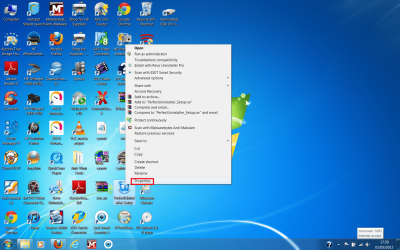
Right click on the .exe file of the driver setup, install, etc, open the compatibility tab. You'll then see a check box that will allow you to use the drop down menu and choose one the the modes.
Untitled.png
 

My Computer

Computer type
PC/Desktop
Computer Manufacturer/Model Number
Home Built Desktop By DataTech
OS
Windows 7 Ultimate X64 SP1
CPU
Intel i5-2550K, Differing ~4.4-4.8GHz No built in GPU
Motherboard
ASUS P8Z68-V PRO/GEN3
Memory
16GB G.Skill Sniper 1866MHz @ 2133MHz 2x8GB
Graphics Card(s)
ASUS GTX650TIB-DC2OC-2GD5, (650TI Boost)
Sound Card
Onboard Realtek 5-1
Monitor(s) Displays
Samsung P2570HD
Screen Resolution
1920x1080
Hard Drives
Samsung 840 Pro 256GB SSD for OS, 500GB Seagate Constellation (Enterprise drive) for Data
PSU
Corsair HX650W
Case
Inwin Dragon Rider
Cooling
Hyper 212 EVO w/two Noctua fans, push-pull, @1300 RPM
Keyboard
E-Z Eyes, bright yellow keys with large characters
Mouse
steelseries SENSEI Laser Pro Gaming
Internet Speed
48-51Mbs Mbs down, 11 Mbs up Xfinity Cable
Antivirus
Norton Internet Security 2013
Browser
IE 10, Opera, Pale Moon if needed
Other Info
4 case fans, LG BluRay-RE, ASUS DVD-RW, Mr. Fusion power supply, 1.21 gigawatts.
If you right click the setup.exe of the driver choose properties
setup.exeproperites.png

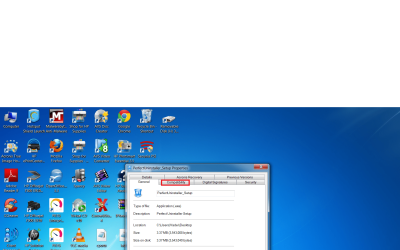
Choose Compatibility tab
compatability.png

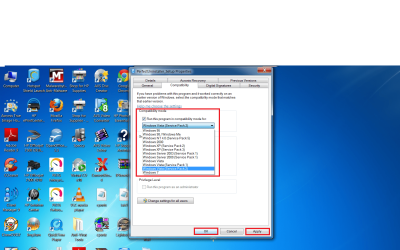
Under Compatibility Mode put a checkmark in Run this program in compatibility mode for and from the drop down menu choose Windows Vista(Service Pack2) click apply and ok.
compatability mode.png

Try and install the driver again.
 

My Computer

Computer Manufacturer/Model Number
HP Compaq 6715B
OS
Windows 7 Ultimate x64
CPU
AMD turion 64x2 TL-64 2.2Ghz
Motherboard
HC030
Memory
Sodimm DDR2 4GB
Graphics Card(s)
ATI Radeon 1250 128MB IGP
Hard Drives
Fujitsu Siemens 500GB sata 3.0 Gb/s
Back
Top