HP dv6-3019ax

You can make several partitions within one Basic Partition. Tutorial Here.
this explains a lot about different disks and partition types.
 

My Computer My Computer

At a glance

Windows 7 Ultimate X64 SP1Intel i5-2550K, Differing ~4.4-4.8GHz No buil...16GB G.Skill Sniper 1866MHz @ 2133MHz 2x8GBASUS GTX650TIB-DC2OC-2GD5, (650TI Boost)
Computer type
PC/Desktop
Computer Manufacturer/Model Number
Home Built Desktop By DataTech
OS
Windows 7 Ultimate X64 SP1
CPU
Intel i5-2550K, Differing ~4.4-4.8GHz No built in GPU
Motherboard
ASUS P8Z68-V PRO/GEN3
Memory
16GB G.Skill Sniper 1866MHz @ 2133MHz 2x8GB
Graphics Card(s)
ASUS GTX650TIB-DC2OC-2GD5, (650TI Boost)
Sound Card
Onboard Realtek 5-1
Monitor(s) Displays
Samsung P2570HD
Screen Resolution
1920x1080
Hard Drives
Samsung 840 Pro 256GB SSD for OS, 500GB Seagate Constellation (Enterprise drive) for Data
PSU
Corsair HX650W
Case
Inwin Dragon Rider
Cooling
Hyper 212 EVO w/two Noctua fans, push-pull, @1300 RPM
Keyboard
E-Z Eyes, bright yellow keys with large characters
Mouse
steelseries SENSEI Laser Pro Gaming
Internet Speed
48-51Mbs Mbs down, 11 Mbs up Xfinity Cable
Antivirus
Norton Internet Security 2013
Browser
IE 10, Opera, Pale Moon if needed
Other Info
4 case fans, LG BluRay-RE, ASUS DVD-RW, Mr. Fusion power supply, 1.21 gigawatts.
Ok latest update, XP is installed and working sucessfully.

Only Problem now,

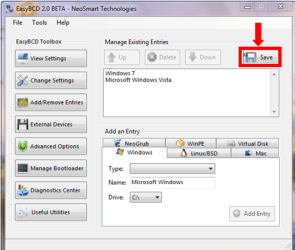
EasyBCD is not adding XP to the boot record.

I followed the tutorial, click add entry, choose XP click add and it says at the bottom, added sucessfully,

Then click add to Windows 7/Vista MBR,

and says added sucessfully to record etc

Just keeps booting to windows 7

Thanks!!

Heres whats currently in the bootloader before restarting

There are a total of 2 entries listed in the bootloader.
Default: Windows 7
Timeout: 30 seconds
EasyBCD Boot Device: C:\
Entry #1
Name: Windows 7
BCD ID: {current}
Drive: C:\
Bootloader Path: \Windows\system32\winload.exe
Entry #2
Name: Microsoft Windows XP
BCD ID: {79fef968-5d0e-11e0-b888-fee2b09be9e2}
Drive: C:\
Bootloader Path: \NST\ntldr

When i restart, it seems to remove it and just boots straight to win 7.
 

My Computer My Computer

At a glance

Windows 7 home
OS
Windows 7 home
Yes i hit save. Am i meant to run it in XP? Now i reinstalled XP and have a boot selection on two XP operating systems instead of XP and 7
 

My Computer My Computer

At a glance

Windows 7 home
OS
Windows 7 home
Delete the old one.
 

My Computer My Computer

At a glance

ME/XP/Vista/Win7
OS
ME/XP/Vista/Win7
Please post back the screenshot for your full Disk Mgmt drive map with listings showing all columns, using the Snipping Tool in Start Menu.

It appears incorrect having both OS's listed in EasyBCD as being on C drive.

If you are in Win7, look at Computer to see what drive letter XP has been given. See if you can delete the XP listing and add it again with it's correct drive letter.
 
Ok i will post pics tonight. When i get home i will try install .Net 2.0 and run easyBCD in XP and see if i can insert the boot record for windows 7 in XP, as the XP boot record now exists.

Is there an easy way to boot between the operating systems without inserting the repair cd for each os and repairing the boot record for the os i want to boot to.

Its a real pain to switch between them at the moment

Ill report back tonight
 

My Computer My Computer

At a glance

Windows 7 home
OS
Windows 7 home
Follow exactly Method Two, Steps 7-12 in this tutorial to try to add Win7 from XP: Dual Boot Installation with Windows 7 and XP

It's too bad you reinstalled XP before attempting to correctly add it from Win7, since it is easier to use Easy from Win7. If following the exact steps above (nothing else!) does not work, you'll need to start Win7 again to try adding XP correctly this time.

You likely already know this since you must have done it once before. But to start Win7 again mark it Active in XP DIsk Mgmt and run 3 Startup Repairs with reboots from the Win7 DVD/Repair CD.
 
Did you install Win XP to C: drive or D: drive?
 

My Computer My Computer

At a glance

ME/XP/Vista/Win7
OS
ME/XP/Vista/Win7
I deleted partition D which was HP Recovery. I figured ive got windows 7 on CD and all drivers are avaliable on HP website, so deleted D: drive (hope it doesnt void warrenty) and shrunk my C: volume and created a new partition F: with 20GB name "Windows XP"

I managed to insert the correct boot record using BCD in XP.

I just had to reinstall XP again cause i installed some graphics drivers i though were for XP as they were described when i downloaded then, they were ATI drivers, and when i rebooted XP, the display just went black, pushed buttons and could hear things happenning so i knew that XP was running, so had to reinstall. Now just have my wifi adapter installed which is really all i need XP for which is networking, cause in 7 it appears that DHCP and the wireless networks get tied up or something :S

but all is good now, really need some graphics drivers as display is a bit laggy.

Thats where im at, Thanks for all help again!!
 

My Computer My Computer

At a glance

Windows 7 home
OS
Windows 7 home
Ill try these tonight. How can i acces safe mode in XP on a dual boot setup. If i screws up again i dont want to have to do the install again. There must be an easier way of removing the incorrect driver rather than reinstalling each time

Thanks
 

My Computer My Computer

At a glance

Windows 7 home
OS
Windows 7 home
You'll need to choose XP from the Dual Boot Menu then quickly tap F8 to get into XP Safe Mode. Set a Restore Point before installing driver as a way to roll it back if you can't get into Windows Updates to Uninstall it.

If you can't get into XP due to a driver malfunction. try Last Known Good Config from F8 boot tools. Also allow unsigned drivers to see if it will at least get into Safe Mode to remove it.
 

My Computer My Computer

At a glance

ME/XP/Vista/Win7
OS
ME/XP/Vista/Win7
ill try these now, its a new laptop though, like1 month old
 

My Computer My Computer

At a glance

Windows 7 home
OS
Windows 7 home
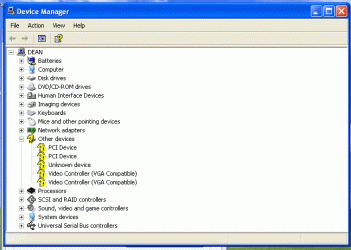
i just tried heaps of drivers, and ony seceeded with 2, Ethernet and SM Bus controller. These devices are still outstanding and i couldnt find any relevant drivers,

untitled (2).gif


Thanks
 

My Computer My Computer

At a glance

Windows 7 home
OS
Windows 7 home
I tried that one
 

My Computer My Computer

At a glance

Windows 7 home
OS
Windows 7 home
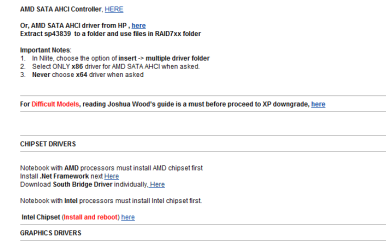
You need the chipset for the PCI controllers. Run it according to the instructions given for it in Theog's link above. If it does not show the PCI controllers (under System Devices in Device Manager) updating, then try clicking Update Driver on each element of the chipset (SATA/IDE, USB and System Device controllers) to see if it will pick up the driver using Automatic or by Browsing to the unzipped chipset in C drive folder.

I posted earlier leads to help your search for the Radeon video driver. You'll need to exhaust all of the search options for "your model + XP drivers" to know you have done all you can. When installing the drivers, if running the installer doesn't install driver then browse to the folder from Device.
 
Thats always how i install my drivers, manually

Ill try again tonight, keep you posted

Cheers
 

My Computer My Computer

At a glance

Windows 7 home
OS
Windows 7 home
Back
Top