HP Laptop even laggier after reformat

samle977

New member
Local time
3:27 AM
Messages
9
I recently did a reformat on my 1.5 yr laptop (windows 7 home premium 64 bit)
because it was acting a bit laggy and the videos I recorded using hypercam (a screen recorder) turned out very jumpy even though the images I was recording were not jumpy.
I was also getting error messages sometimes when I boot up that said "there is no drive/disk to boot from. insert disk and press any key"
I usually just pressed the power down button and restarted in the hopes that it would go to desktop which it sometimes did. (I noticed that these error messages came most often when I had an external hd plugged in)

so i used my recovery disks and did a system restore. but if anything the lag got worse. the error message at bootup still happens sometimes. it takes a lot longer to startup. and actions that used to be instantaneous like deleting small images now sometimes 3 seconds. when I type, the letters appear several seconds afterwards

do i have to install some video drivers or something? the windows update says it installed the Intel Corporation display Intel(r) HD graphics. I assumed those were the video drivers and that the rest of the drivers were installed when I used the recovery disks (but honestly I dont know. I don't know anything about computers)

are there are tests I could run to see if theres a hardware problem? I dont know which programs to scan computers for problems are real and which ones are actually spyware.
I ran an AVG scan but nothing showed up.
the weird thing is that there are moments when the laptop is fine. as in the typing is instanteous. other times its like the computer cant keep up with my typing speed (which has never been a problem)
my screen recording stuff with hypercam was fine for a day after reformatting and then the jumpiness of the recorded video came back after a day.

please help and sorry for the long post :(

edit: it might just be my mind playing tricks on me but my laptop seems even laggier after windows update installed service pack 1 (or it might have been one of the seven other updates they made me install) dunno
 

My Computer My Computer

At a glance

Windows 7 Home Premium 64bit
OS
Windows 7 Home Premium 64bit
Sounds like a failing HDD. Check S.M.A.R.T. info (opensource tool, din't test : CrystalDiskInfo - Software - Crystal Dew World)
and needless to say, keep backups.

Also Its possible that your external HDD is marked as "bootable" but in fact isn't. You could move boot from USB lower then boot from HDD in your bios to fix this. (Though this is no reason why windows itself would run slower)
 
Last edited:

My Computer My Computer

At a glance

Windows 7 professional 32bitIntel Core 2 Duo CPU [email protected]2*2GBATI Mobility Radeon HD3650
Computer Manufacturer/Model Number
HP Elitebook 8530p
OS
Windows 7 professional 32bit
CPU
Intel Core 2 Duo CPU [email protected]
Memory
2*2GB
Graphics Card(s)
ATI Mobility Radeon HD3650
Sound Card
AMD High Definition Audio Device, SoundMAX Integrated DigitA
Hard Drives
TOSHIBA MK2555GSX ATA DEVICE
I tried to start up my laptop this morning and the exact words of the error message were "no bootable device - insert boot disk and press any key"

also if I replace my harddrive, I assume I'll have to reinstall my OS right?
will my system recovery disks that I made when I first bought my laptop work? or do I have to buy a new copy of windows 7?
 

My Computer My Computer

At a glance

Windows 7 Home Premium 64bit
OS
Windows 7 Home Premium 64bit
It does sound as though your hard drive may be about to fail and if you replace your hard drive you will need to reinstall Windows.

Your system recovery discs should work, but if you prefer installing Windows minus the computer manufacturer's bloatware, you can do so, as this tutorial explains.

http://www.sevenforums.com/tutorials/219487-clean-reinstall-factory-oem-windows-7-a.html#post1839164

You won't need to buy another copy of Windows because your OEM product key on the COA sticker is your licence to use Windows.

OEM: Original Equipment Manufacturer
COA: Certificate of Authenticity
 

My Computer My Computer

At a glance

Windows 7 Ultimate SP1 64-BitIntel Core i7 870 @ 2.93GHz8Gb Dual-Channel DDR3 @ 664MHznVidia GeForce GTX 460 1024MB dedicated RAM
Computer Manufacturer/Model Number
HP Pavilion Elite 495UK
OS
Windows 7 Ultimate SP1 64-Bit
CPU
Intel Core i7 870 @ 2.93GHz
Motherboard
MSI 2A9C (CPU1)
Memory
8Gb Dual-Channel DDR3 @ 664MHz
Graphics Card(s)
nVidia GeForce GTX 460 1024MB dedicated RAM
Sound Card
Realtek HD Audio
Monitor(s) Displays
HP2310i
Screen Resolution
1920 x 1080
Hard Drives
1x1954GB Hitachi HDS22020ALA 330 (RAID), 1x1954GB Hitachi External for backup and storage
PSU
460W
Case
HP Elite
Cooling
Air cooled
Keyboard
Logitech K750 solar-powered keyboard
Mouse
Logitech Wireless M180 mouse
Internet Speed
2Mb
Other Info
Pure Avanti Flow Internet Radio with iPod Dock, 64Gb iPod, HP USB Speakers, Sony MDR-V500 Headphones, Sony Vaio F-Series Laptop
so what I would do is take the harddrive out, put the new one in and after pressing the power button, press f11.
it should be pretty easy from there right?

i read online some ppl have problems with the recovery discs and new harddrives...if I buy a new harddrive with the same settings/size I should be fine right? would I have to buy a hp brand drive or could be any brand with the same settings?

also I would like to make sure that its actually my harddrive thats the problem...I keep reading about S.M.A.R.T but I'm not sure how to go about using these S.M.A.R.T. programs or interpreting the results.
 
Last edited:

My Computer My Computer

At a glance

Windows 7 Home Premium 64bit
OS
Windows 7 Home Premium 64bit
Before you go any further, check this article for advice on checking your hard drive.

Testing a computer hard drive for failures.

You also want to contact HP and see what they say. Who knows, they may even replace the drive for you.
 
Last edited:

My Computer My Computer

At a glance

Windows 7 Ultimate SP1 64-BitIntel Core i7 870 @ 2.93GHz8Gb Dual-Channel DDR3 @ 664MHznVidia GeForce GTX 460 1024MB dedicated RAM
Computer Manufacturer/Model Number
HP Pavilion Elite 495UK
OS
Windows 7 Ultimate SP1 64-Bit
CPU
Intel Core i7 870 @ 2.93GHz
Motherboard
MSI 2A9C (CPU1)
Memory
8Gb Dual-Channel DDR3 @ 664MHz
Graphics Card(s)
nVidia GeForce GTX 460 1024MB dedicated RAM
Sound Card
Realtek HD Audio
Monitor(s) Displays
HP2310i
Screen Resolution
1920 x 1080
Hard Drives
1x1954GB Hitachi HDS22020ALA 330 (RAID), 1x1954GB Hitachi External for backup and storage
PSU
460W
Case
HP Elite
Cooling
Air cooled
Keyboard
Logitech K750 solar-powered keyboard
Mouse
Logitech Wireless M180 mouse
Internet Speed
2Mb
Other Info
Pure Avanti Flow Internet Radio with iPod Dock, 64Gb iPod, HP USB Speakers, Sony MDR-V500 Headphones, Sony Vaio F-Series Laptop
It does sound as though your hard drive may be about to fail and if you replace your hard drive you will need to reinstall Windows.

Your system recovery discs should work, but if you prefer installing Windows minus the computer manufacturer's bloatware, you can do so, as this tutorial explains.

http://www.sevenforums.com/tutorials/219487-clean-reinstall-factory-oem-windows-7-a.html#post1839164

You won't need to buy another copy of Windows because your OEM product key on the COA sticker is your licence to use Windows.

OEM: Original Equipment Manufacturer
COA: Certificate of Authenticity


Seavixen beat me to it ;] I was going to suggest that.
 

My Computer My Computer

At a glance

x64 Windows 7 HomeIntel® Core™ i7 2630QM Processor8 GBs DDR3 1333 MHz SDRAM, 4 x SO-DIMM socket...NVIDIA® GeForce® GTX 560M with 2GB GDDR5 VRAM
Computer Manufacturer/Model Number
ASUS G74xs
OS
x64 Windows 7 Home
CPU
Intel® Core™ i7 2630QM Processor
Motherboard
Intel® HM65 Express Chipset
Memory
8 GBs DDR3 1333 MHz SDRAM, 4 x SO-DIMM socket Up To 16GB
Graphics Card(s)
NVIDIA® GeForce® GTX 560M with 2GB GDDR5 VRAM
Sound Card
EAX Advanced HD 5.0, THX TruStudio
Screen Resolution
17.3" 16:9 HD+ (1600x900)
Hard Drives
2.5 SATA 500GB 7200rpm x2
Mouse
Razer Deathadder 3500 DPI
Internet Speed
25/5 MB Comcast High Speed (Lulz)
I ran a chdsk on my computer...after my computer restarted (after the scan) just told me my drive is NTFS and that the volume is clean. I'm not sure what that means...but it doesnt seem to say much about the state of my harddrive. and then it went to desktop. still very laggy :(

i've also notice that when my laptop starts up. the sequence is usually HP logo, multicolored flying windows logo then desktop. recently its been 3 minute hp logo, a black out, hp logo for a minute and then flying windows logo for a long time. dont know if thats relevant or points to how my harddrive is dying.
 

My Computer My Computer

At a glance

Windows 7 Home Premium 64bit
OS
Windows 7 Home Premium 64bit
Go ahead and test your HD and RAM to get that out of the way.
 
Last edited:
...how do you test RAM?

I've also never had any problem with bloatware or lag in these 1.5 years...and I just reformatted my laptop so I dont see how bloatware could be the sole culprit. I just want to know if theres a tutorial for the computer illiterate for seeing if its actually the harddrive that needs to be replaced. I ran checkdisk already and it didnt really tell me anything
 

My Computer My Computer

At a glance

Windows 7 Home Premium 64bit
OS
Windows 7 Home Premium 64bit
Sounds like a hardware issue, first find the hard drive manufacturer.

D/L Speccy , install and open it, the initial page will have the hard drive information.

Run the HDD manufactures testing app, example:

Then D/L and run Western Digital Lifeguard – Quick Test and Extended Test
D/L and run Western Digital Lifeguard – Quick Test and Extended Test

Then D/L and run Seagate SeaTools – Short Drive Self Test and Long Drive Self Test
D/L and run Seagate SeaTools – Short Drive Self Test and Long Drive Self Test

Post the information here.
For posting the information , enter 'Snipping tool' in the Start button > Search box, hit enter. Select the area you want to post and save to a convenient place.
How to Post a Screenshot in Seven Forums
 

My Computer My Computer

At a glance

Windows 7 Ult x64 - SP1/ Windows 8 Pro x64Intel Core i5-3570K 4.6GHz8GB (2X4GB) DDR3 1600 Corsair Vengeance CL8 1.5vSapphire HD 7770 Vapor-X OC 1GB DDR5
Computer type
PC/Desktop
Computer Manufacturer/Model Number
76~2.0
OS
Windows 7 Ult x64 - SP1/ Windows 8 Pro x64
CPU
Intel Core i5-3570K 4.6GHz
Motherboard
Gigabyte GA-Z77X UD3H, f18
Memory
8GB (2X4GB) DDR3 1600 Corsair Vengeance CL8 1.5v
Graphics Card(s)
Sapphire HD 7770 Vapor-X OC 1GB DDR5
Sound Card
Onboard VIA VT2021
Monitor(s) Displays
22" LCD Dell
Screen Resolution
1680x1050
Hard Drives
Samsung 840Pro 128GB SSD,
Seagate Barracuda 500GB SATA2 7200rpm 32MB cache, Seagate Barracuda 1TB SATA2 7200rpm 32MB cache,
PSU
Corsair HX650W
Case
Cooler Master Storm Scout
Cooling
Corsair H80 2x12cm Noctua NF P12 , 2x14cm case fans
Keyboard
Logitech Wave
Mouse
CM Sentinel
Internet Speed
Dismal
Antivirus
Avast
Browser
Opera Next
Other Info
Haswell laptop: HP Envy 17t-j, i7-4700MQ, GeForce 740M 2GB DDR3, 17.3" Full HD 1920x1080, 16GB RAM, Samsung 840 Pro 128GB, 1TB Hitachi 7200 HDD,
Desktop: eSATA ports,
External eSATA Seagate 500GB SATA2 7200rpm,
External WD USB 500GB
hello sorry for bumping this thread again but I finally got the chance to run the RAM test last night...I ran 4 passes with memtest86+ but it said no errors. The second, third, and fourth test took like 50 minutes each while the first was like 25 minutes...if that matters.
is it possible that memtest86+ sometimes fails to pick up an error?

also I ran the speccy program and it says I have a toshiba harddrive...what would be the appropriate program or thing to do to run a test on toshiba harddrives? or can i use the tests from WD or seagate?
 

My Computer My Computer

At a glance

Windows 7 Home Premium 64bit
OS
Windows 7 Home Premium 64bit
I tried running the hitachi dft but my harddrive didnt show up in the list of drives

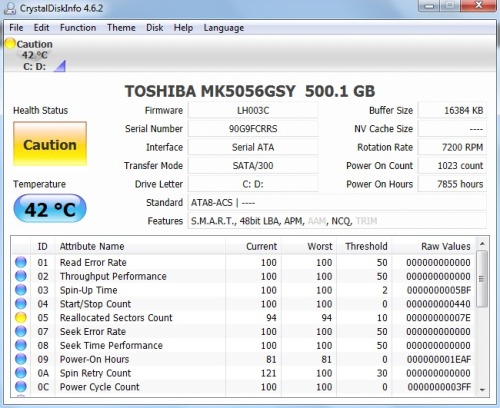
I ran the CrystalDiskInfo thing and I got this
tumblr_m57qqjLAtJ1qcewo2o1_500.jpg

:(

edit;hmmm i downloaded the zip file from the toshiba site you linked to up there but the file inside was a exe file not an iso...how should i go about running that particular test?

also i ran a chdsk a few days ago and told it to fix bad sectors...so I would have thought the reallocated disk count would be lower
 
Last edited:

My Computer My Computer

At a glance

Windows 7 Home Premium 64bit
OS
Windows 7 Home Premium 64bit
The second download says its for bootable CD but when I run the .exe it runs in Windows. You can try it.

It would be better to run a bootable repair CD test which Toshiba doesn't list, except Hitachi. So you may need to run Seatools.
 
the exe file gave me an error message: the version of this file is not compatible with the version of windows you're in or something

I tried running the seatools but when I tried to boot from CD, all I got was a blank screen with some purple illegible scribbles near the top of the screen
 

My Computer My Computer

At a glance

Windows 7 Home Premium 64bit
OS
Windows 7 Home Premium 64bit
tried that an hour ago...it wouldnt detect my harddrive
 

My Computer My Computer

At a glance

Windows 7 Home Premium 64bit
OS
Windows 7 Home Premium 64bit
Back
Top