
HP laserjet 5 driver anyone?

Cliff789

New member
Member
Local time
11:52 PM
Messages
86
HP laserjet 5 ARRRRGGGGGGHHHHHHHHH~!!!

I read this post http://www.sevenforums.com/drivers/137520-hp-laserjet-5n-drivers.html where a member used a driver for a HP LJ2030 PCL5 to get his laserjet 5N going . I have a laserjet 5 and absolutely nothing I've tried will make this work. Has anyone got anything that will make a HP Laser5 run on Win7 64bit???
 

My Computer My Computer

Computer type
PC/Desktop
Computer Manufacturer/Model Number
Home built
OS
ASUS X79 DELUXE LGA 2011 Intel X79 SATA 6Gb/s USB 3.0 ATX
CPU
Intel Core i7-4930K Ivy Bridge-E 3.4GHz LGA 2011 130W 6-Core
Motherboard
ASUS X79 DELUXE LGA 2011 Intel X79 SATA 6Gb/s USB 3.0 ATX
Memory
CORSAIR Dominator Platinum 16GB (4 x 4GB) 240-Pin DDR3 SDRAM
Graphics Card(s)
ASUS EAH6450 Silent/DI/1GD3(LP) Radeon HD 6450 1GB 64-bit DD
Sound Card
onboard
Monitor(s) Displays
Dell lcd 32"
Hard Drives
1tb SATA, 2tb SATA, 500 gig SATA, 500 Gig SATA, 500 Gig IDE
PSU
CORSAIR HX Series HX750 750W ATX12V 2.3 / EPS12V 2.91 SLI Re
Case
something colored black
Cooling
Cooler Master Seidon 120XL
Keyboard
this thing with buttons on it
Mouse
a tailed devil
Internet Speed
whizzing along
Antivirus
KASPERSKY
Browser
Firefox. Opra, Explorer.
Other Info
I am naked and outside your window shouting Non Sequiturs in a loony high pitched voice.
Anything? This is a nice workhorse printer and I can't find a driver solution

Win 7 home premium Retail 64bit
 

My Computer My Computer

Computer type
PC/Desktop
Computer Manufacturer/Model Number
Home built
OS
ASUS X79 DELUXE LGA 2011 Intel X79 SATA 6Gb/s USB 3.0 ATX
CPU
Intel Core i7-4930K Ivy Bridge-E 3.4GHz LGA 2011 130W 6-Core
Motherboard
ASUS X79 DELUXE LGA 2011 Intel X79 SATA 6Gb/s USB 3.0 ATX
Memory
CORSAIR Dominator Platinum 16GB (4 x 4GB) 240-Pin DDR3 SDRAM
Graphics Card(s)
ASUS EAH6450 Silent/DI/1GD3(LP) Radeon HD 6450 1GB 64-bit DD
Sound Card
onboard
Monitor(s) Displays
Dell lcd 32"
Hard Drives
1tb SATA, 2tb SATA, 500 gig SATA, 500 Gig SATA, 500 Gig IDE
PSU
CORSAIR HX Series HX750 750W ATX12V 2.3 / EPS12V 2.91 SLI Re
Case
something colored black
Cooling
Cooler Master Seidon 120XL
Keyboard
this thing with buttons on it
Mouse
a tailed devil
Internet Speed
whizzing along
Antivirus
KASPERSKY
Browser
Firefox. Opra, Explorer.
Other Info
I am naked and outside your window shouting Non Sequiturs in a loony high pitched voice.
looooordy that's a relic man, I remember how cool and fast a laser printer I thought it was back in middleschool when the thing was already like 6 years old lol. But Windows should have drivers for it built-in. What kind of interface is it using to connect to your computer? I can run you through how to manually install a non-USB printer if that's the case.

Here's HP's official driver link just for your info:
HP LaserJet 5/m/n Printer series -  Download drivers and software - HP Business Support Center
 

My Computer My Computer

OS
Windows 7 Professional x64
For HP Laserjet 5 with windows 7 64 bit check Windows updates for a Driver
 

My Computer My Computer

Computer type
PC/Desktop
Computer Manufacturer/Model Number
Custom Build
OS
Windows 7 Pro SP1 x64
CPU
Intel Core i5 4670k @3.4 Ghz
Motherboard
Gigabyte Z87X-D3H
Memory
Corsair XMS3 16GB 1333 Mhz 9/9/9
Graphics Card(s)
Asus 7850 2GB Edition 860/1200
Sound Card
Logitech z506 Speakers / Logitech G930 Headset
Monitor(s) Displays
Asus VE278H / Vizio E320-A0
Screen Resolution
1920x1080 (Asus) / 1366x768 (Vizio)
Hard Drives
120GB OCZ Vertex 3 SSD
1TB Seagate HDD
PSU
Corsair RM 650 Watts
Case
Fractal Define R4 Black Pearl
Cooling
1x140mm Front Intake Fan 1x140mm Rear Exhaust Fan
Keyboard
Cooler Master Quickfire TK Cherry Mx Blue
Mouse
Razer Naga Blue
Internet Speed
Wired Ethernet 15 PING 35.00 Mbps Download 10.00 Mbps Upload
Antivirus
Eset Smart Security 8
Browser
Google Chrome
Other Info
Just ask me if i missed something

My Computer My Computer

Computer type
Laptop
Computer Manufacturer/Model Number
Toshiba Laptop Qosimo X870
OS
Windows 7 Pro x64 SP1
CPU
Intel Core I7
Motherboard
Toshiba Qosmio
Memory
16 Gigs
Graphics Card(s)
NVIDIA GeForce GTX 670M
Monitor(s) Displays
17.7" laptop
Screen Resolution
1600 x 900
Hard Drives
256 Gig SanDisk SSD for C
256 Gig Intel SSD for D
Internet Speed
50/25 FIOS
Antivirus
Vipre (all you can eat for 10 machines)
Browser
IE and FF
Other Info
I have dos 6.22, wfwg 3.11, win98, 2000 and xp VHD's available for testing. MS's Virtual PC works great.
Have you tried these?

Microsoft Update Catalog

Also my system (windows 7 x64) shows a driver for that printer in the add printer wizard.
The list was obtained (updated) by selecting Windows update and waiting
 

Attachments

  • drvhp.PNG
    drvhp.PNG
    15.4 KB · Views: 52

My Computer My Computer

Computer type
PC/Desktop
Computer Manufacturer/Model Number
Custom Built
OS
Windows 10 Pro x64, Windows 8.1 Pro x64, Windows 7 Ultimate x64 SP1,
CPU
INTEL i9-7920X LGA 2066
Motherboard
Gigabyte X299-WU8 F3
Memory
64 GB (4 X 16 GB) G-Skill V Series DDR4 3200 Quad Channel
Graphics Card(s)
EVGA GTX 1060 SC 3 GB
Sound Card
Realtek Onboard ALC1220
Monitor(s) Displays
2 x Samsung S27E310
Screen Resolution
1920x1080
Hard Drives
Samsung 2 x 970 EVO Plus 500 GB NVMe
1 x 6TB WD 6003FZBX SATA
1 x 6TB WD 60EFRX SATA
12 x 3TB WD 30EFRX SATA
PSU
Seasonic X-1050
Case
Thermaltake Armor+
Cooling
Corsair H80i V2 Liquid AOI Cooler
Keyboard
Logitech G510s
Mouse
Logitech MX Master 2S
Internet Speed
200 Mb/s
Antivirus
ESET NOD32 13.1
Browser
EDGE (Dev, Canary, Beta), Chrome
Other Info
ASUS RT-AC68U router
Malwarebytes 4.0.4
Yah PBCOPTER I have done this pick from the list thing a dozen times. I wait and then it's done and nothing happens
The printer looks like it's set up, but it isn't.
The first time I try to print a document it fails.
Then I use the troubleshoot function. It applies a useless fix (making it the default printer) and still nothing happens when I try to print.

I don't understand why Laser 5 appears in the selection list.


HP is the same as HP always has been: Utterly and completely unresponsive.

I used to use their equipment in the physics lab. They made great quadrupole mass spectrometers, but if you had a problem you were on your own.

I've tried other Laserjet5 configurations from the list. There are several #5[xyz] printers, but none work


I just install it as a hplj series II
Huh? Series II? You mean as in Laserjet II P ?

There are three Laserjet II offerings the IIP; the IIP plus; and the IIP PostScript Cartridge v52.2
Are you saying that you can get a Laserjet 5 to run as a Laserjet IIP ?

I have no offering on the list of printers that says Laserjet series II

I just selected the Laserjet IIP from the drop down list and it won't print the test page.

What do you do to run it as the Series II?
 

My Computer My Computer

Computer type
PC/Desktop
Computer Manufacturer/Model Number
Home built
OS
ASUS X79 DELUXE LGA 2011 Intel X79 SATA 6Gb/s USB 3.0 ATX
CPU
Intel Core i7-4930K Ivy Bridge-E 3.4GHz LGA 2011 130W 6-Core
Motherboard
ASUS X79 DELUXE LGA 2011 Intel X79 SATA 6Gb/s USB 3.0 ATX
Memory
CORSAIR Dominator Platinum 16GB (4 x 4GB) 240-Pin DDR3 SDRAM
Graphics Card(s)
ASUS EAH6450 Silent/DI/1GD3(LP) Radeon HD 6450 1GB 64-bit DD
Sound Card
onboard
Monitor(s) Displays
Dell lcd 32"
Hard Drives
1tb SATA, 2tb SATA, 500 gig SATA, 500 Gig SATA, 500 Gig IDE
PSU
CORSAIR HX Series HX750 750W ATX12V 2.3 / EPS12V 2.91 SLI Re
Case
something colored black
Cooling
Cooler Master Seidon 120XL
Keyboard
this thing with buttons on it
Mouse
a tailed devil
Internet Speed
whizzing along
Antivirus
KASPERSKY
Browser
Firefox. Opra, Explorer.
Other Info
I am naked and outside your window shouting Non Sequiturs in a loony high pitched voice.
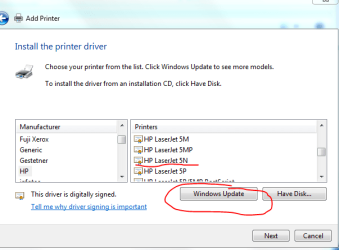
When you say you wait, how long? It ususally takes upwards of 5 minutes to update the list of printers.

When you say "I wait and then it's done and nothing happens", what do you mean by done?
 

My Computer My Computer

Computer type
PC/Desktop
Computer Manufacturer/Model Number
Custom Built
OS
Windows 10 Pro x64, Windows 8.1 Pro x64, Windows 7 Ultimate x64 SP1,
CPU
INTEL i9-7920X LGA 2066
Motherboard
Gigabyte X299-WU8 F3
Memory
64 GB (4 X 16 GB) G-Skill V Series DDR4 3200 Quad Channel
Graphics Card(s)
EVGA GTX 1060 SC 3 GB
Sound Card
Realtek Onboard ALC1220
Monitor(s) Displays
2 x Samsung S27E310
Screen Resolution
1920x1080
Hard Drives
Samsung 2 x 970 EVO Plus 500 GB NVMe
1 x 6TB WD 6003FZBX SATA
1 x 6TB WD 60EFRX SATA
12 x 3TB WD 30EFRX SATA
PSU
Seasonic X-1050
Case
Thermaltake Armor+
Cooling
Corsair H80i V2 Liquid AOI Cooler
Keyboard
Logitech G510s
Mouse
Logitech MX Master 2S
Internet Speed
200 Mb/s
Antivirus
ESET NOD32 13.1
Browser
EDGE (Dev, Canary, Beta), Chrome
Other Info
ASUS RT-AC68U router
Malwarebytes 4.0.4
When you say you wait, how long?

Till the machine is done doing whatever it is doing.


When you say "I wait and then it's done and nothing happens", what do you mean by done?
The machined finishes with it's unhelpful installation and nothing happens when I go to print.


Here is some thing very odd:

My other printer is an HP 3380 all in one fax scanner printer. It's a POS for home use. Not up to the demands that my regular work requires.

Earlier in this thread I reported the printer's I installed trying to get the Laser 5 to work.
I uninstalled all other printers. the only one online is the 3380 and it's set as default.

The Laser 5 is powered up but there is no other printer than the 3380 in the Devices and Printers dialog window.

But I just sent a print to the 3380 which is also on.
However the Laser 5 printed it. Not the 3380

This is too weird. I wonder what'll happen when I reboot?

Well, I rebooted ( this is an edit) And the LaserJet5 no longer is doing the printing.

I wonder if a generic driver will work.
 

My Computer My Computer

Computer type
PC/Desktop
Computer Manufacturer/Model Number
Home built
OS
ASUS X79 DELUXE LGA 2011 Intel X79 SATA 6Gb/s USB 3.0 ATX
CPU
Intel Core i7-4930K Ivy Bridge-E 3.4GHz LGA 2011 130W 6-Core
Motherboard
ASUS X79 DELUXE LGA 2011 Intel X79 SATA 6Gb/s USB 3.0 ATX
Memory
CORSAIR Dominator Platinum 16GB (4 x 4GB) 240-Pin DDR3 SDRAM
Graphics Card(s)
ASUS EAH6450 Silent/DI/1GD3(LP) Radeon HD 6450 1GB 64-bit DD
Sound Card
onboard
Monitor(s) Displays
Dell lcd 32"
Hard Drives
1tb SATA, 2tb SATA, 500 gig SATA, 500 Gig SATA, 500 Gig IDE
PSU
CORSAIR HX Series HX750 750W ATX12V 2.3 / EPS12V 2.91 SLI Re
Case
something colored black
Cooling
Cooler Master Seidon 120XL
Keyboard
this thing with buttons on it
Mouse
a tailed devil
Internet Speed
whizzing along
Antivirus
KASPERSKY
Browser
Firefox. Opra, Explorer.
Other Info
I am naked and outside your window shouting Non Sequiturs in a loony high pitched voice.
No joy on either count guys. HP is no longer supporting them and Win 7 doesn't have a driver on board. Which is bloody weird because in the Printers and Drivers dialog box there is a Laser 5 selection, but it doesn't work and nothing obtains online when it goes searching.

The hell of it is that THis page:
HP LaserJet, Color LaserJet, and LaserJet AiO/MFP Products - Products Not Supported in Windows 7 (32-bit and 64-bit) - c02535920 - HP Business Support Center
Tells me that my printer IS supported.

But I seem unable to get it running.


If it is indeed supported then the drivers should be on my Window's 7 Retail Disk.
Where do I look on the disk for the drivers?
 

My Computer My Computer

Computer type
PC/Desktop
Computer Manufacturer/Model Number
Home built
OS
ASUS X79 DELUXE LGA 2011 Intel X79 SATA 6Gb/s USB 3.0 ATX
CPU
Intel Core i7-4930K Ivy Bridge-E 3.4GHz LGA 2011 130W 6-Core
Motherboard
ASUS X79 DELUXE LGA 2011 Intel X79 SATA 6Gb/s USB 3.0 ATX
Memory
CORSAIR Dominator Platinum 16GB (4 x 4GB) 240-Pin DDR3 SDRAM
Graphics Card(s)
ASUS EAH6450 Silent/DI/1GD3(LP) Radeon HD 6450 1GB 64-bit DD
Sound Card
onboard
Monitor(s) Displays
Dell lcd 32"
Hard Drives
1tb SATA, 2tb SATA, 500 gig SATA, 500 Gig SATA, 500 Gig IDE
PSU
CORSAIR HX Series HX750 750W ATX12V 2.3 / EPS12V 2.91 SLI Re
Case
something colored black
Cooling
Cooler Master Seidon 120XL
Keyboard
this thing with buttons on it
Mouse
a tailed devil
Internet Speed
whizzing along
Antivirus
KASPERSKY
Browser
Firefox. Opra, Explorer.
Other Info
I am naked and outside your window shouting Non Sequiturs in a loony high pitched voice.
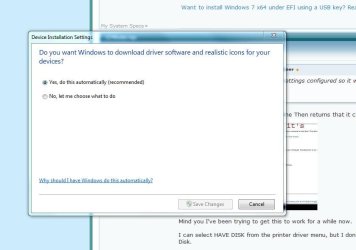
Do you have Device Installation Settings configured so it will look online for drivers?
 

Attachments

  • Capture.JPG
    Capture.JPG
    39.2 KB · Views: 26

My Computer My Computer

Computer Manufacturer/Model Number
Dell XPS 15 L502x
OS
Windows 7 Ultimate x64 SP1
CPU
Core i7-2670QM
Memory
8GB DDR3 PC3-10600
Graphics Card(s)
Intel HD Graphics 3000 + GeForce GT 540M
Screen Resolution
1920x1080
Hard Drives
1TB 5400RPM Seagate
Do you have Device Installation Settings configured so it will look online for drivers?

Yes, I just checked.
device intallation auto.JPG

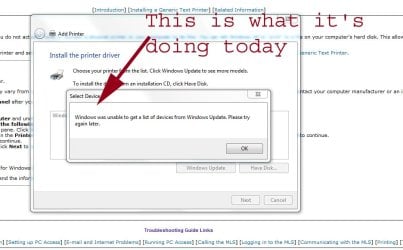
It asks to go online Then returns that it can't get there
No Printer Driver copy.jpg

Mind you I've been trying to get this to work for a while now.

I can select HAVE DISK from the printer driver menu, but I don't know where to send it on the Windows 7 retail Disk.

When I just click NEXT instead of selecting Windows Update it installs the printer.
But when I try to print the test page ( or any page) the triangular error symbol appears next to the printer.
Troublshooting results in only two paths:
1) the troublshooter sets the printer to default ( like that should matter) and
2) then it returns an error that there is a page in queue that hasn't printed and nothing I do will make it print and deleting it from the queue doesn't improve results. I still can't print.
 

My Computer My Computer

Computer type
PC/Desktop
Computer Manufacturer/Model Number
Home built
OS
ASUS X79 DELUXE LGA 2011 Intel X79 SATA 6Gb/s USB 3.0 ATX
CPU
Intel Core i7-4930K Ivy Bridge-E 3.4GHz LGA 2011 130W 6-Core
Motherboard
ASUS X79 DELUXE LGA 2011 Intel X79 SATA 6Gb/s USB 3.0 ATX
Memory
CORSAIR Dominator Platinum 16GB (4 x 4GB) 240-Pin DDR3 SDRAM
Graphics Card(s)
ASUS EAH6450 Silent/DI/1GD3(LP) Radeon HD 6450 1GB 64-bit DD
Sound Card
onboard
Monitor(s) Displays
Dell lcd 32"
Hard Drives
1tb SATA, 2tb SATA, 500 gig SATA, 500 Gig SATA, 500 Gig IDE
PSU
CORSAIR HX Series HX750 750W ATX12V 2.3 / EPS12V 2.91 SLI Re
Case
something colored black
Cooling
Cooler Master Seidon 120XL
Keyboard
this thing with buttons on it
Mouse
a tailed devil
Internet Speed
whizzing along
Antivirus
KASPERSKY
Browser
Firefox. Opra, Explorer.
Other Info
I am naked and outside your window shouting Non Sequiturs in a loony high pitched voice.
My Computer My Computer

Computer Manufacturer/Model Number
Dell XPS 15 L502x
OS
Windows 7 Ultimate x64 SP1
CPU
Core i7-2670QM
Memory
8GB DDR3 PC3-10600
Graphics Card(s)
Intel HD Graphics 3000 + GeForce GT 540M
Screen Resolution
1920x1080
Hard Drives
1TB 5400RPM Seagate
Laserjet 5, as I said. There is no letter designation. If there were, I'd have included it.

it's connected the old way Parallel - the way the laserjet 5 was made to connect. It predates USB.
 

My Computer My Computer

Computer type
PC/Desktop
Computer Manufacturer/Model Number
Home built
OS
ASUS X79 DELUXE LGA 2011 Intel X79 SATA 6Gb/s USB 3.0 ATX
CPU
Intel Core i7-4930K Ivy Bridge-E 3.4GHz LGA 2011 130W 6-Core
Motherboard
ASUS X79 DELUXE LGA 2011 Intel X79 SATA 6Gb/s USB 3.0 ATX
Memory
CORSAIR Dominator Platinum 16GB (4 x 4GB) 240-Pin DDR3 SDRAM
Graphics Card(s)
ASUS EAH6450 Silent/DI/1GD3(LP) Radeon HD 6450 1GB 64-bit DD
Sound Card
onboard
Monitor(s) Displays
Dell lcd 32"
Hard Drives
1tb SATA, 2tb SATA, 500 gig SATA, 500 Gig SATA, 500 Gig IDE
PSU
CORSAIR HX Series HX750 750W ATX12V 2.3 / EPS12V 2.91 SLI Re
Case
something colored black
Cooling
Cooler Master Seidon 120XL
Keyboard
this thing with buttons on it
Mouse
a tailed devil
Internet Speed
whizzing along
Antivirus
KASPERSKY
Browser
Firefox. Opra, Explorer.
Other Info
I am naked and outside your window shouting Non Sequiturs in a loony high pitched voice.
My Computer My Computer

Computer type
PC/Desktop
Computer Manufacturer/Model Number
Home built
OS
ASUS X79 DELUXE LGA 2011 Intel X79 SATA 6Gb/s USB 3.0 ATX
CPU
Intel Core i7-4930K Ivy Bridge-E 3.4GHz LGA 2011 130W 6-Core
Motherboard
ASUS X79 DELUXE LGA 2011 Intel X79 SATA 6Gb/s USB 3.0 ATX
Memory
CORSAIR Dominator Platinum 16GB (4 x 4GB) 240-Pin DDR3 SDRAM
Graphics Card(s)
ASUS EAH6450 Silent/DI/1GD3(LP) Radeon HD 6450 1GB 64-bit DD
Sound Card
onboard
Monitor(s) Displays
Dell lcd 32"
Hard Drives
1tb SATA, 2tb SATA, 500 gig SATA, 500 Gig SATA, 500 Gig IDE
PSU
CORSAIR HX Series HX750 750W ATX12V 2.3 / EPS12V 2.91 SLI Re
Case
something colored black
Cooling
Cooler Master Seidon 120XL
Keyboard
this thing with buttons on it
Mouse
a tailed devil
Internet Speed
whizzing along
Antivirus
KASPERSKY
Browser
Firefox. Opra, Explorer.
Other Info
I am naked and outside your window shouting Non Sequiturs in a loony high pitched voice.
Follow the instructions in the HP document I linked. If that doesn't work, then I guess you're out of luck and you'll have to either use XP or buy a new printer.
 

My Computer My Computer

Computer Manufacturer/Model Number
Dell XPS 15 L502x
OS
Windows 7 Ultimate x64 SP1
CPU
Core i7-2670QM
Memory
8GB DDR3 PC3-10600
Graphics Card(s)
Intel HD Graphics 3000 + GeForce GT 540M
Screen Resolution
1920x1080
Hard Drives
1TB 5400RPM Seagate
Yah, that doesn't tell me anything that I haven't already done a dozen times.
It's unfortunate that HP won't publish the driver.

I'm wondering if a repair installation of Win 7 is not the way to go.
 

My Computer My Computer

Computer type
PC/Desktop
Computer Manufacturer/Model Number
Home built
OS
ASUS X79 DELUXE LGA 2011 Intel X79 SATA 6Gb/s USB 3.0 ATX
CPU
Intel Core i7-4930K Ivy Bridge-E 3.4GHz LGA 2011 130W 6-Core
Motherboard
ASUS X79 DELUXE LGA 2011 Intel X79 SATA 6Gb/s USB 3.0 ATX
Memory
CORSAIR Dominator Platinum 16GB (4 x 4GB) 240-Pin DDR3 SDRAM
Graphics Card(s)
ASUS EAH6450 Silent/DI/1GD3(LP) Radeon HD 6450 1GB 64-bit DD
Sound Card
onboard
Monitor(s) Displays
Dell lcd 32"
Hard Drives
1tb SATA, 2tb SATA, 500 gig SATA, 500 Gig SATA, 500 Gig IDE
PSU
CORSAIR HX Series HX750 750W ATX12V 2.3 / EPS12V 2.91 SLI Re
Case
something colored black
Cooling
Cooler Master Seidon 120XL
Keyboard
this thing with buttons on it
Mouse
a tailed devil
Internet Speed
whizzing along
Antivirus
KASPERSKY
Browser
Firefox. Opra, Explorer.
Other Info
I am naked and outside your window shouting Non Sequiturs in a loony high pitched voice.
Does your computer even have a parallel connector? Most nowadays don't.... And in reality and PCL driver should print....
 

My Computer My Computer

OS
Windows 7
FWIW: I have also installed other laserjet printers that no drivers are available as a lj 2000 and they worked, especially when connected via the parallel port.

Rich
 

My Computer My Computer

Computer type
Laptop
Computer Manufacturer/Model Number
Toshiba Laptop Qosimo X870
OS
Windows 7 Pro x64 SP1
CPU
Intel Core I7
Motherboard
Toshiba Qosmio
Memory
16 Gigs
Graphics Card(s)
NVIDIA GeForce GTX 670M
Monitor(s) Displays
17.7" laptop
Screen Resolution
1600 x 900
Hard Drives
256 Gig SanDisk SSD for C
256 Gig Intel SSD for D
Internet Speed
50/25 FIOS
Antivirus
Vipre (all you can eat for 10 machines)
Browser
IE and FF
Other Info
I have dos 6.22, wfwg 3.11, win98, 2000 and xp VHD's available for testing. MS's Virtual PC works great.
Back
Top