Hp lj 1320

drvic10k

New member
Local time
3:23 AM
Messages
8
Hello,

i can't get a HP LaserJet 1320 to work on Windows 7 64-bit. It is a printer connected to an XP machine on the network, when i add the printer, it says, that the driver can't be found on the network, then i can pick a driver from disk, but the 64-bit driver package, that HP offers on their page for this printer doesn't work.
There's also an install.exe in the package, but it just says Installing for too long and does nothing.

Have you encountered this issue?
 

My Computer

OS
Windows 7
Here's something you could try:

  1. Uninstall all HP drivers and software for your printer you have installed on your Win7 machine
  2. Open Devices and Printers
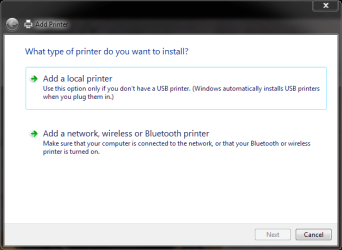
  3. Click Add a printer
  4. Click Add a local printer
    Add_printer.PNG
  5. Click Next
  6. Click Windows Update, wait until the list of printers appears (it takes quite a long time!)
  7. Choose HP on the left pane and HP Laserjet 1320 on the right
    LJ1320.PNG
  8. Click Next and follow the instructions. Connect the printer directly to your Win7 computer when told so, not before
  9. When ready and installed, turn off and disconnect the printer from your Win7 computer. Connect it back to XP and turn on
  10. Reboot Windows 7, follow the steps above until step 4 and choose this time Add a network, wireless or Bluetooth printer instead of a local printer
  11. Click Next, follow the instructions given
It should work now.

Kari
 

My Computer

Computer type
Laptop
Computer Manufacturer/Model Number
HP ENVY 17-1150eg
OS
Windows 10 Pro x64 EN-GB
CPU
1.6 GHz Intel Core i7-720QM Processor
Memory
6 GB
Graphics Card(s)
ATI Mobility Radeon HD 5850 Graphics
Sound Card
Beats sound system with integrated subwoofer
Monitor(s) Displays
17" laptop display, 22" LED and 32" Full HD TV through HDMI
Screen Resolution
1600*900 (1), 1920*1080 (2&3)
Hard Drives
Internal: 2 x 500 GB SATA Hard Disk Drive 7200 rpm
External: 2TB for backups, 3TB USB3 network drive for media
Cooling
As Envy runs a bit warm, I have it on a Cooler Master pad
Keyboard
Logitech diNovo Media Desktop Laser (bluetooth)
Mouse
Logitech Performance Mouse MX
Internet Speed
50/10 Mbps VDSL
Antivirus
Windows Defender 4.3.9431.0
Browser
Maxthon 3.5.2., IE11
Thanks Kari, i will try this tomorrow, but i wouldn't call it a comfortable solution :)
 

My Computer

OS
Windows 7
Thanks Kari, i will try this tomorrow, but i wouldn't call it a comfortable solution :)
No, it is not. There seems to be a big problem to install several HP printers to Seven. Windows drivers are in these cases working better than original HP drivers, so a bit absurd but I normally start instructing to install a HP printer by telling to uninstall all original HP drivers! :rolleyes:

The complexity of the method I told you is because even when used over the network, your printer needs to have drivers installed on your computer. This method installs the drivers, when you then try to install it over the network Seven already knows where to look for those.

Good luck!

Kari
 

My Computer

Computer type
Laptop
Computer Manufacturer/Model Number
HP ENVY 17-1150eg
OS
Windows 10 Pro x64 EN-GB
CPU
1.6 GHz Intel Core i7-720QM Processor
Memory
6 GB
Graphics Card(s)
ATI Mobility Radeon HD 5850 Graphics
Sound Card
Beats sound system with integrated subwoofer
Monitor(s) Displays
17" laptop display, 22" LED and 32" Full HD TV through HDMI
Screen Resolution
1600*900 (1), 1920*1080 (2&3)
Hard Drives
Internal: 2 x 500 GB SATA Hard Disk Drive 7200 rpm
External: 2TB for backups, 3TB USB3 network drive for media
Cooling
As Envy runs a bit warm, I have it on a Cooler Master pad
Keyboard
Logitech diNovo Media Desktop Laser (bluetooth)
Mouse
Logitech Performance Mouse MX
Internet Speed
50/10 Mbps VDSL
Antivirus
Windows Defender 4.3.9431.0
Browser
Maxthon 3.5.2., IE11
i tried to install the printer as local, it let me choose the driver, it added the printer (even without having it plugged in the W7 computer)
but then, when i wanted to add it as a shared printer, it couldn't find the driver again
i was not able to plug the printer in the new comp, as it doesn't have a parallel port

so this is what i did: i switched the 1320 for a 2015dn, that we had on the second floor and plugged this 1320 in the JetDirect on the second floor

i also called the HP support and they told me, that XP machines are often unable to share printers with W7 machines
 

My Computer

OS
Windows 7
I have a HP 1320 connected to my Win7 64 bit PC. I have the printer running with a driver downloaded from HP (I think it was) , but it will only let the printer print up to 600dpi and not the 1200 dpi it was capable of under XP. Does the windows printer driver (see above posts) for the HP 1320 allow 1200dpi printing.
Also how best to uninstall the current printer driver if i decide to try the windows driver?
Thanking you in advance.
 

My Computer

OS
Win 7 home premium 64bit
I have a HP 1320 connected to my Win7 64 bit PC. I have the printer running with a driver downloaded from HP (I think it was) , but it will only let the printer print up to 600dpi and not the 1200 dpi it was capable of under XP. Does the windows printer driver (see above posts) for the HP 1320 allow 1200dpi printing.
Also how best to uninstall the current printer driver if i decide to try the windows driver?
Thanking you in advance.

about the resolution: I don't know if you get better res with MS drivers.

If you want to give it a try, start by unplugging the printer. Go then to Control Panel > Programs and Features and uninstall all LJ 1320 related software. After that go to Device Manager and uninstall printer drivers for LJ 1320.

Kari
 

My Computer

Computer type
Laptop
Computer Manufacturer/Model Number
HP ENVY 17-1150eg
OS
Windows 10 Pro x64 EN-GB
CPU
1.6 GHz Intel Core i7-720QM Processor
Memory
6 GB
Graphics Card(s)
ATI Mobility Radeon HD 5850 Graphics
Sound Card
Beats sound system with integrated subwoofer
Monitor(s) Displays
17" laptop display, 22" LED and 32" Full HD TV through HDMI
Screen Resolution
1600*900 (1), 1920*1080 (2&3)
Hard Drives
Internal: 2 x 500 GB SATA Hard Disk Drive 7200 rpm
External: 2TB for backups, 3TB USB3 network drive for media
Cooling
As Envy runs a bit warm, I have it on a Cooler Master pad
Keyboard
Logitech diNovo Media Desktop Laser (bluetooth)
Mouse
Logitech Performance Mouse MX
Internet Speed
50/10 Mbps VDSL
Antivirus
Windows Defender 4.3.9431.0
Browser
Maxthon 3.5.2., IE11
The Win 7 determined drivers for the HP1320 laserjet installs easy enough and works fine except it wont allow the printer to run at its full 1200dpi only upto 600dpi. 1200dpi is not a selectable option in the printer preferences window. But at least its printing OK. Ive tried getting Win7 to update the printer drivers but it says that they are already uptodate.
Almost there.

As a side note, win7 installs a fully working driver for my HP Photopsmart D7160 - all printer options seem to be there.
 

My Computer

OS
Win 7 home premium 64bit
Back
Top