HP Pavilion DV2000 display problem

saeen

New member
Local time
6:39 PM
Messages
92
Location
Riyadh
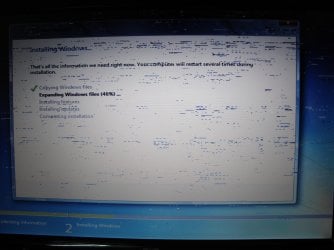
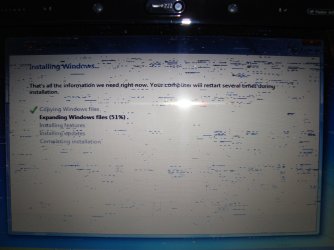
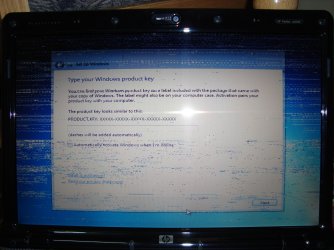
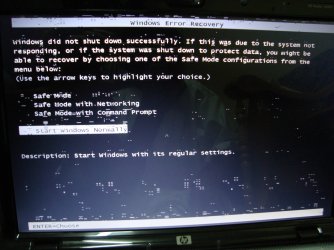
Hey there, i m facing some problem in HP Pavilion DV2000 display. My Vista was working good and suddenly the screen got strange types of lines on it. I upgrade the video drivers but nothing went fine. So last night, I upgrade Windows to 7 and still got that same problem. I want to know whats the problem I cant understand whether its display card problem of screen problem. Please guide.

See the video
http://www.youtube.com/watch?v=5tFofn1prXQ
 

Attachments
  • DSC05392.jpg
    DSC05392.jpg
    559.6 KB · Views: 143
  • DSC05399.jpg
    DSC05399.jpg
    686.4 KB · Views: 83
  • DSC05402.jpg
    DSC05402.jpg
    805.7 KB · Views: 191
  • DSC05404.jpg
    DSC05404.jpg
    818.5 KB · Views: 44
  • DSC05407.jpg
    DSC05407.jpg
    757.7 KB · Views: 63

My Computer

Computer Manufacturer/Model Number
لو تنثر أحلامي, بž
OS
Windows 7 Ultimate x64
CPU
Intel Core 2 Duo E8400 @ 3.0Ghz
Motherboard
Intel DG43NB
Memory
4GB OCZ DDR2 PC2-6400 Gold GX XTC Dual Channel
Graphics Card(s)
XFX GeForce 8800GT 512MB Alpha Dog Edition
Sound Card
Realtek HD
Monitor(s) Displays
LG Flatron M237WA
Screen Resolution
1920 x 1080
Hard Drives
500GB WD5000AAKS 7200RPM, 1TB WD10EARS 5400RPM
PSU
Gigabyte
Case
Thermaltake
Cooling
Intel Stock
Keyboard
Manhattan
Mouse
Logitech
Internet Speed
8192 kb/s / 509kb/s
It looks like the LCD panel is damaged. It's quite easy to determine: take a screenshot and post it here and we'll see. (http://www.sevenforums.com/tutorials/9717-screenshot-paint.html)

If the screenshot does not show these lines, it's safe to assume your LCD is damaged because screenshot shows exactly what your GPU is sending to display.

Kari
 

My Computer

Computer type
Laptop
Computer Manufacturer/Model Number
HP ENVY 17-1150eg
OS
Windows 10 Pro x64 EN-GB
CPU
1.6 GHz Intel Core i7-720QM Processor
Memory
6 GB
Graphics Card(s)
ATI Mobility Radeon HD 5850 Graphics
Sound Card
Beats sound system with integrated subwoofer
Monitor(s) Displays
17" laptop display, 22" LED and 32" Full HD TV through HDMI
Screen Resolution
1600*900 (1), 1920*1080 (2&3)
Hard Drives
Internal: 2 x 500 GB SATA Hard Disk Drive 7200 rpm
External: 2TB for backups, 3TB USB3 network drive for media
Cooling
As Envy runs a bit warm, I have it on a Cooler Master pad
Keyboard
Logitech diNovo Media Desktop Laser (bluetooth)
Mouse
Logitech Performance Mouse MX
Internet Speed
50/10 Mbps VDSL
Antivirus
Windows Defender 4.3.9431.0
Browser
Maxthon 3.5.2., IE11
It looks like the LCD panel is damaged. It's quite easy to determine: take a screenshot and post it here and we'll see. (http://www.sevenforums.com/tutorials/9717-screenshot-paint.html)

If the screenshot does not show these lines, it's safe to assume your LCD is damaged because screenshot shows exactly what your GPU is sending to display.

Kari

No I cant access windows. The mobo stop responding when starting the windows
 

My Computer

Computer Manufacturer/Model Number
لو تنثر أحلامي, بž
OS
Windows 7 Ultimate x64
CPU
Intel Core 2 Duo E8400 @ 3.0Ghz
Motherboard
Intel DG43NB
Memory
4GB OCZ DDR2 PC2-6400 Gold GX XTC Dual Channel
Graphics Card(s)
XFX GeForce 8800GT 512MB Alpha Dog Edition
Sound Card
Realtek HD
Monitor(s) Displays
LG Flatron M237WA
Screen Resolution
1920 x 1080
Hard Drives
500GB WD5000AAKS 7200RPM, 1TB WD10EARS 5400RPM
PSU
Gigabyte
Case
Thermaltake
Cooling
Intel Stock
Keyboard
Manhattan
Mouse
Logitech
Internet Speed
8192 kb/s / 509kb/s
OK. But it really looks more like a damaged LCD panel than anything else. If that's the case, and mobo is damaged, too, then you just got yourself a nice target to practice some shotgun shooting ;)

Seriously, IMO that is a LCD panel issue, not so much GPU.

Kari
 

My Computer

Computer type
Laptop
Computer Manufacturer/Model Number
HP ENVY 17-1150eg
OS
Windows 10 Pro x64 EN-GB
CPU
1.6 GHz Intel Core i7-720QM Processor
Memory
6 GB
Graphics Card(s)
ATI Mobility Radeon HD 5850 Graphics
Sound Card
Beats sound system with integrated subwoofer
Monitor(s) Displays
17" laptop display, 22" LED and 32" Full HD TV through HDMI
Screen Resolution
1600*900 (1), 1920*1080 (2&3)
Hard Drives
Internal: 2 x 500 GB SATA Hard Disk Drive 7200 rpm
External: 2TB for backups, 3TB USB3 network drive for media
Cooling
As Envy runs a bit warm, I have it on a Cooler Master pad
Keyboard
Logitech diNovo Media Desktop Laser (bluetooth)
Mouse
Logitech Performance Mouse MX
Internet Speed
50/10 Mbps VDSL
Antivirus
Windows Defender 4.3.9431.0
Browser
Maxthon 3.5.2., IE11
OK. But it really looks more like a damaged LCD panel than anything else. If that's the case, and mobo is damaged, too, then you just got yourself a nice target to practice some shotgun shooting ;)

Seriously, IMO that is a LCD panel issue, not so much GPU.

Kari

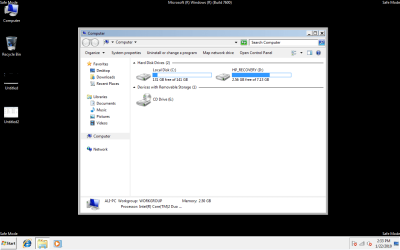
i m in safe mode. snap there. but on my lapi lcd, i still screen those lines :o
 

Attachments

  • Untitled3.png
    Untitled3.png
    26 KB · Views: 209

My Computer

Computer Manufacturer/Model Number
لو تنثر أحلامي, بž
OS
Windows 7 Ultimate x64
CPU
Intel Core 2 Duo E8400 @ 3.0Ghz
Motherboard
Intel DG43NB
Memory
4GB OCZ DDR2 PC2-6400 Gold GX XTC Dual Channel
Graphics Card(s)
XFX GeForce 8800GT 512MB Alpha Dog Edition
Sound Card
Realtek HD
Monitor(s) Displays
LG Flatron M237WA
Screen Resolution
1920 x 1080
Hard Drives
500GB WD5000AAKS 7200RPM, 1TB WD10EARS 5400RPM
PSU
Gigabyte
Case
Thermaltake
Cooling
Intel Stock
Keyboard
Manhattan
Mouse
Logitech
Internet Speed
8192 kb/s / 509kb/s
but sometimes when starting the pc in normal mode, it show blue screen error. The system is halted. mobo stop working
 

My Computer

Computer Manufacturer/Model Number
لو تنثر أحلامي, بž
OS
Windows 7 Ultimate x64
CPU
Intel Core 2 Duo E8400 @ 3.0Ghz
Motherboard
Intel DG43NB
Memory
4GB OCZ DDR2 PC2-6400 Gold GX XTC Dual Channel
Graphics Card(s)
XFX GeForce 8800GT 512MB Alpha Dog Edition
Sound Card
Realtek HD
Monitor(s) Displays
LG Flatron M237WA
Screen Resolution
1920 x 1080
Hard Drives
500GB WD5000AAKS 7200RPM, 1TB WD10EARS 5400RPM
PSU
Gigabyte
Case
Thermaltake
Cooling
Intel Stock
Keyboard
Manhattan
Mouse
Logitech
Internet Speed
8192 kb/s / 509kb/s
Can you boot to Safe Mode?
 

My Computer

Computer type
Laptop
Computer Manufacturer/Model Number
HP ENVY 17-1150eg
OS
Windows 10 Pro x64 EN-GB
CPU
1.6 GHz Intel Core i7-720QM Processor
Memory
6 GB
Graphics Card(s)
ATI Mobility Radeon HD 5850 Graphics
Sound Card
Beats sound system with integrated subwoofer
Monitor(s) Displays
17" laptop display, 22" LED and 32" Full HD TV through HDMI
Screen Resolution
1600*900 (1), 1920*1080 (2&3)
Hard Drives
Internal: 2 x 500 GB SATA Hard Disk Drive 7200 rpm
External: 2TB for backups, 3TB USB3 network drive for media
Cooling
As Envy runs a bit warm, I have it on a Cooler Master pad
Keyboard
Logitech diNovo Media Desktop Laser (bluetooth)
Mouse
Logitech Performance Mouse MX
Internet Speed
50/10 Mbps VDSL
Antivirus
Windows Defender 4.3.9431.0
Browser
Maxthon 3.5.2., IE11
yes can use safe mode.
 

My Computer

Computer Manufacturer/Model Number
لو تنثر أحلامي, بž
OS
Windows 7 Ultimate x64
CPU
Intel Core 2 Duo E8400 @ 3.0Ghz
Motherboard
Intel DG43NB
Memory
4GB OCZ DDR2 PC2-6400 Gold GX XTC Dual Channel
Graphics Card(s)
XFX GeForce 8800GT 512MB Alpha Dog Edition
Sound Card
Realtek HD
Monitor(s) Displays
LG Flatron M237WA
Screen Resolution
1920 x 1080
Hard Drives
500GB WD5000AAKS 7200RPM, 1TB WD10EARS 5400RPM
PSU
Gigabyte
Case
Thermaltake
Cooling
Intel Stock
Keyboard
Manhattan
Mouse
Logitech
Internet Speed
8192 kb/s / 509kb/s
Take a screenshot in safe mode and post it here.

Kari
 

My Computer

Computer type
Laptop
Computer Manufacturer/Model Number
HP ENVY 17-1150eg
OS
Windows 10 Pro x64 EN-GB
CPU
1.6 GHz Intel Core i7-720QM Processor
Memory
6 GB
Graphics Card(s)
ATI Mobility Radeon HD 5850 Graphics
Sound Card
Beats sound system with integrated subwoofer
Monitor(s) Displays
17" laptop display, 22" LED and 32" Full HD TV through HDMI
Screen Resolution
1600*900 (1), 1920*1080 (2&3)
Hard Drives
Internal: 2 x 500 GB SATA Hard Disk Drive 7200 rpm
External: 2TB for backups, 3TB USB3 network drive for media
Cooling
As Envy runs a bit warm, I have it on a Cooler Master pad
Keyboard
Logitech diNovo Media Desktop Laser (bluetooth)
Mouse
Logitech Performance Mouse MX
Internet Speed
50/10 Mbps VDSL
Antivirus
Windows Defender 4.3.9431.0
Browser
Maxthon 3.5.2., IE11
post# 5 was taken from safe mode.
 

My Computer

Computer Manufacturer/Model Number
لو تنثر أحلامي, بž
OS
Windows 7 Ultimate x64
CPU
Intel Core 2 Duo E8400 @ 3.0Ghz
Motherboard
Intel DG43NB
Memory
4GB OCZ DDR2 PC2-6400 Gold GX XTC Dual Channel
Graphics Card(s)
XFX GeForce 8800GT 512MB Alpha Dog Edition
Sound Card
Realtek HD
Monitor(s) Displays
LG Flatron M237WA
Screen Resolution
1920 x 1080
Hard Drives
500GB WD5000AAKS 7200RPM, 1TB WD10EARS 5400RPM
PSU
Gigabyte
Case
Thermaltake
Cooling
Intel Stock
Keyboard
Manhattan
Mouse
Logitech
Internet Speed
8192 kb/s / 509kb/s
Sorry.

The screen is captured raw, as GPU produces it. As you can see, there's no extra distortion on your screenshot so it's quite clear the problem is the display.

Changing the laptop display costs easily more than a new laptop. IMO, you have two choices: live with that or get a new laptop, especi8ally when you have other problems with it.

Kari
 

My Computer

Computer type
Laptop
Computer Manufacturer/Model Number
HP ENVY 17-1150eg
OS
Windows 10 Pro x64 EN-GB
CPU
1.6 GHz Intel Core i7-720QM Processor
Memory
6 GB
Graphics Card(s)
ATI Mobility Radeon HD 5850 Graphics
Sound Card
Beats sound system with integrated subwoofer
Monitor(s) Displays
17" laptop display, 22" LED and 32" Full HD TV through HDMI
Screen Resolution
1600*900 (1), 1920*1080 (2&3)
Hard Drives
Internal: 2 x 500 GB SATA Hard Disk Drive 7200 rpm
External: 2TB for backups, 3TB USB3 network drive for media
Cooling
As Envy runs a bit warm, I have it on a Cooler Master pad
Keyboard
Logitech diNovo Media Desktop Laser (bluetooth)
Mouse
Logitech Performance Mouse MX
Internet Speed
50/10 Mbps VDSL
Antivirus
Windows Defender 4.3.9431.0
Browser
Maxthon 3.5.2., IE11
You could try with a external screen & post back.
 

My Computer

OS
ME/XP/Vista/Win7
hmm hmm sounds strange. I tried external display was going fine i rebooted 2-3 times. Then i disconnected it. And started pc again it was working fine very clear no lines. Used it for 30min appx without problem. Then I start watching videos on youtube. When I switch it to full screen, my lapi got stuck. now again those lines on lcd :(.
 

My Computer

Computer Manufacturer/Model Number
لو تنثر أحلامي, بž
OS
Windows 7 Ultimate x64
CPU
Intel Core 2 Duo E8400 @ 3.0Ghz
Motherboard
Intel DG43NB
Memory
4GB OCZ DDR2 PC2-6400 Gold GX XTC Dual Channel
Graphics Card(s)
XFX GeForce 8800GT 512MB Alpha Dog Edition
Sound Card
Realtek HD
Monitor(s) Displays
LG Flatron M237WA
Screen Resolution
1920 x 1080
Hard Drives
500GB WD5000AAKS 7200RPM, 1TB WD10EARS 5400RPM
PSU
Gigabyte
Case
Thermaltake
Cooling
Intel Stock
Keyboard
Manhattan
Mouse
Logitech
Internet Speed
8192 kb/s / 509kb/s
I doubt if I'd LCD problem, why my lapi get stuck?
 

My Computer

Computer Manufacturer/Model Number
لو تنثر أحلامي, بž
OS
Windows 7 Ultimate x64
CPU
Intel Core 2 Duo E8400 @ 3.0Ghz
Motherboard
Intel DG43NB
Memory
4GB OCZ DDR2 PC2-6400 Gold GX XTC Dual Channel
Graphics Card(s)
XFX GeForce 8800GT 512MB Alpha Dog Edition
Sound Card
Realtek HD
Monitor(s) Displays
LG Flatron M237WA
Screen Resolution
1920 x 1080
Hard Drives
500GB WD5000AAKS 7200RPM, 1TB WD10EARS 5400RPM
PSU
Gigabyte
Case
Thermaltake
Cooling
Intel Stock
Keyboard
Manhattan
Mouse
Logitech
Internet Speed
8192 kb/s / 509kb/s
Sorry to here that.

Looks like a New Notebook.
 

My Computer

OS
ME/XP/Vista/Win7
My daughters HP DV6000 series laptop had a similar problem.
The lcd had lines and it flickers. However it had a function key to use the vga port and we connected a spare monitor. The machine is out of warrantee and it would cost more then it's worth to fix. So now it's set up as a desktop.
 

My Computer

Computer type
PC/Desktop
Computer Manufacturer/Model Number
Self - Build | Asus K53e Laptop
OS
10 x64 | 7 x64
CPU
AMD FX-9590 Vishera 4.7 | i5 Sandy Bridge
Motherboard
MSI 990 FXA | K53e
Memory
16 gigs Crucial Ballistix | 8 gigs Adata ddr3 1600
Graphics Card(s)
RX-570 4gd5 | Intel HD 3000
Sound Card
Realtek HD OnBoard Audio
Monitor(s) Displays
Samsung 22" & 37" Toshiba | 15.6
Hard Drives
ADATA 240 ssd & 750 Caviar Black 7200 sata | 250 840 EVO ssd & samsung ssd
PSU
Thermaltake 700 | 65w
Case
CoolMaster Centurion 534+
Cooling
Corsair H60
Keyboard
Rosewill RK-800G PS/2 Gaming Keyboard | Asus Chiclet
Mouse
Ventus | MS w/side buttons
Internet Speed
RoadRunner
Other Info
I hate the smell of friggin corn chip butt breath snacks.
My daughters HP DV6000 series laptop had a similar problem.
The lcd had lines and it flickers. However it had a function key to use the vga port and we connected a spare monitor. The machine is out of warrantee and it would cost more then it's worth to fix. So now it's set up as a desktop.

You make me laugh at the end, that's what my bro said to me that time for u to use ur lapi as desktop. Thanks for advice but I'll once head for HP service center.
 

My Computer

Computer Manufacturer/Model Number
لو تنثر أحلامي, بž
OS
Windows 7 Ultimate x64
CPU
Intel Core 2 Duo E8400 @ 3.0Ghz
Motherboard
Intel DG43NB
Memory
4GB OCZ DDR2 PC2-6400 Gold GX XTC Dual Channel
Graphics Card(s)
XFX GeForce 8800GT 512MB Alpha Dog Edition
Sound Card
Realtek HD
Monitor(s) Displays
LG Flatron M237WA
Screen Resolution
1920 x 1080
Hard Drives
500GB WD5000AAKS 7200RPM, 1TB WD10EARS 5400RPM
PSU
Gigabyte
Case
Thermaltake
Cooling
Intel Stock
Keyboard
Manhattan
Mouse
Logitech
Internet Speed
8192 kb/s / 509kb/s
Saeen, it would be interesting to hear what HP says. Keep us posted.

Kari
 

My Computer

Computer type
Laptop
Computer Manufacturer/Model Number
HP ENVY 17-1150eg
OS
Windows 10 Pro x64 EN-GB
CPU
1.6 GHz Intel Core i7-720QM Processor
Memory
6 GB
Graphics Card(s)
ATI Mobility Radeon HD 5850 Graphics
Sound Card
Beats sound system with integrated subwoofer
Monitor(s) Displays
17" laptop display, 22" LED and 32" Full HD TV through HDMI
Screen Resolution
1600*900 (1), 1920*1080 (2&3)
Hard Drives
Internal: 2 x 500 GB SATA Hard Disk Drive 7200 rpm
External: 2TB for backups, 3TB USB3 network drive for media
Cooling
As Envy runs a bit warm, I have it on a Cooler Master pad
Keyboard
Logitech diNovo Media Desktop Laser (bluetooth)
Mouse
Logitech Performance Mouse MX
Internet Speed
50/10 Mbps VDSL
Antivirus
Windows Defender 4.3.9431.0
Browser
Maxthon 3.5.2., IE11
I think that problem is not of LCD cause now in safe mode, there is no problem but when starting in normal mode, it create problems. Anyways, will go to HP care.
 

My Computer

Computer Manufacturer/Model Number
لو تنثر أحلامي, بž
OS
Windows 7 Ultimate x64
CPU
Intel Core 2 Duo E8400 @ 3.0Ghz
Motherboard
Intel DG43NB
Memory
4GB OCZ DDR2 PC2-6400 Gold GX XTC Dual Channel
Graphics Card(s)
XFX GeForce 8800GT 512MB Alpha Dog Edition
Sound Card
Realtek HD
Monitor(s) Displays
LG Flatron M237WA
Screen Resolution
1920 x 1080
Hard Drives
500GB WD5000AAKS 7200RPM, 1TB WD10EARS 5400RPM
PSU
Gigabyte
Case
Thermaltake
Cooling
Intel Stock
Keyboard
Manhattan
Mouse
Logitech
Internet Speed
8192 kb/s / 509kb/s
hi saeen

I think that problem is not of LCD cause now in safe mode, there is no problem but when starting in normal mode, it create problems. Anyways, will go to HP care.

Hi saeen, this is ramesh, same problem i also getting now... :( i dont no what to do... i went to my country HP service center it's called by "DMS" they are the one main head delares in my country but that people are told me it will take more time i mean more than a week to reparia it :( and i dont like to give any other laptop reparia center... coz its HP so i thought HP service center will help me to do it but not her vry bad,,, service... still i cant get repaire it... have you repaire it? is it working you well now... ? please reply me please please please

thank you,
ramesh
 

My Computer

Computer Manufacturer/Model Number
dv2000
OS
Windows Home Premium 32bit.
CPU
HP Pavilion
Motherboard
intel
Memory
2gb
Graphics Card(s)
nvidia
Monitor(s) Displays
lcd
Back
Top