HP Pavillion a6000

Nano3

New member
Local time
5:16 AM
Messages
138
Location
Chicago IL / Springfield MA
I brought my aunts computer home to clean it up... (Remove malware,spyware... Disable addons... etc)

It was fully operational but for some reason. the computer would not turn on at home... I tried diagnosing the trouble for quite some time but i resorted to just switching out the power supply (i had several lying around)

I've stupidly unplugged everything without taking a picture first and now can't find a diagram to show me where to plug everything back. I've managed to provide power to the motherboard but I'm having an issue


when i turn on the switch to the power supply the motherboard receives power and the computer turns on... Now to turn it off i can only do so by turning that same switch off... Get it? i don't know if I'm quite making any sense.


I know that along from the main connector to the board itself i need to connect another plug to it.


Can you guys just begin to ask questions :( lol

Edit: The model number for the model number is ht2000
 

My Computer My Computer

Computer Manufacturer/Model Number
HP Pavilion dv4-1275mx Entertainment Notebook PC
OS
7
CPU
2.1 GHz AMD Turion Ultra ZM-80 Processor
Memory
4GB
Graphics Card(s)
ATI Radeon HD 3200 GPU
Does it fully boot up?
 

My Computer My Computer

Computer type
PC/Desktop
Computer Manufacturer/Model Number
Custom
OS
windows 10 pro 64 bit
CPU
i5 4690K@4500 COOLER MASTER Seidon 120M water cooler
Motherboard
ASUS SABERTOOTH Z87 LGA 1150 Intel
Memory
16gb Kingston HyperX DDR3 1600
Graphics Card(s)
EVGA GTX 1070 sc
Monitor(s) Displays
BenQ GL2760H Black 27" 2ms HDMI Widescreen LED 1920X1080
Screen Resolution
DSR 2103X1183
Hard Drives
ADATA 256 gig SSD + 4 junk
PSU
EVGA supernova 750
Case
coolermaster
Cooling
many...
Keyboard
z merc
Mouse
Logitech wireless G602
Internet Speed
2.5mbs cable
the computer turns on... Why havent i checked to see if i can see video from it?... /sigh, brb
 

My Computer My Computer

Computer Manufacturer/Model Number
HP Pavilion dv4-1275mx Entertainment Notebook PC
OS
7
CPU
2.1 GHz AMD Turion Ultra ZM-80 Processor
Memory
4GB
Graphics Card(s)
ATI Radeon HD 3200 GPU
No video output... How do i make it POST?
 

My Computer My Computer

Computer Manufacturer/Model Number
HP Pavilion dv4-1275mx Entertainment Notebook PC
OS
7
CPU
2.1 GHz AMD Turion Ultra ZM-80 Processor
Memory
4GB
Graphics Card(s)
ATI Radeon HD 3200 GPU
ok check, the 20+4 motherboard connector(sometimes the+4 part is not plugged in), some use a 4 pin connector near the cpu, all the drives connected, possible bad power cord/outlet... that should be about all that a power supply swap be involved with
 

My Computer My Computer

Computer type
PC/Desktop
Computer Manufacturer/Model Number
Custom
OS
windows 10 pro 64 bit
CPU
i5 4690K@4500 COOLER MASTER Seidon 120M water cooler
Motherboard
ASUS SABERTOOTH Z87 LGA 1150 Intel
Memory
16gb Kingston HyperX DDR3 1600
Graphics Card(s)
EVGA GTX 1070 sc
Monitor(s) Displays
BenQ GL2760H Black 27" 2ms HDMI Widescreen LED 1920X1080
Screen Resolution
DSR 2103X1183
Hard Drives
ADATA 256 gig SSD + 4 junk
PSU
EVGA supernova 750
Case
coolermaster
Cooling
many...
Keyboard
z merc
Mouse
Logitech wireless G602
Internet Speed
2.5mbs cable
okay, so i did notice that connector neir the cpu and plugged in the corresponding power plug to it. Now, When i plug in the power chord to the back of the power supply the computer will turn on as normal... for about 5 seconds and then the fans stop spinning... i immediately turn of the power to prevent overheating...

again, the power button on the computer is not functioning! the computer turns on when i plug in the power plug and the only way to shut it down... right now... is by unplugging it. Thanks in advance for all the help!
 

My Computer My Computer

Computer Manufacturer/Model Number
HP Pavilion dv4-1275mx Entertainment Notebook PC
OS
7
CPU
2.1 GHz AMD Turion Ultra ZM-80 Processor
Memory
4GB
Graphics Card(s)
ATI Radeon HD 3200 GPU

My Computer My Computer

Computer type
PC/Desktop
Computer Manufacturer/Model Number
Custom
OS
windows 10 pro 64 bit
CPU
i5 4690K@4500 COOLER MASTER Seidon 120M water cooler
Motherboard
ASUS SABERTOOTH Z87 LGA 1150 Intel
Memory
16gb Kingston HyperX DDR3 1600
Graphics Card(s)
EVGA GTX 1070 sc
Monitor(s) Displays
BenQ GL2760H Black 27" 2ms HDMI Widescreen LED 1920X1080
Screen Resolution
DSR 2103X1183
Hard Drives
ADATA 256 gig SSD + 4 junk
PSU
EVGA supernova 750
Case
coolermaster
Cooling
many...
Keyboard
z merc
Mouse
Logitech wireless G602
Internet Speed
2.5mbs cable
It looks like the right one however... i got the following numbers from the motherboard...

HT2000 & MCP61PM-HM

I think the model number might be HT2000... I am not getting any beeps.

I left the cmos battery off the motherboard since last night. i just got home, plugged in the battery and plugged the power to the power supply.. as soon as that happens the computer turns on but no display is being seen to the monitor. No beeps... 10 seconds later, the fan stops but i can still hear the computer on! you mentioned the "Restart buttons" whats that?
 

My Computer My Computer

Computer Manufacturer/Model Number
HP Pavilion dv4-1275mx Entertainment Notebook PC
OS
7
CPU
2.1 GHz AMD Turion Ultra ZM-80 Processor
Memory
4GB
Graphics Card(s)
ATI Radeon HD 3200 GPU
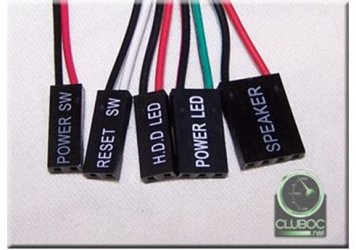
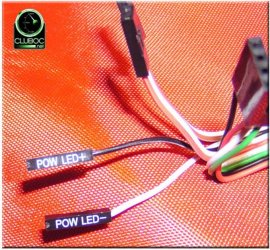
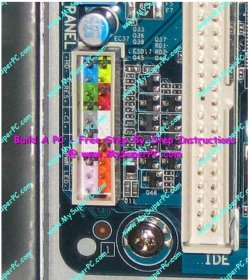
Could you have accidentally knocked loose any of the MotherBoard Panel connectors that control ON/OFF, Reset Button, Led power / HD lights ?
 

Attachments

  • MB_Header_Conn_Leads.JPG
    MB_Header_Conn_Leads.JPG
    32.2 KB · Views: 11
  • MB_Header_connectors.JPG
    MB_Header_connectors.JPG
    123.5 KB · Views: 8
  • MB_Header_Panel.JPG
    MB_Header_Panel.JPG
    107.7 KB · Views: 21

My Computer My Computer

Computer type
PC/Desktop
Computer Manufacturer/Model Number
Built them myself, Science Experiments !
OS
Win7 Enterprise, Win7 x86 (Ult 7600), Win7 x64 Ult 7600, TechNet RTM on AMD x64 (2.8Ghz)
CPU
AMD fx8350 4ghz, AMD-32 2400mhz, AMD-64 3200mhz, AMDx64 2.8G
Motherboard
SIS 755, ECS-K8M890M-M (Ult 7600), GigaByte & others
Memory
2gb, 4gb on the Ult 7600, 4gb on Technet RTM, 32gb on FX8350
Graphics Card(s)
Draw my own Graphics, several nVidia cards
Sound Card
on motherboard
Monitor(s) Displays
19" flat scr, 28" I-Inc widescr,22" Emprex Widescr, 23" Acer
Screen Resolution
1280 x 1024, 1440 x 900, 1920 x 1080
Hard Drives
6 pata Ide HD's & 2 Sata HD's
added 80gb external on Ult 7600 computer,
numerous extra 1tb, 2TB, 3Tb SATA HD's
A collection of ext HD Docks w/ HDs
PSU
430w, 550w, 600w, 700, 800, etc
Case
All Generic Full Towers
Cooling
Open Air & a few fans, some w/ colored LEDs
Keyboard
Compaq & Dell recycled from GoodWill
Mouse
Made in China Optical Wired Mouse
Internet Speed
Fast Cable InterNet
Antivirus
AVG Free on 24 different Desktops, NO Problems!
Browser
IE 8 is preferred, but use FireFox sometimes
Other Info
Linksys Routers, switches, & Hubs
Too Many USB Flash Drives to count, Biggest is 64GB !
Eight computers in my home network.
Sixteen computers at my business network.
Linked via TeamViewer !
Lots of old used spare computer parts everywhere!
As for turning on and the comp turning itself off after ~ 5 secs: It might be a long shot but I had that happen at several HPs/Compaqs so far:
HPs are notorious for having the main switch on the comp failing. Those plastic switches are garbage. If you press them too hard or off center they have a tendency to get stuck in the front plate so that the contact never get's released.
(That's just like when you do a hard shut down by holding the power button for 4 seconds) Thus turning on and off without any chance for BIOS Beeps and the likes.
Try turning the computer on with just your fingertip, avoid to push in the button too deep.
Or try to power it on with the front cover of the mini tower removed so that you have to press that little "stick"

-DG
 

My Computer My Computer

Computer Manufacturer/Model Number
HP m8000n
OS
Windows 7 Ultimate x86
CPU
DualCore AMD Athlon 64 X2, 2600 MHz 5200+
Motherboard
Asus M2N68-LA (Narra)
Memory
Samsung 2GB DDR2
Graphics Card(s)
Onboard NVIDIA GeForce 6150SE nForce 430
Sound Card
Onboard nVIDIA nForce 6100-430 (MCP61P)
Monitor(s) Displays
Westinghouse 19" LED
Screen Resolution
1280x1024
Hard Drives
SATA II Seagate Barracuda 500GB
USB II WD Elements 500GB
USB II WD My Book 1TB
USB II WD My Book 2TB
PSU
Stock (HP)
Case
Stock (HP)
Cooling
Stock
Keyboard
Logitech Classic KB 200
Mouse
Standard HP opticle USB mouse
As for turning on and the comp turning itself off after ~ 5 secs: It might be a long shot but I had that happen at several HPs/Compaqs so far:
HPs are notorious for having the main switch on the comp failing. Those plastic switches are garbage. If you press them too hard or off center they have a tendency to get stuck in the front plate so that the contact never get's released.
(That's just like when you do a hard shut down by holding the power button for 4 seconds) Thus turning on and off without any chance for BIOS Beeps and the likes.
Try turning the computer on with just your fingertip, avoid to push in the button too deep.
Or try to power it on with the front cover of the mini tower removed so that you have to press that little "stick"

-DG

That is a very good suggestion....check for a stuck power button
 

My Computer My Computer

Computer type
PC/Desktop
Computer Manufacturer/Model Number
Custom
OS
windows 10 pro 64 bit
CPU
i5 4690K@4500 COOLER MASTER Seidon 120M water cooler
Motherboard
ASUS SABERTOOTH Z87 LGA 1150 Intel
Memory
16gb Kingston HyperX DDR3 1600
Graphics Card(s)
EVGA GTX 1070 sc
Monitor(s) Displays
BenQ GL2760H Black 27" 2ms HDMI Widescreen LED 1920X1080
Screen Resolution
DSR 2103X1183
Hard Drives
ADATA 256 gig SSD + 4 junk
PSU
EVGA supernova 750
Case
coolermaster
Cooling
many...
Keyboard
z merc
Mouse
Logitech wireless G602
Internet Speed
2.5mbs cable
i had a similar problem a couple of months back, mine was caused by the 4pin ATX power plug not being pluged into the mother board correctly, this is a seperate plug in addition to the 20+4 mentioned earlier if this is not pluged in or not making a good connection then the motherboard will show power but the machine will not boot, maybe worth a look.
 

My Computer My Computer

Computer Manufacturer/Model Number
Custom Built
OS
Windows 7 Ultimate 64 Bit
CPU
Amd Athlon II X 4 640
Motherboard
ASUS M4A78LT-M-LE
Memory
4.00GB Kingston DDR3
Graphics Card(s)
Intergrated AM-ATI Radeon HD3000
Sound Card
Intergrated Via VT1708S (8 Channel HD Audio)
Monitor(s) Displays
LG TV ( 42LD450 )
Screen Resolution
1920 X 1080
Hard Drives
500GB Wester Digital Caviar Blue 7200 RPM, 16mb cache sataII
PSU
680w G7 Power Extreme ATX PSU
Case
Novatech Prowler
Cooling
On Board
Keyboard
Logitech MK300 Wireless Keyboard
Mouse
Logitech Mk300 Wireless Mouse
Internet Speed
Download 13.00Mbps / Upload 1.18Mbps / Ping 20ms
thank you all for the quick and very helpful responses.

I have just tried re-seating the Ram. I notice that there is a component that deals with the whole "powering the computer on" ... i say this because thats where the wire that the button is hooked up to.. which is sort of like a card?...

Well i traced all the ends to the motherboard and made sure that those where seated tightly, even all the small connectors and such. Either way i dont beleive that i touched any of the small little details other than the two main plugs to the power supply that i had unplugged with the other power supply i switched to... which by the way... is another story, but ill try your suggestion @SledgeDG and try to figure out how to manually press the button on the case...
 

My Computer My Computer

Computer Manufacturer/Model Number
HP Pavilion dv4-1275mx Entertainment Notebook PC
OS
7
CPU
2.1 GHz AMD Turion Ultra ZM-80 Processor
Memory
4GB
Graphics Card(s)
ATI Radeon HD 3200 GPU
I just called friends over at Reddit and Facebook for help ;)
 

My Computer My Computer

Computer Manufacturer/Model Number
HP Pavilion dv4-1275mx Entertainment Notebook PC
OS
7
CPU
2.1 GHz AMD Turion Ultra ZM-80 Processor
Memory
4GB
Graphics Card(s)
ATI Radeon HD 3200 GPU
i took the front cover off and found the "stick"

still same results... now to disassemble the SD/ mini SD card reader? that's where the button is located at...
 

My Computer My Computer

Computer Manufacturer/Model Number
HP Pavilion dv4-1275mx Entertainment Notebook PC
OS
7
CPU
2.1 GHz AMD Turion Ultra ZM-80 Processor
Memory
4GB
Graphics Card(s)
ATI Radeon HD 3200 GPU
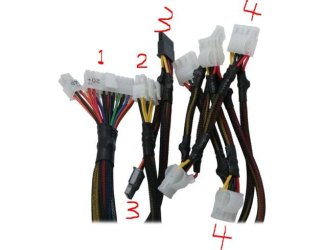
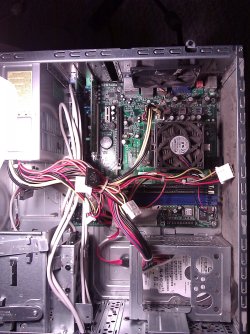
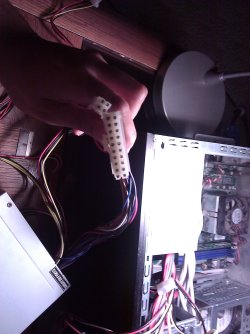
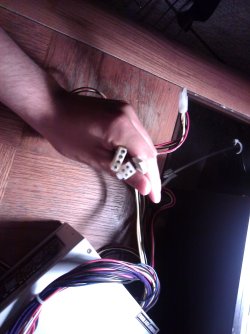
In your earlier post, you said you did not take a pic of the original PS connections.
Can you take any pics of the old PS connectors now, as it is not in the computer presently?

MB_Power_Supply_connectors.JPG
 

My Computer My Computer

Computer type
PC/Desktop
Computer Manufacturer/Model Number
Built them myself, Science Experiments !
OS
Win7 Enterprise, Win7 x86 (Ult 7600), Win7 x64 Ult 7600, TechNet RTM on AMD x64 (2.8Ghz)
CPU
AMD fx8350 4ghz, AMD-32 2400mhz, AMD-64 3200mhz, AMDx64 2.8G
Motherboard
SIS 755, ECS-K8M890M-M (Ult 7600), GigaByte & others
Memory
2gb, 4gb on the Ult 7600, 4gb on Technet RTM, 32gb on FX8350
Graphics Card(s)
Draw my own Graphics, several nVidia cards
Sound Card
on motherboard
Monitor(s) Displays
19" flat scr, 28" I-Inc widescr,22" Emprex Widescr, 23" Acer
Screen Resolution
1280 x 1024, 1440 x 900, 1920 x 1080
Hard Drives
6 pata Ide HD's & 2 Sata HD's
added 80gb external on Ult 7600 computer,
numerous extra 1tb, 2TB, 3Tb SATA HD's
A collection of ext HD Docks w/ HDs
PSU
430w, 550w, 600w, 700, 800, etc
Case
All Generic Full Towers
Cooling
Open Air & a few fans, some w/ colored LEDs
Keyboard
Compaq & Dell recycled from GoodWill
Mouse
Made in China Optical Wired Mouse
Internet Speed
Fast Cable InterNet
Antivirus
AVG Free on 24 different Desktops, NO Problems!
Browser
IE 8 is preferred, but use FireFox sometimes
Other Info
Linksys Routers, switches, & Hubs
Too Many USB Flash Drives to count, Biggest is 64GB !
Eight computers in my home network.
Sixteen computers at my business network.
Linked via TeamViewer !
Lots of old used spare computer parts everywhere!
Will do, give me 6 minutes
 

My Computer My Computer

Computer Manufacturer/Model Number
HP Pavilion dv4-1275mx Entertainment Notebook PC
OS
7
CPU
2.1 GHz AMD Turion Ultra ZM-80 Processor
Memory
4GB
Graphics Card(s)
ATI Radeon HD 3200 GPU
It's beginning to sound like a power good wire issue.....
 

My Computer My Computer

Computer type
PC/Desktop
Computer Manufacturer/Model Number
Custom
OS
windows 10 pro 64 bit
CPU
i5 4690K@4500 COOLER MASTER Seidon 120M water cooler
Motherboard
ASUS SABERTOOTH Z87 LGA 1150 Intel
Memory
16gb Kingston HyperX DDR3 1600
Graphics Card(s)
EVGA GTX 1070 sc
Monitor(s) Displays
BenQ GL2760H Black 27" 2ms HDMI Widescreen LED 1920X1080
Screen Resolution
DSR 2103X1183
Hard Drives
ADATA 256 gig SSD + 4 junk
PSU
EVGA supernova 750
Case
coolermaster
Cooling
many...
Keyboard
z merc
Mouse
Logitech wireless G602
Internet Speed
2.5mbs cable
As requested... power supply pictures. Sorry for the long wait... school/work
 

Attachments

  • WP_000005 (2).jpg
    WP_000005 (2).jpg
    685.7 KB · Views: 31
  • WP_000001 (3).jpg
    WP_000001 (3).jpg
    468.1 KB · Views: 19
  • WP_000002 (3).jpg
    WP_000002 (3).jpg
    440.2 KB · Views: 14

My Computer My Computer

Computer Manufacturer/Model Number
HP Pavilion dv4-1275mx Entertainment Notebook PC
OS
7
CPU
2.1 GHz AMD Turion Ultra ZM-80 Processor
Memory
4GB
Graphics Card(s)
ATI Radeon HD 3200 GPU
Back
Top