HP Pavillion a6000

I am now uploading a video on youtube.... for more resource... Thank you all for taking your time to help me out!
 

My Computer My Computer

Computer Manufacturer/Model Number
HP Pavilion dv4-1275mx Entertainment Notebook PC
OS
7
CPU
2.1 GHz AMD Turion Ultra ZM-80 Processor
Memory
4GB
Graphics Card(s)
ATI Radeon HD 3200 GPU
It sure is odd.
What do you mean with "I can hear the Processor working" ?
Anyhow...to me it looks like the computer hasn't been turned on yet...you'll get a short power burst until the ATX power supply notice the computer is turned off and cuts the power.
So I still stand by my first assumption: a defective/malfunctioning power switch.
Or can you actually open the DVD drive after the fans have stopped ?

On a different note : You shouldn't pull the plug off the mainboard just by the cable strands. there is a little "lock thingy" on the plug you should press to release the cable.

-DG
 

My Computer My Computer

Computer Manufacturer/Model Number
HP m8000n
OS
Windows 7 Ultimate x86
CPU
DualCore AMD Athlon 64 X2, 2600 MHz 5200+
Motherboard
Asus M2N68-LA (Narra)
Memory
Samsung 2GB DDR2
Graphics Card(s)
Onboard NVIDIA GeForce 6150SE nForce 430
Sound Card
Onboard nVIDIA nForce 6100-430 (MCP61P)
Monitor(s) Displays
Westinghouse 19" LED
Screen Resolution
1280x1024
Hard Drives
SATA II Seagate Barracuda 500GB
USB II WD Elements 500GB
USB II WD My Book 1TB
USB II WD My Book 2TB
PSU
Stock (HP)
Case
Stock (HP)
Cooling
Stock
Keyboard
Logitech Classic KB 200
Mouse
Standard HP opticle USB mouse
When the fans stop spinning... i can hear the processor working. as in i still can hear the computer on when the fans stop spinning. No, i do not get a video display. I did connect the DVD drive to the power and was able to open/close the tray.
 

My Computer My Computer

Computer Manufacturer/Model Number
HP Pavilion dv4-1275mx Entertainment Notebook PC
OS
7
CPU
2.1 GHz AMD Turion Ultra ZM-80 Processor
Memory
4GB
Graphics Card(s)
ATI Radeon HD 3200 GPU
Adding? the video card on the computer is onboard...
 

My Computer My Computer

Computer Manufacturer/Model Number
HP Pavilion dv4-1275mx Entertainment Notebook PC
OS
7
CPU
2.1 GHz AMD Turion Ultra ZM-80 Processor
Memory
4GB
Graphics Card(s)
ATI Radeon HD 3200 GPU
i ordered a 20 pin to 24 pin PSU connector from ebay. i have three power supplys at home that can be swapped out and used to see if it's the actual PSU that is defective... either way. Why does the computer power on when plugging in the power chord... and wont turn off...
 

My Computer My Computer

Computer Manufacturer/Model Number
HP Pavilion dv4-1275mx Entertainment Notebook PC
OS
7
CPU
2.1 GHz AMD Turion Ultra ZM-80 Processor
Memory
4GB
Graphics Card(s)
ATI Radeon HD 3200 GPU
This may be a silly question ... is the monitor securely plugged in? On my XP, the monitor has a way of losing it's connection if I move it, even slightly.
 

My Computer My Computer

Computer type
PC/Desktop
Computer Manufacturer/Model Number
Bruce ... somewhere in his 40's
OS
Windows 7 Ultimate 32bit SP1
CPU
Intel(R) Core(TM)2 Quad CPU @ 2.40GHz, 2400 MHz
Motherboard
INTEL/D975XBX2
Memory
4 GB
Graphics Card(s)
ATI Radeon HD 2600 Pro
Monitor(s) Displays
Samsung SyncMaster 914v
Screen Resolution
1280 x 1024
Hard Drives
2/500GB each ... ST3500630AS ATA Device.
One is not connected
PSU
Rocketfish 700 W
Case
G.Skill Gigabyte Chassis
Keyboard
Standard PS/2 Keyboard
Mouse
Microsoft PS/2 Mouse
Internet Speed
DSL
Antivirus
Avira Internet Security
Browser
IE 11
Other Info
ATI HDMI Audio
The monitor is plugged in, when the machine powers on. the monitor does also however no video output is shown. To verify that the monitor was correctly working... while the computer was "on" I disconnected the monitor from the back of the computer and "video source is not founf" on the monitor appears so yes. the monitor is plugged in. No such thing as a silly question ;) ...

It's time to come up with a solution. when i get the converter that i orderes for the PSU... to test the spare ones i have lying around. Whats the next thing i should be looking at? ... this is really frustrating.
 

My Computer My Computer

Computer Manufacturer/Model Number
HP Pavilion dv4-1275mx Entertainment Notebook PC
OS
7
CPU
2.1 GHz AMD Turion Ultra ZM-80 Processor
Memory
4GB
Graphics Card(s)
ATI Radeon HD 3200 GPU
Did you check the settings on the monitor as the tint or contrast turned all the way?
 

My Computer My Computer

Computer type
PC/Desktop
Computer Manufacturer/Model Number
Custom
OS
windows 10 pro 64 bit
CPU
i5 4690K@4500 COOLER MASTER Seidon 120M water cooler
Motherboard
ASUS SABERTOOTH Z87 LGA 1150 Intel
Memory
16gb Kingston HyperX DDR3 1600
Graphics Card(s)
EVGA GTX 1070 sc
Monitor(s) Displays
BenQ GL2760H Black 27" 2ms HDMI Widescreen LED 1920X1080
Screen Resolution
DSR 2103X1183
Hard Drives
ADATA 256 gig SSD + 4 junk
PSU
EVGA supernova 750
Case
coolermaster
Cooling
many...
Keyboard
z merc
Mouse
Logitech wireless G602
Internet Speed
2.5mbs cable
Adding? the video card on the computer is onboard...

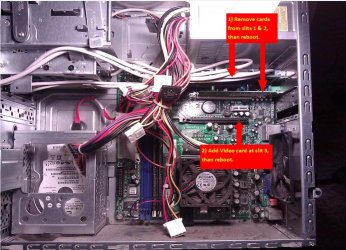
1) Remove cards from slits 1 & 2, than reboot.

2) Add Video card at slit 3, than reboot.

CaptureHPrepair.jpg

Post back.
 

My Computer My Computer

OS
ME/XP/Vista/Win7
PROGRESS!

I removed the cards off the motherboard, i then inserted the power chord into the power supply and the computer booted up as it has booted before but only this time... The fans stood on! so i held onto the power button and the machine still would not turn off... the fans however still where spinning.

I then unplugged the power chord from the power supply and the computer turned off. I then removed both sticks of RAM off the board and a LONG BEEP! occurs as well as my previous experience. (computer fans staying on)

Regardless. the computer is not turning off by holding down the power button... still no video display.
 

My Computer My Computer

Computer Manufacturer/Model Number
HP Pavilion dv4-1275mx Entertainment Notebook PC
OS
7
CPU
2.1 GHz AMD Turion Ultra ZM-80 Processor
Memory
4GB
Graphics Card(s)
ATI Radeon HD 3200 GPU
1) No blanking plate,
2) Vodeo card has been removed.
3) Return Vodeo card to slot.Boot up.

CaptureHPrepair2.PNG
 

My Computer My Computer

OS
ME/XP/Vista/Win7
I don't think the computer had a video card that came with it. I do see the blanking plate missing but i don't remember there being a video card there... i do not have a video card that can fit that slot but i have one for the other slots. I just disconnected every card from the motherboard... including the HDD and RAM. the computer beeps and does the same thing.

Plug in the power chord to the back of the PSU

Fans turn on
no video output
hold down power button but the PC doesn't turn off
 

My Computer My Computer

Computer Manufacturer/Model Number
HP Pavilion dv4-1275mx Entertainment Notebook PC
OS
7
CPU
2.1 GHz AMD Turion Ultra ZM-80 Processor
Memory
4GB
Graphics Card(s)
ATI Radeon HD 3200 GPU
bump ...:o
 

My Computer My Computer

Computer Manufacturer/Model Number
HP Pavilion dv4-1275mx Entertainment Notebook PC
OS
7
CPU
2.1 GHz AMD Turion Ultra ZM-80 Processor
Memory
4GB
Graphics Card(s)
ATI Radeon HD 3200 GPU
Try a different keyboard....
 

My Computer My Computer

Computer type
PC/Desktop
Computer Manufacturer/Model Number
Custom
OS
windows 10 pro 64 bit
CPU
i5 4690K@4500 COOLER MASTER Seidon 120M water cooler
Motherboard
ASUS SABERTOOTH Z87 LGA 1150 Intel
Memory
16gb Kingston HyperX DDR3 1600
Graphics Card(s)
EVGA GTX 1070 sc
Monitor(s) Displays
BenQ GL2760H Black 27" 2ms HDMI Widescreen LED 1920X1080
Screen Resolution
DSR 2103X1183
Hard Drives
ADATA 256 gig SSD + 4 junk
PSU
EVGA supernova 750
Case
coolermaster
Cooling
many...
Keyboard
z merc
Mouse
Logitech wireless G602
Internet Speed
2.5mbs cable
I never had a keyboard or mouse plugged in during any of the troubleshooting. im at work now but will try once i get home... Could it be a PSU issue? i am ordering a new one today.

Will update when i get home. thank you all for helping me figure out whats going on.
 

My Computer My Computer

Computer Manufacturer/Model Number
HP Pavilion dv4-1275mx Entertainment Notebook PC
OS
7
CPU
2.1 GHz AMD Turion Ultra ZM-80 Processor
Memory
4GB
Graphics Card(s)
ATI Radeon HD 3200 GPU
Some motherboards will not boot w/out keyboard and it could also be a PSU....
 

My Computer My Computer

Computer type
PC/Desktop
Computer Manufacturer/Model Number
Custom
OS
windows 10 pro 64 bit
CPU
i5 4690K@4500 COOLER MASTER Seidon 120M water cooler
Motherboard
ASUS SABERTOOTH Z87 LGA 1150 Intel
Memory
16gb Kingston HyperX DDR3 1600
Graphics Card(s)
EVGA GTX 1070 sc
Monitor(s) Displays
BenQ GL2760H Black 27" 2ms HDMI Widescreen LED 1920X1080
Screen Resolution
DSR 2103X1183
Hard Drives
ADATA 256 gig SSD + 4 junk
PSU
EVGA supernova 750
Case
coolermaster
Cooling
many...
Keyboard
z merc
Mouse
Logitech wireless G602
Internet Speed
2.5mbs cable
Some motherboards will not boot w/out keyboard and it could also be a PSU....

Right that's when you get the retarded message"Keyboard not detected...Press F1 to continue:D:D
But that can be changed in BIOS: "halt on all errors but keyboard"
 

My Computer My Computer

Computer Manufacturer/Model Number
HP m8000n
OS
Windows 7 Ultimate x86
CPU
DualCore AMD Athlon 64 X2, 2600 MHz 5200+
Motherboard
Asus M2N68-LA (Narra)
Memory
Samsung 2GB DDR2
Graphics Card(s)
Onboard NVIDIA GeForce 6150SE nForce 430
Sound Card
Onboard nVIDIA nForce 6100-430 (MCP61P)
Monitor(s) Displays
Westinghouse 19" LED
Screen Resolution
1280x1024
Hard Drives
SATA II Seagate Barracuda 500GB
USB II WD Elements 500GB
USB II WD My Book 1TB
USB II WD My Book 2TB
PSU
Stock (HP)
Case
Stock (HP)
Cooling
Stock
Keyboard
Logitech Classic KB 200
Mouse
Standard HP opticle USB mouse
Still the same results... only this time, it changes from the fans staying spinning... to the fans not spinning.

Does everyone get whats going on here? am i making any sense? should i close this thread and start all over?
 

My Computer My Computer

Computer Manufacturer/Model Number
HP Pavilion dv4-1275mx Entertainment Notebook PC
OS
7
CPU
2.1 GHz AMD Turion Ultra ZM-80 Processor
Memory
4GB
Graphics Card(s)
ATI Radeon HD 3200 GPU
Back
Top