HP ProtectSmart

win7rox

New member
Local time
10:42 PM
Messages
6
Did any one manage to get HP ProtectSmart working in Windows 7 x64?

I installed Win 7 x64 on HP Pavilion dv7 1183cl. everything is fine. I had to install drivers for memory card reader manually after the action center told me to download the driver.

The only one Windows could not figure out was the ProtectSmart sensor & QuickLaunch button. After I installed the ProtectSmart driver from HP site, the device manager is happy but the ProtectSmart application says that my hard drives are not supported. I guess the driver was not happy.

QuickLaunch button works but I did not install the QuickPlay. Its a load of crap anyway, given I cannot change quickplay button to launch something else, like media center, i am nto too worried about it.

But I love to get protect smart working again if I can,

Also, I had to install the latest audio (IDT) application & driver even though Windows was able to play sounds normally without it. I also installed HP Wireless utility to enable bluetooth.

Any help with protectsmart is well appreciated.
 

My Computer

OS
Windows 7 x64
I finally got it to work, after almost giving up. Even the document published by HP "Installing Windows 7 Beta on HP Business Notebooks" says "3D DriveGuard does not function - a new version of HP 3D DriveGuard will be available at Windows 7 Launch". (But I couldn't wait for 6 months)

There are two components - the Driver, and the Application. You need to install the application from an older softpaq, and the driver from a newer softpaq.

1- Uninstall HP 3D DriveGuard from your system

2- Go to device manager and open System Devices -> HP Mobile Data Protection Sensor. Uninstall the driver and delete driver files.

3- Download SP42565 and install from the HP website.

4- Once I did this I had the latest driver (version 3.10.2.1) which works on Windows 7 64-bit. The problem is this version came with a ProtectSmart application which doesn't run. You can try it by running C:\Windows\System32\accelerometerST.exe because it won't install in the start menu.

5- If it works and you get the protectsmart settings, you should be able to enable the drive.

6- If it doesn't work, you need to start by installing SP39123. This is an older version for Windows XP, but we only need the application from it. You need to repeat step 2 first to uninstall the newer driver.

7- Once SP39123 is installed and accelerometerST.exe runs properly (but reports drive not supported) go to Control Panel, and update the driver HP Mobile Data Protection Sensor. Choose to manually update the driver, from the location c:\swsetup\SP42564\ which you had previouslly extracted in step 3.

8- Once I did that it worked for me. Remember that you have to restart your PC everytime you remove or install something above.

To recap, you just need two things:

- accelerometerST.exe (ProtectSmart Hard Drive Protection) v. 3.10 A7 from SP39123
- latest driver for HP Mobile Data Protection Sensor v. 3.10.2.1 07-Aug-08 from SP42565

The problem is when you install SP39123 it installs the correct application but the wrong driver, and when you install SP42565 it installs the correct driver, but the wrong application. To resolve this, the steps above install the correct application and the wrong driver, and then manually update the driver.

Good luck!
 

My Computer

OS
Windows 7
Thank you very much!

I downloaded SP42565.exe from here: Download HP 3D DriveGuard Utility 3.10 Rev.D Driver for Windows Vista - Softpedia as I could not locate the file on HP site.

I installed it and as you said the application did not install but the driver did.

Then I started the setup manually from here: C:\swsetup\SP42565\setup.exe

Restart and there it was in control panel HP 3D DriveGuard. On my original Vista it was called HP ProtectSmart.

thanks!
 

My Computer

OS
Windows 7 x64
had the same problem as you on a hp pavilion dv5 1101en ...i solved it just by uninstalling SP39123(driver and application) and installing SP42565(of it said that it couldn't install..but somehow after restart everything worked fine)...on the x86 version never had this issue...anyway your post helped me a lot..thanks
 

My Computer

Computer Manufacturer/Model Number
HP Pavilion DV5 1101en
OS
Windows 7 x64
Hi Guys,

Thanks for your posts, just to add my situation:

Just got a HP Elitebook 2530p and installed Windows 7 RC1 64-bit.

Installed HP 3D DriveGuard indicated on HP site: SP39410 - V3.10 A. As reported it installed perfectly fine but didn't work saying the hard-disk was not supported.

Installed the SP42656 indicated above and it upgraded the previous installation and now it works great. Even less stress than some of the other ways.

Will try and install the complete ProtectTools and see how it goes.

After that the challenge will be to put the WWAN Gobi adapter to work...:)

Thx!
 

My Computer

OS
Windows 7 RC1
i have a dv5t-1200se and had vista 32 bit and protect smart was working but then I formatted c and installed windows 7 7600.16385 and i think its not even detecting my hp protectsmart and when i run SP42565 it says the HP 3D Driveguard driver cannot install, the accelerometer hardware is not present or supported on this unit.click ok to exit. when i click ok it says components not installed due to installation failure or feature not supported.
 
Last edited:

My Computer

Computer Manufacturer/Model Number
HP Pavilion dv5t-1200SE
OS
Windows 7 Ultimate X86
CPU
C2D 2.0GHz (T6400)
Memory
3GB
Graphics Card(s)
Intel GMA 4500MHD
Hard Drives
160GB
Hi gang,

This issue had been vexing me since I tried win7 beta on my HP dv7-1240us.

So I take it that the protection will now be called Drive Guard instead of protectsmart? (Or was this for the business models only?)

Anyway, can anyone confirm that this fixes it on that model? DV7-1240us ?

I would hate to install the RC then have to go thru a whole reimage again ...

If good to go then you are truly a lifesaver! I want Vista x64 off the lappy and back to win7 ...

Thanks.
 

My Computer

OS
vista x64
CPU
i7 920 Oc'd to 4Ghz
Motherboard
EVGA Classified X58
Memory
6Gb Corsair Dominator
Graphics Card(s)
EVGA GTX 295
Sound Card
Creative Fatality
Monitor(s) Displays
3 Dell 19" with TH2G integration
Hard Drives
1WD 1Tb internal, one ext as backup/storage
PSU
Ultra X3 1000W
Case
Thermatake Shark Black
Cooling
CM V8
I followed the instructions step by step

And it didn't work. Still claims the hard drive is unsupported. It worked fine in Vista 64.
 

My Computer

Computer Manufacturer/Model Number
HP DV7 1245
OS
Windows 7 RC
CPU
72
Memory
4 G
Graphics Card(s)
HD 3200
Monitor(s) Displays
1440x900
Hello,

I have an HP DV5 model (DV5-1157ca). It was preloaded with Vista x64. I am having the same issue as "nab"... The software installs (Protect Smart) and once the computer restarts, the panel does not want to open.

When I click on it, it open momentarily and then shuts down stating Not responding.

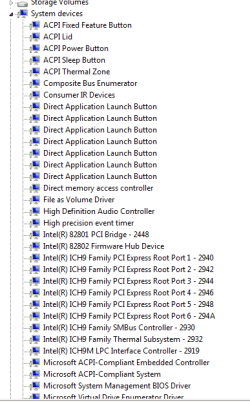
I don't know if it is normal, but I don't have your driver listed anywhere in my list. I have attached a screenshot of what I see.

Any help would be appreciated. BTW, I tried installing it your way, but the install never got through, it said my computer did not have teh components required to install.
 

Attachments

  • Capture.PNG
    Capture.PNG
    9.4 KB · Views: 582

My Computer

Computer Manufacturer/Model Number
HP DV5-1157ca
OS
Win 7 Build 7100
CPU
P7300
Fixed on HP Elite 8730w

this worked for me and also I have reinstalled the application with newer version x64 4.0.3.1 sp44320.exe

Thanks!

Milos
 

My Computer

Computer Manufacturer/Model Number
HP 8730w
OS
Win7 x64
CPU
Core2 Extreme
Memory
4GB
Graphics Card(s)
nVidia Quadro 2700M
I'm wondering if you guys who fixed it are still seeing your sata drives as removable, can you tell me? thx.
 

My Computer

OS
vista x64
CPU
i7 920 Oc'd to 4Ghz
Motherboard
EVGA Classified X58
Memory
6Gb Corsair Dominator
Graphics Card(s)
EVGA GTX 295
Sound Card
Creative Fatality
Monitor(s) Displays
3 Dell 19" with TH2G integration
Hard Drives
1WD 1Tb internal, one ext as backup/storage
PSU
Ultra X3 1000W
Case
Thermatake Shark Black
Cooling
CM V8
Remova

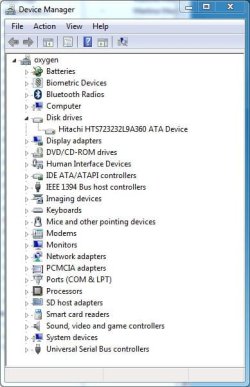
I am not sure what you mean by removable drive - never was listed as removable, but to reply your question, no they look like regular drives.
 

Attachments

  • DeviceManager.JPG
    DeviceManager.JPG
    44.2 KB · Views: 146
Last edited:

My Computer

Computer Manufacturer/Model Number
HP 8730w
OS
Win7 x64
CPU
Core2 Extreme
Memory
4GB
Graphics Card(s)
nVidia Quadro 2700M
My issue has been that protectsmart will not work with the laptop drive saying not that it is not supported, but that is is a removable.

SATA drives show up under safely remove hardware, and I've seen that the driver has changed where the device capability is set for removable, whereas the driver in vista 64 does not. This prevents me from enabling protectsmart or lifeguard, either one from working with it.

I'm at a loss ...
 

My Computer

OS
vista x64
CPU
i7 920 Oc'd to 4Ghz
Motherboard
EVGA Classified X58
Memory
6Gb Corsair Dominator
Graphics Card(s)
EVGA GTX 295
Sound Card
Creative Fatality
Monitor(s) Displays
3 Dell 19" with TH2G integration
Hard Drives
1WD 1Tb internal, one ext as backup/storage
PSU
Ultra X3 1000W
Case
Thermatake Shark Black
Cooling
CM V8
Follow Ehsan

I am using Win 7 RC x64 and Ehsan trick is working - I have reinstalled with newer protect tools and have no problem - remove all traces of protect tools and try Ehsan's stp by step.

Good luck

Milos
 

My Computer

Computer Manufacturer/Model Number
HP 8730w
OS
Win7 x64
CPU
Core2 Extreme
Memory
4GB
Graphics Card(s)
nVidia Quadro 2700M
I'll give it a shot in the next week or so, just wanted to reiterate though, did any of you with DV7's end up having your SATa hard drive listed in safely remove hardware int he systray? And then check to see that protection wouldn't work with it as it believed the HD was removable?

That is what I was running into, not necessarily a driver issue with protectsmart (IMO).

I'll see when I reload 7
 

My Computer

OS
vista x64
CPU
i7 920 Oc'd to 4Ghz
Motherboard
EVGA Classified X58
Memory
6Gb Corsair Dominator
Graphics Card(s)
EVGA GTX 295
Sound Card
Creative Fatality
Monitor(s) Displays
3 Dell 19" with TH2G integration
Hard Drives
1WD 1Tb internal, one ext as backup/storage
PSU
Ultra X3 1000W
Case
Thermatake Shark Black
Cooling
CM V8
i have a dv5 the sata hdd is in the removable devices, but the 3d guard works just fine without any issues


ive got the version 3.10 d2 and it works great with my w7 pro x64, the versions before that didnt work either on the Beta nor on the RC. but this one is hust fine. the file is sp42565.exe i am just installing it and everything els is done by the system itself.
 

My Computer

Computer Manufacturer/Model Number
dv5 1199ew
OS
W7
Other Info
+Rep if I have helped
i have a dv5t-1000 and had vista 32 bit and protect smart was working but then I formatted c and installed windows 7 and i think its not even detecting my hp protectsmart and when i run sp45501 it says the HP 3D Driveguard driver cannot install, the accelerometer hardware is not present or supported on this unit.click ok to exit. when i click ok it says components not installed due to installation failure or feature not supported. so how do i fix this?
 

My Computer

Computer Manufacturer/Model Number
HP DV5t-1000
OS
Windows 7 Pro x86
I found the solution:


Just make sure that driveguard/protect smart is not installed on your system prior to installing the above. Also, please restart between each install.
 

My Computer

Computer Manufacturer/Model Number
HP DV5-1157ca
OS
Win 7 Build 7100
CPU
P7300
I found the solution:


Just make sure that driveguard/protect smart is not installed on your system prior to installing the above. Also, please restart between each install.


nope not working....tried exactly as u said.....same problem....('HP 3D Driveguard driver cannot install, the accelerometer hardware is not present or supported on this unit.click ok to exit')

anyone contacted hp chat support regarding this issue??
 

My Computer

Computer Manufacturer/Model Number
HP Pavilion dv5t-1200SE
OS
Windows 7 Ultimate X86
CPU
C2D 2.0GHz (T6400)
Memory
3GB
Graphics Card(s)
Intel GMA 4500MHD
Hard Drives
160GB
I found the solution:


Just make sure that driveguard/protect smart is not installed on your system prior to installing the above. Also, please restart between each install.

yea it didnt work for me either the same as what the guy above me said
 

My Computer

Computer Manufacturer/Model Number
HP DV5t-1000
OS
Windows 7 Pro x86
Back
Top