
HP start up screen

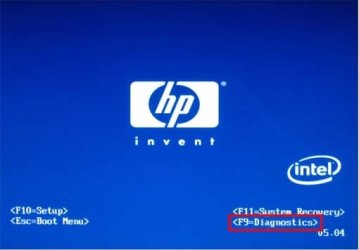
So each time i reboot or boot up my Computer i see this
c01413989.jpg

I know its the normal boot screen for a HP computer but i was wondering if i could hide that so it goes straight to the loading of windows 7

Im sick of seeing the blue HP screen..

Anyone with ideas??
 

My Computer

Computer Manufacturer/Model Number
Built
OS
Windows 7 RC build 7100x64 // 7260x32
CPU
Quad core 2.33GHz
Motherboard
Asus P5Q SE
Memory
4 gig DRR2
Graphics Card(s)
8400 GS gigabyte
Sound Card
built in with motherboard
Monitor(s) Displays
LG Flaton l1739s
Screen Resolution
1440x900 x2
Hard Drives
500 gig HDD // and a 500 gig out
PSU
500Watt
Case
ATX black case
Cooling
Cpu fan \ case fan
Keyboard
logitech
Mouse
logitech
Internet Speed
1500
So each time i reboot or boot up my Computer i see this

View attachment 13681

I know its the normal boot screen for a HP computer but i was wondering if i could hide that so it goes straight to the loading of windows 7

Im sick of seeing the blue HP screen..

Anyone with ideas??
Thats the bios screen. And no, you can't get rid of it.
 

My Computer

OS
Windows 7 7127 x64
Aw man... wish i could.. i hate seeing it.. makes the start disappointing..
 

My Computer

Computer Manufacturer/Model Number
Built
OS
Windows 7 RC build 7100x64 // 7260x32
CPU
Quad core 2.33GHz
Motherboard
Asus P5Q SE
Memory
4 gig DRR2
Graphics Card(s)
8400 GS gigabyte
Sound Card
built in with motherboard
Monitor(s) Displays
LG Flaton l1739s
Screen Resolution
1440x900 x2
Hard Drives
500 gig HDD // and a 500 gig out
PSU
500Watt
Case
ATX black case
Cooling
Cpu fan \ case fan
Keyboard
logitech
Mouse
logitech
Internet Speed
1500
Sometimes you can disable this. If you go into your BIOS, look for an option called "BIOS Splash Screen" or "Logo Display". Mine has this option, but since I didn't buy a manufactured PC, it's disabled. You might be able to disable it, but what you'll see instead are diagnostics, such as the RAM check, hardware installed, etc.
 

My Computer

Computer Manufacturer/Model Number
Home-Built and has been slowly upgraded since 1999
OS
Windows 7 RC (Build 7100)
CPU
AMD Athlon XP 2400+
Motherboard
ECS L7S7A2
Memory
1.25 GB
Graphics Card(s)
ATI Radeon
Sound Card
SoundBlaster Live! Platinum (w/ Live! Drive)
Monitor(s) Displays
ViewSonic 19" LCD
Screen Resolution
1440x900
Hard Drives
320GB PATA
250GB external USB Backup
PSU
500W
Case
Generic Beige Box
Cooling
A bunch of Fans
Keyboard
Old one with the keys pried off that I don't use
Mouse
Microsoft Optical Mouse I found at Unclaimed baggage for $10
Internet Speed
Knology Cable Internet (~6-7Mbps)
Sometimes you can disable this. If you go into your BIOS, look for an option called "BIOS Splash Screen" or "Logo Display". Mine has this option, but since I didn't buy a manufactured PC, it's disabled. You might be able to disable it, but what you'll see instead are diagnostics, such as the RAM check, hardware installed, etc.

I had a look and didnt find anything like what you said.. or anything that sounds another to do with it

I have never seen that on my HP.

Maybe we have different models of HP
Some may have it and some may not

:( i was looking forward to a way to disable or hide it
 

My Computer

Computer Manufacturer/Model Number
Built
OS
Windows 7 RC build 7100x64 // 7260x32
CPU
Quad core 2.33GHz
Motherboard
Asus P5Q SE
Memory
4 gig DRR2
Graphics Card(s)
8400 GS gigabyte
Sound Card
built in with motherboard
Monitor(s) Displays
LG Flaton l1739s
Screen Resolution
1440x900 x2
Hard Drives
500 gig HDD // and a 500 gig out
PSU
500Watt
Case
ATX black case
Cooling
Cpu fan \ case fan
Keyboard
logitech
Mouse
logitech
Internet Speed
1500
im in Australia maybe there made different for different areas?
 

My Computer

Computer Manufacturer/Model Number
Built
OS
Windows 7 RC build 7100x64 // 7260x32
CPU
Quad core 2.33GHz
Motherboard
Asus P5Q SE
Memory
4 gig DRR2
Graphics Card(s)
8400 GS gigabyte
Sound Card
built in with motherboard
Monitor(s) Displays
LG Flaton l1739s
Screen Resolution
1440x900 x2
Hard Drives
500 gig HDD // and a 500 gig out
PSU
500Watt
Case
ATX black case
Cooling
Cpu fan \ case fan
Keyboard
logitech
Mouse
logitech
Internet Speed
1500
HP is big on having different models for parts of the world just look at one line of the DV5 you will find the part number is something like DV5225us the last two items tell you where the items was distributed. For Australia it might end in "as" not too sure tho. It drives me up the wall when repairing Computers for a major company that has employees around the world. You might have to update to the newest firmware from HP and see if it adds the option to disable the Boot Screen and give you the diagnostic view (i.e. ram, hard drive view)
 

My Computer

Computer Manufacturer/Model Number
Custom Build
OS
Windows 7 Ultimate x64 SP1
CPU
AMD Phenom II 1090 3.2 six core
Motherboard
MSI 890FXA-GD65
Memory
16 gig DDR3
Graphics Card(s)
MSI R6950 2gig
Sound Card
on board
Monitor(s) Displays
Acer 23inch led
Screen Resolution
1900x1080 widescreen
Hard Drives
Seagate 1tb SATA6
2x 1tb HITACHI Deskstar
PSU
CORSAIR Enthusiast Series TX750 V2 750W
Case
CoolMaster HAF 922
Cooling
Box AMD Heatsink/Fan
Internet Speed
Cable 12Mbps/3Mbps
Back
Top