HP System Recovery DVD won't boot: G62-340US Windows 7 x64.

JaronDaWizard

New member
Local time
10:58 AM
Messages
6
There's no error message or anything. I even have the dvd drive booting first in the BIOS, and all I get after the startup screen is a blank screen with nothing happening. Somebody please help.
 

My Computer My Computer

At a glance

Windows 7 x64
Computer Manufacturer/Model Number
HP G62-340US
OS
Windows 7 x64

My Computer My Computer

At a glance

64-bit Windows 11 Pro for WorkstationsIntel i7-8700K OC'd to 5 GHz64 GB (4x16GB) G.SKILL TridentZ RGB DDR4 3600...ASUS ROG-STRIX-GTX1080TI-O11G-GAMING
Computer type
PC/Desktop
Computer Manufacturer/Model Number
Self built custom
OS
64-bit Windows 11 Pro for Workstations
CPU
Intel i7-8700K OC'd to 5 GHz
Motherboard
ASUS ROG Maximus XI Formula Z390
Memory
64 GB (4x16GB) G.SKILL TridentZ RGB DDR4 3600 MHz
Graphics Card(s)
ASUS ROG-STRIX-GTX1080TI-O11G-GAMING
Sound Card
Integrated
Monitor(s) Displays
2 x Samsung Odyssey G7 27"
Screen Resolution
2560x1440
Hard Drives
1TB Samsung 990 PRO M.2,
4TB Samsung 990 PRO PRO M.2,
TerraMaster F8 SSD Plus NAS
PSU
Seasonic Prime Titanium 850W
Case
Thermaltake Core P3
Cooling
Corsair Hydro H115i
Keyboard
Logitech wireless K800
Mouse
Logitech MX Master 4
Internet Speed
2 Gb/s Download and 100 Mb/s Upload
Antivirus
Malwarebyte Anti-Malware Premium
Browser
Google Chrome
Other Info
Logitech Z625 speaker system,
Logitech BRIO 4K Pro webcam,
HP Color LaserJet Pro MFP M477fdn,
APC SMART-UPS RT 1000 XL - SURT1000XLI,
Galaxy S23 Plus phone
I've tried both of those options. However the recovery manager keeps saying that there's no recovery partition detected. I know my hard drive's not busted in any way because I installed windows 7 ultimate in hopes of seeing that the recovery disks would load off windows, but that didn't work either.
 
Last edited:

My Computer My Computer

At a glance

Windows 7 x64
Computer Manufacturer/Model Number
HP G62-340US
OS
Windows 7 x64
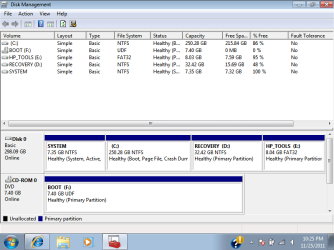
That's not good. Could you post a screenshot of your Disk Management (diskmgmt.msc) window showing all of your HDD's layout to see if anything may stand out?

When you boot from the DVD, do you get the "Press any key to boot from DVD" message and press a key to boot from the DVD?
 

My Computer My Computer

At a glance

64-bit Windows 11 Pro for WorkstationsIntel i7-8700K OC'd to 5 GHz64 GB (4x16GB) G.SKILL TridentZ RGB DDR4 3600...ASUS ROG-STRIX-GTX1080TI-O11G-GAMING
Computer type
PC/Desktop
Computer Manufacturer/Model Number
Self built custom
OS
64-bit Windows 11 Pro for Workstations
CPU
Intel i7-8700K OC'd to 5 GHz
Motherboard
ASUS ROG Maximus XI Formula Z390
Memory
64 GB (4x16GB) G.SKILL TridentZ RGB DDR4 3600 MHz
Graphics Card(s)
ASUS ROG-STRIX-GTX1080TI-O11G-GAMING
Sound Card
Integrated
Monitor(s) Displays
2 x Samsung Odyssey G7 27"
Screen Resolution
2560x1440
Hard Drives
1TB Samsung 990 PRO M.2,
4TB Samsung 990 PRO PRO M.2,
TerraMaster F8 SSD Plus NAS
PSU
Seasonic Prime Titanium 850W
Case
Thermaltake Core P3
Cooling
Corsair Hydro H115i
Keyboard
Logitech wireless K800
Mouse
Logitech MX Master 4
Internet Speed
2 Gb/s Download and 100 Mb/s Upload
Antivirus
Malwarebyte Anti-Malware Premium
Browser
Google Chrome
Other Info
Logitech Z625 speaker system,
Logitech BRIO 4K Pro webcam,
HP Color LaserJet Pro MFP M477fdn,
APC SMART-UPS RT 1000 XL - SURT1000XLI,
Galaxy S23 Plus phone
Here's the screenshot, and no I didn't get that message. That's the first thing that led me to realize that there's something wrong.
 

Attachments

  • diskmanagement.png
    diskmanagement.png
    21.9 KB · Views: 94

My Computer My Computer

At a glance

Windows 7 x64
Computer Manufacturer/Model Number
HP G62-340US
OS
Windows 7 x64
Well, your factory recovery partitions appear to be intact.

Are you able to boot to the boot menu instead of BIOS, then select to boot from the DVD?
 

My Computer My Computer

At a glance

64-bit Windows 11 Pro for WorkstationsIntel i7-8700K OC'd to 5 GHz64 GB (4x16GB) G.SKILL TridentZ RGB DDR4 3600...ASUS ROG-STRIX-GTX1080TI-O11G-GAMING
Computer type
PC/Desktop
Computer Manufacturer/Model Number
Self built custom
OS
64-bit Windows 11 Pro for Workstations
CPU
Intel i7-8700K OC'd to 5 GHz
Motherboard
ASUS ROG Maximus XI Formula Z390
Memory
64 GB (4x16GB) G.SKILL TridentZ RGB DDR4 3600 MHz
Graphics Card(s)
ASUS ROG-STRIX-GTX1080TI-O11G-GAMING
Sound Card
Integrated
Monitor(s) Displays
2 x Samsung Odyssey G7 27"
Screen Resolution
2560x1440
Hard Drives
1TB Samsung 990 PRO M.2,
4TB Samsung 990 PRO PRO M.2,
TerraMaster F8 SSD Plus NAS
PSU
Seasonic Prime Titanium 850W
Case
Thermaltake Core P3
Cooling
Corsair Hydro H115i
Keyboard
Logitech wireless K800
Mouse
Logitech MX Master 4
Internet Speed
2 Gb/s Download and 100 Mb/s Upload
Antivirus
Malwarebyte Anti-Malware Premium
Browser
Google Chrome
Other Info
Logitech Z625 speaker system,
Logitech BRIO 4K Pro webcam,
HP Color LaserJet Pro MFP M477fdn,
APC SMART-UPS RT 1000 XL - SURT1000XLI,
Galaxy S23 Plus phone
I tried that too and still nothing.
 

My Computer My Computer

At a glance

Windows 7 x64
Computer Manufacturer/Model Number
HP G62-340US
OS
Windows 7 x64
Do you have a Windows.old folder? If yes.
Try opening the HP Recovery Manager from Windows.old,
 

My Computer My Computer

At a glance

ME/XP/Vista/Win7
OS
ME/XP/Vista/Win7
I can't help but wonder why the SYSTEM partition (the first one which has no drive letter) is over 7GB large and almost full...it would be interesting to see what's in there, and if the recovery data wasn't damaged after all.
 

My Computer My Computer

At a glance

Windows 7 Professional SP1 32-bitIntel Core 2 Duo E6600 2.4GHz4GB DDR2-667 (4x1GB in dual-channel config)nVidia GeForce 9800 GT
Computer type
PC/Desktop
Computer Manufacturer/Model Number
Custom-built
OS
Windows 7 Professional SP1 32-bit
CPU
Intel Core 2 Duo E6600 2.4GHz
Motherboard
Asus PL5D2
Memory
4GB DDR2-667 (4x1GB in dual-channel config)
Graphics Card(s)
nVidia GeForce 9800 GT
Sound Card
Creative X-Fi XtremeMusic
Monitor(s) Displays
Acer P236H
Screen Resolution
1920x1200 (DVI)
Hard Drives
OCZ SSD Vertex Plus 60GB SATA (Firmware 3.55), 64MB cache
Hitachi HD321KJ SATA, 320GB, 7200rpm, 16MB cache
PSU
Antec TruePower 2.0
Case
Cooler Master Centurion
Cooling
Too many fans
Keyboard
Standard
Mouse
Microsoft wireless optical mouse
Internet Speed
AT&T U-verse (18mbit/sec)
Antivirus
Microsoft Security Essentials
Browser
Firefox
Other Info
Other devices:
Compaq CQ-60 laptop
Google Nexus 7 (2012) tablet
Nvidia SHIELD tablet (US/LTE)
Hardkernel ODROID-XU single-board computer (Samsung Exynos 5420)
I can't help but wonder why the SYSTEM partition (the first one which has no drive letter) is over 7GB large and almost full...it would be interesting to see what's in there, and if the recovery data wasn't damaged after all.

Its is very large mine is 200MB. It's not full though 7.32GB free of 7.35.
 

My Computer My Computer

At a glance

Microsoft Windows 7 Home Premium 64-bit Servi...Intel(R) Core(TM) i3 CPU M 330 @ 2.13GHz8 GB DDR3Intel(R) HD Graphics
Computer type
Laptop
Computer Manufacturer/Model Number
Hewlett-Packard/G62-107SA Notebook
OS
Microsoft Windows 7 Home Premium 64-bit Service Pack 1
CPU
Intel(R) Core(TM) i3 CPU M 330 @ 2.13GHz
Motherboard
Hewlett-Packard 1425
Memory
8 GB DDR3
Graphics Card(s)
Intel(R) HD Graphics
Sound Card
Realtek High Definition Audio
Monitor(s) Displays
Builtin
Screen Resolution
1366 x 768 x 32 bits (4294967296 colors) @ 60 Hz
Hard Drives
250 GB SATA Hard Disk Drive 7200 rpm
2TB Seagate GoFlex USB 2 Drive
1TB Iomega Prestige USB 2 Drive
1.5TB Iomega Prestige USB 2 Drive (Samsung)
2TB WD MyBook Live NAS.
Mouse
Logitech Anywhere MX
Internet Speed
152 Mbs download 10 Mbs upload
Antivirus
Norton 360
Browser
Chrome
Can you post back a screenshot of folder when you rightclick>Explore the System partition in Disk management, if necessary after unhiding files in Control Panel>Folder options>View?

Make sure you have set the BIOS to boot DVD drive first as shown here: How to Boot your Computer from a Bootable CD or DVD. If you don't get a prompt to Press any key to boot DVD, then it is not bootable. Try resetting the BIOS to Optimal Defaults, then set Boot Order again.

You can try marking Recovery partition Active then reboot to see if it will trigger it to start, however you need to be able to boot back into Win7 DVD or System Repair Disk to return the Active flag to System if it fails: Partition - Mark as Active (Method Two).

Or you could use free Partition Wizard bootable CD which will autostart at boot to change the Active flag, and also browse the System partition to see what's clogging it.

What I would do is find a Win7 installation DVD for your licensed version to clean reinstall without the HP factory bloatware, following these steps to get a perfect reinstall and even reclaim any favorite HP apps: Reinstalling Windows 7

If the DVD will not boot I'd autostart PW CD to wipe the HD which will in turn force Installation DVD or Recovery DVD to autostart.
 
I think I'll try that. But before I do I'd like your inquiry on something. After reading your post, I'm wondering if it would be possible to wipe clean my hard drive using the clean all command via the diskpart command prompt, and see if that will force install the recovery disks. Do you think that would work?
 

My Computer My Computer

At a glance

Windows 7 x64
Computer Manufacturer/Model Number
HP G62-340US
OS
Windows 7 x64
I can't help but wonder why the SYSTEM partition (the first one which has no drive letter) is over 7GB large and almost full...it would be interesting to see what's in there, and if the recovery data wasn't damaged after all.

Its is very large mine is 200MB. It's not full though 7.32GB free of 7.35.

Right you are - I was mistakenly looking at the F: "BOOT" partition which is full.
 

My Computer My Computer

At a glance

Windows 7 Professional SP1 32-bitIntel Core 2 Duo E6600 2.4GHz4GB DDR2-667 (4x1GB in dual-channel config)nVidia GeForce 9800 GT
Computer type
PC/Desktop
Computer Manufacturer/Model Number
Custom-built
OS
Windows 7 Professional SP1 32-bit
CPU
Intel Core 2 Duo E6600 2.4GHz
Motherboard
Asus PL5D2
Memory
4GB DDR2-667 (4x1GB in dual-channel config)
Graphics Card(s)
nVidia GeForce 9800 GT
Sound Card
Creative X-Fi XtremeMusic
Monitor(s) Displays
Acer P236H
Screen Resolution
1920x1200 (DVI)
Hard Drives
OCZ SSD Vertex Plus 60GB SATA (Firmware 3.55), 64MB cache
Hitachi HD321KJ SATA, 320GB, 7200rpm, 16MB cache
PSU
Antec TruePower 2.0
Case
Cooler Master Centurion
Cooling
Too many fans
Keyboard
Standard
Mouse
Microsoft wireless optical mouse
Internet Speed
AT&T U-verse (18mbit/sec)
Antivirus
Microsoft Security Essentials
Browser
Firefox
Other Info
Other devices:
Compaq CQ-60 laptop
Google Nexus 7 (2012) tablet
Nvidia SHIELD tablet (US/LTE)
Hardkernel ODROID-XU single-board computer (Samsung Exynos 5420)
I would have the Win7 Installation DVD for your verison standing by in case the Recov Disks will not autostart on a wiped HD (as they should) which the Win7 DVD will do.

It is a superior install anyway, and here's how to get it perfect: Reinstalling Windows 7
 
Back
Top