
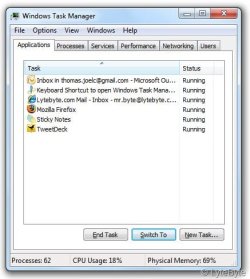
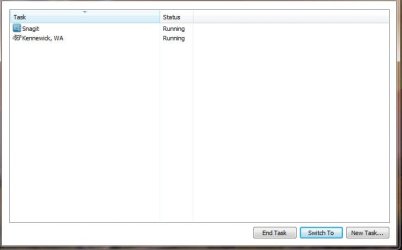
Task manager isn't opening the way it should on my laptop. The 1st attached file "task manager.jpg" is as the way the task manager in my Win7 home 32bit is looking like. The next attached file "task-manager.jpg" is what we all know that task manager in Win7 should look like . This problem just started doing this when I started up the laptop this morning. I don't remember the last time I had to open task manager but it was fine. The rest of Windows is fine. Which leads me to think some kind of a virtual software switch accidently got thrown. Where, what and how, I don't know. I would like to get the task manager back to normal. Also I did try a cold reboot of the laptop (I pulled the ac power pack and the battery). No change in the task manager after the boot up. How do I fix this?
Steve
Steve
Attachments
My Computer
- Computer type
- Laptop
- Computer Manufacturer/Model Number
- Dell Inspiron 3541
- OS
- windows 7 home 32 bit, I just changed back from 64 to 32bit
- CPU
- amc a6-6310, radon r4 graphics 1800mhz with 4 cores
- Memory
- 6.8gb
- Graphics Card(s)
- not sure off hand
- Sound Card
- not shure off hand
- Monitor(s) Displays
- built in lcd
- Screen Resolution
- 1366 x 768
- Hard Drives
- 1 500gb sata internal HDD and 1 250 gb's sata HDD in a USB external USB case.
- Keyboard
- Wifi with attached wifi mouse
- Internet Speed
- don't know
- Antivirus
- Zone Alarm
- Browser
- Firefox
- Other Info
- The gateway laptop model MD2614U died because a voltage regulator on the motherboard went poof. The Gateway laptop has been scraped.


