Solved I Broke Windows 7

jbaylon

New member
Local time
7:28 AM
Messages
24
Hi all,

First time posting. Sorry if I require a little patience.

I just broke Windows. I was trying to install Ubuntu, so I shrunk my C:/ partition, removed my recovery (heh) and HP Tools partitions, and used Gparted (live USB) to split the free space into a root, swap, and home directory.

Here's where the trouble starts. In order to get Gparted to create the partitions, I needed to run the following commands:
sudo mdadm --detail -scan
then, for each of the drives listed (2):
sudo mdadm --remove *drive name (e.g. /dev/something that starts with 'm')*

Then, gparted created the partitions without complaint. My understanding was that it was something about stopping raid arrays... maybe. Windows still started fine, so I was happy.

Then, I went to Ubuntu to install. Ubuntu didn't see any partitions, and I found this:
partitioning - Dual Booting - Ubuntu Installer doesn't recognize Windows 7 or find partitions - Super User

so I used dmraid and presumably broke my raid. The ubuntu install failed anyways, and now, obviously, windows won't boot.

Any thoughts? I don't care about getting ubuntu any more, I just want my windows back. Is there a way to undo the dmraid command?

Thanks
 

My Computer

Computer type
Laptop
Computer Manufacturer/Model Number
HP
OS
Windows 7
CPU
intel i7
Motherboard
?
Memory
?
Graphics Card(s)
NVIDIA GT650
Hard Drives
500GB HDD
32GB SDD
You might have to reinstall Windows. Do you have the Win 7 DVD?

Regards
 

My Computer

Computer type
PC/Desktop
Computer Manufacturer/Model Number
Custom Build
OS
Windows 7 Professional x64 SP1
CPU
Intel i7-980x @ 3.6GHz
Motherboard
Intel DX58SO
Memory
Corsair 12GB DDR3 RAM (3x4GB)
Graphics Card(s)
EVGA NVIDIA GeForce GTX 760 SC
Sound Card
Intel High Definition 7.1 Audio Subsystem - Realtek ALC889
Monitor(s) Displays
Dual Display - LG Electronics Flatron L227WTG
Screen Resolution
1680 x 1050 60Hz 32-bit
Hard Drives
2 Seagate Constellation ST1000NM0033 1TB SATA 6Gb/s HDDs configured as Intel SATA Array 0, RST RAID 1, Vol. 0 (C:\) & Vol. 1 (D:\), & 2 Seagate Barracuda ST500DM002 500GB SATA 6Gb/s HDDs configured as Intel SATA Array 1 RST RAID 1, Vol. 0 (E:\)
PSU
Corsair HX850W
Case
Antec P182
Cooling
Stock Intel i7-980x Cooling Solution + 4 120mm Case Fans
Keyboard
Microsoft Wireless Multimedia Keyboard 1.1
Mouse
Microsoft Standard Wireless Optical Mouse
Internet Speed
DSL - 3.0 Mb/s download 768 Kb/s upload
Antivirus
ESET Smart Security 12, Defender & SuperAntiSpyware Pro
Browser
Firefox Quantum 64-bit
Other Info
Optical Drives: Pioneer DVR-216R & TSSTcorp SH-S223Q, Anker USB 3.0 PCI-E Card, Hauppauge WinTV-HVR 2250 Dual TV Tuner Board for Windows Media Center, Bose Companion 3 Series II multimedia speaker system, APC Smart-UPS SMT1500
Are you sure you have RAID on an HP Factory install? This is unusual. What kind of RAID was it?

You'd have to restore your RAID first but your data may be lost. Once you do that then mark Active C and run http://www.sevenforums.com/tutorials/105541-startup-repair-run-3-separate-times.html to see if it will start.

If not I'd unRAID since we see nothing here but problems with Win7 and RAID, then http://www.sevenforums.com/tutorials/219487-clean-reinstall-factory-oem-windows-7-a.html#post1839164.

In the future the best method is here to http://www.sevenforums.com/tutorials/257048-dual-boot-windows-7-linux.html

You should always have your data backed up externally along with a Win7 backup image. To do risky operations like you did without doing so is the same as saying you don't care if your data is lost.
 
I've been using Intel desktop RAID for more than five years and I haven't noticed any RAID related issues with Win 7. Win 7 and Intel desktop RAID are fully compatible and I think the OS is more reliable with the RAID volume.

I don't know what type RAID, if any, the OP is referring to. But, if his two drives were in a RAID configuration, then I don't think there is a way to "unRAID" without a clean install.

The challenge here is to get an accurate description of the original setup and system specs. A lot of thread starters are clueless and it makes understanding the problem difficult.

From what I've been reading lately, I don't think RAIDs are an issue with Win 7, but I do think use of third party disk utilities to partition and resize partitions is a problem especially when the drives are in a RAID configuration.
 

My Computer

Computer type
PC/Desktop
Computer Manufacturer/Model Number
Custom Build
OS
Windows 7 Professional x64 SP1
CPU
Intel i7-980x @ 3.6GHz
Motherboard
Intel DX58SO
Memory
Corsair 12GB DDR3 RAM (3x4GB)
Graphics Card(s)
EVGA NVIDIA GeForce GTX 760 SC
Sound Card
Intel High Definition 7.1 Audio Subsystem - Realtek ALC889
Monitor(s) Displays
Dual Display - LG Electronics Flatron L227WTG
Screen Resolution
1680 x 1050 60Hz 32-bit
Hard Drives
2 Seagate Constellation ST1000NM0033 1TB SATA 6Gb/s HDDs configured as Intel SATA Array 0, RST RAID 1, Vol. 0 (C:\) & Vol. 1 (D:\), & 2 Seagate Barracuda ST500DM002 500GB SATA 6Gb/s HDDs configured as Intel SATA Array 1 RST RAID 1, Vol. 0 (E:\)
PSU
Corsair HX850W
Case
Antec P182
Cooling
Stock Intel i7-980x Cooling Solution + 4 120mm Case Fans
Keyboard
Microsoft Wireless Multimedia Keyboard 1.1
Mouse
Microsoft Standard Wireless Optical Mouse
Internet Speed
DSL - 3.0 Mb/s download 768 Kb/s upload
Antivirus
ESET Smart Security 12, Defender & SuperAntiSpyware Pro
Browser
Firefox Quantum 64-bit
Other Info
Optical Drives: Pioneer DVR-216R & TSSTcorp SH-S223Q, Anker USB 3.0 PCI-E Card, Hauppauge WinTV-HVR 2250 Dual TV Tuner Board for Windows Media Center, Bose Companion 3 Series II multimedia speaker system, APC Smart-UPS SMT1500
My point is that all we see are problems with RAID, never any successes - at least until an offhand comment like yours.

But your experience with RAID will be valuable here if that is indeed what OP has.
 
Sorry about the cluelessness

Yeah, I'm OK with a clean install, most or all of my important data is backed up, and I can reinstall all my programs. I do have a windows 7 install USB.

As for the original configuration, the RAID existed out of the box. The idea, in my limited understanding, is that there is a 32GB SSD to which some commonly accessed files are offloaded to to speed things up. I deleted the metadata while trying to get a dual boot set up, and my lack of education in these matters proved fatal. oops.

As for configuration specifics, I don't know the HDD and SSD config, or specifics about what kind of raid it was. Any way I could find that out? I can poke around with what's left of the computer to glean some info (boot from live ubuntu DVD, maybe?) if you let me know what would be helpful for moving forward. I'm not sure how to reconfigure the RAID either....

Thanks for your help!
 

My Computer

Computer type
Laptop
Computer Manufacturer/Model Number
HP
OS
Windows 7
CPU
intel i7
Motherboard
?
Memory
?
Graphics Card(s)
NVIDIA GT650
Hard Drives
500GB HDD
32GB SDD
If your system was in a RAID configuration, we would need to know the specifics: 1. What type of RAID?, e.g. 0, 1, 5, 10, etc..., 2 Who is the manufacturer of your RAID driver? Intel? Marvell? Adaptec? or, another company? 3. What version RAID driver?

If this was an out of box RAID installed on your new machine, you should be able to get all the information from the manufacturer's website and the specs on your setup.

You may also have a restore disk if you have all the materials that came with the new system. If you have a restore disk, it may be just for the RAID setup or may include the OS and manufacturer installed programs as well. If you have a restore disk, do you also have a Win 7 DVD?

If you can provide all the information accurately, we can get you back up and running in your original out of box configuration.

There are usually a couple of ways to setup the RAID and BIOS settings are critical. There are different ways the RAID is implemented as well. The RAID could be built into the chipset or it could be an add-on board. There are software RAIDs and hardware RAIDs. So, we need the specifics so we know how to proceed.

Also, if you want to set up a dual or multi boot system, that's fine as well. We can do that easily if you indicate what you want before we start the repair.

Why did you use the third party disk utility, Gparted? I think you can do what you need to do using the Win 7 computer management console - storage - disk management. I think it's safer that using a third party program to adjust and configure your partitions.

Regards
 
Last edited:

My Computer

Computer type
PC/Desktop
Computer Manufacturer/Model Number
Custom Build
OS
Windows 7 Professional x64 SP1
CPU
Intel i7-980x @ 3.6GHz
Motherboard
Intel DX58SO
Memory
Corsair 12GB DDR3 RAM (3x4GB)
Graphics Card(s)
EVGA NVIDIA GeForce GTX 760 SC
Sound Card
Intel High Definition 7.1 Audio Subsystem - Realtek ALC889
Monitor(s) Displays
Dual Display - LG Electronics Flatron L227WTG
Screen Resolution
1680 x 1050 60Hz 32-bit
Hard Drives
2 Seagate Constellation ST1000NM0033 1TB SATA 6Gb/s HDDs configured as Intel SATA Array 0, RST RAID 1, Vol. 0 (C:\) & Vol. 1 (D:\), & 2 Seagate Barracuda ST500DM002 500GB SATA 6Gb/s HDDs configured as Intel SATA Array 1 RST RAID 1, Vol. 0 (E:\)
PSU
Corsair HX850W
Case
Antec P182
Cooling
Stock Intel i7-980x Cooling Solution + 4 120mm Case Fans
Keyboard
Microsoft Wireless Multimedia Keyboard 1.1
Mouse
Microsoft Standard Wireless Optical Mouse
Internet Speed
DSL - 3.0 Mb/s download 768 Kb/s upload
Antivirus
ESET Smart Security 12, Defender & SuperAntiSpyware Pro
Browser
Firefox Quantum 64-bit
Other Info
Optical Drives: Pioneer DVR-216R & TSSTcorp SH-S223Q, Anker USB 3.0 PCI-E Card, Hauppauge WinTV-HVR 2250 Dual TV Tuner Board for Windows Media Center, Bose Companion 3 Series II multimedia speaker system, APC Smart-UPS SMT1500
You should have said you have MSATA which is a hybrid drive that's RAIDed to a 32gb SSD in order for the SSD to provide a paging file and often boot the OS. This theoretically speeds up the system but most who reinstall without it say it doesn't make any difference.

How to Enable or Disable it is discussed in these tutorials: Install Windows on MSATA (SSD) Drive - Windows 7 Help Forums
Install Windows on System with MSATA and ISRT - Windows 7 Help Forums


We have even helped users reinstall the OS to the 32gb SSD with most programs and all User files going onto the HD.

I would start with confirming that IRST is enabled in BIOS and elsewhere as described in tutorial. If it won't start then boot into the Win7 installation media or http://www.sevenforums.com/performance-maintenance/51100-repair-cd-system-repair-disk.html to see if you can access your files via http://www.sevenforums.com/tutorials/93347-copy-paste-windows-recovery-console.html.
 
Last edited:
uhh

Your description of the SATA drive and SDD is correct. I'm working on finding out the details of the RAID setup now, and I'll post details as soon as I can hunt them down. I do have a windows 7 installation USB.

So I tried to find the Smart Response setting in Bios, and I wasn't able to hunt down the setting. There were a pretty limited number of options in the menus, but I'll try to find more specifics on how to enable that.

I tried to copy files as you showed using the repair option on my Win7 installation USB, but it seems to only recognize 39.9GB of space in a completely empty C: drive. That's a little baffling to me since I have a 500GB and a 32GB drive... thoughts?

As for why I used Gparted, it's because the windows disk partitioning tool can't format to ext formats, needed for linux. I shrunk C: in windows, to avoid damages, and then used Gparted to divide up the freed space. Gparted isn't what ruined windows, though. The windows 7 boot failures started after I used dmraid while installing ubuntu. As I understand it, dmraid removed the metadata that links the two drives. or something.

Thoughts on how to get windows to recognize the SATA drive as a valid and reasonable place to install windows?
 
Last edited:

My Computer

Computer type
Laptop
Computer Manufacturer/Model Number
HP
OS
Windows 7
CPU
intel i7
Motherboard
?
Memory
?
Graphics Card(s)
NVIDIA GT650
Hard Drives
500GB HDD
32GB SDD
When you're setting up a dual boot on a RAID configured volume, you need to ensure you have a RAID driver that will work with both operating systems. That could be a problem with Win 7 and Linux. That's not a problem with Intel RST RAID on a dual boot combo with Win XP, Vista, and Win 7, because the Intel RST RAID driver is usually the same.
 

My Computer

Computer type
PC/Desktop
Computer Manufacturer/Model Number
Custom Build
OS
Windows 7 Professional x64 SP1
CPU
Intel i7-980x @ 3.6GHz
Motherboard
Intel DX58SO
Memory
Corsair 12GB DDR3 RAM (3x4GB)
Graphics Card(s)
EVGA NVIDIA GeForce GTX 760 SC
Sound Card
Intel High Definition 7.1 Audio Subsystem - Realtek ALC889
Monitor(s) Displays
Dual Display - LG Electronics Flatron L227WTG
Screen Resolution
1680 x 1050 60Hz 32-bit
Hard Drives
2 Seagate Constellation ST1000NM0033 1TB SATA 6Gb/s HDDs configured as Intel SATA Array 0, RST RAID 1, Vol. 0 (C:\) & Vol. 1 (D:\), & 2 Seagate Barracuda ST500DM002 500GB SATA 6Gb/s HDDs configured as Intel SATA Array 1 RST RAID 1, Vol. 0 (E:\)
PSU
Corsair HX850W
Case
Antec P182
Cooling
Stock Intel i7-980x Cooling Solution + 4 120mm Case Fans
Keyboard
Microsoft Wireless Multimedia Keyboard 1.1
Mouse
Microsoft Standard Wireless Optical Mouse
Internet Speed
DSL - 3.0 Mb/s download 768 Kb/s upload
Antivirus
ESET Smart Security 12, Defender & SuperAntiSpyware Pro
Browser
Firefox Quantum 64-bit
Other Info
Optical Drives: Pioneer DVR-216R & TSSTcorp SH-S223Q, Anker USB 3.0 PCI-E Card, Hauppauge WinTV-HVR 2250 Dual TV Tuner Board for Windows Media Center, Bose Companion 3 Series II multimedia speaker system, APC Smart-UPS SMT1500
soo, the bios doesn't have any options to enable ISRT... wouldn't I need to start with figuring out how to get that enabled before proceeding with the install?
The UEFI install USB I made per the link you sent still only recognizes a small, empty C: drive for installation, this time only ~29GB.
 

My Computer

Computer type
Laptop
Computer Manufacturer/Model Number
HP
OS
Windows 7
CPU
intel i7
Motherboard
?
Memory
?
Graphics Card(s)
NVIDIA GT650
Hard Drives
500GB HDD
32GB SDD
I'm not familiar with the chipset on your motherboard. You should provide us the specs. But, on an Intel board, you set the BIOS SATA drive option to RAID. You then load your OS. Again, on the Intel board, if you set the BIOS SATA option to anything else, you can't establish the RAID volume and you can't go back an change the BIOS SATA option after you've installed the OS.

Does your motherboard use an Intel chipset? I suspect it does if you're looking for IRST, Intel Rapid Storage Technology and you've got an Intel i7 cpu.
 

My Computer

Computer type
PC/Desktop
Computer Manufacturer/Model Number
Custom Build
OS
Windows 7 Professional x64 SP1
CPU
Intel i7-980x @ 3.6GHz
Motherboard
Intel DX58SO
Memory
Corsair 12GB DDR3 RAM (3x4GB)
Graphics Card(s)
EVGA NVIDIA GeForce GTX 760 SC
Sound Card
Intel High Definition 7.1 Audio Subsystem - Realtek ALC889
Monitor(s) Displays
Dual Display - LG Electronics Flatron L227WTG
Screen Resolution
1680 x 1050 60Hz 32-bit
Hard Drives
2 Seagate Constellation ST1000NM0033 1TB SATA 6Gb/s HDDs configured as Intel SATA Array 0, RST RAID 1, Vol. 0 (C:\) & Vol. 1 (D:\), & 2 Seagate Barracuda ST500DM002 500GB SATA 6Gb/s HDDs configured as Intel SATA Array 1 RST RAID 1, Vol. 0 (E:\)
PSU
Corsair HX850W
Case
Antec P182
Cooling
Stock Intel i7-980x Cooling Solution + 4 120mm Case Fans
Keyboard
Microsoft Wireless Multimedia Keyboard 1.1
Mouse
Microsoft Standard Wireless Optical Mouse
Internet Speed
DSL - 3.0 Mb/s download 768 Kb/s upload
Antivirus
ESET Smart Security 12, Defender & SuperAntiSpyware Pro
Browser
Firefox Quantum 64-bit
Other Info
Optical Drives: Pioneer DVR-216R & TSSTcorp SH-S223Q, Anker USB 3.0 PCI-E Card, Hauppauge WinTV-HVR 2250 Dual TV Tuner Board for Windows Media Center, Bose Companion 3 Series II multimedia speaker system, APC Smart-UPS SMT1500
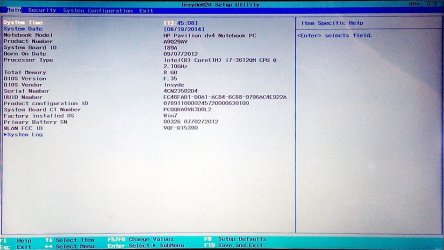
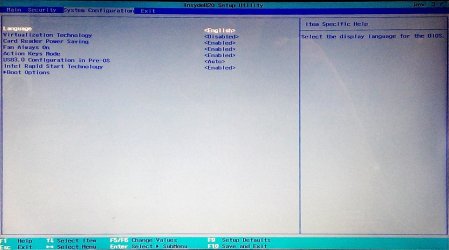
I'm beginning to think something screwed up the BIOS too... Perhaps you can correct me and let me know if I'm doing something wrong. Pressing F10 while booting puts me in the menu shown in the attached picture. The system configuration tab doesn't have any SATA options... just a few things to enable or disable and a boot order list. Am I missing something?
 

Attachments

  • bios_setup.jpg
    bios_setup.jpg
    160.2 KB · Views: 3

My Computer

Computer type
Laptop
Computer Manufacturer/Model Number
HP
OS
Windows 7
CPU
intel i7
Motherboard
?
Memory
?
Graphics Card(s)
NVIDIA GT650
Hard Drives
500GB HDD
32GB SDD
soo, the bios doesn't have any options to enable ISRT... wouldn't I need to start with figuring out how to get that enabled before proceeding with the install?
The UEFI install USB I made per the link you sent still only recognizes a small, empty C: drive for installation, this time only ~29GB.

What is the SATA controller setting and all its choices in BIOS setup.

Read the Manual on the PC's Support Downloads webpage for how IRST works on your model.

Is HD detected in BIOS setup? If so test it with makers HD diagnostics CD scan in Troubleshooting tutorial below. If not try reseating it or replace.
 
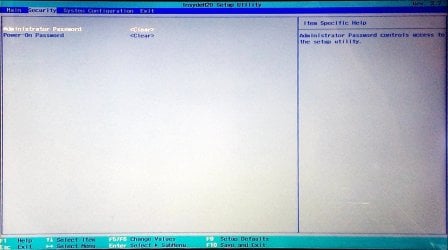
Show us a screen shot of the Security, System and Configuration tabs.

You should do a Google to see if anyone has done a dual boot with Win 7 and Linux on the same RAID volume. It might not be possible on a laptop. It could be done on a desktop, because you can use a non-RAID hdd on the system.
 

My Computer

Computer type
PC/Desktop
Computer Manufacturer/Model Number
Custom Build
OS
Windows 7 Professional x64 SP1
CPU
Intel i7-980x @ 3.6GHz
Motherboard
Intel DX58SO
Memory
Corsair 12GB DDR3 RAM (3x4GB)
Graphics Card(s)
EVGA NVIDIA GeForce GTX 760 SC
Sound Card
Intel High Definition 7.1 Audio Subsystem - Realtek ALC889
Monitor(s) Displays
Dual Display - LG Electronics Flatron L227WTG
Screen Resolution
1680 x 1050 60Hz 32-bit
Hard Drives
2 Seagate Constellation ST1000NM0033 1TB SATA 6Gb/s HDDs configured as Intel SATA Array 0, RST RAID 1, Vol. 0 (C:\) & Vol. 1 (D:\), & 2 Seagate Barracuda ST500DM002 500GB SATA 6Gb/s HDDs configured as Intel SATA Array 1 RST RAID 1, Vol. 0 (E:\)
PSU
Corsair HX850W
Case
Antec P182
Cooling
Stock Intel i7-980x Cooling Solution + 4 120mm Case Fans
Keyboard
Microsoft Wireless Multimedia Keyboard 1.1
Mouse
Microsoft Standard Wireless Optical Mouse
Internet Speed
DSL - 3.0 Mb/s download 768 Kb/s upload
Antivirus
ESET Smart Security 12, Defender & SuperAntiSpyware Pro
Browser
Firefox Quantum 64-bit
Other Info
Optical Drives: Pioneer DVR-216R & TSSTcorp SH-S223Q, Anker USB 3.0 PCI-E Card, Hauppauge WinTV-HVR 2250 Dual TV Tuner Board for Windows Media Center, Bose Companion 3 Series II multimedia speaker system, APC Smart-UPS SMT1500
I'm not totally sure there is a SATA controller... I don't see anything in the BIOS setup that says anything about a SATA drive. Does that mean it's just not recognizing the drive?

It doesn't make sense to me that I should have to reseat the drive. Everything was working wonderfully until the dmraid command I ran while installing Ubuntu, and I haven't made any hardware adjustments or modifications to this machine.
 

My Computer

Computer type
Laptop
Computer Manufacturer/Model Number
HP
OS
Windows 7
CPU
intel i7
Motherboard
?
Memory
?
Graphics Card(s)
NVIDIA GT650
Hard Drives
500GB HDD
32GB SDD
Yeah, I've basically given up on the dual boot thing. A single boot machine would be a win for me =)
 

My Computer

Computer type
Laptop
Computer Manufacturer/Model Number
HP
OS
Windows 7
CPU
intel i7
Motherboard
?
Memory
?
Graphics Card(s)
NVIDIA GT650
Hard Drives
500GB HDD
32GB SDD
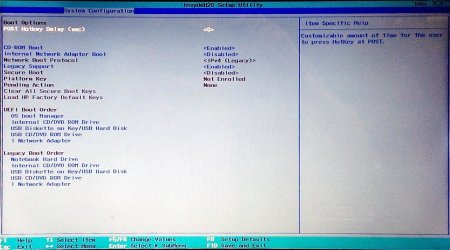
here are the screenshots you requested. The third one is the boot options menu under system config
 

Attachments

  • bios_security.jpg
    bios_security.jpg
    123 KB · Views: 2
  • Bios_system_config.jpg
    Bios_system_config.jpg
    149.9 KB · Views: 1
  • boot_options.jpg
    boot_options.jpg
    153.7 KB · Views: 2

My Computer

Computer type
Laptop
Computer Manufacturer/Model Number
HP
OS
Windows 7
CPU
intel i7
Motherboard
?
Memory
?
Graphics Card(s)
NVIDIA GT650
Hard Drives
500GB HDD
32GB SDD
Need to find some sign of HD registering anywhere in BIOS setup. If you can't then either way I'd boot the hard drive diagnostics to be sure.

Disable IRST which is clearly there in settings.
 
Back
Top