Solved I cannot run chkdsk

jakleves7retire

New member
Local time
7:01 PM
Messages
10
I have a problem that has long been going and really need it fixed. I cannot run chkdsk. I have followed the steps given by Mr. Shawn, AKA Brink? sorry if wrong been all over looking for answers., Thank you sir for your brilliancy and awesome info sharing, BTW. You rock!!. So in/with vista64 help thread, I have done all but taken ownership cause I am not that comp savvy, questions following. To clarify, I am running XP home premium, 1. initially tried to run and chkdsk would not at boot. 2.I have tried to run in safemode workaround, 3. tried to replace reg file, says it was successful but would still not execute, 4. tried manually replacing reg file, sometimes it was saved as autocheck autochk* after reboot, sometimes originally found "autocheck /P?p?" or something to this effect, was found re-plugged in after attempt/reboot, 5. tried to run sfc /scannow, comes back with errors but reports it cant fix them, 6. do not know if "Do not take ownership of the drive that you have Windows installed on. If you do, you will end up having to reinstall Windows.", I did not know if that meant taking control of the COMPLETE C:/ drive system or the individual file one needs to work on, i.e. I should be working from a different bootable copy of windows, working ON my folders on the drive that has my exucutable copy of windows/laptop hard drive. sorry if that doesn't make sense, I am comp illiterate, for the most part, I refuse to pass up 7, install 10 and I am retiring, and at 36 years of age, That's gonna have to wait lol. Please help and THANK YOU in advance, and welcoming someone to direct of location this thread needs to be in
 
Last edited:

My Computer

Computer type
Laptop
Computer Manufacturer/Model Number
dell XPS 1340
OS
7 64 bit
Antivirus
iolo System sheild
Browser
chrome and exp
Try holding the windows key, and pressing R, to run the command prompt as administrator, and then check out this disk check commands for cmd
 

My Computer

Computer type
PC/Desktop
Computer Manufacturer/Model Number
Gateway
OS
Windows 7 Ultimate x64
CPU
3rd Generation i5
Memory
8GB GDDR3
Hard Drives
Samsung 840 Evo 250GB
Antivirus
None
Browser
Firefox Extended Support Release
I'm also new here, so...
Try to help out where I can though...

Could you do the following please :

Open an elevated command prompt and type chkdsk c: /F/X (or do it through explorer, doesn't matter much)
Since you cannot run chkdsk it probably won't run...

Now type eventvwr in the run box and see if any errors are logged in the System or Application log, around the time you tried chkdsk, or either from times before...

Post them here if any please.


Also, after this, if you haven't already, do an 'sfc /scannow' from an elevated cmd.

Could be that some files are corrupted, though I'd imagine Brink would have easily found that...


Can you remember when it started ? Maybe around or after some updates or system changes ?
 

My Computer

Computer type
PC/Desktop
OS
win7 x64 sp1
Thanks for reply, I have tried to do so (chkdsk) from control panel with schedule, cmd, elevated cmd, still no execute, sorry just seen other from respoda, scannow does not work either
 
Last edited:

My Computer

Computer type
Laptop
Computer Manufacturer/Model Number
dell XPS 1340
OS
7 64 bit
Antivirus
iolo System sheild
Browser
chrome and exp
Thanks for reply, I have tried to do so (chkdsk) from control panel with schedule, cmd, elevated cmd, still no execute

No problem.
I would have thought that..

Could you quickly check event viewer and post any errors logged in either 'System' or 'Application' log ?
Thanks.
 

My Computer

Computer type
PC/Desktop
OS
win7 x64 sp1
Guess i need to study how to do that but they are showing error logs in application for sources wmi and vss, is this what you are referring to?
 

My Computer

Computer type
Laptop
Computer Manufacturer/Model Number
dell XPS 1340
OS
7 64 bit
Antivirus
iolo System sheild
Browser
chrome and exp
Guess i need to study how to do that but they are showing error logs in application for sources wmi and vss, is this what you are referring to?

Yes, In the Start>run box, type eventvwr +ENTER

Then select Windows logs, select system log and application log, and check for any errors, then post the details here please.
 

My Computer

Computer type
PC/Desktop
OS
win7 x64 sp1
Also, did you attempt to run 'sfc /scannow' from an elevated command prompt ?
If any file or system corruption exists, which is probable, sfc should be able to fix it, or at least confirm it.
 

My Computer

Computer type
PC/Desktop
OS
win7 x64 sp1

My Computer

Computer type
PC/Desktop
Computer Manufacturer/Model Number
n/a
OS
W7 Ultimate SP1, LM19.2 MATE, W10 Home 1703, W10 Pro 1703 VM, #All 64 bit
CPU
AMD Phenom II x6 1100T, 3.3 GHz
Motherboard
ASUS M4A88T-M/USB3 (AM3)
Memory
12GB DDR3 1333 G-Skill (4GB x 2), G-Skill (2GB x 2)
Graphics Card(s)
NVIDIA GeForce GTX 660
Sound Card
Realtek?
Monitor(s) Displays
Samsung S23B350
Screen Resolution
1920x1080
Hard Drives
WD Green 2TB (SATA), WD Green 3TB (SATA), WD Blue 4TB (SATA), WD Blue 6TB (SATA)
PSU
Cooler Master
Case
Antec GX300 Tower
Cooling
3x Antec TRICOOL 120mm Fans
Mouse
Wired Optical
Internet Speed
DSL
Antivirus
Avast
Browser
Pale Moon (64 bit)
Other Info
2018-12-27 Upgraded HDDs
2015-12-10 Upgraded case, graphics card, storage
2015-08-15 Upgraded motherboard & RAM
2015-07-15 Upgraded LM17.1 to LM17.2
The following is a partial quote which i will revise to clarify my situation, thanks so much for the patience with my ignorance and all assistance,
I ll get it right eventually, lol, if you guys patience don't run out on me, lol,
I cannot run chkdsk. I have followed the steps given by Mr. Shawn, AKA Brink? Thank you sir for your brilliancy and awesome info sharing. So in/with vista64 help thread, I have done all but taken ownership cause I am not that comp savvy, questions following. To clarify, I am running XP home premium,on a dell XPS

all attempts chkdsk and sfc scannow have been in user (default) and attempts also made in elevated

all instruction was taken from

Chkdsk will Not Run at Startup in Vista

1. initially tried to run and chkdsk would not at boot.
2. then I tried to run in safemode workaround, following vista64 guidance
3. tried to replace reg file, says it was successful but would still not execute chkdsk,
4. tried manually replacing reg file, sometimes it was saved as autocheck autochk* after reboot, sometimes originally found "autocheck /P?p?" or something to this effect, was found re-plugged in after attempt/reboot,

5. tried to run sfc /scannow, comes back with errors but reports it cant fix them,

6. do not know if "Do not take ownership of the drive that you have Windows installed on. If you do, you will end up having to reinstall Windows.", I did not know if that meant taking control of the COMPLETE C:/ drive system or the individual file one needs to work on, i.e. I should be working from a different bootable copy of windows, working ON my folders on the drive that has my exucutable copy of windows/laptop hard drive. sorry if that doesn't make sense, I am comp illiterate, for the most part,

I refuse to pass up 7, install 10 and I am retiring, and at 36 years of age, That's gonna have to wait lol. Please help and THANK YOU in advance, and welcoming someone to direct of location this thread needs to be in


I will now try to post errors from event vwr
 

My Computer

Computer type
Laptop
Computer Manufacturer/Model Number
dell XPS 1340
OS
7 64 bit
Antivirus
iolo System sheild
Browser
chrome and exp
is this correct
 

Attachments

My Computer

Computer type
Laptop
Computer Manufacturer/Model Number
dell XPS 1340
OS
7 64 bit
Antivirus
iolo System sheild
Browser
chrome and exp
Hi and welcome to SevenForums :)

Where to post your logs will depend on their nature, If you can briefly explain the issue you have I can get the thread moved to an appropriate area :)
 

My Computers

System One System Two

  • Computer type
    PC/Desktop
    Computer Manufacturer/Model Number
    ChillBlast - Custom to my design
    OS
    Windows 11 Pro x64 [Latest Release and Release Preview]
    CPU
    Ryzen 9 5950X, 3.8 - 5.2 MHz
    Motherboard
    Asus Prime X570-Pro
    Memory
    64GB [2 x 32GB] DDR4 3200MHz
    Graphics Card(s)
    4GB NVIDIA GEFORCE GTX 1650 Ti
    Sound Card
    On-board SPDIF to 5.1 System + HDMI [5.1 system]
    Monitor(s) Displays
    32" UHD 32 Bit HDR Monitor + 43" UHD 4K 32Bit HDR TV
    Screen Resolution
    2 x 3840 x 2160 @60Hz
    Hard Drives
    1TB M2 SSD OS, 500GB Fast Access SSD, 2 x 8TB Data + Various Externals from 1TB to 4TB, 10TB NAS
    PSU
    NZXT C750 80 PLUS Gold 750W Modular PSU
    Case
    Workstation Case [Matt Black]
    Cooling
    NZXT Kraken X63 280mm CPU Cooler +2x Quiet Case fans
    Keyboard
    Logitech Wireless MX Keys & K400 + others
    Mouse
    Logitech Wireless MX Master 3S
    Internet Speed
    920 MB Down 50 MB Up
    Antivirus
    BitDefender Total Security Pro
    Browser
    Chrome (always run latest Non-Beta)
    Other Info
    Also run ...
    Laptop - Quad 8GB - Windows 10 Pro x64
    Nexus 7 Android tablet x2
    Samsung 10.2" tablet
    Blackview TAB 8 4G Android Tablet c/w Keyboard
    Wacom Intuos Pro Medium Pen Pad
    Wacom Intuos Pro Small Pen Pad
    Wacom Expresskeys Remote
    Loopdeck+ Graphics Controller
    Shuttle Pro v2 Control
  • Computer type
    Laptop
    System Manufacturer/Model Number
    Dell XPS 17 10750H
    OS
    Windows 11 Pro x64 Latest RP
    CPU
    Intel I7 10750H 5.0GHz
    Motherboard
    Dell XPS
    Memory
    32GB [2x16GB] DDR4 2933 MHz
    Graphics Card(s)
    nVidia GTX1650Ti 4 GB GDDR6
    Sound Card
    Stock [Realtek] 4 Speaker
    Monitor(s) Displays
    17" IPS UHD+ Infinity Edge Touchscreen
    Screen Resolution
    3840 x 2400
    Hard Drives
    2TB M2 NVMe, 4TB External + various 500GB & 1TB External NVMe (also have access to spinner HDD from
    PSU
    Stock
    Case
    Stock XPS Aluminium & Carbon Fibre
    Cooling
    Stock - Active Fan Control
    Keyboard
    Backlit + Various Logitech
    Mouse
    Stock Track Pad + Logitech MX Trackball
    Internet Speed
    72 MB Down 18MB Up
    Browser
    Chrome
    Other Info
    Also run ...
    Laptop - Quad 8GB - Windows 10 Pro x64
    Nexus 7 Android tablet x2
    10.2" tablet
    Sony Z3 Android Smartphone
    Wacom Intuos Pro Medium Pen Pad
    Wacom Intuos Pro Small Pen Pad
    Wacom Expresskeys Remote
    Loopdeck+ Graphics Controller
    Shuttle Pro v2 Control Pad
    10TB NAS
Inability to run chkdsk started the whole thing
 

My Computer

Computer type
Laptop
Computer Manufacturer/Model Number
dell XPS 1340
OS
7 64 bit
Antivirus
iolo System sheild
Browser
chrome and exp
Thread moved to Performance and maintenance :)
 

My Computers

System One System Two

  • Computer type
    PC/Desktop
    Computer Manufacturer/Model Number
    ChillBlast - Custom to my design
    OS
    Windows 11 Pro x64 [Latest Release and Release Preview]
    CPU
    Ryzen 9 5950X, 3.8 - 5.2 MHz
    Motherboard
    Asus Prime X570-Pro
    Memory
    64GB [2 x 32GB] DDR4 3200MHz
    Graphics Card(s)
    4GB NVIDIA GEFORCE GTX 1650 Ti
    Sound Card
    On-board SPDIF to 5.1 System + HDMI [5.1 system]
    Monitor(s) Displays
    32" UHD 32 Bit HDR Monitor + 43" UHD 4K 32Bit HDR TV
    Screen Resolution
    2 x 3840 x 2160 @60Hz
    Hard Drives
    1TB M2 SSD OS, 500GB Fast Access SSD, 2 x 8TB Data + Various Externals from 1TB to 4TB, 10TB NAS
    PSU
    NZXT C750 80 PLUS Gold 750W Modular PSU
    Case
    Workstation Case [Matt Black]
    Cooling
    NZXT Kraken X63 280mm CPU Cooler +2x Quiet Case fans
    Keyboard
    Logitech Wireless MX Keys & K400 + others
    Mouse
    Logitech Wireless MX Master 3S
    Internet Speed
    920 MB Down 50 MB Up
    Antivirus
    BitDefender Total Security Pro
    Browser
    Chrome (always run latest Non-Beta)
    Other Info
    Also run ...
    Laptop - Quad 8GB - Windows 10 Pro x64
    Nexus 7 Android tablet x2
    Samsung 10.2" tablet
    Blackview TAB 8 4G Android Tablet c/w Keyboard
    Wacom Intuos Pro Medium Pen Pad
    Wacom Intuos Pro Small Pen Pad
    Wacom Expresskeys Remote
    Loopdeck+ Graphics Controller
    Shuttle Pro v2 Control
  • Computer type
    Laptop
    System Manufacturer/Model Number
    Dell XPS 17 10750H
    OS
    Windows 11 Pro x64 Latest RP
    CPU
    Intel I7 10750H 5.0GHz
    Motherboard
    Dell XPS
    Memory
    32GB [2x16GB] DDR4 2933 MHz
    Graphics Card(s)
    nVidia GTX1650Ti 4 GB GDDR6
    Sound Card
    Stock [Realtek] 4 Speaker
    Monitor(s) Displays
    17" IPS UHD+ Infinity Edge Touchscreen
    Screen Resolution
    3840 x 2400
    Hard Drives
    2TB M2 NVMe, 4TB External + various 500GB & 1TB External NVMe (also have access to spinner HDD from
    PSU
    Stock
    Case
    Stock XPS Aluminium & Carbon Fibre
    Cooling
    Stock - Active Fan Control
    Keyboard
    Backlit + Various Logitech
    Mouse
    Stock Track Pad + Logitech MX Trackball
    Internet Speed
    72 MB Down 18MB Up
    Browser
    Chrome
    Other Info
    Also run ...
    Laptop - Quad 8GB - Windows 10 Pro x64
    Nexus 7 Android tablet x2
    10.2" tablet
    Sony Z3 Android Smartphone
    Wacom Intuos Pro Medium Pen Pad
    Wacom Intuos Pro Small Pen Pad
    Wacom Expresskeys Remote
    Loopdeck+ Graphics Controller
    Shuttle Pro v2 Control Pad
    10TB NAS
Thank you sir and thank you for the welcoming, there are still good folks out there, I am utterly impressed by peoples willingness to assist, this is light to me, very grateful to have found this jewel and so thankful this exists
 

My Computer

Computer type
Laptop
Computer Manufacturer/Model Number
dell XPS 1340
OS
7 64 bit
Antivirus
iolo System sheild
Browser
chrome and exp
sfc fix by dism cleanup attempt

Thanks for the assis, This what I am getting when attempting to run, the suggested repair, I cannot do the next step in suggested forum and get ISO cause it was manufacturer installed, but I do however have the install cd, but don't how to mount and address the instruction from cmd prompt to look at the appropriate place/folder for it, the cd does not seem to have the same language as folders in downloaded iso that is being directed to find, hope that makes sense


This is the following error message given:

C:\Windows\system32>Dism /Online /Cleanup-Image /RestoreHealth /Source:wim:H:\so
urces\install.wim:1 /limitaccess

Deployment Image Servicing and Management tool
Version: 6.1.7600.16385

Image Version: 6.1.7601.18489


Error: 87

The restorehealth option is not recognized in this context.
For more information, refer to the help.
The source option is not recognized in this context.
For more information, refer to the help.
The limitaccess option is not recognized in this context.
For more information, refer to the help.

The DISM log file can be found at C:\Windows\Logs\DISM\dism.log
 

My Computer

Computer type
Laptop
Computer Manufacturer/Model Number
dell XPS 1340
OS
7 64 bit
Antivirus
iolo System sheild
Browser
chrome and exp
You are right, that command is for win8 and up only.
The error 87 means the command isn't applicable to win7.

If you enter "Dism /?" you will see the commands for Win7.
You can go further in detail by entering "dism.exe /online /?" and so on...


Try this command though :


Dism /Online /Cleanup-Image /RestoreHealth /Image:H:\so -> (is 'so' correct ?)


if it still don't work, I must ask :
Do you by any chance have 2 AV tools installed (f.e. Avast AND MS Security essentials) ?
 

My Computer

Computer type
PC/Desktop
OS
win7 x64 sp1
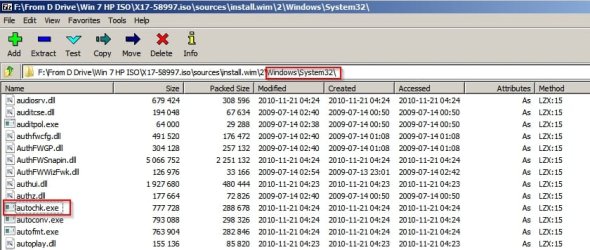
See tutorial here:


You can extract the file somewhere handy:

ISO.jpg

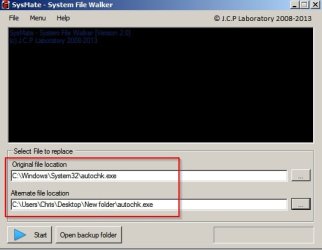
You could try replacing the file using this software instead of mucking around with take ownership:

SFW.jpg

SysMate - System File Walker Download

The good thing about it is that it will backup the original before replacing it.

However I'm not expert on autochk.exe and have no idea if simply replacing the version in system32 will work as there are versions of the file in other places.
 

My Computer

Computer type
Laptop
Computer Manufacturer/Model Number
ASUS
OS
Microsoft Windows 7 Home Premium 64-bit 7601 Multiprocessor Free Service Pack 1
CPU
AMD C-60 APU with Radeon(tm) HD Graphics
Motherboard
ASUSTeK COMPUTER INC. X501U
Memory
4.00 GB
Graphics Card(s)
AMD Radeon HD 6290 Graphics
Sound Card
(1) AMD High Definition Audio Device (2) Realtek High Defi
Screen Resolution
1366 x 768 x 32 bits (4294967296 colors) @ 60 Hz
Hard Drives
Hitachi HTS545050A7E380 SATA Disk Device
Antivirus
Comodo CIS & FW, SecureAplus App Whitelisting, Threatfire
Browser
Cyberfox 64bit, Opera 64bit, Airfox
Other Info
Spy-The-Spy, HitmanPro.Alert, Norton Connect Safe, MJRegWatcher, BitDefender TrafficLight, Voodoo Shield, Zemana AntiMalware
Could very well work if only the file itself is corrupted, but still if his system has further corruption,
replacing only that file won't fix it completely, and errors would pop up again rather soon...

I'd say try it for sure, but do check the logs for a while afterwards, even without noticable issues.
 

My Computer

Computer type
PC/Desktop
OS
win7 x64 sp1
Back
Top