I can't install Windows 7

adimix

New member
Local time
1:24 AM
Messages
18
Location
London
Hello Guys!
This is my first post on this forum.
I bought a new laptop and I need to install my CAD software for interior design.
After installation it seems that the software is not fully functional :(
I contact software support and they said I need to install it on Windows 7.
My Clevo N150RD came with preinstalled Win 10 Home.
I have a full retail version of Windows 7 two disc 64 & 32 bit.
I tried to installed it with no sucess.
When system try to boot, it freeze on black screen with no complete Windows logo. I also attached my screen.
I've contacted the laptop retailer (scan UK) and the said that this laptop is not compatible with Win 7 due to drivers.
After my research I found that the Sager (which is Clevo) has drivers for my computer for Windows 7.
I presume that the issue here will be drivers but I'm not a pro with this.
Could you help please! :confused:
Thanks.
 

Attachments

  • image.jpg
    image.jpg
    461.4 KB · Views: 1

My Computer

Computer type
Laptop
Computer Manufacturer/Model Number
Clevo N150RD
OS
Windows 10 Home 64bit
CPU
Intel i7-6700HQ @2.60GHz
Memory
8 GB Crucial value
Graphics Card(s)
GeForce GTX 960m
Hard Drives
samsung 840 PRO 256 GB
Browser
Chrome
Did you turn on legacy/CSM/BIOS mode?
If you didn't, windows 7 won't work.

If you want to know how to turn it on, just search online, there will be many tutorials to help you do it.
 

My Computer

Computer type
Laptop
Computer Manufacturer/Model Number
HP
OS
Windows 7 Professional x64
CPU
AMD A8-6410
Memory
8GB DDR3
Graphics Card(s)
Radeon R5 Graphics
Screen Resolution
1366X768
Browser
Firefox
Hi
Thanks for quick respond.
I have not idea how to do that. :(
 

My Computer

Computer type
Laptop
Computer Manufacturer/Model Number
Clevo N150RD
OS
Windows 10 Home 64bit
CPU
Intel i7-6700HQ @2.60GHz
Memory
8 GB Crucial value
Graphics Card(s)
GeForce GTX 960m
Hard Drives
samsung 840 PRO 256 GB
Browser
Chrome
When it does that press the escape button, then look around the eufi settings until you find legacy/csm mode or something like that, then enable it.
 

My Computer

Computer type
Laptop
Computer Manufacturer/Model Number
HP
OS
Windows 7 Professional x64
CPU
AMD A8-6410
Memory
8GB DDR3
Graphics Card(s)
Radeon R5 Graphics
Screen Resolution
1366X768
Browser
Firefox
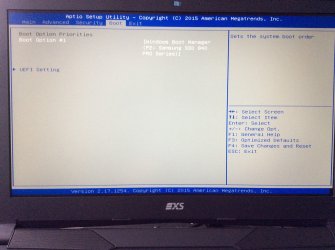
This is a option I do see in BIOS:
 

Attachments

  • image.jpg
    image.jpg
    416.8 KB · Views: 0

My Computer

Computer type
Laptop
Computer Manufacturer/Model Number
Clevo N150RD
OS
Windows 10 Home 64bit
CPU
Intel i7-6700HQ @2.60GHz
Memory
8 GB Crucial value
Graphics Card(s)
GeForce GTX 960m
Hard Drives
samsung 840 PRO 256 GB
Browser
Chrome
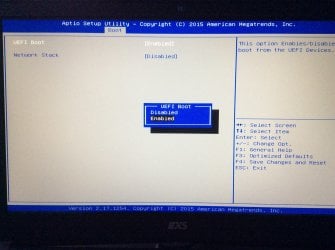
Next
 

Attachments

  • image.jpg
    image.jpg
    411 KB · Views: 1

My Computer

Computer type
Laptop
Computer Manufacturer/Model Number
Clevo N150RD
OS
Windows 10 Home 64bit
CPU
Intel i7-6700HQ @2.60GHz
Memory
8 GB Crucial value
Graphics Card(s)
GeForce GTX 960m
Hard Drives
samsung 840 PRO 256 GB
Browser
Chrome
Actually the photos are other way around
Sorry!
 

My Computer

Computer type
Laptop
Computer Manufacturer/Model Number
Clevo N150RD
OS
Windows 10 Home 64bit
CPU
Intel i7-6700HQ @2.60GHz
Memory
8 GB Crucial value
Graphics Card(s)
GeForce GTX 960m
Hard Drives
samsung 840 PRO 256 GB
Browser
Chrome
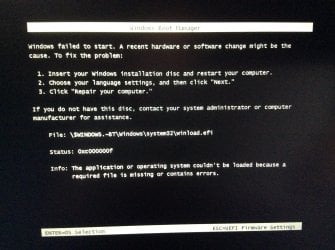
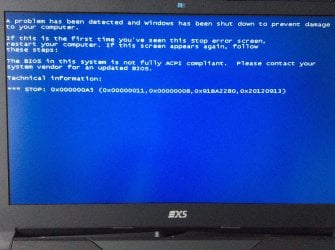
So I have disable the UEFI and I get this screen when windows installation starts

When UEFI is enable I can't boot from DVD/CD disk.
 

Attachments

  • image.jpg
    image.jpg
    602 KB · Views: 0

My Computer

Computer type
Laptop
Computer Manufacturer/Model Number
Clevo N150RD
OS
Windows 10 Home 64bit
CPU
Intel i7-6700HQ @2.60GHz
Memory
8 GB Crucial value
Graphics Card(s)
GeForce GTX 960m
Hard Drives
samsung 840 PRO 256 GB
Browser
Chrome
Hi and welcome to SevenForums,
You need to do a little preparation in win-10 before you'll be able to possibly install 7
In your bios disable Fast or quick startup in the boot section I believe = this might help

But ultimately you need to do it in win-10 too probably
Fast Startup - Turn On or Off in Windows 10 - Windows 10 Forums
 

My Computer

Computer type
PC/Desktop
Computer Manufacturer/Model Number
Custom assembled by me :}
OS
Win-7-Pro64bit 7-H-Prem-64bit
CPU
i7-5930K 2nd i9-9940x both water blocked VRM's too
Motherboard
ASUS SABERTOOTH X99 2nd ASUS x299 Apex
Memory
Trident-z 3200C14 2nd Trident-z 3600C16
Graphics Card(s)
EVGA 1080ti ftw3 2nd Titan Xp both water blocked
Sound Card
Built-in Realtek
Monitor(s) Displays
1-AOC G2460PG 24"G-Sync 144Hz/ 2nd 1-ASUS VG248QE 24" 144Hz
Screen Resolution
1920 x 1080 144Hz
Hard Drives
2-Samsung M.2 Evo & Evo Plus
2-Samsung 850 EVO 500GB SSD's/ 3-2.5 W.D. Black 1tb-&3-1tb/3-3.5 WD Black 1tb hdd's
PSU
EVGA SuperNOVA 1000-P2 2nd 1200-P2
Case
2-Corsair Obsidian Series 450D Black ATX Mid Tower
Cooling
Custom water loops
Keyboard
Logitech G710+/ 2nd Logitech G910
Mouse
2-RedDragon M901 Perdition 16400 dpi Gaming mouse = wired
Internet Speed
Comcast Ping 19ms 89.31mbps download speed 6.12mbps upload
Antivirus
Malwarebytes Pro/ Superantispyware Pro
Browser
FireFox & Pale moon
Other Info
2nd ASUS X299 Apex/Intel i9-9940x with Custom water loop/7H-Prem-x64/Corsair 450D case/Ram Trident-z 3600C16 4x8gb / Samsung970Evo plus 500gb SSD/Dual ssd EZ swap evo/PSU EVGA SuperNova 1200w-P2 80+Platinum/GPU Titan Xp /8-ML-140 on push-pull on 2-280GTX rads
Go to uefi settings and show what is there.
 

My Computer

Computer type
PC/Desktop
Computer Manufacturer/Model Number
Custom assembled by me :}
OS
Win-7-Pro64bit 7-H-Prem-64bit
CPU
i7-5930K 2nd i9-9940x both water blocked VRM's too
Motherboard
ASUS SABERTOOTH X99 2nd ASUS x299 Apex
Memory
Trident-z 3200C14 2nd Trident-z 3600C16
Graphics Card(s)
EVGA 1080ti ftw3 2nd Titan Xp both water blocked
Sound Card
Built-in Realtek
Monitor(s) Displays
1-AOC G2460PG 24"G-Sync 144Hz/ 2nd 1-ASUS VG248QE 24" 144Hz
Screen Resolution
1920 x 1080 144Hz
Hard Drives
2-Samsung M.2 Evo & Evo Plus
2-Samsung 850 EVO 500GB SSD's/ 3-2.5 W.D. Black 1tb-&3-1tb/3-3.5 WD Black 1tb hdd's
PSU
EVGA SuperNOVA 1000-P2 2nd 1200-P2
Case
2-Corsair Obsidian Series 450D Black ATX Mid Tower
Cooling
Custom water loops
Keyboard
Logitech G710+/ 2nd Logitech G910
Mouse
2-RedDragon M901 Perdition 16400 dpi Gaming mouse = wired
Internet Speed
Comcast Ping 19ms 89.31mbps download speed 6.12mbps upload
Antivirus
Malwarebytes Pro/ Superantispyware Pro
Browser
FireFox & Pale moon
Other Info
2nd ASUS X299 Apex/Intel i9-9940x with Custom water loop/7H-Prem-x64/Corsair 450D case/Ram Trident-z 3600C16 4x8gb / Samsung970Evo plus 500gb SSD/Dual ssd EZ swap evo/PSU EVGA SuperNova 1200w-P2 80+Platinum/GPU Titan Xp /8-ML-140 on push-pull on 2-280GTX rads
Hi
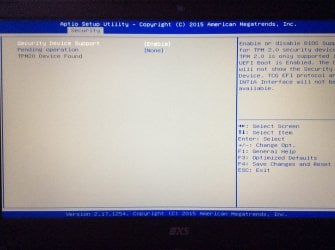
This is the screenshot oF UEFI settings:
 

Attachments

  • image.jpg
    image.jpg
    383.7 KB · Views: 0

My Computer

Computer type
Laptop
Computer Manufacturer/Model Number
Clevo N150RD
OS
Windows 10 Home 64bit
CPU
Intel i7-6700HQ @2.60GHz
Memory
8 GB Crucial value
Graphics Card(s)
GeForce GTX 960m
Hard Drives
samsung 840 PRO 256 GB
Browser
Chrome
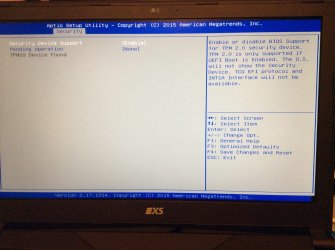
I found also this
 

Attachments

  • image.jpg
    image.jpg
    372.2 KB · Views: 0

My Computer

Computer type
Laptop
Computer Manufacturer/Model Number
Clevo N150RD
OS
Windows 10 Home 64bit
CPU
Intel i7-6700HQ @2.60GHz
Memory
8 GB Crucial value
Graphics Card(s)
GeForce GTX 960m
Hard Drives
samsung 840 PRO 256 GB
Browser
Chrome
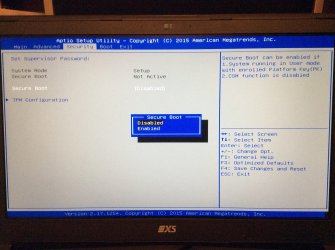
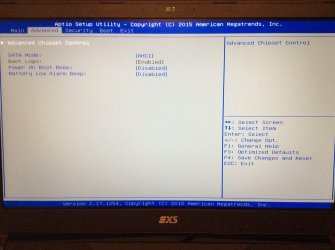
Weird lets see the Advanced and security sections,
Although uefi needs to be enabled if there's a os type listing see if it's set to uefi only and if there's a different setting,
Secure boot might be listed in the security section which will or might need to be disabled

Did or were you able to turn off fast startup in win-10 ?
 

My Computer

Computer type
PC/Desktop
Computer Manufacturer/Model Number
Custom assembled by me :}
OS
Win-7-Pro64bit 7-H-Prem-64bit
CPU
i7-5930K 2nd i9-9940x both water blocked VRM's too
Motherboard
ASUS SABERTOOTH X99 2nd ASUS x299 Apex
Memory
Trident-z 3200C14 2nd Trident-z 3600C16
Graphics Card(s)
EVGA 1080ti ftw3 2nd Titan Xp both water blocked
Sound Card
Built-in Realtek
Monitor(s) Displays
1-AOC G2460PG 24"G-Sync 144Hz/ 2nd 1-ASUS VG248QE 24" 144Hz
Screen Resolution
1920 x 1080 144Hz
Hard Drives
2-Samsung M.2 Evo & Evo Plus
2-Samsung 850 EVO 500GB SSD's/ 3-2.5 W.D. Black 1tb-&3-1tb/3-3.5 WD Black 1tb hdd's
PSU
EVGA SuperNOVA 1000-P2 2nd 1200-P2
Case
2-Corsair Obsidian Series 450D Black ATX Mid Tower
Cooling
Custom water loops
Keyboard
Logitech G710+/ 2nd Logitech G910
Mouse
2-RedDragon M901 Perdition 16400 dpi Gaming mouse = wired
Internet Speed
Comcast Ping 19ms 89.31mbps download speed 6.12mbps upload
Antivirus
Malwarebytes Pro/ Superantispyware Pro
Browser
FireFox & Pale moon
Other Info
2nd ASUS X299 Apex/Intel i9-9940x with Custom water loop/7H-Prem-x64/Corsair 450D case/Ram Trident-z 3600C16 4x8gb / Samsung970Evo plus 500gb SSD/Dual ssd EZ swap evo/PSU EVGA SuperNova 1200w-P2 80+Platinum/GPU Titan Xp /8-ML-140 on push-pull on 2-280GTX rads
Fast startup is disable
And here are the screen shots:
 

Attachments

  • image.jpg
    image.jpg
    416.5 KB · Views: 0

My Computer

Computer type
Laptop
Computer Manufacturer/Model Number
Clevo N150RD
OS
Windows 10 Home 64bit
CPU
Intel i7-6700HQ @2.60GHz
Memory
8 GB Crucial value
Graphics Card(s)
GeForce GTX 960m
Hard Drives
samsung 840 PRO 256 GB
Browser
Chrome
And another
 

Attachments

  • image.jpg
    image.jpg
    437.4 KB · Views: 0

My Computer

Computer type
Laptop
Computer Manufacturer/Model Number
Clevo N150RD
OS
Windows 10 Home 64bit
CPU
Intel i7-6700HQ @2.60GHz
Memory
8 GB Crucial value
Graphics Card(s)
GeForce GTX 960m
Hard Drives
samsung 840 PRO 256 GB
Browser
Chrome
and one more
 

Attachments

  • image.jpg
    image.jpg
    372.5 KB · Views: 0

My Computer

Computer type
Laptop
Computer Manufacturer/Model Number
Clevo N150RD
OS
Windows 10 Home 64bit
CPU
Intel i7-6700HQ @2.60GHz
Memory
8 GB Crucial value
Graphics Card(s)
GeForce GTX 960m
Hard Drives
samsung 840 PRO 256 GB
Browser
Chrome
It always stuck on first boot and blue screen with errors appears.
I was thinking to flash BIOS but I don't really want to break the warranty rules...
plus I don't really remember how to operate in DOS.
 

Attachments

  • image.jpg
    image.jpg
    602 KB · Views: 0

My Computer

Computer type
Laptop
Computer Manufacturer/Model Number
Clevo N150RD
OS
Windows 10 Home 64bit
CPU
Intel i7-6700HQ @2.60GHz
Memory
8 GB Crucial value
Graphics Card(s)
GeForce GTX 960m
Hard Drives
samsung 840 PRO 256 GB
Browser
Chrome
What happened to the original install is it still intact ?
If so did you ever disable fast start in power option in win-10 ?

CSM would usually need to be enabled :/
F5 to optimize defaults and get back inside win-10.
 

My Computer

Computer type
PC/Desktop
Computer Manufacturer/Model Number
Custom assembled by me :}
OS
Win-7-Pro64bit 7-H-Prem-64bit
CPU
i7-5930K 2nd i9-9940x both water blocked VRM's too
Motherboard
ASUS SABERTOOTH X99 2nd ASUS x299 Apex
Memory
Trident-z 3200C14 2nd Trident-z 3600C16
Graphics Card(s)
EVGA 1080ti ftw3 2nd Titan Xp both water blocked
Sound Card
Built-in Realtek
Monitor(s) Displays
1-AOC G2460PG 24"G-Sync 144Hz/ 2nd 1-ASUS VG248QE 24" 144Hz
Screen Resolution
1920 x 1080 144Hz
Hard Drives
2-Samsung M.2 Evo & Evo Plus
2-Samsung 850 EVO 500GB SSD's/ 3-2.5 W.D. Black 1tb-&3-1tb/3-3.5 WD Black 1tb hdd's
PSU
EVGA SuperNOVA 1000-P2 2nd 1200-P2
Case
2-Corsair Obsidian Series 450D Black ATX Mid Tower
Cooling
Custom water loops
Keyboard
Logitech G710+/ 2nd Logitech G910
Mouse
2-RedDragon M901 Perdition 16400 dpi Gaming mouse = wired
Internet Speed
Comcast Ping 19ms 89.31mbps download speed 6.12mbps upload
Antivirus
Malwarebytes Pro/ Superantispyware Pro
Browser
FireFox & Pale moon
Other Info
2nd ASUS X299 Apex/Intel i9-9940x with Custom water loop/7H-Prem-x64/Corsair 450D case/Ram Trident-z 3600C16 4x8gb / Samsung970Evo plus 500gb SSD/Dual ssd EZ swap evo/PSU EVGA SuperNova 1200w-P2 80+Platinum/GPU Titan Xp /8-ML-140 on push-pull on 2-280GTX rads
Windows 10 is booting normally but when UEFI is disabled I can't boot win 10 from my SSD.
Fast start is disabled in power options and still win 7 not booting :/
 

My Computer

Computer type
Laptop
Computer Manufacturer/Model Number
Clevo N150RD
OS
Windows 10 Home 64bit
CPU
Intel i7-6700HQ @2.60GHz
Memory
8 GB Crucial value
Graphics Card(s)
GeForce GTX 960m
Hard Drives
samsung 840 PRO 256 GB
Browser
Chrome
Windows 10 is booting normally but when UEFI is disabled I can't boot win 10 from my SSD.
Fast start is disabled in power options and still win 7 not booting :/
Try clean installing windows 7 again, except with UEFI disabled.
 

My Computer

Computer type
Laptop
Computer Manufacturer/Model Number
HP
OS
Windows 7 Professional x64
CPU
AMD A8-6410
Memory
8GB DDR3
Graphics Card(s)
Radeon R5 Graphics
Screen Resolution
1366X768
Browser
Firefox
Back
Top