Solved I could use some help with a factory reset...

rc dragon

New member
Local time
5:39 PM
Messages
15
I am new to this forum and this is my first post... In light of recent events my computer has a ton of malware and spyware for the second time now... The first time I was able to go in and just go to control panel and factory reset it by clicking the option... now it no longer exists and It says I need a point to go back to... but I just want it clean and wiped, I went back to before I got the virus and it was still there after I restored it to that point so it was unsuccessful... How do I go about doing this with a complete system restore without using a point, I do NOT have an original disk with my OS because it came pre-installed with Home Premium... Any help would be appreciated!
 

My Computer My Computer

At a glance

Windows 7 Home Premium 64bitIntel(R) Pentium(R) CPU B950 @ 2.10GHz8gb CrucialIntel(R) HD Graphics Family
Computer type
Laptop
Computer Manufacturer/Model Number
Toshiba Satellite C655
OS
Windows 7 Home Premium 64bit
CPU
Intel(R) Pentium(R) CPU B950 @ 2.10GHz
Motherboard
TOSHIBA Portable PC
Memory
8gb Crucial
Graphics Card(s)
Intel(R) HD Graphics Family
Sound Card
Conexant SmartAudio HD
Screen Resolution
1366 x 768 x 32 bits (4294967296 colors) @ 59 Hz
Hard Drives
298.09 GB
Welcome to the Forum.
A restore point probably would not help because it is probably infected also.
We need some information to start off with.
What infections were found?
What programs did you run to remove the infections?
What anti virus programs do you use (Active)?
---------------------
Could you do this to give us some more information.

By Brink:
http://www.sevenforums.com/tutorials/180324-system-info-see-your-system-specs.html
 

My Computer My Computer

At a glance

Windows 10 Pro. 64/ version 1709 Windows 7 Pr...Intel i7-6800K @ 4.3Corsair Platinum 16 gig @2400EVGA GTX 1070 OC
Computer type
PC/Desktop
Computer Manufacturer/Model Number
Home made Desktop
OS
Windows 10 Pro. 64/ version 1709 Windows 7 Pro/64
CPU
Intel i7-6800K @ 4.3
Motherboard
ASUS X-99 Deluxe II
Memory
Corsair Platinum 16 gig @2400
Graphics Card(s)
EVGA GTX 1070 OC
Monitor(s) Displays
Asus 27" LED LCD/VE278Q
Screen Resolution
1920-1080 or 1280-720 HDMI
Hard Drives
INTEL SSD 730-240 Gb Sata 3.0/
PSU
EVGA Platium 1200W
Case
Phanteks Luxe Tempered Glass 8 fans/ one radiator
Cooling
XSPC/ Water Cooled CPU
Keyboard
Das 4 Professional
Mouse
Logitech M705/MX Anywhere 2-S
Internet Speed
100 mbits
Antivirus
Microsoft Security Essentials/ Malwarebytes Premium 3.0/ SAS
Browser
I.E. 11 default/Firefox/ ISP Time Warner Cable/Spectrum
Other Info
LG BluRay Burner/
Sound system-KLipsch-THX/
Icy Dock ssd Hot Swap bays.
AVG is my current antivirus, it is a lot of spam and popups in my chrome, firefox, and internet explorer browsers. After restoring to a point about two months ago I uninstalled chrome and re-installed it... it still had the popups and the spam. It found the infections using my malware antibytes and temporarily deleted them, but the just came back after a while... weird huh... But all I want to do is Factory reset my whole laptop because a similar occurrence happened a couple months ago with a completely different virus... At that time I went to Control Pannel, Recovery, And Advanced Recovery Methods, and I found an option to restore to factory settings... Now that option is replaced with another option needing a Windows installation disk (which did not come with my laptop).
 

My Computer My Computer

At a glance

Windows 7 Home Premium 64bitIntel(R) Pentium(R) CPU B950 @ 2.10GHz8gb CrucialIntel(R) HD Graphics Family
Computer type
Laptop
Computer Manufacturer/Model Number
Toshiba Satellite C655
OS
Windows 7 Home Premium 64bit
CPU
Intel(R) Pentium(R) CPU B950 @ 2.10GHz
Motherboard
TOSHIBA Portable PC
Memory
8gb Crucial
Graphics Card(s)
Intel(R) HD Graphics Family
Sound Card
Conexant SmartAudio HD
Screen Resolution
1366 x 768 x 32 bits (4294967296 colors) @ 59 Hz
Hard Drives
298.09 GB
lol, well, here we go, is it a cleaning session, or a reinstall? If we can clean your computer we'll probably give you suggestions to keep your computer clean always, and I'm sure you'll remember some of the tips, so, what's it gunna be?
 

My Computer My Computer

At a glance

.
Computer type
PC/Desktop
OS
.
lol, well, here we go, is it a cleaning session, or a reinstall? If we can clean your computer we'll probably give you suggestions to keep your computer clean always, and I'm sure you'll remember some of the tips, so, what's it gunna be?
It is a Cleaning... I do not have the means of re installing windows due to the fact that my computer did not come with a recovery disk... only Windows pre installed
 

My Computer My Computer

At a glance

Windows 7 Home Premium 64bitIntel(R) Pentium(R) CPU B950 @ 2.10GHz8gb CrucialIntel(R) HD Graphics Family
Computer type
Laptop
Computer Manufacturer/Model Number
Toshiba Satellite C655
OS
Windows 7 Home Premium 64bit
CPU
Intel(R) Pentium(R) CPU B950 @ 2.10GHz
Motherboard
TOSHIBA Portable PC
Memory
8gb Crucial
Graphics Card(s)
Intel(R) HD Graphics Family
Sound Card
Conexant SmartAudio HD
Screen Resolution
1366 x 768 x 32 bits (4294967296 colors) @ 59 Hz
Hard Drives
298.09 GB
Welcome to the Forum.
A restore point probably would not help because it is probably infected also.
We need some information to start off with.
What infections were found?
What programs did you run to remove the infections?
What anti virus programs do you use (Active)?
---------------------
Could you do this to give us some more information.

By Brink:
http://www.sevenforums.com/tutorials/180324-system-info-see-your-system-specs.html
Annoying popups and other internet add ons were found
Malware antibytes was used to remove them but the never perminently left
I had AVG but after restoring to a point 2 months ago my virus protection is current gone
 

My Computer My Computer

At a glance

Windows 7 Home Premium 64bitIntel(R) Pentium(R) CPU B950 @ 2.10GHz8gb CrucialIntel(R) HD Graphics Family
Computer type
Laptop
Computer Manufacturer/Model Number
Toshiba Satellite C655
OS
Windows 7 Home Premium 64bit
CPU
Intel(R) Pentium(R) CPU B950 @ 2.10GHz
Motherboard
TOSHIBA Portable PC
Memory
8gb Crucial
Graphics Card(s)
Intel(R) HD Graphics Family
Sound Card
Conexant SmartAudio HD
Screen Resolution
1366 x 768 x 32 bits (4294967296 colors) @ 59 Hz
Hard Drives
298.09 GB
I found out the name of my culprit, it is just the Conduit browser hijacking virus...
 

My Computer My Computer

At a glance

Windows 7 Home Premium 64bitIntel(R) Pentium(R) CPU B950 @ 2.10GHz8gb CrucialIntel(R) HD Graphics Family
Computer type
Laptop
Computer Manufacturer/Model Number
Toshiba Satellite C655
OS
Windows 7 Home Premium 64bit
CPU
Intel(R) Pentium(R) CPU B950 @ 2.10GHz
Motherboard
TOSHIBA Portable PC
Memory
8gb Crucial
Graphics Card(s)
Intel(R) HD Graphics Family
Sound Card
Conexant SmartAudio HD
Screen Resolution
1366 x 768 x 32 bits (4294967296 colors) @ 59 Hz
Hard Drives
298.09 GB
well, we want you to run MBAM (MalwareBytes Anti-Malware) do you have the full or the free one, or did it dissapear when you restored? I've included a link to the Free version in the instructions (by VistaKing) below:

Malwarebytes

Download Link (download free, not the trial) :ar: Malwarebytes : Malwarebytes Anti-Malware removes malware including viruses, spyware, worms and trojans, plus it protects your computer

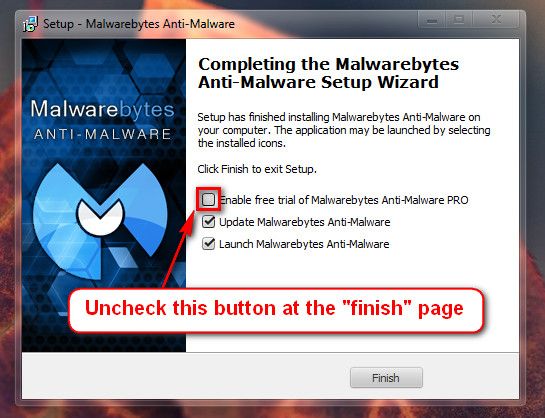
When the installation is done uncheck Enable free trial of Malwarebytes (see image below )


Update the definitions and do a full scan

:ar: On the Scanner tab:
Make sure the "Perform Full Scan" option is selected.
Then click on the Scan button.
:ar: If asked to select the drives to scan, leave all the drives selected and click on the Start Scan button.
:ar: The scan will begin and "Scan in progress" will show at the top. It may take some time to complete so please be patient.
:ar: When the scan is finished, a message box will say "The scan completed successfully. Click 'Show Results' to display all objects found".
:ar: Click OK to close the message box and continue with the removal process.
:ar: Back at the main Scanner screen, click on the Show Results button to see a list of any malware that was found.
:ar: Make sure that everything is checked, and click Remove Selected.
:ar: When removal is completed, a log report will open in Notepad.
:ar: The log is automatically saved and can be viewed by clicking the Logs tab in MBAM.
:ar: Copy and paste the contents of that report in your next reply and exit MBAM.

Log looks like this : mbam-log-yyyy-mm-dd

Log located : C:\Users\{Your UserName}\AppData\Roaming\Malwarebytes\Malwarebytes' Anti-Malware\Logs or C:\ProgramData\Malwarebytes\Malwarebytes' Anti-Malware\Logs
 

My Computer My Computer

At a glance

.
Computer type
PC/Desktop
OS
.
I used another Virus cleaner called adwcleaner and it removed all the seach conduit files and restarted the computer... upon boot it seems my virus is gone in my browsers, I am running Malwarebytes to confirm this as asked though along with the other programs listed. I hope it is gone for good thank you Redfang
 

My Computer My Computer

At a glance

Windows 7 Home Premium 64bitIntel(R) Pentium(R) CPU B950 @ 2.10GHz8gb CrucialIntel(R) HD Graphics Family
Computer type
Laptop
Computer Manufacturer/Model Number
Toshiba Satellite C655
OS
Windows 7 Home Premium 64bit
CPU
Intel(R) Pentium(R) CPU B950 @ 2.10GHz
Motherboard
TOSHIBA Portable PC
Memory
8gb Crucial
Graphics Card(s)
Intel(R) HD Graphics Family
Sound Card
Conexant SmartAudio HD
Screen Resolution
1366 x 768 x 32 bits (4294967296 colors) @ 59 Hz
Hard Drives
298.09 GB
I did update my computer specs by the way Layback Bear
 

My Computer My Computer

At a glance

Windows 7 Home Premium 64bitIntel(R) Pentium(R) CPU B950 @ 2.10GHz8gb CrucialIntel(R) HD Graphics Family
Computer type
Laptop
Computer Manufacturer/Model Number
Toshiba Satellite C655
OS
Windows 7 Home Premium 64bit
CPU
Intel(R) Pentium(R) CPU B950 @ 2.10GHz
Motherboard
TOSHIBA Portable PC
Memory
8gb Crucial
Graphics Card(s)
Intel(R) HD Graphics Family
Sound Card
Conexant SmartAudio HD
Screen Resolution
1366 x 768 x 32 bits (4294967296 colors) @ 59 Hz
Hard Drives
298.09 GB
Adwcleaner is a excellent little program for removing junk from your browsers but will not stop you from getting more junk. Most of this browser junk comes with programs you download. Little add ons you must watch for or you will keep getting them. The industry doesn't class them as a infection but PUP (Probably Unwanted Programs). That is why your anti virus is not stopping them.
I personally prefer Microsoft Security Essentials along with Malwarebytes Anti Malware Pro.

Microsoft Security Essentials - Microsoft Windows

Malwarebytes : Malwarebytes Anti-Malware PRO removes malware including viruses, spyware, worms and trojans, plus it protects your computer
 

My Computer My Computer

At a glance

Windows 10 Pro. 64/ version 1709 Windows 7 Pr...Intel i7-6800K @ 4.3Corsair Platinum 16 gig @2400EVGA GTX 1070 OC
Computer type
PC/Desktop
Computer Manufacturer/Model Number
Home made Desktop
OS
Windows 10 Pro. 64/ version 1709 Windows 7 Pro/64
CPU
Intel i7-6800K @ 4.3
Motherboard
ASUS X-99 Deluxe II
Memory
Corsair Platinum 16 gig @2400
Graphics Card(s)
EVGA GTX 1070 OC
Monitor(s) Displays
Asus 27" LED LCD/VE278Q
Screen Resolution
1920-1080 or 1280-720 HDMI
Hard Drives
INTEL SSD 730-240 Gb Sata 3.0/
PSU
EVGA Platium 1200W
Case
Phanteks Luxe Tempered Glass 8 fans/ one radiator
Cooling
XSPC/ Water Cooled CPU
Keyboard
Das 4 Professional
Mouse
Logitech M705/MX Anywhere 2-S
Internet Speed
100 mbits
Antivirus
Microsoft Security Essentials/ Malwarebytes Premium 3.0/ SAS
Browser
I.E. 11 default/Firefox/ ISP Time Warner Cable/Spectrum
Other Info
LG BluRay Burner/
Sound system-KLipsch-THX/
Icy Dock ssd Hot Swap bays.
I'll have to download that program as well... Thank you Layback Bear and Redfang! I was wondering what the best free virus protecting software that I could download... or do the programs already listed work for that?
 

My Computer My Computer

At a glance

Windows 7 Home Premium 64bitIntel(R) Pentium(R) CPU B950 @ 2.10GHz8gb CrucialIntel(R) HD Graphics Family
Computer type
Laptop
Computer Manufacturer/Model Number
Toshiba Satellite C655
OS
Windows 7 Home Premium 64bit
CPU
Intel(R) Pentium(R) CPU B950 @ 2.10GHz
Motherboard
TOSHIBA Portable PC
Memory
8gb Crucial
Graphics Card(s)
Intel(R) HD Graphics Family
Sound Card
Conexant SmartAudio HD
Screen Resolution
1366 x 768 x 32 bits (4294967296 colors) @ 59 Hz
Hard Drives
298.09 GB
My recommendations are in post #13. I also use the built in Windows 7 Firewall.
 

My Computer My Computer

At a glance

Windows 10 Pro. 64/ version 1709 Windows 7 Pr...Intel i7-6800K @ 4.3Corsair Platinum 16 gig @2400EVGA GTX 1070 OC
Computer type
PC/Desktop
Computer Manufacturer/Model Number
Home made Desktop
OS
Windows 10 Pro. 64/ version 1709 Windows 7 Pro/64
CPU
Intel i7-6800K @ 4.3
Motherboard
ASUS X-99 Deluxe II
Memory
Corsair Platinum 16 gig @2400
Graphics Card(s)
EVGA GTX 1070 OC
Monitor(s) Displays
Asus 27" LED LCD/VE278Q
Screen Resolution
1920-1080 or 1280-720 HDMI
Hard Drives
INTEL SSD 730-240 Gb Sata 3.0/
PSU
EVGA Platium 1200W
Case
Phanteks Luxe Tempered Glass 8 fans/ one radiator
Cooling
XSPC/ Water Cooled CPU
Keyboard
Das 4 Professional
Mouse
Logitech M705/MX Anywhere 2-S
Internet Speed
100 mbits
Antivirus
Microsoft Security Essentials/ Malwarebytes Premium 3.0/ SAS
Browser
I.E. 11 default/Firefox/ ISP Time Warner Cable/Spectrum
Other Info
LG BluRay Burner/
Sound system-KLipsch-THX/
Icy Dock ssd Hot Swap bays.
How do you use the Firewall?
 

My Computer My Computer

At a glance

Windows 7 Home Premium 64bitIntel(R) Pentium(R) CPU B950 @ 2.10GHz8gb CrucialIntel(R) HD Graphics Family
Computer type
Laptop
Computer Manufacturer/Model Number
Toshiba Satellite C655
OS
Windows 7 Home Premium 64bit
CPU
Intel(R) Pentium(R) CPU B950 @ 2.10GHz
Motherboard
TOSHIBA Portable PC
Memory
8gb Crucial
Graphics Card(s)
Intel(R) HD Graphics Family
Sound Card
Conexant SmartAudio HD
Screen Resolution
1366 x 768 x 32 bits (4294967296 colors) @ 59 Hz
Hard Drives
298.09 GB
Malwarebytes Anti-Malware 1.75.0.1300
Malwarebytes : Free anti-malware download

Database version: v2013.08.27.01

Windows 7 Service Pack 1 x64 NTFS
Internet Explorer 10.0.9200.16618
Casey :: OPTIMUSPRIME [administrator]

8/26/2013 10:01:04 PM
mbam-log-2013-08-26 (22-01-04).txt

Scan type: Full scan (C:\|D:\|Q:\|)
Scan options enabled: Memory | Startup | Registry | File System | Heuristics/Extra | Heuristics/Shuriken | PUP | PUM
Scan options disabled: P2P
Objects scanned: 331384
Time elapsed: 31 minute(s), 59 second(s)

Memory Processes Detected: 0
(No malicious items detected)

Memory Modules Detected: 0
(No malicious items detected)

Registry Keys Detected: 0
(No malicious items detected)

Registry Values Detected: 0
(No malicious items detected)

Registry Data Items Detected: 0
(No malicious items detected)

Folders Detected: 0
(No malicious items detected)

Files Detected: 0
(No malicious items detected)

(end)
 

My Computer My Computer

At a glance

Windows 7 Home Premium 64bitIntel(R) Pentium(R) CPU B950 @ 2.10GHz8gb CrucialIntel(R) HD Graphics Family
Computer type
Laptop
Computer Manufacturer/Model Number
Toshiba Satellite C655
OS
Windows 7 Home Premium 64bit
CPU
Intel(R) Pentium(R) CPU B950 @ 2.10GHz
Motherboard
TOSHIBA Portable PC
Memory
8gb Crucial
Graphics Card(s)
Intel(R) HD Graphics Family
Sound Card
Conexant SmartAudio HD
Screen Resolution
1366 x 768 x 32 bits (4294967296 colors) @ 59 Hz
Hard Drives
298.09 GB
did it find anything?
 

My Computer My Computer

At a glance

.
Computer type
PC/Desktop
OS
.
Nope, Adw must have removed all of it beforehand... I think I am in the clear! but I am checking the other programs you listed to be sure
 

My Computer My Computer

At a glance

Windows 7 Home Premium 64bitIntel(R) Pentium(R) CPU B950 @ 2.10GHz8gb CrucialIntel(R) HD Graphics Family
Computer type
Laptop
Computer Manufacturer/Model Number
Toshiba Satellite C655
OS
Windows 7 Home Premium 64bit
CPU
Intel(R) Pentium(R) CPU B950 @ 2.10GHz
Motherboard
TOSHIBA Portable PC
Memory
8gb Crucial
Graphics Card(s)
Intel(R) HD Graphics Family
Sound Card
Conexant SmartAudio HD
Screen Resolution
1366 x 768 x 32 bits (4294967296 colors) @ 59 Hz
Hard Drives
298.09 GB
Also, run this little program called TDSSKiller, also, with instruction that Vistaking Always Issued:

Run

TDSSKILLER

download link :ar: TDSSKiller Rootkit Removal Utility Free Download | Kaspersky Lab US

Save to the Desktop

Right-click the program and select


When the TDSSKiller console opens, click on: Change Parameters
Under Additional Options, place a check in the box next to: Detect TDLFS File System

Click: OK


Press: Start Scan


If a suspicious object is detected, the default action is Skip, leave it as is, and click on: Continue
If malicious objects are found, they show in the Scan results.
Ensure Cure (the default) is selected, then click: Continue > Reboot now, to finish the cleaning process.
(Note: If Cure is not available, select Skip, >>Do not select: Delete<<)


When done, the tool outputs its log to the disk with the Windows Operating System, normally C:\


Logs have a name like:
C:\TDSSKiller.X.X.X_12.04.2013_15.31.43_log.txt


Please post the TDSSKiller log in your reply.
 

My Computer My Computer

At a glance

.
Computer type
PC/Desktop
OS
.
Back
Top