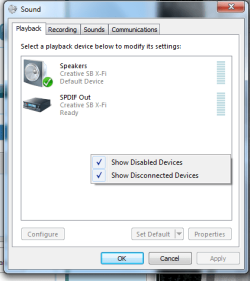
For some reason, there was sound coming out from both the computer's internal speakers and the headphones that were plugged into it at the time I did this. I tried keeping the 'speakers' volume down all the way in the volume mixer, but this caused all the 'Applications' audio to turn off as well. So I went to its (Speakers) general properties and disabled then applied changes. Now I can't find said Speakers device anywhere in the control panel under 'Hardware and Sound.'
I'm running Windows 7 Ultimate x64 on an '09 iMac with Boot Camp. I don't know if this directly affects the problem in any way, but just putting that out there.
Thank you.
I'm running Windows 7 Ultimate x64 on an '09 iMac with Boot Camp. I don't know if this directly affects the problem in any way, but just putting that out there.
Thank you.
My Computer
At a glance
Windows 7 Ultimate x64
- OS
- Windows 7 Ultimate x64