
I don't WANT to change Windows color scheme but can't stop prompts

zlloyd1

New member
Local time
6:57 PM
Messages
17
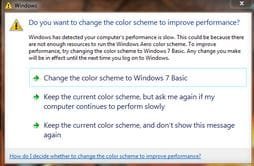
I am continuously getting a prompt to change my color scheme, every time I log out of a game I play on Windows 7. There is an option to not change, and to never show again, but it does not seem to do anything, except close the pop up window.... :mad:
chngcolor.JPG
I do not need to change my color scheme, there are no performace issues, and I have even tried going ahead, and changing it back to basic, but that does not stop this from recurring. :confused:
PLEASE tell me how to stop this, and thanks in advance!! :geek:
 

My Computer My Computer

At a glance

Microsoft Windows 7 Home Premium 64-bit 7601 ...Intel(R) Core(TM) i5-2310 CPU @ 2.90GHz8.00 GB(1) Mirage Driver (2) Mirage Driver (3) AMD R...
Computer type
PC/Desktop
Computer Manufacturer/Model Number
Dell xps8300
OS
Microsoft Windows 7 Home Premium 64-bit 7601 Multiprocessor Free Service Pack 1
CPU
Intel(R) Core(TM) i5-2310 CPU @ 2.90GHz
Motherboard
Dell Inc. 0Y2MRG
Memory
8.00 GB
Graphics Card(s)
(1) Mirage Driver (2) Mirage Driver (3) AMD Radeon HD 64
Sound Card
(1) USB Audio Device (2) AMD High Definition Audio Device
Monitor(s) Displays
Dell ST2320L_Analog
Screen Resolution
1920 x 1080 x 32 bits (4294967296 colors) @ 60 Hz
Hard Drives
(1) WDC WD10EALX-759BA1 ATA Device (2) Generic- Compact Flash USB Device (3) Generic- MS/MS-Pro USB Device (4) Generic- SD/MMC USB Device (5) Generic- SM/xD-Picture USB Device
Hi zlloyd1,

The best thing to try would be to disable desktop composition and disable visual themes for the games that you receive this prompt with. Right click the .exe file and choose properties>compatibility>disable those 2 items.
 
Last edited:

My Computer My Computer

At a glance

Windows 7 Home Premium x64 SP1Core i5 3570K 3.4GHz16GB Corsair Vengeance 1600MHzEVGA GTX 970 4GB
Computer type
PC/Desktop
Computer Manufacturer/Model Number
Self built
OS
Windows 7 Home Premium x64 SP1
CPU
Core i5 3570K 3.4GHz
Motherboard
Asus P8Z77-V
Memory
16GB Corsair Vengeance 1600MHz
Graphics Card(s)
EVGA GTX 970 4GB
Sound Card
Realtek High Definition Audio
Monitor(s) Displays
1. HP 2511X 2. Viewsonic VX2439wm
Screen Resolution
1. 1920x1080 2. 1920x1080
Hard Drives
1. Silicon Power S60 240GB 2. WD 1TB 3. WD 3TB 4. ESATA external 2TB
PSU
Corsair HXi HX850i
Case
ThermalTake Overseer RX-1 Full Tower
Cooling
Air
Keyboard
Corsair K70
Mouse
Logitech G9x
Internet Speed
Cable
:ditto: Squid is right, that will solve your problem.
 

My Computer My Computer

At a glance

Windows 10 Pro X64Intel(R) Core(TM) i5-3570K CPU OC@ 4.5GHZ Turbo8.00 GB DDR3 1600MhzMSI Gaming X GTX 1070
Computer type
PC/Desktop
Computer Manufacturer/Model Number
Dude Build
OS
Windows 10 Pro X64
CPU
Intel(R) Core(TM) i5-3570K CPU OC@ 4.5GHZ Turbo
Motherboard
MSI Z77A-G45 Gaming
Memory
8.00 GB DDR3 1600Mhz
Graphics Card(s)
MSI Gaming X GTX 1070
Sound Card
Realtek High Definition
Monitor(s) Displays
Dell S23O9W, HP L1710
Screen Resolution
DELL-1920 x 1080 HP-1280 x1024
Hard Drives
Crucial m4 256 SSD, WD 7200RPM 500GB WD 1TB
PSU
Seasonic X650 GOLD
Case
Zalman Z12
Cooling
Antec Kuhler 920
Keyboard
Logitech
Mouse
MSI DS100 Interceptor
Internet Speed
50 down and 5 up
Antivirus
MSE
Browser
Chrome, IE 11
Other Info
Logitech X-620 Speakers
+another ▲


There is an option to not change, and to never show again, but it does not seem to do anything, except close the pop up window.... :mad:
That prompt used to drive me wild too until I learnt about the per app disabling options :)
 

My Computer My Computer

At a glance

8 Pro x64i7 3770K 4.6GHz16GB G.Skill Trident X 2666mhzx2 EVGA 780 Ti Superclocked SLI
Computer type
PC/Desktop
Computer Manufacturer/Model Number
Systems by SmartEyeball
OS
8 Pro x64
CPU
i7 3770K 4.6GHz
Motherboard
ASUS P8Z77 WS
Memory
16GB G.Skill Trident X 2666mhz
Graphics Card(s)
x2 EVGA 780 Ti Superclocked SLI
Sound Card
SB X-FI Surround 5.1 PRO USB / ATH-AD900 Headphones
Monitor(s) Displays
x3 Dell U2410 / 58" Samsung
Screen Resolution
5760*1200/ 1920*1200
Hard Drives
2x Intel 520 240GB (RAID 0) * 2x WD Caviar Blacks 2TB (RAID 0) * 2TB WD Caviar Black * Sony Optirac DVD
PSU
Silverstone Strider Evolution 1200W
Case
Thermaltake Level 10 GT Snow Edition
Cooling
Noctua NH-D14
Keyboard
Topre Realforce // Ducky Shine MX Black // Filco Ninja TKL
Mouse
Thermaltake Theron (Highly Recommended) + Razer Imperator
Antivirus
MSE
Browser
IE, FF, WaterFox
Other Info
GT Extreme V2 Sim Racing Cockpit + 40" LCD and K/B Mouse stand ▼
Fanatec CSR Elite Wheel + Clubsport V1 Pedals + CSR shifter/7G-H ▼Saitek X52 Pro ▼ TrackIR 5 Pro
Buttkicker v2 Seat Rumbler with Dedicated 5.1 and Sub Woofer attached to frame ▼
=
Bloody Big Grin
+1 more for this fix. It works and I've not been plagued by this popup for a few years now because of it.
 

My Computer My Computer

At a glance

Windows 7 Home premiumI7 3770 3.4Corsair Vengance ddr3 8gb x2 1600 [@ 2400]AMD 7970 6GB x3 [currently x2 until x3 is act...
Computer type
PC/Desktop
Computer Manufacturer/Model Number
Home built
OS
Windows 7 Home premium
CPU
I7 3770 3.4
Motherboard
Republic of Gamers Maximus V
Memory
Corsair Vengance ddr3 8gb x2 1600 [@ 2400]
Graphics Card(s)
AMD 7970 6GB x3 [currently x2 until x3 is actually useful]
Sound Card
N/A
Monitor(s) Displays
Visio 47" 3D/Acer 27" 3D
Screen Resolution
1920x1080 120mhz Passive 3D
Hard Drives
Samsung 830 series SSD 512gb x2
Seagate 2tb x2
Segate 750 Gb
PSU
1500w
Case
Coolermaster
Cooling
Noctua D14
Keyboard
Logitech g10
Mouse
Naga Razer
Internet Speed
30mb Cable
Antivirus
Like I'd tell.
Browser
Waterfox mostly.
+another ▲
That prompt used to drive me wild too until I learnt about the per app disabling options :)

Thanks a Million, I have made those changes, and will post back if it works!! :thumbsup:
 

My Computer My Computer

At a glance

Microsoft Windows 7 Home Premium 64-bit 7601 ...Intel(R) Core(TM) i5-2310 CPU @ 2.90GHz8.00 GB(1) Mirage Driver (2) Mirage Driver (3) AMD R...
Computer type
PC/Desktop
Computer Manufacturer/Model Number
Dell xps8300
OS
Microsoft Windows 7 Home Premium 64-bit 7601 Multiprocessor Free Service Pack 1
CPU
Intel(R) Core(TM) i5-2310 CPU @ 2.90GHz
Motherboard
Dell Inc. 0Y2MRG
Memory
8.00 GB
Graphics Card(s)
(1) Mirage Driver (2) Mirage Driver (3) AMD Radeon HD 64
Sound Card
(1) USB Audio Device (2) AMD High Definition Audio Device
Monitor(s) Displays
Dell ST2320L_Analog
Screen Resolution
1920 x 1080 x 32 bits (4294967296 colors) @ 60 Hz
Hard Drives
(1) WDC WD10EALX-759BA1 ATA Device (2) Generic- Compact Flash USB Device (3) Generic- MS/MS-Pro USB Device (4) Generic- SD/MMC USB Device (5) Generic- SM/xD-Picture USB Device
Hi zlloyd1,

The best thing to try would be to disable desktop composition and disable visual themes for the games that you receive this prompt with. Right click the .exe file and choose properties>compatibility>disable those 2 items.

I have done just that, and disabled those, I will post back whether it solved the issue!! ;)
 

My Computer My Computer

At a glance

Microsoft Windows 7 Home Premium 64-bit 7601 ...Intel(R) Core(TM) i5-2310 CPU @ 2.90GHz8.00 GB(1) Mirage Driver (2) Mirage Driver (3) AMD R...
Computer type
PC/Desktop
Computer Manufacturer/Model Number
Dell xps8300
OS
Microsoft Windows 7 Home Premium 64-bit 7601 Multiprocessor Free Service Pack 1
CPU
Intel(R) Core(TM) i5-2310 CPU @ 2.90GHz
Motherboard
Dell Inc. 0Y2MRG
Memory
8.00 GB
Graphics Card(s)
(1) Mirage Driver (2) Mirage Driver (3) AMD Radeon HD 64
Sound Card
(1) USB Audio Device (2) AMD High Definition Audio Device
Monitor(s) Displays
Dell ST2320L_Analog
Screen Resolution
1920 x 1080 x 32 bits (4294967296 colors) @ 60 Hz
Hard Drives
(1) WDC WD10EALX-759BA1 ATA Device (2) Generic- Compact Flash USB Device (3) Generic- MS/MS-Pro USB Device (4) Generic- SD/MMC USB Device (5) Generic- SM/xD-Picture USB Device
Back
Top