i got a virus...HELP!

Status
Not open for further replies.

Shadowed s0ul

Banned
Local time
3:40 PM
Messages
11
Location
Colorado
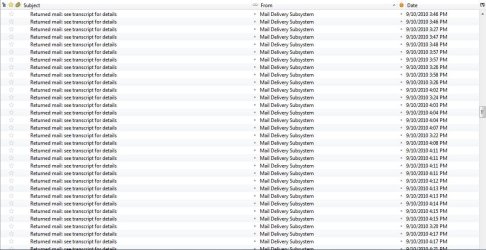
hey guys i think my computer has a virus, or AOL does. When i open my email, i find almost 50 emails from email postmasters, like [email protected], Mail delivery subsystem, and other postmasters. when i look at what the error was, it was stuff like "you were exepted into the circl-e of trust" or other spam sounding subjects. i send emails, but i dont send that many


also i attached a image of the problem
 

Attachments

  • Capture.JPG
    Capture.JPG
    121.3 KB · Views: 65

My Computer

Computer Manufacturer/Model Number
Alienware/Dell
OS
Windows 8 BETA
Memory
8GB RAM
Monitor(s) Displays
15'' LCD wireless VGA / 15'' HD built in
Screen Resolution
1366x768
Hard Drives
1 Terabyte
Case
crappy plastic
Cooling
Liquid Cooling w/ fan
Keyboard
built in/alienware backlight
Mouse
touchpad-built in
Internet Speed
-1 mps
Sounds like your email has been hijacked. Someone is using your address to send out mail to others. When they bounce they come back to you. It is a common practice with spammers.
Until the real experts get here, run your antivirus and download and run malwarebytes. Use the full scan and be sure to update malwarebytes before using. I am sure our experts are going to want to see the MB log. So be prepared and start the scan.
Malwarebytes' Anti-Malware: Malwarebytes
 

My Computer

Computer type
PC/Desktop
Computer Manufacturer/Model Number
Dell XPS 420
OS
Windows 10, Home Clean Install
CPU
Intel Core2 processsor Q8200(2.33Ghz 1333FSB) Quad Core Tech
Motherboard
Dell
Memory
6 gb
Graphics Card(s)
ATI Radeon 256MB HD3650
Sound Card
Intergrated 7.1 Channel Audio
Monitor(s) Displays
Dell SP2009W 20"
Hard Drives
640 GB Serial ATA Hard drive
Cooling
Fan
Keyboard
Dell USB Keyboard
Mouse
Dell Premium Optical USB
Internet Speed
DSL 2.85
Hi Shadow,

Delete any emails that look suspicious, then run a full system scan with your Anti Virus.

Also do a full system scan with SuperAnti Spyware - SuperAnti Spyware
and Malwarebytes - Malwarebytes

See what they can find/clear.

Regards,
JDobbsy1987

*EDIT* richc46 got there before me :thumbsup:
 

My Computer

Computer type
PC/Desktop
Computer Manufacturer/Model Number
Self Built
OS
Windows 8.1 Pro x64
CPU
Intel Core i5-2500K @ 3.30GHz - S1155
Motherboard
Asus P8P67 LE Rev3, Intel P67, S115
Memory
8GB Corsair DDR3 XMS3, PC3-12800
Graphics Card(s)
NVIDIA GeForce GTX 650
Sound Card
On-Board
Monitor(s) Displays
3 x 24" {Extended Display}
Screen Resolution
1920 x 1080
Hard Drives
300GB Seagate Barracuda 7200
PSU
550W Coolermaster GX550
Case
Silverstone Precision PS04B
Cooling
Stock
Keyboard
Logitech K120
Mouse
World of Warcraft Cataclysm MMO Gaming Mouse
Internet Speed
80 MB
Antivirus
MSE / Windows Defender
Browser
Chrome
Change your password for your email account after you have scanned as well.
 

My Computer

Computer Manufacturer/Model Number
Toshiba L505
OS
Windows 7 64x
CPU
AMD Turion II Dual-Core Mobile M520 2.30 GHz
Memory
4GB
Graphics Card(s)
ATI Radeon HD 4200
Changing the password on a regular basis is always good advice. But if this hijacking is what I think it is the only solution is a new email address; the spammer is not actually using your email. Wait for the experts, they will be along shortly and give you definitive advice.
 

My Computer

Computer type
PC/Desktop
Computer Manufacturer/Model Number
Dell XPS 420
OS
Windows 10, Home Clean Install
CPU
Intel Core2 processsor Q8200(2.33Ghz 1333FSB) Quad Core Tech
Motherboard
Dell
Memory
6 gb
Graphics Card(s)
ATI Radeon 256MB HD3650
Sound Card
Intergrated 7.1 Channel Audio
Monitor(s) Displays
Dell SP2009W 20"
Hard Drives
640 GB Serial ATA Hard drive
Cooling
Fan
Keyboard
Dell USB Keyboard
Mouse
Dell Premium Optical USB
Internet Speed
DSL 2.85
You might also want to consider not using Aol as your mail provider. Mail providers like AOL, Yahoo, Hotmail and sometimes live get spoofed a lot by junk spammers.

While changing your password is a good suggestion, it only protects you as far as people accessing mail that you have on the server. It does not prevent others from still faking your e-mail to either send spam or malware.

Definitely consider running some AV scans and Malwarebyte's Anti-malware on your computer, but I have my suspicions that you might not have anything on your computer and someone else who you may be exchanging e-mails might have a spyware or malware that harvested your e-mail address and using it to spam itself out to others.
 

My Computer

Computer Manufacturer/Model Number
Alienware Area 51 Desktop and Dell Inspirion 17R (N7010)
OS
Windows 7 Ultimate x64 and Home Premium x64
CPU
Intel i7 960 (3.2 GHz Quad Core)
Motherboard
Alienware Intel based X58
Memory
12 Gigs (Triple Channel)
Graphics Card(s)
Alienware OEM nVidia GTX 560 Ti (1.25 Gig)
Sound Card
Creative Labs X-Fi Titanium
Monitor(s) Displays
Samsung PX2370 LED 23" Monitor
Screen Resolution
1920x1080
Hard Drives
2 320 Gig SATA in Raid 1 Configuration (System/App)
1 1 Tera SATA (Games)
1 1 Tera SATA (Data/Music/Videos)
PSU
750 Watt Power Supply
Case
Alienware Area 51 Desktop
Cooling
Liquid Cooled
Keyboard
Logitech G510
Mouse
Microsoft Trackball Explorer
Internet Speed
Cable
kk i did a scan and saved the .txt log file for malwarebytes. it only found a trojan regestry key and the program itself, also i have alot of things on my email that i need, is there a way to get rid of the spammer w/o making a new one
 

Attachments

My Computer

Computer Manufacturer/Model Number
Alienware/Dell
OS
Windows 8 BETA
Memory
8GB RAM
Monitor(s) Displays
15'' LCD wireless VGA / 15'' HD built in
Screen Resolution
1366x768
Hard Drives
1 Terabyte
Case
crappy plastic
Cooling
Liquid Cooling w/ fan
Keyboard
built in/alienware backlight
Mouse
touchpad-built in
Internet Speed
-1 mps
You will be helped by experts, just be patient.
 

My Computer

Computer type
PC/Desktop
Computer Manufacturer/Model Number
Dell XPS 420
OS
Windows 10, Home Clean Install
CPU
Intel Core2 processsor Q8200(2.33Ghz 1333FSB) Quad Core Tech
Motherboard
Dell
Memory
6 gb
Graphics Card(s)
ATI Radeon 256MB HD3650
Sound Card
Intergrated 7.1 Channel Audio
Monitor(s) Displays
Dell SP2009W 20"
Hard Drives
640 GB Serial ATA Hard drive
Cooling
Fan
Keyboard
Dell USB Keyboard
Mouse
Dell Premium Optical USB
Internet Speed
DSL 2.85
As richc46 has said "wait for the experts"

But just a quick question, have you just ran malwarebytes or have you ran superanti spyware / full anti virus scan with your antivirus software??

Regards,
JDobbsy1987
 

My Computer

Computer type
PC/Desktop
Computer Manufacturer/Model Number
Self Built
OS
Windows 8.1 Pro x64
CPU
Intel Core i5-2500K @ 3.30GHz - S1155
Motherboard
Asus P8P67 LE Rev3, Intel P67, S115
Memory
8GB Corsair DDR3 XMS3, PC3-12800
Graphics Card(s)
NVIDIA GeForce GTX 650
Sound Card
On-Board
Monitor(s) Displays
3 x 24" {Extended Display}
Screen Resolution
1920 x 1080
Hard Drives
300GB Seagate Barracuda 7200
PSU
550W Coolermaster GX550
Case
Silverstone Precision PS04B
Cooling
Stock
Keyboard
Logitech K120
Mouse
World of Warcraft Cataclysm MMO Gaming Mouse
Internet Speed
80 MB
Antivirus
MSE / Windows Defender
Browser
Chrome
As richc46 has said "wait for the experts"

But just a quick question, have you just ran malwarebytes or have you ran superanti spyware / full anti virus scan with your antivirus software??

Regards,
JDobbsy1987

no, one at a time. first i shut down norton and then ran malwarebytes/ vice versa
 

My Computer

Computer Manufacturer/Model Number
Alienware/Dell
OS
Windows 8 BETA
Memory
8GB RAM
Monitor(s) Displays
15'' LCD wireless VGA / 15'' HD built in
Screen Resolution
1366x768
Hard Drives
1 Terabyte
Case
crappy plastic
Cooling
Liquid Cooling w/ fan
Keyboard
built in/alienware backlight
Mouse
touchpad-built in
Internet Speed
-1 mps
Hi, Shadowed s0ul.

Your MBAM Log:

Malwarebytes' Anti-Malware 1.46
Malwarebytes

Database version: 4640

Windows 6.1.7600
Internet Explorer 8.0.7600.16385

9/17/2010 3:45:20 PM
mbam-log-2010-09-17 (15-45-20).txt

Scan type: Quick scan
Objects scanned: 156722
Time elapsed: 8 minute(s), 21 second(s)

Memory Processes Infected: 0
Memory Modules Infected: 0
Registry Keys Infected: 1
Registry Values Infected: 1
Registry Data Items Infected: 0
Folders Infected: 0
Files Infected: 1

Memory Processes Infected:
(No malicious items detected)

Memory Modules Infected:
(No malicious items detected)

Registry Keys Infected:
HKEY_CURRENT_USER\SOFTWARE\Microsoft\Internet Explorer\SearchScopes\{fe4c2c37-edc8-4c00-b864-3c38cf3ba834} (Adware.Adshot) -> No action taken.

Registry Values Infected:
HKEY_LOCAL_MACHINE\SOFTWARE\Microsoft\Windows\CurrentVersion\Run\cyejicawajuri (Trojan.Agent.U) -> No action taken.

Registry Data Items Infected:
(No malicious items detected)

Folders Infected:
(No malicious items detected)

Files Infected:
C:\ProgramData\Update\seupd.exe (Trojan.Agent) -> No action taken.

~~~~~~~~~~~~~~~~~~~~~~~~~~~~

This time, scan with MBAM again but please do the following

  • Launch Malwarebytes' Anti-Malware then click the Update tab and "Check for Updates
  • Once the update has been installed and the program has loaded, select Quick scan
    [*]When the scan is complete, click OK, then Show Results to view the results.
    [*]Be sure that everything is checked, EXCEPT items in System Restore as shown in this sample:
    MBAM_SR.png

    [*] Click Remove Selected.
    [*]When disinfection is completed, a log will open in Notepad and you may be prompted to Restart. (See the Note below)
    [*]The log is automatically saved by MBAM and can be viewed by clicking the Logs tab in MBAM.
    [*]Please post contents of that file in your next reply.


** Note **

If MBAM encounters a file that is difficult to remove, you will be presented with 1 of 2 prompts. Click OK to either and let MBAM proceed with the disinfection process. If asked to restart the computer, please do so immediately.

 

My Computer

OS
Windows 7 & Windows Vista Ultimate
You have a variant of TDSS/TDL3.2x rootkit.

After you follow Corrine's instructions, download TDSSKiller.zip from Kaspersky from here and save it to your Desktop.
  • You will then need to extract the file(s) from the zipped folder.
  • To do this: Right-click on the zipped folder and from the menu that appears, click on Extract All...
    In the Extraction Wizard window that opens, click on Next> and in the next window that appears, click on Next> again.
    In the final window, click on Finish
  • Double click TDSSKiller.exe to begin.
  • Click Start scan and allow the tool to do just that.
  • Once the scan has completed, if the tool detects anything the default action is Cure - please click on that and change it to Skip.
  • Finally, click on Report and let us look at the contents of the text file that will open.
 

My Computer

Computer type
PC/Desktop
Computer Manufacturer/Model Number
Bruce ... somewhere in his 40's
OS
Windows 7 Ultimate 32bit SP1
CPU
Intel(R) Core(TM)2 Quad CPU @ 2.40GHz, 2400 MHz
Motherboard
INTEL/D975XBX2
Memory
4 GB
Graphics Card(s)
ATI Radeon HD 2600 Pro
Monitor(s) Displays
Samsung SyncMaster 914v
Screen Resolution
1280 x 1024
Hard Drives
2/500GB each ... ST3500630AS ATA Device.
One is not connected
PSU
Rocketfish 700 W
Case
G.Skill Gigabyte Chassis
Keyboard
Standard PS/2 Keyboard
Mouse
Microsoft PS/2 Mouse
Internet Speed
DSL
Antivirus
Avira Internet Security
Browser
IE 11
Other Info
ATI HDMI Audio
You have a variant of TDSS/TDL3.2x rootkit.

After you follow Corrine's instructions, download TDSSKiller.zip from Kaspersky from here and save it to your Desktop.
  • You will then need to extract the file(s) from the zipped folder.
  • To do this: Right-click on the zipped folder and from the menu that appears, click on Extract All...
    In the Extraction Wizard window that opens, click on Next> and in the next window that appears, click on Next> again.
    In the final window, click on Finish
  • Double click TDSSKiller.exe to begin.
  • Click Start scan and allow the tool to do just that.
  • Once the scan has completed, if the tool detects anything the default action is Cure - please click on that and change it to Skip.
  • Finally, click on Report and let us look at the contents of the text file that will open.


lol, i think i had that one and removed it back in July. ok then


i scanned with TDSS killer and it says nothing 2xx files scanned and......what amazes me is that about 5 seconds later after i took the screen shot i got a blue screen (attached file has errror report after restart)....so that gives me that strange feeling the virus wants to stay there....also there is a screenshot of TDSS killer in the .zip file, i was going to press report for a screenie too and when i was in the middle of it BLUE SCREEN....plzzzz help
 

Attachments

Last edited:

My Computer

Computer Manufacturer/Model Number
Alienware/Dell
OS
Windows 8 BETA
Memory
8GB RAM
Monitor(s) Displays
15'' LCD wireless VGA / 15'' HD built in
Screen Resolution
1366x768
Hard Drives
1 Terabyte
Case
crappy plastic
Cooling
Liquid Cooling w/ fan
Keyboard
built in/alienware backlight
Mouse
touchpad-built in
Internet Speed
-1 mps
Rootkits are a very serious infection. In my opinion, removing them gives you a false sense of security. The truth is, your computer will never be stable again.

If this was my computer, I would save my important Documents and pictures, then wipe and do a "Clean" install with Windows.

Please read this article http://en.wikipedia.org/wiki/Rootkit
 

My Computer

Computer type
PC/Desktop
Computer Manufacturer/Model Number
Bruce ... somewhere in his 40's
OS
Windows 7 Ultimate 32bit SP1
CPU
Intel(R) Core(TM)2 Quad CPU @ 2.40GHz, 2400 MHz
Motherboard
INTEL/D975XBX2
Memory
4 GB
Graphics Card(s)
ATI Radeon HD 2600 Pro
Monitor(s) Displays
Samsung SyncMaster 914v
Screen Resolution
1280 x 1024
Hard Drives
2/500GB each ... ST3500630AS ATA Device.
One is not connected
PSU
Rocketfish 700 W
Case
G.Skill Gigabyte Chassis
Keyboard
Standard PS/2 Keyboard
Mouse
Microsoft PS/2 Mouse
Internet Speed
DSL
Antivirus
Avira Internet Security
Browser
IE 11
Other Info
ATI HDMI Audio
Rootkits are a very serious infection. In my opinion, removing them gives you a false sense of security. The truth is, your computer will never be stable again.

If this was my computer, I would save my important Documents and pictures, then wipe and do a "Clean" install with Windows.

Please read this article Rootkit - Wikipedia, the free encyclopedia
by clean you mean "legal" huh?, and will restoring before the spam started fix the problem? i know it removes documents and programs so wouldent this be the same situation???? ill try and see because 3/5 times it doesnt work but i might as well try right?
 

My Computer

Computer Manufacturer/Model Number
Alienware/Dell
OS
Windows 8 BETA
Memory
8GB RAM
Monitor(s) Displays
15'' LCD wireless VGA / 15'' HD built in
Screen Resolution
1366x768
Hard Drives
1 Terabyte
Case
crappy plastic
Cooling
Liquid Cooling w/ fan
Keyboard
built in/alienware backlight
Mouse
touchpad-built in
Internet Speed
-1 mps
Rootkits are a very serious infection. In my opinion, removing them gives you a false sense of security. The truth is, your computer will never be stable again.

If this was my computer, I would save my important Documents and pictures, then wipe and do a "Clean" install with Windows.

Please read this article Rootkit - Wikipedia, the free encyclopedia
by clean you mean "legal" huh?, and will restoring before the spam started fix the problem? i know it removes documents and programs so wouldent this be the same situation???? ill try and see because 3/5 times it doesnt work but i might as well try right?

By clean I'm sure Jacee means completely installing windows 7 again and not doing a repair, this would wipe everything on your computer hence the reason for backing up all you work before you do it.

See this 'Clean' install tutorial for help:
http://www.sevenforums.com/tutorials/1649-clean-install-windows-7-a.html

**EDIT**
But as you said Legal?... the answer is yes, make sure it is a legal copy/serial :)

Regards,
JDobbsy1987
 
Last edited:

My Computer

Computer type
PC/Desktop
Computer Manufacturer/Model Number
Self Built
OS
Windows 8.1 Pro x64
CPU
Intel Core i5-2500K @ 3.30GHz - S1155
Motherboard
Asus P8P67 LE Rev3, Intel P67, S115
Memory
8GB Corsair DDR3 XMS3, PC3-12800
Graphics Card(s)
NVIDIA GeForce GTX 650
Sound Card
On-Board
Monitor(s) Displays
3 x 24" {Extended Display}
Screen Resolution
1920 x 1080
Hard Drives
300GB Seagate Barracuda 7200
PSU
550W Coolermaster GX550
Case
Silverstone Precision PS04B
Cooling
Stock
Keyboard
Logitech K120
Mouse
World of Warcraft Cataclysm MMO Gaming Mouse
Internet Speed
80 MB
Antivirus
MSE / Windows Defender
Browser
Chrome
Rootkits are a very serious infection. In my opinion, removing them gives you a false sense of security. The truth is, your computer will never be stable again.

If this was my computer, I would save my important Documents and pictures, then wipe and do a "Clean" install with Windows.

Please read this article Rootkit - Wikipedia, the free encyclopedia
by clean you mean "legal" huh?, and will restoring before the spam started fix the problem? i know it removes documents and programs so wouldent this be the same situation???? ill try and see because 3/5 times it doesnt work but i might as well try right?

By clean I'm sure Shadowed S0ul means completely installing windows 7 again and not doing a repair, this would wipe everything on your computer hence the reason for backing up all you work before you do it.

See this 'Clean' install tutorial for help:
http://www.sevenforums.com/tutorials/1649-clean-install-windows-7-a.html

**EDIT**
But as you said Legal?... the answer is yes, make sure it is a legal copy/serial :)

Regards,
JDobbsy1987

yes 100% clean install, windows 7 ultimate came with the computer, straight from the dell/alienware store
 

My Computer

Computer Manufacturer/Model Number
Alienware/Dell
OS
Windows 8 BETA
Memory
8GB RAM
Monitor(s) Displays
15'' LCD wireless VGA / 15'' HD built in
Screen Resolution
1366x768
Hard Drives
1 Terabyte
Case
crappy plastic
Cooling
Liquid Cooling w/ fan
Keyboard
built in/alienware backlight
Mouse
touchpad-built in
Internet Speed
-1 mps
Jacee is suggesting that you do a clean install, since you bought the computer you have been infected with a rootkit which quite rightly Jacee has said are not very nice :(

to ensure a stable and secure system in future Jacee is saying you are best to do a clean install.
http://www.sevenforums.com/tutorials/1649-clean-install-windows-7-a.html

Back your files up first though as everything will be wiped clean.
 

My Computer

Computer type
PC/Desktop
Computer Manufacturer/Model Number
Self Built
OS
Windows 8.1 Pro x64
CPU
Intel Core i5-2500K @ 3.30GHz - S1155
Motherboard
Asus P8P67 LE Rev3, Intel P67, S115
Memory
8GB Corsair DDR3 XMS3, PC3-12800
Graphics Card(s)
NVIDIA GeForce GTX 650
Sound Card
On-Board
Monitor(s) Displays
3 x 24" {Extended Display}
Screen Resolution
1920 x 1080
Hard Drives
300GB Seagate Barracuda 7200
PSU
550W Coolermaster GX550
Case
Silverstone Precision PS04B
Cooling
Stock
Keyboard
Logitech K120
Mouse
World of Warcraft Cataclysm MMO Gaming Mouse
Internet Speed
80 MB
Antivirus
MSE / Windows Defender
Browser
Chrome
Yes, clean install and DVD that is legally yours :)
 

My Computer

Computer type
PC/Desktop
Computer Manufacturer/Model Number
Bruce ... somewhere in his 40's
OS
Windows 7 Ultimate 32bit SP1
CPU
Intel(R) Core(TM)2 Quad CPU @ 2.40GHz, 2400 MHz
Motherboard
INTEL/D975XBX2
Memory
4 GB
Graphics Card(s)
ATI Radeon HD 2600 Pro
Monitor(s) Displays
Samsung SyncMaster 914v
Screen Resolution
1280 x 1024
Hard Drives
2/500GB each ... ST3500630AS ATA Device.
One is not connected
PSU
Rocketfish 700 W
Case
G.Skill Gigabyte Chassis
Keyboard
Standard PS/2 Keyboard
Mouse
Microsoft PS/2 Mouse
Internet Speed
DSL
Antivirus
Avira Internet Security
Browser
IE 11
Other Info
ATI HDMI Audio
If you have used a USB flash drive that's been shared with another compromized computer, then I'd toss that one and buy a new one.
 

My Computer

Computer type
PC/Desktop
Computer Manufacturer/Model Number
Bruce ... somewhere in his 40's
OS
Windows 7 Ultimate 32bit SP1
CPU
Intel(R) Core(TM)2 Quad CPU @ 2.40GHz, 2400 MHz
Motherboard
INTEL/D975XBX2
Memory
4 GB
Graphics Card(s)
ATI Radeon HD 2600 Pro
Monitor(s) Displays
Samsung SyncMaster 914v
Screen Resolution
1280 x 1024
Hard Drives
2/500GB each ... ST3500630AS ATA Device.
One is not connected
PSU
Rocketfish 700 W
Case
G.Skill Gigabyte Chassis
Keyboard
Standard PS/2 Keyboard
Mouse
Microsoft PS/2 Mouse
Internet Speed
DSL
Antivirus
Avira Internet Security
Browser
IE 11
Other Info
ATI HDMI Audio
Status
Not open for further replies.
Back
Top