I hate windows 7

yes i am talking about firefox. I thought the changeover to IE would have probably made it fairly obvious.

What addons do you have installed in Firefox ?
Some poorly written addons can freeze everything.

Try running Firefox in Safe mode.
Code:
"C:\Program Files\Mozilla Firefox\firefox.exe" -safe-mode

You can also try uninstalling Firefox and reinstalling it.
 

My Computer

Computer type
Laptop
Computer Manufacturer/Model Number
HP EliteBook 8530w Mobile Workstation
OS
Windows 7 Ultimate x64 (XP, 98SE, 95, 3.11, DOS 7.10 on VM) + Ubuntu 10.04 LTS Lucid Lynx
CPU
Intel Core 2 Duo Processor P8600 (2.40 GHz, 3 MB L2 cache)
Motherboard
Mobile Intel PM45 Express Chipset ICH9M-Enhanced
Memory
4GB 800 MHz DDR2 SDRAM
Graphics Card(s)
ATI Mobility FireGL V5700 with 256 MB
Sound Card
SoundMAX Integrated Digital HD Audio
Monitor(s) Displays
15.4-inch WXGA anti-glare (1280 x 800 resolution)
Screen Resolution
1280 x 800
Hard Drives
500GB + 1TB
Mouse
Synaptics PS/2 Port Touchpad, USB Mouse
Internet Speed
4 Mbps
Antivirus
MSE
Browser
Firefox, Chrome, IE
Other Info
Authentec AES2810 Fingerprint Reader
New to Win7 as well.

Hi, I had XP running for years without any problems, it was bullet proof, then the MB went pop and fried it's self. So 2 weeks ago I bought a new PC wth Win7 home premium on it, that was the start of my troubles. I don't think a day has gone by without trouble, anyhow, some of the tips I have found which have helped are (1) remove AVG9 if installed (2) Adobe flash, disable hardware accelleration. I hope this helps you a bit.
 

My Computer

Computer Manufacturer/Model Number
Desktop PC
OS
7 Home Premium 64 bit
CPU
AMD Athlon II X4 635
Motherboard
ASRock K10N78
Memory
4.0GB Dual-Channel DDR2 @ 400MHz
Graphics Card(s)
NVIDIA GeForce 210
Sound Card
SB Audigy
Monitor(s) Displays
M227WD @ 1360x768
Hard Drives
488GB Western Digital WDC WD5000AAKS-00V1A0 ATA Device (IDE)
PSU
400w
Case
Tower
Cooling
Normal fans
Keyboard
Standard PS/2 Keyboard
Mouse
Microsoft PS/2 Mouse
Internet Speed
around 100 kbs
Other Info
PC is store bought 10.07.2010

My Computer

Computer Manufacturer/Model Number
Hewlett packard/p6512uk
OS
Microsoft Windows 7 Home Premium 64-bit 7600
CPU
IIx4 amd athelon 635 processor
Motherboard
FOXCONN 2AA9
Memory
2x2gb
Graphics Card(s)
ati radeon HD 5450
Sound Card
(1) Realtek High Definition Audio (2) AMD High Definition
Monitor(s) Displays
samsung lcd tv 32"
Screen Resolution
1360x 768
Hard Drives
(1) WDC WD10 01FAES-60Z2A0 SATA Disk Device (2) Maxtor OneTouch USB Device (3) ST310003 33AS USB Device (4) WD My Book 1111 USB Device
PSU
?
Cooling
air!
Keyboard
wireless hp
Mouse
wireless Hp,optical
Internet Speed
1.10mb/s
Antivirus
MSE
Browser
Firefox
ihatewin7

Your reaction seems close to my own when I first installed window 7 64bit. I would stick around these forums and ask a few questions. There is enough brain power here to sort things out, I'm sure. My own problems were mainly due to a crap configuration by the computer builder, and a whole load of out of date drivers. 90% sorted by these forums and my guess is, remaining problems 'might' get sorted with Service Pack 1, when it arrives.

However, I could go for a power mac, equivalent spec apart from RAID 1 + 0 would cost me around £6k :eek: Or, work at it and save £££K's, the latter option is for me. The result is, I admit, maybe not as stable as a mac, but, I have a PC work horse that can open as many apps as I want, open over 100 full res raw images at the same time in PS CS5 (just because I can :D ) and run Premiere CS5 as well.

Installed software: Office 2007, Adobe CS5 (full monty), Firefox, iTunes, Capture NX2. That's about it.
 

My Computer

OS
Windows 7 (64bit)
CPU
Intel i7 930
Motherboard
AsusP6X58D-E
Memory
12 gig
Graphics Card(s)
Radion HD 5770
Sound Card
On board
Monitor(s) Displays
Iiyama 24in HD Widescreen
Hard Drives
2 X 1Tb Western Digital Caviar Black
PSU
800 w
I suggest you have a look into the Event Viewer to see whether any unusual events were recorded. It is obvious that your system is defunct somewhere. We'll just have to find the cause and the Event Viewer is a good starting point.
Go to Start > Right click on Computer > Manage > Event Viewer - or type Event Viewer into Start/search and hit Enter
 

My Computer

Computer Manufacturer/Model Number
HP, Dell, Gateway, Toshiba - 4 laptops and 2 desktops
OS
Vista, Windows7, Mint Mate, Zorin, Windows 8
CPU
from 1.6GHz Duo to i7
Monitor(s) Displays
2x HP w2207
Hard Drives
5x HDD, 7x SSD, 12x Externals
Keyboard
with trackball - no mices
Mouse
Trackball mice
Internet Speed
DSL 6000
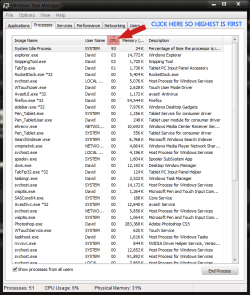
Have a look in task manager click show 'processes from all users' then click the cpu tab so it sorts by highest usage and look to see what's eating all you cpu cycles!!
 

Attachments

  • task manager.PNG
    task manager.PNG
    76.7 KB · Views: 16

My Computer

Computer type
PC/Desktop
Computer Manufacturer/Model Number
Self Build
OS
MS Windows 7 Professional 64-bit SP1
CPU
AMD FX(tm)-6100 Six-Core Processor Socket AM3+ (942)
Motherboard
ASUSTeK COMPUTER INC. SABERTOOTH 990FX (AM3r2)
Memory
8.00 GB Dual-Channel DDR3 @ 802MHz (11-11-11-36) 1.5Volts
Graphics Card(s)
NVIDIA GeForce GTX 560 Ti
Sound Card
Onboard Realtek HD
Monitor(s) Displays
shimian (1920x1080@60Hz)
Screen Resolution
1920*1080
Hard Drives
OCZ-AGIL ITY3 SATA Disk Device 120GB
PSU
Corsair TX 750
Case
Corsair
Cooling
WaterCooled
Keyboard
Microsoft Wired
Mouse
Logitech USB Optical TiltWheel Mouse
Internet Speed
Realtek PCIe GBE Family Controller 20MB*1MB
Antivirus
Avast
Browser
Firefox
Other Info
150GB Internal Hard Drive for Backing Up Important Files -
Hauppauge Nova-DT Dual DVB-T Tuner Device (+IR) -
USB PC Camera with Mic (SN9C105)
Hi ihatewin7,

I failed to mention that malware is also a likely possibility. Have you run any scans recently?

Thanks,
Harvey Meale
 

My Computer

Computer Manufacturer/Model Number
Dell Inspiron 1545
OS
Windows 7 Home Premium 32-bit, BackTrack 4, Ubuntu
ihatewin7.

The first add on you may want to try to disable would be the McAfee site advisor, I have had issues were my PC cpu shot up to 100%. After some investigation I pin pointed the problem at being the site advisor.
 

My Computer

Computer Manufacturer/Model Number
Dell Inspiron
OS
Windows 7
CPU
2.4 GHz Intel i3 cpu
Memory
8GB
Mouse
MS Explorer Mouse
Internet Speed
100 Mb/s
ihatewin7.

The first add on you may want to try to disable would be the McAfee site advisor, I have had issues were my PC cpu shot up to 100%. After some investigation I pin pointed the problem at being the site advisor.
Hmm, I do understand that some people have problems with the McAfee AV suite (that I do not use). But I do use the McAfee Site Advisor on several systems and never had a problem with that.
 

My Computer

Computer Manufacturer/Model Number
HP, Dell, Gateway, Toshiba - 4 laptops and 2 desktops
OS
Vista, Windows7, Mint Mate, Zorin, Windows 8
CPU
from 1.6GHz Duo to i7
Monitor(s) Displays
2x HP w2207
Hard Drives
5x HDD, 7x SSD, 12x Externals
Keyboard
with trackball - no mices
Mouse
Trackball mice
Internet Speed
DSL 6000
Instead of a clean install, how about disabling all non ms services and startup through msconfig just to see if it still purrs.
 

My Computer

Computer Manufacturer/Model Number
Asus
OS
Windows 7 x64 Ultimate SP1
CPU
I5 875K Unlocked
Motherboard
P7P55D-E-PRO
Memory
Kingston HyperX Genesis DDR3-1600MHz 9-9-9-27 @ 1.65V XMP
Graphics Card(s)
EVGA GeForce GTX 570 HD 732 MHz GPU 1280 MB, 152 GB Mem
Sound Card
Onboard Via 1828S
Monitor(s) Displays
Samsung T240 HD
Screen Resolution
Dual 1920X1200 1027X768
Hard Drives
OCZ Vertex II Extended Sandforce SSD 60 Gig 2X WD Black Caviar 1 terabyte 6GBS Transer Sata 3 Marvell Chip
PSU
Corsair Gold fully Modular 80 Plus 850
Case
Coolermaster Half X Full Tower
Cooling
Noctua NH-U12P
Keyboard
MS
Mouse
MS
Internet Speed
Fast enough
Other Info
My fridge has a water tap
I think it's obvious that there is something corrupted in this installation. Trying to fix it only prolongs the agony and frustration. I think the OP should wipe, format and reinstall Win 7, then install any missing drivers, followed by Firefox. At that point, he should STOP and evaluate the performance of the system before continuing to install ANY additional software.
 

My Computer

Computer Manufacturer/Model Number
Custom
OS
Windows 7 Ultimate RTM (Technet)
CPU
3.00 gigahertz Intel Core2 Duo E8400
Motherboard
ASUSTeK Computer INC. P5K/EPU Rev 1.xx
Memory
4GB
Graphics Card(s)
ATI Radeon X1950 Pro
Sound Card
Built in HD Audio
Monitor(s) Displays
22" Gateway LCD
Screen Resolution
1920 x 1200
Hard Drives
ST3160023A [Hard drive] (160.04 GB) -- drive 0, rev 8.01, ST3500630AS [Hard drive] (500.11 GB) -- drive 2, rev 3.AAK
ST3500630AS [Hard drive] (500.11 GB) -- drive 1, rev 3.AAK
Keyboard
Logitech G11
Mouse
Microsoft Wireless Laser Mouse 5000
Internet Speed
13.44 Mbps
I think it's obvious that there is something corrupted in this installation. Trying to fix it only prolongs the agony and frustration. I think the OP should wipe, format and reinstall Win 7, then install any missing drivers, followed by Firefox. At that point, he should STOP and evaluate the performance of the system before continuing to install ANY additional software.
+1, I would vote for that too.
 

My Computer

Computer Manufacturer/Model Number
HP, Dell, Gateway, Toshiba - 4 laptops and 2 desktops
OS
Vista, Windows7, Mint Mate, Zorin, Windows 8
CPU
from 1.6GHz Duo to i7
Monitor(s) Displays
2x HP w2207
Hard Drives
5x HDD, 7x SSD, 12x Externals
Keyboard
with trackball - no mices
Mouse
Trackball mice
Internet Speed
DSL 6000
I think it's obvious that there is something corrupted in this installation. Trying to fix it only prolongs the agony and frustration. I think the OP should wipe, format and reinstall Win 7, then install any missing drivers, followed by Firefox. At that point, he should STOP and evaluate the performance of the system before continuing to install ANY additional software.

+2 good call MacGyvr
 

My Computer

Computer Manufacturer/Model Number
Dell XPS 730
OS
Windows 7 Home Premium 64 bit
CPU
Intel Core 2 quad Extreme Q9770 @ 3.2 GHz
Memory
4x2 GB Muskin 1600 MHz ram
Graphics Card(s)
NVidia GTX 250
Sound Card
Soundblaster X-Fi Fatality Champion
Monitor(s) Displays
2 Dell 2007WFP Ultrascans
Screen Resolution
3360 x 1050
Hard Drives
WD Black 1TB sata, 2-WD Black 500 sata, 2-Seagate 500 Go external
PSU
1000 Watt
Cooling
air
Keyboard
MS Natrual Keyboard Pro
Mouse
Logitech Wireless Trackball
Internet Speed
DSL Elite
I think it's obvious that there is something corrupted in this installation. Trying to fix it only prolongs the agony and frustration. I think the OP should wipe, format and reinstall Win 7, then install any missing drivers, followed by Firefox. At that point, he should STOP and evaluate the performance of the system before continuing to install ANY additional software.

Make that a +3. Spot on advice.
 

My Computer

Computer Manufacturer/Model Number
Home built
OS
Windows 7 Ultimate 32 bit
CPU
Intel(R) Pentium(R) 4 CPU 3.00GHz
Motherboard
ASUS P4P800-VM Motherboard Chipset: Intel 865G + ICH5
Memory
2.50 GB RAM
Graphics Card(s)
NVIDIA GeForce 7600 GS
Sound Card
SoundMax Integrated Digital Audio (Chip)
Monitor(s) Displays
ViewSonic VX 1962 wm
Screen Resolution
1680 X 1050
Hard Drives
Seagate Barracuda 7200.10 80 GB
ST380215A ATA Device 18.6 GB
Western Digital "My Book" external hard drive 750 GB
Cooling
Fan based
Keyboard
Microsoft Comfort Curve Keyboard 2000 v10 USB
Mouse
Logitec optic USB
Internet Speed
3.01 Mb/s download 0.64 Mb/s upload
A big + 4 here. Then I would make a restore point and update Windows which will make another restore point. If every thing goes well you have a point to return to if needed as you continue.
 

My Computer

Computer type
PC/Desktop
Computer Manufacturer/Model Number
Home made Desktop
OS
Windows 10 Pro. 64/ version 1709 Windows 7 Pro/64
CPU
Intel i7-6800K @ 4.3
Motherboard
ASUS X-99 Deluxe II
Memory
Corsair Platinum 16 gig @2400
Graphics Card(s)
EVGA GTX 1070 OC
Monitor(s) Displays
Asus 27" LED LCD/VE278Q
Screen Resolution
1920-1080 or 1280-720 HDMI
Hard Drives
INTEL SSD 730-240 Gb Sata 3.0/
PSU
EVGA Platium 1200W
Case
Phanteks Luxe Tempered Glass 8 fans/ one radiator
Cooling
XSPC/ Water Cooled CPU
Keyboard
Das 4 Professional
Mouse
Logitech M705/MX Anywhere 2-S
Internet Speed
100 mbits
Antivirus
Microsoft Security Essentials/ Malwarebytes Premium 3.0/ SAS
Browser
I.E. 11 default/Firefox/ ISP Time Warner Cable/Spectrum
Other Info
LG BluRay Burner/
Sound system-KLipsch-THX/
Icy Dock ssd Hot Swap bays.
+5. A clean install will fix 1) any problems with corrupted system files, 2) remove any viruses, and 3) fix any current problems with poorly installed software.

Since it was never answered, what AV do you use?

These tutorials will help make sure what you do is a clean install, will the least likely hood of problems.
http://www.sevenforums.com/tutorials/91339-ssd-hdd-optimize-windows-reinstallation.html
http://www.sevenforums.com/tutorials/1649-clean-install-windows-7-a.html
http://www.sevenforums.com/tutorials/31402-clean-install-upgrade-windows-7-version.html
 

My Computer

Computer type
Laptop
Computer Manufacturer/Model Number
Toshiba P775-S7100
OS
Windows 7 Professional SP1 64-bit
CPU
Intel Core i5-2450M @2.5 GHz
Memory
6 GB DDR3 1333MHz
Graphics Card(s)
Intel HD 3000
Monitor(s) Displays
Built-in 17.3" LED; 22" Insignia NS-L22Q-10A
Screen Resolution
1600x900; 1360x768
Hard Drives
750 GB Hitachi
1TB Seagate FreeAgent External
Internet Speed
Verizon DSL Speed(Down/Up): 3360 Kbps / 800 Kbps
Antivirus
MSE and MBAM Pro
Browser
IE10
Before I tried a full re-install I would check that my video drivers are up to date.
I had an issue with it freezing like you when I first ran Win7. Turned out my video drivers were not current and the card was lacking, so I upgraded.
Might be worth a try.

Also which version of Win7 are you running.. there are differences!
and which version of FF. The original 3.5* had a memory leak that would cause it to hang the system up after a while (on my PC anyway), so I moved to Chrome and have not looked back.
Still use FF (3.6.8 currently) at work, but not at home.
 

My Computer

OS
Win7 x64 Ultimate
Wow, you guys are awesome. Thank you all. I will have a go at your suggestions tonight and let you know what it is. I think firefox is probably the bandit in this picture. But hey it could be anything. I still don't have 100% faith that I can work with WIN7 in the same manner as I work with XP. This may change with the forthcoming service pack.
 

My Computer

OS
Windows Home 64 bit
CPU
AMD Athlon II X2 Dual Core 250 CPU AM3 3.0GHz (65W)
Motherboard
Asus M4A77TD-Pro AM3 770 HT5200 4DDR3 160OC PCIE2.0 GLan ATX
Memory
2 x Kingston 2GB DDR3-1333MHZ
Graphics Card(s)
PowerColor HD5450 1G GDDR3 DVI HDMI
Monitor(s) Displays
LG E2340V 23"W Slim LED HDMI FULL HD
Hard Drives
WD 500gb Green Power
oh i use Sophos AV. We get it free from work.
 

My Computer

OS
Windows Home 64 bit
CPU
AMD Athlon II X2 Dual Core 250 CPU AM3 3.0GHz (65W)
Motherboard
Asus M4A77TD-Pro AM3 770 HT5200 4DDR3 160OC PCIE2.0 GLan ATX
Memory
2 x Kingston 2GB DDR3-1333MHZ
Graphics Card(s)
PowerColor HD5450 1G GDDR3 DVI HDMI
Monitor(s) Displays
LG E2340V 23"W Slim LED HDMI FULL HD
Hard Drives
WD 500gb Green Power
oh i use Sophos AV. We get it free from work.
Suggest you use MSE. It is also free and better suited for Win. Plus it is better all together.
 

My Computer

Computer Manufacturer/Model Number
HP, Dell, Gateway, Toshiba - 4 laptops and 2 desktops
OS
Vista, Windows7, Mint Mate, Zorin, Windows 8
CPU
from 1.6GHz Duo to i7
Monitor(s) Displays
2x HP w2207
Hard Drives
5x HDD, 7x SSD, 12x Externals
Keyboard
with trackball - no mices
Mouse
Trackball mice
Internet Speed
DSL 6000
Back
Top