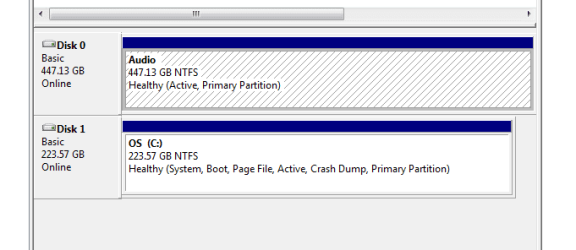
I meant that the "audio" partition is a copy of my "OS" system partition i.e. Windows 7, except that the "audio" partition has no MS Office, etc. Just the bare W7 plus audio programs.
In the beginning I had a drive divided into two, with C: being W7 plus MS Office and all my email, browser, day to day stuff, and D: being a logical drive with only W7 and my audio programs. Dual booting via DualBoot Pro.
I then wanted to do away with the C partition, leaving the D becoming the active partition and reclaiming the disk space.
As I had a spare ssd, I thought I would copy via True Image, C: to the new drive (I replaced the internal optical). This was fine.
It's when I wanted to reclaim the space back from the C and make the D: W7 with audio a complete disk that my memory started to fail me. So where am I now ?.
I wish I knew. I used to know this as I have done it before. Anyway I now have my original ssd (Bare W7 with audio programs) as one whole disk, and the old c: (W7 plus MS Office) now on another ssd. I've run the repair disk and all is OK.
Except. I have to select the main ssd after selecting the "old C" partition from the bios boot and then being presented with DualBootPro's selection memory.
Sorry for the saga. I'll post the disk manager pic as soon as I can.