Solved I have 2 W7s on 1 drive. I want the logical drive to stay........

2pods

New member
Member
Local time
12:53 PM
Messages
92
..........and delete the boot version. Both are on 1 ssd using DualBootPro
 

My Computer My Computer

At a glance

Windows 7 64 Home PremiumIntel Core I7 377016gb DDR3 1200Intel HD400
Computer type
PC/Desktop
Computer Manufacturer/Model Number
SCAN V20 I7
OS
Windows 7 64 Home Premium
CPU
Intel Core I7 3770
Motherboard
Intel
Memory
16gb DDR3 1200
Graphics Card(s)
Intel HD400
Sound Card
EMU 0404|USB2, Realtek HD
Monitor(s) Displays
27" iiyama Pro Lite LCD
Screen Resolution
1920 x1080
Hard Drives
2 x 224gb SanDisk Extreme SSDs,Seagate 2tb SATA3, Seagate 500gb SATA3
PSU
Corsair 500
Internet Speed
21N up to 20mbps
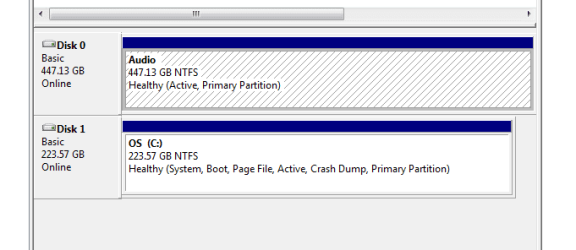
Post a screen shot of Windows Disk Management so we can see your partitions.
 

My Computer My Computer

At a glance

Windows 7 Home Premium SP1, 64-bitIntel Skylake i5-6600K, not overclocked8 GB HyperX DDR4-2666 (2 x 4 GB)none; graphics are integrated on CPU
Computer type
PC/Desktop
Computer Manufacturer/Model Number
Ignatz Special; 4 speed manual gearbox; factory air conditioning; one of one
OS
Windows 7 Home Premium SP1, 64-bit
CPU
Intel Skylake i5-6600K, not overclocked
Motherboard
AsRock Z170M Extreme 4, micro ATX
Memory
8 GB HyperX DDR4-2666 (2 x 4 GB)
Graphics Card(s)
none; graphics are integrated on CPU
Sound Card
onboard: Realtek ALC1150; external: USB Behringer UF0-202
Monitor(s) Displays
Dell S2340M 23 inch IPS
Screen Resolution
1600 x 900
Hard Drives
System: Crucial MX100 series SSD, 128 GB;
Data: Samsung Spinpoint 103SJ, 1 TB;
Backup: WD Caviar Green WD30EZRX-00D8PB0, 3 TB
PSU
Rosewill SilentNight 500 watt fanless, semi-modular
Case
Antec Solo II
Cooling
Noctua NH-U12S; Noctua F12 intake, Noctua S12A exhaust
Keyboard
Microsoft 200 6JH-00001 USB
Mouse
Dell or Microsoft optical wired; USB
Antivirus
Microsoft Security Essentials and Malwarebytes Premium
Browser
Pale Moon
Other Info
All fans PWM; speeds at idle: CPU circa 500 rpm; intake circa 600 rpm; exhaust circa 600 rpm; CPU temps 27 idle and 47 C load in a warm room (27 C/81 F) when running Intel Extreme Tuning Utility stress test.
Decided to go with the slash and burn approach and copy the required partition off to a hard drive delete the original and restore.
I know I sorted something like this before, but just couldn't remember how I did it.

replies are coming via my tablet, as I'm away from the laptop just now.
 

My Computer My Computer

At a glance

Windows 7 64 Home PremiumIntel Core I7 377016gb DDR3 1200Intel HD400
Computer type
PC/Desktop
Computer Manufacturer/Model Number
SCAN V20 I7
OS
Windows 7 64 Home Premium
CPU
Intel Core I7 3770
Motherboard
Intel
Memory
16gb DDR3 1200
Graphics Card(s)
Intel HD400
Sound Card
EMU 0404|USB2, Realtek HD
Monitor(s) Displays
27" iiyama Pro Lite LCD
Screen Resolution
1920 x1080
Hard Drives
2 x 224gb SanDisk Extreme SSDs,Seagate 2tb SATA3, Seagate 500gb SATA3
PSU
Corsair 500
Internet Speed
21N up to 20mbps
How did you copy this partition? It requires an imaging utility like free Macrium Imaging - Windows 7 Help Forums.

If the Win7 partition is Logical and not Primary, it cannot contain boot files. You'd need to convert it to Primary following How to set partition as Primary or Logical with Partition Wizard,

Then Mark Partiion Active and run Startup Repair - Run 3 Separate Times .

It would be better to see Disk Mgmt so we can see if there are any other potential problems. Using the old disk you can also move the Bootmgr - Move to C with EasyBCD - Windows 7 Forums before imaging it over to the other drive.

Be aware that continuiing to try random things without our help can often result in an OS so badly corrupted it is beyond repair. That's why its best to work with us since we've handled tens of thousands of these successfully.
 
Disk Manager image as requested. I've used Disk Director to turn the drive from logical into active.
 

Attachments

  • diskmanager 01.PNG
    diskmanager 01.PNG
    5.4 KB · Views: 22

My Computer My Computer

At a glance

Windows 7 64 Home PremiumIntel Core I7 377016gb DDR3 1200Intel HD400
Computer type
PC/Desktop
Computer Manufacturer/Model Number
SCAN V20 I7
OS
Windows 7 64 Home Premium
CPU
Intel Core I7 3770
Motherboard
Intel
Memory
16gb DDR3 1200
Graphics Card(s)
Intel HD400
Sound Card
EMU 0404|USB2, Realtek HD
Monitor(s) Displays
27" iiyama Pro Lite LCD
Screen Resolution
1920 x1080
Hard Drives
2 x 224gb SanDisk Extreme SSDs,Seagate 2tb SATA3, Seagate 500gb SATA3
PSU
Corsair 500
Internet Speed
21N up to 20mbps
After windows repair everything seems ok with both booting. I can see the original OS drive from the audio w7 drive. Can't see the audio w7 drive from the OS w7 drive though. That's a bit weird...

So it's not really solved.
 

My Computer My Computer

At a glance

Windows 7 64 Home PremiumIntel Core I7 377016gb DDR3 1200Intel HD400
Computer type
PC/Desktop
Computer Manufacturer/Model Number
SCAN V20 I7
OS
Windows 7 64 Home Premium
CPU
Intel Core I7 3770
Motherboard
Intel
Memory
16gb DDR3 1200
Graphics Card(s)
Intel HD400
Sound Card
EMU 0404|USB2, Realtek HD
Monitor(s) Displays
27" iiyama Pro Lite LCD
Screen Resolution
1920 x1080
Hard Drives
2 x 224gb SanDisk Extreme SSDs,Seagate 2tb SATA3, Seagate 500gb SATA3
PSU
Corsair 500
Internet Speed
21N up to 20mbps

My Computer My Computer

At a glance

Windows 10 Pro. 64/ version 1709 Windows 7 Pr...Intel i7-6800K @ 4.3Corsair Platinum 16 gig @2400EVGA GTX 1070 OC
Computer type
PC/Desktop
Computer Manufacturer/Model Number
Home made Desktop
OS
Windows 10 Pro. 64/ version 1709 Windows 7 Pro/64
CPU
Intel i7-6800K @ 4.3
Motherboard
ASUS X-99 Deluxe II
Memory
Corsair Platinum 16 gig @2400
Graphics Card(s)
EVGA GTX 1070 OC
Monitor(s) Displays
Asus 27" LED LCD/VE278Q
Screen Resolution
1920-1080 or 1280-720 HDMI
Hard Drives
INTEL SSD 730-240 Gb Sata 3.0/
PSU
EVGA Platium 1200W
Case
Phanteks Luxe Tempered Glass 8 fans/ one radiator
Cooling
XSPC/ Water Cooled CPU
Keyboard
Das 4 Professional
Mouse
Logitech M705/MX Anywhere 2-S
Internet Speed
100 mbits
Antivirus
Microsoft Security Essentials/ Malwarebytes Premium 3.0/ SAS
Browser
I.E. 11 default/Firefox/ ISP Time Warner Cable/Spectrum
Other Info
LG BluRay Burner/
Sound system-KLipsch-THX/
Icy Dock ssd Hot Swap bays.

My Computer My Computer

At a glance

Windows 7 64 Home PremiumIntel Core I7 377016gb DDR3 1200Intel HD400
Computer type
PC/Desktop
Computer Manufacturer/Model Number
SCAN V20 I7
OS
Windows 7 64 Home Premium
CPU
Intel Core I7 3770
Motherboard
Intel
Memory
16gb DDR3 1200
Graphics Card(s)
Intel HD400
Sound Card
EMU 0404|USB2, Realtek HD
Monitor(s) Displays
27" iiyama Pro Lite LCD
Screen Resolution
1920 x1080
Hard Drives
2 x 224gb SanDisk Extreme SSDs,Seagate 2tb SATA3, Seagate 500gb SATA3
PSU
Corsair 500
Internet Speed
21N up to 20mbps
While in Disk Mgmt assign a letter to the Audio drive: Drive Letter - Add, Change, or Remove in Windows 7 - Windows 7 Forums

Also mark Audio Drive Inactive: Partition - Mark as Inactive - Windows 7 Forums Only the partition booting the OS should be marked Active.

It would be best to swap the data cables between the two drives so that Win7 drive is in DISK0 position. Otherwise if you don't unplug the Audio Drive during any future Repairs or Reinstall it may derail the System Active boot files to the first-in-order Primary partition.

Drive Letter will be assigned :)

I need the audio partition to be active as it's my OS system but with audio programs on it :)

Win drive is disk 0 as is. :)
 

My Computer My Computer

At a glance

Windows 7 64 Home PremiumIntel Core I7 377016gb DDR3 1200Intel HD400
Computer type
PC/Desktop
Computer Manufacturer/Model Number
SCAN V20 I7
OS
Windows 7 64 Home Premium
CPU
Intel Core I7 3770
Motherboard
Intel
Memory
16gb DDR3 1200
Graphics Card(s)
Intel HD400
Sound Card
EMU 0404|USB2, Realtek HD
Monitor(s) Displays
27" iiyama Pro Lite LCD
Screen Resolution
1920 x1080
Hard Drives
2 x 224gb SanDisk Extreme SSDs,Seagate 2tb SATA3, Seagate 500gb SATA3
PSU
Corsair 500
Internet Speed
21N up to 20mbps
From post #1
I have 2 W7s on 1 drive.
This makes no sense to me.

@greg

Could these programs be use be causing this mess?

DualBootPro

Disk Director
 

My Computer My Computer

At a glance

Windows 10 Pro. 64/ version 1709 Windows 7 Pr...Intel i7-6800K @ 4.3Corsair Platinum 16 gig @2400EVGA GTX 1070 OC
Computer type
PC/Desktop
Computer Manufacturer/Model Number
Home made Desktop
OS
Windows 10 Pro. 64/ version 1709 Windows 7 Pro/64
CPU
Intel i7-6800K @ 4.3
Motherboard
ASUS X-99 Deluxe II
Memory
Corsair Platinum 16 gig @2400
Graphics Card(s)
EVGA GTX 1070 OC
Monitor(s) Displays
Asus 27" LED LCD/VE278Q
Screen Resolution
1920-1080 or 1280-720 HDMI
Hard Drives
INTEL SSD 730-240 Gb Sata 3.0/
PSU
EVGA Platium 1200W
Case
Phanteks Luxe Tempered Glass 8 fans/ one radiator
Cooling
XSPC/ Water Cooled CPU
Keyboard
Das 4 Professional
Mouse
Logitech M705/MX Anywhere 2-S
Internet Speed
100 mbits
Antivirus
Microsoft Security Essentials/ Malwarebytes Premium 3.0/ SAS
Browser
I.E. 11 default/Firefox/ ISP Time Warner Cable/Spectrum
Other Info
LG BluRay Burner/
Sound system-KLipsch-THX/
Icy Dock ssd Hot Swap bays.
I need the audio partition to be active as it's my OS system but with audio programs on it :)

In what sense is the "audio partition" an "OS system"?? Do you mean you want it to be bootable and not require ANY other drive or partition?

It appears to be a drive, not just a partition.

Do you mean that the "audio partition" can now boot your PC with the other drive disconnected?

I, for one, am not clear on what you want, what you have now, and what you think you have now.
 
Last edited:

My Computer My Computer

At a glance

Windows 7 Home Premium SP1, 64-bitIntel Skylake i5-6600K, not overclocked8 GB HyperX DDR4-2666 (2 x 4 GB)none; graphics are integrated on CPU
Computer type
PC/Desktop
Computer Manufacturer/Model Number
Ignatz Special; 4 speed manual gearbox; factory air conditioning; one of one
OS
Windows 7 Home Premium SP1, 64-bit
CPU
Intel Skylake i5-6600K, not overclocked
Motherboard
AsRock Z170M Extreme 4, micro ATX
Memory
8 GB HyperX DDR4-2666 (2 x 4 GB)
Graphics Card(s)
none; graphics are integrated on CPU
Sound Card
onboard: Realtek ALC1150; external: USB Behringer UF0-202
Monitor(s) Displays
Dell S2340M 23 inch IPS
Screen Resolution
1600 x 900
Hard Drives
System: Crucial MX100 series SSD, 128 GB;
Data: Samsung Spinpoint 103SJ, 1 TB;
Backup: WD Caviar Green WD30EZRX-00D8PB0, 3 TB
PSU
Rosewill SilentNight 500 watt fanless, semi-modular
Case
Antec Solo II
Cooling
Noctua NH-U12S; Noctua F12 intake, Noctua S12A exhaust
Keyboard
Microsoft 200 6JH-00001 USB
Mouse
Dell or Microsoft optical wired; USB
Antivirus
Microsoft Security Essentials and Malwarebytes Premium
Browser
Pale Moon
Other Info
All fans PWM; speeds at idle: CPU circa 500 rpm; intake circa 600 rpm; exhaust circa 600 rpm; CPU temps 27 idle and 47 C load in a warm room (27 C/81 F) when running Intel Extreme Tuning Utility stress test.
Thank you ignatzatsonic.

You made my day. Seem I'm not the only one that doesn't understand.

How does one install Windows 7, 2 times on one drive with one partition?
 

My Computer My Computer

At a glance

Windows 10 Pro. 64/ version 1709 Windows 7 Pr...Intel i7-6800K @ 4.3Corsair Platinum 16 gig @2400EVGA GTX 1070 OC
Computer type
PC/Desktop
Computer Manufacturer/Model Number
Home made Desktop
OS
Windows 10 Pro. 64/ version 1709 Windows 7 Pro/64
CPU
Intel i7-6800K @ 4.3
Motherboard
ASUS X-99 Deluxe II
Memory
Corsair Platinum 16 gig @2400
Graphics Card(s)
EVGA GTX 1070 OC
Monitor(s) Displays
Asus 27" LED LCD/VE278Q
Screen Resolution
1920-1080 or 1280-720 HDMI
Hard Drives
INTEL SSD 730-240 Gb Sata 3.0/
PSU
EVGA Platium 1200W
Case
Phanteks Luxe Tempered Glass 8 fans/ one radiator
Cooling
XSPC/ Water Cooled CPU
Keyboard
Das 4 Professional
Mouse
Logitech M705/MX Anywhere 2-S
Internet Speed
100 mbits
Antivirus
Microsoft Security Essentials/ Malwarebytes Premium 3.0/ SAS
Browser
I.E. 11 default/Firefox/ ISP Time Warner Cable/Spectrum
Other Info
LG BluRay Burner/
Sound system-KLipsch-THX/
Icy Dock ssd Hot Swap bays.
How does one install Windows 7, 2 times on one drive with one partition?

That would be possible using a Virtual Machine, but i doubt that is what 2pods is doing.

@2pods
If you can boot the "Audio" drive, which i think you are saying you can, please post a Disk Management screen print while "Audio" is booted.
Then we could see if each disk has a bootloader, or you have a single bootloader on the "OS" drive used for 2 OS's.
 

My Computer My Computer

At a glance

Multi-Boot W7_Pro_x64 W8.1_Pro_x64 W10_Pro_x6...AMD Athlon II x4 6206GB GSkill DDR2 800AMD 4670 GPU + AMD 4200 IGP
Computer type
PC/Desktop
Computer Manufacturer/Model Number
home built
OS
Multi-Boot W7_Pro_x64 W8.1_Pro_x64 W10_Pro_x64 +Linux_VMs +Chromium_VM
CPU
AMD Athlon II x4 620
Motherboard
Gigabyte GA-MA785G-UD3H
Memory
6GB GSkill DDR2 800
Graphics Card(s)
AMD 4670 GPU + AMD 4200 IGP
Sound Card
on board Realtek ALC889A
Monitor(s) Displays
RCA 40" LCD TV, Insignia 32" LCD TV, HP 15" LCD monitor
Screen Resolution
1680 x 1050
Hard Drives
OCZ Vertex 3 120GB,
Samsung F3 1TB (3),
Several others - WD, Seagate, Hitachi, ...
PSU
Corsair 500 W
Case
Rosewill mid tower
Cooling
CM 90mm rifle
Keyboard
Gyration wireless, Logitech wireless, Dell USB wired
Mouse
Gyration wireless, Logitech wireless, V7 USB wired
Internet Speed
Spectrum - 100Mbps D / 10Mbps U
Antivirus
Avast, MBAM3, EMET, WinPatrol
Browser
Pale Moon, Firefox, IE
Other Info
2 multi-boot PC's
Mainly HTPC/Office/Gen purpose (no gaming).
Trendnet USB KVM.
LG DVD burner/Blue Ray Player.
Tray system for removable SATA backup drives.

Not currently OCd, under-volted.
I use Hybrid sleep, rarely re-boot or shutdown.

Hauppauge HD-PVR, Avermedia PCIe TV Tuner, Hauppauge PCI TV Tuner.
I meant that the "audio" partition is a copy of my "OS" system partition i.e. Windows 7, except that the "audio" partition has no MS Office, etc. Just the bare W7 plus audio programs.

In the beginning I had a drive divided into two, with C: being W7 plus MS Office and all my email, browser, day to day stuff, and D: being a logical drive with only W7 and my audio programs. Dual booting via DualBoot Pro.

I then wanted to do away with the C partition, leaving the D becoming the active partition and reclaiming the disk space.
As I had a spare ssd, I thought I would copy via True Image, C: to the new drive (I replaced the internal optical). This was fine.

It's when I wanted to reclaim the space back from the C and make the D: W7 with audio a complete disk that my memory started to fail me. So where am I now ?.
I wish I knew. I used to know this as I have done it before. Anyway I now have my original ssd (Bare W7 with audio programs) as one whole disk, and the old c: (W7 plus MS Office) now on another ssd. I've run the repair disk and all is OK.

Except. I have to select the main ssd after selecting the "old C" partition from the bios boot and then being presented with DualBootPro's selection memory.

Sorry for the saga. I'll post the disk manager pic as soon as I can.

 
Last edited:

My Computer My Computer

At a glance

Windows 7 64 Home PremiumIntel Core I7 377016gb DDR3 1200Intel HD400
Computer type
PC/Desktop
Computer Manufacturer/Model Number
SCAN V20 I7
OS
Windows 7 64 Home Premium
CPU
Intel Core I7 3770
Motherboard
Intel
Memory
16gb DDR3 1200
Graphics Card(s)
Intel HD400
Sound Card
EMU 0404|USB2, Realtek HD
Monitor(s) Displays
27" iiyama Pro Lite LCD
Screen Resolution
1920 x1080
Hard Drives
2 x 224gb SanDisk Extreme SSDs,Seagate 2tb SATA3, Seagate 500gb SATA3
PSU
Corsair 500
Internet Speed
21N up to 20mbps
We should have seen a screen print of disk management from before you started making changes, but it's too late for that now.

If you can boot the Audio drive, post a Disk Management screen print when Audio is booted.
 

My Computer My Computer

At a glance

Multi-Boot W7_Pro_x64 W8.1_Pro_x64 W10_Pro_x6...AMD Athlon II x4 6206GB GSkill DDR2 800AMD 4670 GPU + AMD 4200 IGP
Computer type
PC/Desktop
Computer Manufacturer/Model Number
home built
OS
Multi-Boot W7_Pro_x64 W8.1_Pro_x64 W10_Pro_x64 +Linux_VMs +Chromium_VM
CPU
AMD Athlon II x4 620
Motherboard
Gigabyte GA-MA785G-UD3H
Memory
6GB GSkill DDR2 800
Graphics Card(s)
AMD 4670 GPU + AMD 4200 IGP
Sound Card
on board Realtek ALC889A
Monitor(s) Displays
RCA 40" LCD TV, Insignia 32" LCD TV, HP 15" LCD monitor
Screen Resolution
1680 x 1050
Hard Drives
OCZ Vertex 3 120GB,
Samsung F3 1TB (3),
Several others - WD, Seagate, Hitachi, ...
PSU
Corsair 500 W
Case
Rosewill mid tower
Cooling
CM 90mm rifle
Keyboard
Gyration wireless, Logitech wireless, Dell USB wired
Mouse
Gyration wireless, Logitech wireless, V7 USB wired
Internet Speed
Spectrum - 100Mbps D / 10Mbps U
Antivirus
Avast, MBAM3, EMET, WinPatrol
Browser
Pale Moon, Firefox, IE
Other Info
2 multi-boot PC's
Mainly HTPC/Office/Gen purpose (no gaming).
Trendnet USB KVM.
LG DVD burner/Blue Ray Player.
Tray system for removable SATA backup drives.

Not currently OCd, under-volted.
I use Hybrid sleep, rarely re-boot or shutdown.

Hauppauge HD-PVR, Avermedia PCIe TV Tuner, Hauppauge PCI TV Tuner.
Thank you ignatzatsonic.

You made my day. Seem I'm not the only one that doesn't understand.

How does one install Windows 7, 2 times on one drive with one partition?

By creating a logical drive.
Logical ?
 

My Computer My Computer

At a glance

Windows 7 64 Home PremiumIntel Core I7 377016gb DDR3 1200Intel HD400
Computer type
PC/Desktop
Computer Manufacturer/Model Number
SCAN V20 I7
OS
Windows 7 64 Home Premium
CPU
Intel Core I7 3770
Motherboard
Intel
Memory
16gb DDR3 1200
Graphics Card(s)
Intel HD400
Sound Card
EMU 0404|USB2, Realtek HD
Monitor(s) Displays
27" iiyama Pro Lite LCD
Screen Resolution
1920 x1080
Hard Drives
2 x 224gb SanDisk Extreme SSDs,Seagate 2tb SATA3, Seagate 500gb SATA3
PSU
Corsair 500
Internet Speed
21N up to 20mbps
We should have seen a screen print of disk management from before you started making changes, but it's too late for that now.

If you can boot the Audio drive, post a Disk Management screen print when Audio is booted.

I should have a disk management screen for you in about 20 minutes
Both drives boot. Except C: has to be selected from D:'s DualBootPro boot menu
 

My Computer My Computer

At a glance

Windows 7 64 Home PremiumIntel Core I7 377016gb DDR3 1200Intel HD400
Computer type
PC/Desktop
Computer Manufacturer/Model Number
SCAN V20 I7
OS
Windows 7 64 Home Premium
CPU
Intel Core I7 3770
Motherboard
Intel
Memory
16gb DDR3 1200
Graphics Card(s)
Intel HD400
Sound Card
EMU 0404|USB2, Realtek HD
Monitor(s) Displays
27" iiyama Pro Lite LCD
Screen Resolution
1920 x1080
Hard Drives
2 x 224gb SanDisk Extreme SSDs,Seagate 2tb SATA3, Seagate 500gb SATA3
PSU
Corsair 500
Internet Speed
21N up to 20mbps
I didn't go the Virtual Machine road because I didn't think that is what 2 pods is referring.

By creating a logical drive.
Logical drive should show up in Disk Management.

One more time.
We need a proper posting of Disk Management. Without it we are lost.
Don't change things and then post it. We need it as your system was having problems.
 

My Computer My Computer

At a glance

Windows 10 Pro. 64/ version 1709 Windows 7 Pr...Intel i7-6800K @ 4.3Corsair Platinum 16 gig @2400EVGA GTX 1070 OC
Computer type
PC/Desktop
Computer Manufacturer/Model Number
Home made Desktop
OS
Windows 10 Pro. 64/ version 1709 Windows 7 Pro/64
CPU
Intel i7-6800K @ 4.3
Motherboard
ASUS X-99 Deluxe II
Memory
Corsair Platinum 16 gig @2400
Graphics Card(s)
EVGA GTX 1070 OC
Monitor(s) Displays
Asus 27" LED LCD/VE278Q
Screen Resolution
1920-1080 or 1280-720 HDMI
Hard Drives
INTEL SSD 730-240 Gb Sata 3.0/
PSU
EVGA Platium 1200W
Case
Phanteks Luxe Tempered Glass 8 fans/ one radiator
Cooling
XSPC/ Water Cooled CPU
Keyboard
Das 4 Professional
Mouse
Logitech M705/MX Anywhere 2-S
Internet Speed
100 mbits
Antivirus
Microsoft Security Essentials/ Malwarebytes Premium 3.0/ SAS
Browser
I.E. 11 default/Firefox/ ISP Time Warner Cable/Spectrum
Other Info
LG BluRay Burner/
Sound system-KLipsch-THX/
Icy Dock ssd Hot Swap bays.
Back
Top