A alaaden New member Thread Starter Local time 4:48 PM Messages 32 Oct 23, 2009 #21 there is no restore point when IDM was working :S My Computer My Computer At a glance Windows -->7<--OSWindows -->7<--
R rubbishbin New member Local time 5:48 AM Messages 15 Oct 23, 2009 #22 try adding idm to yr KIS exclusion list... i had the same problem, after i done that it was solved My Computer My Computer At a glance Windows 7 ProfessionalOSWindows 7 Professional
A alaaden New member Thread Starter Local time 4:48 PM Messages 32 Oct 23, 2009 #23 How i do that ? My Computer My Computer At a glance Windows -->7<--OSWindows -->7<--
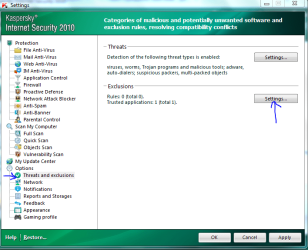
R rubbishbin New member Local time 5:48 AM Messages 15 Oct 23, 2009 #24 open up your KIS and 1. go to Settings 2. Options --> Threats and Exclusions 3. Exclusions --> Settings 4. Trusted applications and add IDM to the list and check all exclusion rules My Computer My Computer At a glance Windows 7 ProfessionalOSWindows 7 Professional
open up your KIS and 1. go to Settings 2. Options --> Threats and Exclusions 3. Exclusions --> Settings 4. Trusted applications and add IDM to the list and check all exclusion rules
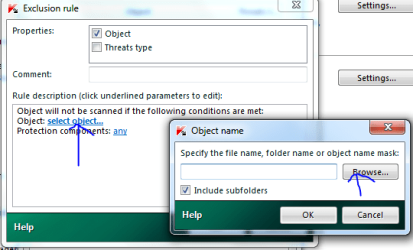
Dinesh Wonder Man Guru Gold Member SF Team Local time 3:18 AM Messages 8,471 Location Mumbai, India Oct 23, 2009 #25 Go to the settings window and click Threats and exclusions. Now under exclusions, click Settings. Now click select object and click Browse. Then Go to C:\Program files\Internet download manager\IDMan.exe and click OK. Edit: Rubbishbin beat me to it. My Computer My Computer At a glance Windows® 8 Pro (64-bit)Intel® Core™ i5 Processor 2467M (1.60GHz, 3MB...6GB DDR3 System Memory at 1,333MHz (on BD 4GB...AMD Radeon™ HD7550M 1GB DDR3 (Ext. Graphic)Computer Manufacturer/Model NumberSamsung NP530U4B-S02INOSWindows® 8 Pro (64-bit)CPUIntel® Core™ i5 Processor 2467M (1.60GHz, 3MB L3 Cache)MotherboardSamsung ElectronicsMemory6GB DDR3 System Memory at 1,333MHz (on BD 4GB + 2GB x 1)Graphics Card(s)AMD Radeon™ HD7550M 1GB DDR3 (Ext. Graphic)Sound CardRealtek High Definition AudioMonitor(s) Displays35.56cm (14.0) SuperBright 300nit HD LED DisplayScreen Resolution1366x768Hard Drives1TB S-ATA II Hard Drive (5400RPM) with ExpressCache 16GB SSDInternet SpeedsucksAntivirusMicrosoft Security EssentialsBrowserGoogle Chrome (Sync enabled)
Go to the settings window and click Threats and exclusions. Now under exclusions, click Settings. Now click select object and click Browse. Then Go to C:\Program files\Internet download manager\IDMan.exe and click OK. Edit: Rubbishbin beat me to it.
A alaaden New member Thread Starter Local time 4:48 PM Messages 32 Oct 24, 2009 #26 I have done this but its still not working !!:S My Computer My Computer At a glance Windows -->7<--OSWindows -->7<--
Dinesh Wonder Man Guru Gold Member SF Team Local time 3:18 AM Messages 8,471 Location Mumbai, India Oct 24, 2009 #27 I think you should contact IDM and email them about this issue. Internet Download Manager - the fastest download accelerator My Computer My Computer At a glance Windows® 8 Pro (64-bit)Intel® Core™ i5 Processor 2467M (1.60GHz, 3MB...6GB DDR3 System Memory at 1,333MHz (on BD 4GB...AMD Radeon™ HD7550M 1GB DDR3 (Ext. Graphic)Computer Manufacturer/Model NumberSamsung NP530U4B-S02INOSWindows® 8 Pro (64-bit)CPUIntel® Core™ i5 Processor 2467M (1.60GHz, 3MB L3 Cache)MotherboardSamsung ElectronicsMemory6GB DDR3 System Memory at 1,333MHz (on BD 4GB + 2GB x 1)Graphics Card(s)AMD Radeon™ HD7550M 1GB DDR3 (Ext. Graphic)Sound CardRealtek High Definition AudioMonitor(s) Displays35.56cm (14.0) SuperBright 300nit HD LED DisplayScreen Resolution1366x768Hard Drives1TB S-ATA II Hard Drive (5400RPM) with ExpressCache 16GB SSDInternet SpeedsucksAntivirusMicrosoft Security EssentialsBrowserGoogle Chrome (Sync enabled)
I think you should contact IDM and email them about this issue. Internet Download Manager - the fastest download accelerator