I have a question concerning a low performance (RAM) on my Pc?

Yankie007

New member
Power User
Local time
4:04 PM
Messages
87
Location
New-Brunswick, Canada
Hi Guys,
I have some concerns about the performance of my Pc. My computer has Windows 7 (64 Bit) installed and 6 Gb of Memory (RAM) in it. The first thing I'm wondering is that I have a bunch of programs (18) pin in the Taskbar and I would like to know if it takes a lot of memories just to have them stored in that Taskbar?

My second question can sound a bit stupid but I need to know for sure:
I have a gadget installed that measures how many RAM Memory I'm using at the moment in Percentage. Now, I will tell you all the programs that are actually open on my computer so you can tell me if it's at a normal level of speed. Here is the programs that are running: 2 Internet Explorer page open, My Picture & My document are open, 3 Microsoft word pages open, I'm downloading 2 torrents, Adobe Dreamweaver, Window calendar & Windows Live Mail. There are eight programs in total that are open and my Gadget (ram in %) shows that I'm using 56% of my 6 Gb Memories. With this result, can you tell me if it's a normal percentage (%) or it is supposed to be lower than that?? Can you please let me know, I would appreciated.

Thanks in advance,

Yannik

Specs:

Windows 7 Home Premium (64 bit)
Intel Core i7 CPU
Memory RAM: 6.0 Gb
 

My Computer My Computer

At a glance

Windows 7 Home Premium 64bit.Intel Core i7 CPU6.00 GB RAMATI Radeon HD 5700 Series
OS
Windows 7 Home Premium 64bit.
CPU
Intel Core i7 CPU
Motherboard
Gigabyte X58A-UD3R
Memory
6.00 GB RAM
Graphics Card(s)
ATI Radeon HD 5700 Series
Sound Card
Creative Sb-X-Fi
Monitor(s) Displays
Acer 24 inch
Screen Resolution
1400 X 1050
Hard Drives
1 Tb
Case
NZXT Mid Tower
Mouse
Kensington Expert Mouse
Internet Speed
Cable
Hi,

Can you close Dreamweaver and see what the RAM% usage is then?

Regards,
Golden
 

My Computer My Computer

At a glance

Windows 10 Pro x64 ; Xubuntu x64Intel i7 860 @ 2.80 GHz O/C'ed to 4.0GHz16GB Corsair Vengance DDR3 @ 661 MHz Dual Cha...EVGA NVidia GTX 560 1024MB
Computer type
PC/Desktop
Computer Manufacturer/Model Number
Golden Mk. I.4
OS
Windows 10 Pro x64 ; Xubuntu x64
CPU
Intel i7 860 @ 2.80 GHz O/C'ed to 4.0GHz
Motherboard
Gigabyte P55A-UD3R Rev.1. Award BIOS F13
Memory
16GB Corsair Vengance DDR3 @ 661 MHz Dual Channel (9-9-9-24)
Graphics Card(s)
EVGA NVidia GTX 560 1024MB
Sound Card
Realtek Integrated
Monitor(s) Displays
Dual Samsung SyncMaster 2494HS
Screen Resolution
1920*1080 and 1920*1080
Hard Drives
1*Samsung 840 EVO 120GB SSD;
1*OCZ Vertex 2 60GB SSD;
2*Samsung F3 SpinPoint 1TB in RAID0;
1*Samsung F1 SpinPoint 1TB;
2*Western Digital 1TB External USB 3.0
1*Western Digital 500GB External USB 3.0
1*Seagate 500GB External USB 2.0
PSU
Thermaltake ToughPower QFan 750W
Case
Thermaltake Element S VK60001W2Z
Cooling
Corsair H60 Water Cooling, 2*230mm and 2*80mm case fans
Keyboard
Logitech G110
Mouse
Logitech MX518
Hi,

Can you close Dreamweaver and see what the RAM% usage is then?

Regards,
Golden

Hi Golden,
I just closed "Dreamweaver" but unfortunatly, the RAM% only came down from 54% to 49%
 

My Computer My Computer

At a glance

Windows 7 Home Premium 64bit.Intel Core i7 CPU6.00 GB RAMATI Radeon HD 5700 Series
OS
Windows 7 Home Premium 64bit.
CPU
Intel Core i7 CPU
Motherboard
Gigabyte X58A-UD3R
Memory
6.00 GB RAM
Graphics Card(s)
ATI Radeon HD 5700 Series
Sound Card
Creative Sb-X-Fi
Monitor(s) Displays
Acer 24 inch
Screen Resolution
1400 X 1050
Hard Drives
1 Tb
Case
NZXT Mid Tower
Mouse
Kensington Expert Mouse
Internet Speed
Cable
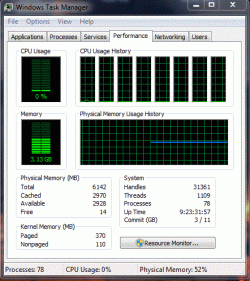
Can you show us your Task Manager Performance Tab.
 

Attachments

  • MEMORY USAGE.JPG
    MEMORY USAGE.JPG
    56.9 KB · Views: 9

My Computer My Computer

At a glance

MS Windows 7 Professional 64-bit SP1AMD FX(tm)-6100 Six-Core Processor Socket AM3...8.00 GB Dual-Channel DDR3 @ 802MHz (11-11-11-...NVIDIA GeForce GTX 560 Ti
Computer type
PC/Desktop
Computer Manufacturer/Model Number
Self Build
OS
MS Windows 7 Professional 64-bit SP1
CPU
AMD FX(tm)-6100 Six-Core Processor Socket AM3+ (942)
Motherboard
ASUSTeK COMPUTER INC. SABERTOOTH 990FX (AM3r2)
Memory
8.00 GB Dual-Channel DDR3 @ 802MHz (11-11-11-36) 1.5Volts
Graphics Card(s)
NVIDIA GeForce GTX 560 Ti
Sound Card
Onboard Realtek HD
Monitor(s) Displays
shimian (1920x1080@60Hz)
Screen Resolution
1920*1080
Hard Drives
OCZ-AGIL ITY3 SATA Disk Device 120GB
PSU
Corsair TX 750
Case
Corsair
Cooling
WaterCooled
Keyboard
Microsoft Wired
Mouse
Logitech USB Optical TiltWheel Mouse
Internet Speed
Realtek PCIe GBE Family Controller 20MB*1MB
Antivirus
Avast
Browser
Firefox
Other Info
150GB Internal Hard Drive for Backing Up Important Files -
Hauppauge Nova-DT Dual DVB-T Tuner Device (+IR) -
USB PC Camera with Mic (SN9C105)
Registry and memory are very important to the computer, they are like the brains.
That being said. Take a memory test to rule out memory problems
Guide to using Memtest86+
 

My Computer My Computer

At a glance

Windows 10, Home Clean InstallIntel Core2 processsor Q8200(2.33Ghz 1333FSB)...6 gbATI Radeon 256MB HD3650
Computer type
PC/Desktop
Computer Manufacturer/Model Number
Dell XPS 420
OS
Windows 10, Home Clean Install
CPU
Intel Core2 processsor Q8200(2.33Ghz 1333FSB) Quad Core Tech
Motherboard
Dell
Memory
6 gb
Graphics Card(s)
ATI Radeon 256MB HD3650
Sound Card
Intergrated 7.1 Channel Audio
Monitor(s) Displays
Dell SP2009W 20"
Hard Drives
640 GB Serial ATA Hard drive
Cooling
Fan
Keyboard
Dell USB Keyboard
Mouse
Dell Premium Optical USB
Internet Speed
DSL 2.85
Hello again,
I just took a screenshot of both the Task Manager and Processes so you can see if it is normal or not.
Thanks,
Yannik
Taskbar.GIF
Processes.GIF
 

My Computer My Computer

At a glance

Windows 7 Home Premium 64bit.Intel Core i7 CPU6.00 GB RAMATI Radeon HD 5700 Series
OS
Windows 7 Home Premium 64bit.
CPU
Intel Core i7 CPU
Motherboard
Gigabyte X58A-UD3R
Memory
6.00 GB RAM
Graphics Card(s)
ATI Radeon HD 5700 Series
Sound Card
Creative Sb-X-Fi
Monitor(s) Displays
Acer 24 inch
Screen Resolution
1400 X 1050
Hard Drives
1 Tb
Case
NZXT Mid Tower
Mouse
Kensington Expert Mouse
Internet Speed
Cable
Hi,

A few more questions:

Your iexplore seems a bit on the high side - how many browser tabs do you typically have open?

Your Word document - how large is that? Does it have a lot of embedded graphics?

I would follow richc46's suggestion and test your RAM to be on the safe side.

Regards,
Golden
 

My Computer My Computer

At a glance

Windows 10 Pro x64 ; Xubuntu x64Intel i7 860 @ 2.80 GHz O/C'ed to 4.0GHz16GB Corsair Vengance DDR3 @ 661 MHz Dual Cha...EVGA NVidia GTX 560 1024MB
Computer type
PC/Desktop
Computer Manufacturer/Model Number
Golden Mk. I.4
OS
Windows 10 Pro x64 ; Xubuntu x64
CPU
Intel i7 860 @ 2.80 GHz O/C'ed to 4.0GHz
Motherboard
Gigabyte P55A-UD3R Rev.1. Award BIOS F13
Memory
16GB Corsair Vengance DDR3 @ 661 MHz Dual Channel (9-9-9-24)
Graphics Card(s)
EVGA NVidia GTX 560 1024MB
Sound Card
Realtek Integrated
Monitor(s) Displays
Dual Samsung SyncMaster 2494HS
Screen Resolution
1920*1080 and 1920*1080
Hard Drives
1*Samsung 840 EVO 120GB SSD;
1*OCZ Vertex 2 60GB SSD;
2*Samsung F3 SpinPoint 1TB in RAID0;
1*Samsung F1 SpinPoint 1TB;
2*Western Digital 1TB External USB 3.0
1*Western Digital 500GB External USB 3.0
1*Seagate 500GB External USB 2.0
PSU
Thermaltake ToughPower QFan 750W
Case
Thermaltake Element S VK60001W2Z
Cooling
Corsair H60 Water Cooling, 2*230mm and 2*80mm case fans
Keyboard
Logitech G110
Mouse
Logitech MX518
Is your computer actually running slow or anything? If not, do not worry about it. You will only make things slower or worse if you try and fix a problem when there is no problem. And yes those numbers you are showing are perfectly normal. You with use more RAM and get a faster computer, or you use the Hard Drive and make a slower computer. You should be glad your computer is using as much RAM as you got. Why else spend all that money to buy it and never use it?

I wish I had more then 2 GB of RAM then maybe I can join the RAM hordes club D:
 

My Computer My Computer

At a glance

Windows 10 Pro (x64)Intel Core i7-3930K (3.2GHz - 4.5GHz)4x Samsung 4GB PC3-12800 DDR3 (16GB 1600MHz)Nvidia Geforce GTX 690
Computer type
PC/Desktop
Computer Manufacturer/Model Number
Alienware Aurora ALX R4
OS
Windows 10 Pro (x64)
CPU
Intel Core i7-3930K (3.2GHz - 4.5GHz)
Motherboard
Alienware Aurora-R4 x79
Memory
4x Samsung 4GB PC3-12800 DDR3 (16GB 1600MHz)
Graphics Card(s)
Nvidia Geforce GTX 690
Sound Card
SteelSeries Siberia Elite
Monitor(s) Displays
Dell UltraSharp U3011
Screen Resolution
2560x1600
Hard Drives
Samsung 850 Pro 256 GB, Seagate 1TB Desktop Hybrid HDD, 2x Western Digital 4TB Green HDD
PSU
875W Some Dell PSU <.<
Case
Alienware Aurora ALX
Cooling
Custom Liquid Cooling (EK CPU & GPU blocks) dual EK 480RAD
Keyboard
Logitech G710+ Mechanical
Mouse
Logitech G700s
Internet Speed
Verizon Fios (50 mbps average)
Other Info
Server: Intel NUC D54250WYK: i5-4250U, 16GB, 256 GB mSATA, Windows Server 2012 R2
Looks fine to me, agree with logicearth, the RAM is there to be used.

Depending on what you're tasking your system to do, win7 will use all the RAM available if needed.

If it's not slowing down, then it's all good.
 

My Computer My Computer

At a glance

Windows 7 Ult x64 - SP1/ Windows 8 Pro x64Intel Core i5-3570K 4.6GHz8GB (2X4GB) DDR3 1600 Corsair Vengeance CL8 1.5vSapphire HD 7770 Vapor-X OC 1GB DDR5
Computer type
PC/Desktop
Computer Manufacturer/Model Number
76~2.0
OS
Windows 7 Ult x64 - SP1/ Windows 8 Pro x64
CPU
Intel Core i5-3570K 4.6GHz
Motherboard
Gigabyte GA-Z77X UD3H, f18
Memory
8GB (2X4GB) DDR3 1600 Corsair Vengeance CL8 1.5v
Graphics Card(s)
Sapphire HD 7770 Vapor-X OC 1GB DDR5
Sound Card
Onboard VIA VT2021
Monitor(s) Displays
22" LCD Dell
Screen Resolution
1680x1050
Hard Drives
Samsung 840Pro 128GB SSD,
Seagate Barracuda 500GB SATA2 7200rpm 32MB cache, Seagate Barracuda 1TB SATA2 7200rpm 32MB cache,
PSU
Corsair HX650W
Case
Cooler Master Storm Scout
Cooling
Corsair H80 2x12cm Noctua NF P12 , 2x14cm case fans
Keyboard
Logitech Wave
Mouse
CM Sentinel
Internet Speed
Dismal
Antivirus
Avast
Browser
Opera Next
Other Info
Haswell laptop: HP Envy 17t-j, i7-4700MQ, GeForce 740M 2GB DDR3, 17.3" Full HD 1920x1080, 16GB RAM, Samsung 840 Pro 128GB, 1TB Hitachi 7200 HDD,
Desktop: eSATA ports,
External eSATA Seagate 500GB SATA2 7200rpm,
External WD USB 500GB
Hello again,
I just took a screenshot of both the Task Manager and Processes so you can see if it is normal or not.
Thanks,
Yannik
View attachment 133720
View attachment 133721


OK win will use about ~ 1/2 of ram for quick starting new apps etc. Thats a very good thing (3 gigs)

Just the five apps with arrows are using about 600 Mb.


Combine the two and you have >50% ram usage.


Normal and fine


Ken J
 
Last edited:

My Computer My Computer

At a glance

Win 8 Release candidate 8400[email protected]4 gigsNvidia 9600M
Computer Manufacturer/Model Number
HP Pavillion dv-7 1005 Tx
OS
Win 8 Release candidate 8400
CPU
[email protected]
Memory
4 gigs
Graphics Card(s)
Nvidia 9600M
Sound Card
HD built-in
Monitor(s) Displays
17" Wxga
Screen Resolution
1440x900
Cooling
none
Internet Speed
45Mb down 5Mb up
Looks fine to me, Windows 7 is using half your memory to cache your programs, which is a good thing ;)
 

My Computer My Computer

At a glance

MS Windows 7 Professional 64-bit SP1AMD FX(tm)-6100 Six-Core Processor Socket AM3...8.00 GB Dual-Channel DDR3 @ 802MHz (11-11-11-...NVIDIA GeForce GTX 560 Ti
Computer type
PC/Desktop
Computer Manufacturer/Model Number
Self Build
OS
MS Windows 7 Professional 64-bit SP1
CPU
AMD FX(tm)-6100 Six-Core Processor Socket AM3+ (942)
Motherboard
ASUSTeK COMPUTER INC. SABERTOOTH 990FX (AM3r2)
Memory
8.00 GB Dual-Channel DDR3 @ 802MHz (11-11-11-36) 1.5Volts
Graphics Card(s)
NVIDIA GeForce GTX 560 Ti
Sound Card
Onboard Realtek HD
Monitor(s) Displays
shimian (1920x1080@60Hz)
Screen Resolution
1920*1080
Hard Drives
OCZ-AGIL ITY3 SATA Disk Device 120GB
PSU
Corsair TX 750
Case
Corsair
Cooling
WaterCooled
Keyboard
Microsoft Wired
Mouse
Logitech USB Optical TiltWheel Mouse
Internet Speed
Realtek PCIe GBE Family Controller 20MB*1MB
Antivirus
Avast
Browser
Firefox
Other Info
150GB Internal Hard Drive for Backing Up Important Files -
Hauppauge Nova-DT Dual DVB-T Tuner Device (+IR) -
USB PC Camera with Mic (SN9C105)
Wow, thanks a lot guys. I trully appreciated your help & advices!
 

My Computer My Computer

At a glance

Windows 7 Home Premium 64bit.Intel Core i7 CPU6.00 GB RAMATI Radeon HD 5700 Series
OS
Windows 7 Home Premium 64bit.
CPU
Intel Core i7 CPU
Motherboard
Gigabyte X58A-UD3R
Memory
6.00 GB RAM
Graphics Card(s)
ATI Radeon HD 5700 Series
Sound Card
Creative Sb-X-Fi
Monitor(s) Displays
Acer 24 inch
Screen Resolution
1400 X 1050
Hard Drives
1 Tb
Case
NZXT Mid Tower
Mouse
Kensington Expert Mouse
Internet Speed
Cable
You're welcome, enjoy your machine.
 

My Computer My Computer

At a glance

Windows 7 Ult x64 - SP1/ Windows 8 Pro x64Intel Core i5-3570K 4.6GHz8GB (2X4GB) DDR3 1600 Corsair Vengeance CL8 1.5vSapphire HD 7770 Vapor-X OC 1GB DDR5
Computer type
PC/Desktop
Computer Manufacturer/Model Number
76~2.0
OS
Windows 7 Ult x64 - SP1/ Windows 8 Pro x64
CPU
Intel Core i5-3570K 4.6GHz
Motherboard
Gigabyte GA-Z77X UD3H, f18
Memory
8GB (2X4GB) DDR3 1600 Corsair Vengeance CL8 1.5v
Graphics Card(s)
Sapphire HD 7770 Vapor-X OC 1GB DDR5
Sound Card
Onboard VIA VT2021
Monitor(s) Displays
22" LCD Dell
Screen Resolution
1680x1050
Hard Drives
Samsung 840Pro 128GB SSD,
Seagate Barracuda 500GB SATA2 7200rpm 32MB cache, Seagate Barracuda 1TB SATA2 7200rpm 32MB cache,
PSU
Corsair HX650W
Case
Cooler Master Storm Scout
Cooling
Corsair H80 2x12cm Noctua NF P12 , 2x14cm case fans
Keyboard
Logitech Wave
Mouse
CM Sentinel
Internet Speed
Dismal
Antivirus
Avast
Browser
Opera Next
Other Info
Haswell laptop: HP Envy 17t-j, i7-4700MQ, GeForce 740M 2GB DDR3, 17.3" Full HD 1920x1080, 16GB RAM, Samsung 840 Pro 128GB, 1TB Hitachi 7200 HDD,
Desktop: eSATA ports,
External eSATA Seagate 500GB SATA2 7200rpm,
External WD USB 500GB
Back
Top