I have a UNIQUE computer problem

Magikal

New member
Member
Local time
1:03 AM
Messages
48
My PC display in terms of Windows Xp and Windows 7 has the left side of my screen slanted/bent backwards a bit. Instead of the straight-across flawless display I am supposed to have. I've troubleshooted using different monitors, two CRT's and two LCD's, I've used different hard drives, moved the PC to different rooms in my apartment, and as far as display adapters are concerned I am using Intel extreme graphics 2. Which Windows 7 tells me is up to date as the latest driver for Intel on board graphics.

This issue occurs in Safe Mode as well, and with my Gateway e-4100 and e-4610 desktops respectively. My theory at this point is two things...my on board graphics chip is faulty. But would that be the case with many different PC's? I've also purchased different e-4100 units in the past and am still having this same issue. It started way back at the start of April this year. So I am looking to get a new graphics card.

My second theory is something in my building or outside of it is interfering with my VGA signal. Now I've always thought PC's were built to block out any sort of interference like that. And all of my cables have ferrites on them. I don't have any magnets near my PC either. Nothing magnet intensive like a Microwave, and I don't own a stereo system, which has magnets. My flat-screen t.v. is in the living room. The bedrooms have a 30 inch Sharp brand color t.v., and an RCA 32 inch High Def t.v. Yet in both bedrooms, this issue persists. I live almost in the heart of New York City, so I am not in some backwoods area where all kinds of stuff gets set up and causes signal interference. I have digital cable, not satellite. So 3 boxes are in my house. No dish. Two boxes are generic cable company brand they gave me with my service. One in the bedroom is a Samsung.

I've also plugged up my PC in the hallway of my building on my floor. And still, have the same issue. So in the case of it possibly being a signal issue, is there anything I could purchase to block any signal interference to my monitor's VGA cable? Also what Intel drivers are connected to the on-board graphics system specifically? Maybe something just needs to updated. Anyone know what may be the issue here? Thanks for any answers!
 

My Computer

Computer type
PC/Desktop
Computer Manufacturer/Model Number
Gateway
OS
Windows 7 64 bit
CPU
Intel Core(R) 2 CPU 1.80GHZ
Motherboard
Intel
Memory
2 GB
Graphics Card(s)
Intel Q965/Q963 Express Chipset Family
Monitor(s) Displays
LCD Gateway, CRT Gateway
Screen Resolution
1024x768, 60 Hertz
Hard Drives
Western Digital 70 GB SATA
PSU
275 watts
Case
Small Form
Cooling
Heatsink Fan
Keyboard
Gateway Millenium
Mouse
Logitech Microsoft
Internet Speed
No specifics but twitter and facebook load very quickly!
Antivirus
United States
Browser
Chrome, IE8
Have you tried adjusting the settings on your monitor, Not the settings on the computer but the monitor its self
 

My Computer

Computer type
PC/Desktop
Computer Manufacturer/Model Number
Compac
OS
Microsoft Windows 7 Ultimate 32-bit 7601
CPU
Intel(R) Pentium(R) Dual CPU E2160 @ 1.80GHz
Motherboard
MSI Boston
Memory
4.00 GB
Graphics Card(s)
(1) VNC Mirror Driver (2) Intel(R) G33/G31 Express Chipset
Sound Card
Disabled
Monitor(s) Displays
Headless
Screen Resolution
1280 x 960 x 32 bits (4294967296 colors) @ 60 Hz
Hard Drives
ST3320820AS ATA Device
Keyboard
Headless
Mouse
Headless
Antivirus
Malwarebytes pro
Other Info
Also
Windows 8.1 Laptop and Desktop both Acer
Have you tried adjusting the settings on your monitor, Not the settings on the computer but the monitor its self

I doubt that would be the issue seeing as he has tried 4 different monitors whilst troubleshooting.

Edit : That is one strange issue though.

Could you borrow a discrete gpu to test it out?
 
Last edited:

My Computer

OS
Windows 7 Professional 64 bit
My PC display in terms of Windows Xp and Windows 7 has the left side of my screen slanted/bent backwards a bit.
There should be settings in your monitor on screen display (OSD) that adjusts the horizontal/vertical edges of the generated display to match the edges of the monitor. The setting would actually bow the side of the display in towards to center of the monitor or out beyond the edge.
I tried looking for a manual to help describe it, but I need more than "Gateway e-4100 and e-4610".

"Back in the day" with the smaller monitors I used to play with those settings to try and get the display to match up with the edges of the monitor. It would take some time because it would throw out the horizontal and vertical edges and mess with the total size of the display or you'd have to correct the side to side or top to bottom alignment.

You'd get one adjustment then have to fiddle with one or two more to straighten things out. Do you have children? They learn from example and it would be possible to copy mommy or daddy.


I live almost in the heart of New York City, so I am not in some backwoods area where all kinds of stuff gets set up and causes signal interference.
Hey! I resemble that remark :p

If you think for one moment your safe in NYC, I have a Bridge for sale, its in Brooklyn crossing the East River.
 

My Computer

Computer type
PC/Desktop
Computer Manufacturer/Model Number
Gateway DX4831-01e (Mid-Tower Desktop)
OS
Originally Win 7 Hm Prem x64 Ver 6.1.7600 Build 7601-SP1 | Upgraded to Windows 10 December 14, 2019
CPU
Intel i3 530 2.93GHz, 2933MHz 2 Cores 4 Logical Processors
Motherboard
Gateway H57M01 133 megahertz
Memory
6GB of 1,333MHz DDR3 SDRAM
Graphics Card(s)
32MB Intel Graphics Media Accelerator HD IGChip
Sound Card
Realtek High Definition Audio
Monitor(s) Displays
Gateway HX2000 20inch TFT active matrix TN
Screen Resolution
1600 x 900 x 59 hertz
Hard Drives
WDC WD10EADS-00M2B0 [HDD] (1000.20 GB) -- drive 0,
HL-DT-ST DVDRAM GH41N [CD-ROM dr]
Four card readers, and Four USB 2.0
PSU
300watts.
Case
Mid-Tower Desktop
Cooling
Stock from Gateway
Keyboard
Natural Ergonomic Keyboard 4000, see Other Info
Mouse
Orig. Gateway wore out now using Insignia USB wired optical
Internet Speed
Vz FIOS 10ms png 57.64Mbps down 65.53Mbps up Speedtest.org
Antivirus
Zamana Anti-logger with Anti-malware, MSE, Windows Firewall,
Browser
IE11.0.9600.19399-Upd ver11.0.135, Firefox 68.0.1 x64
Other Info
System Specs by Belarc.

BIOS: American Megatrends Inc. P01-A0 11/17/2009

Replaced the MS 'Natural' Standard PS/2 Enhanced 101-102 Keyboard with a new Natural Ergonomic Keyboard 4000 on August 1st 2014.

Canon Pixma MG3222 Printer.

Updated to IE11 on 12102015 | Fios Quantum Router g1100

Additional AV: SpywareBlaster, manual Mbam, SAS
Have you tried adjusting the settings on your monitor, Not the settings on the computer but the monitor its self

I've tried that six ways to Sunday. It didn't help. The mysterious bend is still there.
 

My Computer

Computer type
PC/Desktop
Computer Manufacturer/Model Number
Gateway
OS
Windows 7 64 bit
CPU
Intel Core(R) 2 CPU 1.80GHZ
Motherboard
Intel
Memory
2 GB
Graphics Card(s)
Intel Q965/Q963 Express Chipset Family
Monitor(s) Displays
LCD Gateway, CRT Gateway
Screen Resolution
1024x768, 60 Hertz
Hard Drives
Western Digital 70 GB SATA
PSU
275 watts
Case
Small Form
Cooling
Heatsink Fan
Keyboard
Gateway Millenium
Mouse
Logitech Microsoft
Internet Speed
No specifics but twitter and facebook load very quickly!
Antivirus
United States
Browser
Chrome, IE8
My PC display in terms of Windows Xp and Windows 7 has the left side of my screen slanted/bent backwards a bit.
There should be settings in your monitor on screen display (OSD) that adjusts the horizontal/vertical edges of the generated display to match the edges of the monitor. The setting would actually bow the side of the display in towards to center of the monitor or out beyond the edge.
I tried looking for a manual to help describe it, but I need more than "Gateway e-4100 and e-4610".

"Back in the day" with the smaller monitors I used to play with those settings to try and get the display to match up with the edges of the monitor. It would take some time because it would throw out the horizontal and vertical edges and mess with the total size of the display or you'd have to correct the side to side or top to bottom alignment.

You'd get one adjustment then have to fiddle with one or two more to straighten things out. Do you have children? They learn from example and it would be possible to copy mommy or daddy.


I live almost in the heart of New York City, so I am not in some backwoods area where all kinds of stuff gets set up and causes signal interference.
Hey! I resemble that remark :p

If you think for one moment your safe in NYC, I have a Bridge for sale, its in Brooklyn crossing the East River.


:p....No offense meant. It's just illustrating I don't live in an area where jerks mostly pitch towers, and other crazy electronic stuff that screws up frequencies and signals. I had my settings set very well previously. This problem just appeared one day in early April. And it spread across all monitors. So it's either a strange frequency/signal interference issue, or the on board graphics chip is faulty.
 

My Computer

Computer type
PC/Desktop
Computer Manufacturer/Model Number
Gateway
OS
Windows 7 64 bit
CPU
Intel Core(R) 2 CPU 1.80GHZ
Motherboard
Intel
Memory
2 GB
Graphics Card(s)
Intel Q965/Q963 Express Chipset Family
Monitor(s) Displays
LCD Gateway, CRT Gateway
Screen Resolution
1024x768, 60 Hertz
Hard Drives
Western Digital 70 GB SATA
PSU
275 watts
Case
Small Form
Cooling
Heatsink Fan
Keyboard
Gateway Millenium
Mouse
Logitech Microsoft
Internet Speed
No specifics but twitter and facebook load very quickly!
Antivirus
United States
Browser
Chrome, IE8
:p....No offense meant.
None takin' That's why I stuck my tongue out.

It's just illustrating I don't live in an area where jerks mostly pitch towers, and other crazy electronic stuff that screws up frequencies and signals. I had my settings set very well previously. This problem just appeared one day in early April. And it spread across all monitors. So it's either a strange frequency/signal interference issue, or the on board graphics chip is faulty.
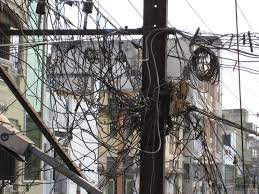
This is no offense to our resident members from India, but, you should feel lucky you don't live there.
india.jpgindia2.jpgIt is to my understanding, it is just the way things are. :(

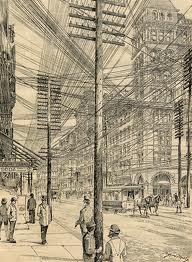
This is how NYC was back in 1900
NYC.jpg

Can you remember back to that time in April, what happened?

  • Did a new neighbor move in?
  • Did you move to a new domicile?
  • Were there Utility crews mucking about?
  • Do you know if there are any HAM operators locally?
  • If you are close to the NYC harbor was there a change in the Coast Guard frequencies? You'd have to contact them to ask. This is a google link: https://www.google.com/search?num=5...t8t7gA6PIgMgE&ved=0CCoQvwUoAA&biw=768&bih=462 It should give you contact #'s to call. The US Navy will just ignore you. Politely.
  • Did Mayor Bloomberg change any security frequencies? Contact the Mayor | NYC.gov
  • Any new buildings that have shot up? refraction can be difficult to track down.
  • Until you check the above, have you tried a system restore?
  • Have you tried a Tin Foil Hat for your monitors?, don't laugh, I use one on my speakers to cut down on the interference from our wi-fi, that may at least see if you are receiving interference. The foil will block it.
I'm kinda' runnin' outta' ideas......................................
 

My Computer

Computer type
PC/Desktop
Computer Manufacturer/Model Number
Gateway DX4831-01e (Mid-Tower Desktop)
OS
Originally Win 7 Hm Prem x64 Ver 6.1.7600 Build 7601-SP1 | Upgraded to Windows 10 December 14, 2019
CPU
Intel i3 530 2.93GHz, 2933MHz 2 Cores 4 Logical Processors
Motherboard
Gateway H57M01 133 megahertz
Memory
6GB of 1,333MHz DDR3 SDRAM
Graphics Card(s)
32MB Intel Graphics Media Accelerator HD IGChip
Sound Card
Realtek High Definition Audio
Monitor(s) Displays
Gateway HX2000 20inch TFT active matrix TN
Screen Resolution
1600 x 900 x 59 hertz
Hard Drives
WDC WD10EADS-00M2B0 [HDD] (1000.20 GB) -- drive 0,
HL-DT-ST DVDRAM GH41N [CD-ROM dr]
Four card readers, and Four USB 2.0
PSU
300watts.
Case
Mid-Tower Desktop
Cooling
Stock from Gateway
Keyboard
Natural Ergonomic Keyboard 4000, see Other Info
Mouse
Orig. Gateway wore out now using Insignia USB wired optical
Internet Speed
Vz FIOS 10ms png 57.64Mbps down 65.53Mbps up Speedtest.org
Antivirus
Zamana Anti-logger with Anti-malware, MSE, Windows Firewall,
Browser
IE11.0.9600.19399-Upd ver11.0.135, Firefox 68.0.1 x64
Other Info
System Specs by Belarc.

BIOS: American Megatrends Inc. P01-A0 11/17/2009

Replaced the MS 'Natural' Standard PS/2 Enhanced 101-102 Keyboard with a new Natural Ergonomic Keyboard 4000 on August 1st 2014.

Canon Pixma MG3222 Printer.

Updated to IE11 on 12102015 | Fios Quantum Router g1100

Additional AV: SpywareBlaster, manual Mbam, SAS
...This issue occurs in Safe Mode as well, and with my Gateway e-4100 and e-4610 desktops respectively. My theory at this point is two things...my on board graphics chip is faulty. But would that be the case with many different PC's? I've also purchased different e-4100 units in the past and am still having this same issue. It started way back at the start of April this year. So I am looking to get a new graphics card.

I'm ready to agree. Here's one suggestion: Borrow a vid card from someone you know. The Big Apple must be full of people who have a spare vid card laying around. Nothing bigtime. An old nVidia card someone salvaged from something they were tossing out. Install the current drivers and check with your current monitor. Check with two or three, if necessary. Good display will equal vid card issue. Bad display will equal time to start making a tin foil hat. Either way, however, you'll need to check if the vid cards in all those units are the same brand. What's the difference between the 4100 and the 4610 models? I bet they use the same vid... Could be something interferring with that specific type of card for a very specific reason that affects no other cards that you've witnessed.
 

My Computer

Computer type
PC/Desktop
Computer Manufacturer/Model Number
iBuyPower NZXT
OS
Microsoft Windows 10 Home Build 15036
CPU
Intel(R) Core(TM) i7-860 @ 2.80GHz
Motherboard
Gigabyte Technology Co., Ltd. P55-UD3L
Memory
4.00 GB
Graphics Card(s)
NVIDIA GeForce GTX 750
Sound Card
(1) Line 6 UX2 (2) Realtek High Definition Audio
Monitor(s) Displays
23" acer
Screen Resolution
1920 x 1080 x 32 bits (4294967296 colors) @ 60 Hz
Hard Drives
(1) WDC WD5000AAKS-00D2B0 ATA Device (2) Seagate FreeAgent Go 250G USB Device
Cooling
Corsair H75 liquid cooler (Very easy to install, actually)
Internet Speed
60M cable modem-->Linksys E1200-->1Gbps net card
Browser
Chrome
Other Info
This is probably the longest I've ever had a Windows machine run without having to restore it to scratch. I'm used to restoring to "factory" about every 2 yrs. I've run with Win7 since new in 2009 and only recently (Nov, '14) restored to clean up the machine from all my 'xperimenting. LOL!! I may never need another machine.

Upgraded to 10 when it was still free, then installed 2017 update.
:p....No offense meant.
None takin' That's why I stuck my tongue out.

It's just illustrating I don't live in an area where jerks mostly pitch towers, and other crazy electronic stuff that screws up frequencies and signals. I had my settings set very well previously. This problem just appeared one day in early April. And it spread across all monitors. So it's either a strange frequency/signal interference issue, or the on board graphics chip is faulty.
This is no offense to our resident members from India, but, you should feel lucky you don't live there.
View attachment 277519View attachment 277520It is to my understanding, it is just the way things are. :(

This is how NYC was back in 1900
View attachment 277529

Can you remember back to that time in April, what happened?

  • Did a new neighbor move in?
  • Did you move to a new domicile?
  • Were there Utility crews mucking about?
  • Do you know if there are any HAM operators locally?
  • If you are close to the NYC harbor was there a change in the Coast Guard frequencies? You'd have to contact them to ask. This is a google link: https://www.google.com/search?num=5...t8t7gA6PIgMgE&ved=0CCoQvwUoAA&biw=768&bih=462 It should give you contact #'s to call. The US Navy will just ignore you. Politely.
  • Did Mayor Bloomberg change any security frequencies? Contact the Mayor | NYC.gov
  • Any new buildings that have shot up? refraction can be difficult to track down.
  • Until you check the above, have you tried a system restore?
  • Have you tried a Tin Foil Hat for your monitors?, don't laugh, I use one on my speakers to cut down on the interference from our wi-fi, that may at least see if you are receiving interference. The foil will block it.
I'm kinda' runnin' outta' ideas......................................


I was always told to keep aluminum foil away from PC's as they can create a charge of some kind. I do have some people doing work in the area but it's not major. Just clearing some rooftops, and across the street from me the people haven't been back for like weeks now. It's the usual demolishing a small building and building something else. But I don't see why that would affect my PC. There's no heavy duty machinery involved.

I accounted for a neighbor in back of me with a satellite dish but dishes are built to block any interference causing, and plus I moved the PC all the way to the other end of the house. Far away from my neighbor in back. The issue was still there. No new buildings have been built in the area. We've had new neighbors, but unless they're smuggling medical equipment, I don't see how they could affect my PC this way with anything standard. System restore was done when issue first started, and didn't work.

I've lived in this apartment for 6 years now with no issue like this ever. If it is frequency related, I need to know if there's something I can buy to solve the issue. Like maybe a cord I can attach to my VGA cord and then plug into the PC. I thought about switching to a DVI, but I don't have the DVI type of plug in back of my PC that can be used with a VGA adapter. Mine doesn't have the four dots and the dash in between. Other than that, I have a JATON 82208N/V2 VIDEO 208PCI-128TV 128MB LOW PROFILE PCI VIDEO GRAPHIC CARD that I might buy to solve this issue.

My PC is not a gaming PC so I just need a card that can do browsing, watch movies, youtube videos, and regular stuff like check email or surf message boards and handle the avatars and such. I am a strictly console gamer.
 

My Computer

Computer type
PC/Desktop
Computer Manufacturer/Model Number
Gateway
OS
Windows 7 64 bit
CPU
Intel Core(R) 2 CPU 1.80GHZ
Motherboard
Intel
Memory
2 GB
Graphics Card(s)
Intel Q965/Q963 Express Chipset Family
Monitor(s) Displays
LCD Gateway, CRT Gateway
Screen Resolution
1024x768, 60 Hertz
Hard Drives
Western Digital 70 GB SATA
PSU
275 watts
Case
Small Form
Cooling
Heatsink Fan
Keyboard
Gateway Millenium
Mouse
Logitech Microsoft
Internet Speed
No specifics but twitter and facebook load very quickly!
Antivirus
United States
Browser
Chrome, IE8
Just to clarify:

The issue exists over multiple displays
The issue exists over multiple computers
Both computers have the same graphics adapter
Magnetic Interference has largely been ruled out by location changes and absence of high EMI equipment.
This is not something that can be tweaked out via the on screen menu of a CRT.

If all the above is correct you are looking at either:

1. A GPU fault that has been duplicated...

If running the latest drivers, try searching for an older driver for testing.

2. Some unheard of cable fault (overheated in the past and lost sufficient insulation between internal strands)

Try a different VGA cable.

3. What ANAC said above!

Do what ANAC said above.

Testing with another GPU has been mentioned and would confirm the fault lies in the GPU's which I believe are on-board.
 

My Computer

Computer type
PC/Desktop
Computer Manufacturer/Model Number
Self Build
OS
Windows 7 Ultimate x64
CPU
Intel Core2 Quad Q8300 2.5Ghz
Motherboard
Asus P5QD Turbo
Memory
Kingston HyperX 4x1GB DDR2 1066Mhz
Graphics Card(s)
Asus/Nvidia 9500GT 1GB
Sound Card
On-Board HD
Monitor(s) Displays
22" Widescreen TFT
Screen Resolution
1920x1080
Hard Drives
2x 320Gb Seagate SATAII RAID 0
2x 80Gb Seagate SATAII RAID 0
1x 1tb hybrid (8gb ssd)
PSU
650w
Case
ATX
Cooling
140mm front, 120mm Rear, 80mm Chipset + stock CPU and GPU
Keyboard
Plastic one
Mouse
Plastic one
Internet Speed
4Mbps
Other Info
Laptop: HP Elitebook 2560p
i5 @2.7Ghz 4GB DDR3
Magikal said:
ANAC said:
  • Have you tried a Tin Foil Hat for your monitors?, don't laugh, I use one on my speakers to cut down on the interference from our wi-fi, that may at least see if you are receiving interference. The foil will block it.

I was always told to keep aluminum foil away from PC's as they can create a charge of some kind.

Tin foil around an EMI producing device will reflect the interference back inside and could potentialy lead to a significant positive charge. Putting it around a non EMI producing device will help shield it.

PC's should not be giving out a significant amount of EMI as the manufacturers have long been governed by radio interference regulations.

Foil around cables. I would
Foil around speakers. I Would
Foil around Monitor. I would NOT (mainly because of thermal insulation)
Foil around Desktop. I would not. Theoretically not a problem but I would rather have any EMI leaving the chasis rather than bouncing around inside causing potential BSOD
 

My Computer

Computer type
PC/Desktop
Computer Manufacturer/Model Number
Self Build
OS
Windows 7 Ultimate x64
CPU
Intel Core2 Quad Q8300 2.5Ghz
Motherboard
Asus P5QD Turbo
Memory
Kingston HyperX 4x1GB DDR2 1066Mhz
Graphics Card(s)
Asus/Nvidia 9500GT 1GB
Sound Card
On-Board HD
Monitor(s) Displays
22" Widescreen TFT
Screen Resolution
1920x1080
Hard Drives
2x 320Gb Seagate SATAII RAID 0
2x 80Gb Seagate SATAII RAID 0
1x 1tb hybrid (8gb ssd)
PSU
650w
Case
ATX
Cooling
140mm front, 120mm Rear, 80mm Chipset + stock CPU and GPU
Keyboard
Plastic one
Mouse
Plastic one
Internet Speed
4Mbps
Other Info
Laptop: HP Elitebook 2560p
i5 @2.7Ghz 4GB DDR3
Magikal said:
ANAC said:
  • Have you tried a Tin Foil Hat for your monitors?, don't laugh, I use one on my speakers to cut down on the interference from our wi-fi, that may at least see if you are receiving interference. The foil will block it.

I was always told to keep aluminum foil away from PC's as they can create a charge of some kind.

Tin foil around an EMI producing device will reflect the interference back inside and could potentialy lead to a significant positive charge. Putting it around a non EMI producing device will help shield it.

PC's should not be giving out a significant amount of EMI as the manufacturers have long been governed by radio interference regulations.

Foil around cables. I would
Foil around speakers. I Would
Foil around Monitor. I would NOT (mainly because of thermal insulation)
Foil around Desktop. I would not. Theoretically not a problem but I would rather have any EMI leaving the chasis rather than bouncing around inside causing potential BSOD


My vga monitor cable has a ferrite though. To protect against interference I guess. So should I wrap a little bit of foil around the wire part after the ferrite or before it?
 

My Computer

Computer type
PC/Desktop
Computer Manufacturer/Model Number
Gateway
OS
Windows 7 64 bit
CPU
Intel Core(R) 2 CPU 1.80GHZ
Motherboard
Intel
Memory
2 GB
Graphics Card(s)
Intel Q965/Q963 Express Chipset Family
Monitor(s) Displays
LCD Gateway, CRT Gateway
Screen Resolution
1024x768, 60 Hertz
Hard Drives
Western Digital 70 GB SATA
PSU
275 watts
Case
Small Form
Cooling
Heatsink Fan
Keyboard
Gateway Millenium
Mouse
Logitech Microsoft
Internet Speed
No specifics but twitter and facebook load very quickly!
Antivirus
United States
Browser
Chrome, IE8
the ferrite, is a magnetic loop to stifle any magnetic interference from traveling down the cable, a VGA cable will already be shielded internally, there is no point in wrapping it in foil, sorry that was a general do's and dont's to clarify on the tin foil point.

Although the monitor idea would be ok for a short period to see if it helps, just dont leave it wrapped or your monitor will overheat. About 5mins will be fine.

A Ferrite (magnet) wont repair a degraded signal though, have you tried multiple VGA cables or are all these tests from the same cable?
 

My Computer

Computer type
PC/Desktop
Computer Manufacturer/Model Number
Self Build
OS
Windows 7 Ultimate x64
CPU
Intel Core2 Quad Q8300 2.5Ghz
Motherboard
Asus P5QD Turbo
Memory
Kingston HyperX 4x1GB DDR2 1066Mhz
Graphics Card(s)
Asus/Nvidia 9500GT 1GB
Sound Card
On-Board HD
Monitor(s) Displays
22" Widescreen TFT
Screen Resolution
1920x1080
Hard Drives
2x 320Gb Seagate SATAII RAID 0
2x 80Gb Seagate SATAII RAID 0
1x 1tb hybrid (8gb ssd)
PSU
650w
Case
ATX
Cooling
140mm front, 120mm Rear, 80mm Chipset + stock CPU and GPU
Keyboard
Plastic one
Mouse
Plastic one
Internet Speed
4Mbps
Other Info
Laptop: HP Elitebook 2560p
i5 @2.7Ghz 4GB DDR3
the ferrite, is a magnetic loop to stifle any magnetic interference from traveling down the cable, a VGA cable will already be shielded internally, there is no point in wrapping it in foil, sorry that was a general do's and dont's to clarify on the tin foil point.

Although the monitor idea would be ok for a short period to see if it helps, just dont leave it wrapped or your monitor will overheat. About 5mins will be fine.

A Ferrite (magnet) wont repair a degraded signal though, have you tried multiple VGA cables or are all these tests from the same cable?


Each of my monitors have their own vga cable so yes I have used different cables.
 

My Computer

Computer type
PC/Desktop
Computer Manufacturer/Model Number
Gateway
OS
Windows 7 64 bit
CPU
Intel Core(R) 2 CPU 1.80GHZ
Motherboard
Intel
Memory
2 GB
Graphics Card(s)
Intel Q965/Q963 Express Chipset Family
Monitor(s) Displays
LCD Gateway, CRT Gateway
Screen Resolution
1024x768, 60 Hertz
Hard Drives
Western Digital 70 GB SATA
PSU
275 watts
Case
Small Form
Cooling
Heatsink Fan
Keyboard
Gateway Millenium
Mouse
Logitech Microsoft
Internet Speed
No specifics but twitter and facebook load very quickly!
Antivirus
United States
Browser
Chrome, IE8
Can you take one of your PCs to a friends house that is not in your neighborhood and test it there?
 

My Computer

Computer type
PC/Desktop
Computer Manufacturer/Model Number
home built
OS
Multi-Boot W7_Pro_x64 W8.1_Pro_x64 W10_Pro_x64 +Linux_VMs +Chromium_VM
CPU
AMD Athlon II x4 620
Motherboard
Gigabyte GA-MA785G-UD3H
Memory
6GB GSkill DDR2 800
Graphics Card(s)
AMD 4670 GPU + AMD 4200 IGP
Sound Card
on board Realtek ALC889A
Monitor(s) Displays
RCA 40" LCD TV, Insignia 32" LCD TV, HP 15" LCD monitor
Screen Resolution
1680 x 1050
Hard Drives
OCZ Vertex 3 120GB,
Samsung F3 1TB (3),
Several others - WD, Seagate, Hitachi, ...
PSU
Corsair 500 W
Case
Rosewill mid tower
Cooling
CM 90mm rifle
Keyboard
Gyration wireless, Logitech wireless, Dell USB wired
Mouse
Gyration wireless, Logitech wireless, V7 USB wired
Internet Speed
Spectrum - 100Mbps D / 10Mbps U
Antivirus
Avast, MBAM3, EMET, WinPatrol
Browser
Pale Moon, Firefox, IE
Other Info
2 multi-boot PC's
Mainly HTPC/Office/Gen purpose (no gaming).
Trendnet USB KVM.
LG DVD burner/Blue Ray Player.
Tray system for removable SATA backup drives.

Not currently OCd, under-volted.
I use Hybrid sleep, rarely re-boot or shutdown.

Hauppauge HD-PVR, Avermedia PCIe TV Tuner, Hauppauge PCI TV Tuner.
Does your computer support digital video output? that would rule out interference.
 

My Computer

Computer type
PC/Desktop
Computer Manufacturer/Model Number
Apple 17" iMac MA199LL (Early 2006)
OS
Windows 8 Pro (32-bit)
CPU
1.83GHz Intel Core Duo
Memory
2GB 667MHz DDR2 SDRAM (PC2-5300) (upgrade)
Graphics Card(s)
ATI Radeon X1600 with 128MB GDDR3 memory
Monitor(s) Displays
17-inch TFT active-matrix LCD, millions of colors
Screen Resolution
1440 x 900
Hard Drives
Hitachi 320GB HDT721032SLA360 7200RPM SATA II (upgrade)
Keyboard
Microsoft Wired Keyboard 600
Mouse
Microsoft Basic Optical Mouse v2.0
Internet Speed
4 Mbps
Antivirus
Microsoft Security Essentials
Browser
Google Chrome
Other Info
WEI:
Base Score: 3.9 Processor: 4.4 Memory 4.7
Graphics: 3.9 Gaming Graphics: 4.1 Primary HD: 5.9
Thanks Sub Styler I learned something today about tin aluminum foil and computers, and for the thread synopsis it helps to keep things on track.

Magikal, it sounds like you're entertaining the idea of using the foil on your monitor, be alert and no longer than the 5minutes like Styler suggested.

David's tip about taking one of the PC's to an entirely different location is a good one.

FuturDreamz tip had me looking to see if your Intel extreme graphics 2 does support DVO and I came up with this:
intel display.JPG

Source: http://download.intel.com/support/graphics/sb/14xug.pdf

If you see it listed, you have it. If you don't, you don't.

Also:
Graphics — Troubleshooting TV connections to computer

Graphics — Intel® Graphics And Televisions FAQ
 

My Computer

Computer type
PC/Desktop
Computer Manufacturer/Model Number
Gateway DX4831-01e (Mid-Tower Desktop)
OS
Originally Win 7 Hm Prem x64 Ver 6.1.7600 Build 7601-SP1 | Upgraded to Windows 10 December 14, 2019
CPU
Intel i3 530 2.93GHz, 2933MHz 2 Cores 4 Logical Processors
Motherboard
Gateway H57M01 133 megahertz
Memory
6GB of 1,333MHz DDR3 SDRAM
Graphics Card(s)
32MB Intel Graphics Media Accelerator HD IGChip
Sound Card
Realtek High Definition Audio
Monitor(s) Displays
Gateway HX2000 20inch TFT active matrix TN
Screen Resolution
1600 x 900 x 59 hertz
Hard Drives
WDC WD10EADS-00M2B0 [HDD] (1000.20 GB) -- drive 0,
HL-DT-ST DVDRAM GH41N [CD-ROM dr]
Four card readers, and Four USB 2.0
PSU
300watts.
Case
Mid-Tower Desktop
Cooling
Stock from Gateway
Keyboard
Natural Ergonomic Keyboard 4000, see Other Info
Mouse
Orig. Gateway wore out now using Insignia USB wired optical
Internet Speed
Vz FIOS 10ms png 57.64Mbps down 65.53Mbps up Speedtest.org
Antivirus
Zamana Anti-logger with Anti-malware, MSE, Windows Firewall,
Browser
IE11.0.9600.19399-Upd ver11.0.135, Firefox 68.0.1 x64
Other Info
System Specs by Belarc.

BIOS: American Megatrends Inc. P01-A0 11/17/2009

Replaced the MS 'Natural' Standard PS/2 Enhanced 101-102 Keyboard with a new Natural Ergonomic Keyboard 4000 on August 1st 2014.

Canon Pixma MG3222 Printer.

Updated to IE11 on 12102015 | Fios Quantum Router g1100

Additional AV: SpywareBlaster, manual Mbam, SAS
In order to have a digital display, I'd have to buy a whole new monitor. My DVI socket on my pc tower is DVI-D.
 

My Computer

Computer type
PC/Desktop
Computer Manufacturer/Model Number
Gateway
OS
Windows 7 64 bit
CPU
Intel Core(R) 2 CPU 1.80GHZ
Motherboard
Intel
Memory
2 GB
Graphics Card(s)
Intel Q965/Q963 Express Chipset Family
Monitor(s) Displays
LCD Gateway, CRT Gateway
Screen Resolution
1024x768, 60 Hertz
Hard Drives
Western Digital 70 GB SATA
PSU
275 watts
Case
Small Form
Cooling
Heatsink Fan
Keyboard
Gateway Millenium
Mouse
Logitech Microsoft
Internet Speed
No specifics but twitter and facebook load very quickly!
Antivirus
United States
Browser
Chrome, IE8
This is frustrating, and I can see you've been at it longer:

At my wits end! Hope someone can help! - Geeks to Go Forums

Is it Windows or my PC? | Windows Secrets Lounge

After reading through those two threads, your theory about the bad graphics chip might be true. I believe you said in one or both you bought the machines from Ebay?

That got me to thinking about dried out thermal paste, and I couldn't find anywhere that anyone mentioned about testing for a bad Motherboard (MB).

You could use Prime95 to test the MB to see if it can handle the stress, and heat, I can point you to it, but I don't know much about it because I've never used it.

Here's some documentation: Prime95

If you decide to go with the Jaton card install (Support) don't forget to go into the bios and disable the on board graphics, and personally in my humble opinion, I'd stay away from Ebay.

If it's not too late return those units and deal with a local computer shop.
 

My Computer

Computer type
PC/Desktop
Computer Manufacturer/Model Number
Gateway DX4831-01e (Mid-Tower Desktop)
OS
Originally Win 7 Hm Prem x64 Ver 6.1.7600 Build 7601-SP1 | Upgraded to Windows 10 December 14, 2019
CPU
Intel i3 530 2.93GHz, 2933MHz 2 Cores 4 Logical Processors
Motherboard
Gateway H57M01 133 megahertz
Memory
6GB of 1,333MHz DDR3 SDRAM
Graphics Card(s)
32MB Intel Graphics Media Accelerator HD IGChip
Sound Card
Realtek High Definition Audio
Monitor(s) Displays
Gateway HX2000 20inch TFT active matrix TN
Screen Resolution
1600 x 900 x 59 hertz
Hard Drives
WDC WD10EADS-00M2B0 [HDD] (1000.20 GB) -- drive 0,
HL-DT-ST DVDRAM GH41N [CD-ROM dr]
Four card readers, and Four USB 2.0
PSU
300watts.
Case
Mid-Tower Desktop
Cooling
Stock from Gateway
Keyboard
Natural Ergonomic Keyboard 4000, see Other Info
Mouse
Orig. Gateway wore out now using Insignia USB wired optical
Internet Speed
Vz FIOS 10ms png 57.64Mbps down 65.53Mbps up Speedtest.org
Antivirus
Zamana Anti-logger with Anti-malware, MSE, Windows Firewall,
Browser
IE11.0.9600.19399-Upd ver11.0.135, Firefox 68.0.1 x64
Other Info
System Specs by Belarc.

BIOS: American Megatrends Inc. P01-A0 11/17/2009

Replaced the MS 'Natural' Standard PS/2 Enhanced 101-102 Keyboard with a new Natural Ergonomic Keyboard 4000 on August 1st 2014.

Canon Pixma MG3222 Printer.

Updated to IE11 on 12102015 | Fios Quantum Router g1100

Additional AV: SpywareBlaster, manual Mbam, SAS

My Computer

Computer type
PC/Desktop
Computer Manufacturer/Model Number
Golden Mk. I.4
OS
Windows 10 Pro x64 ; Xubuntu x64
CPU
Intel i7 860 @ 2.80 GHz O/C'ed to 4.0GHz
Motherboard
Gigabyte P55A-UD3R Rev.1. Award BIOS F13
Memory
16GB Corsair Vengance DDR3 @ 661 MHz Dual Channel (9-9-9-24)
Graphics Card(s)
EVGA NVidia GTX 560 1024MB
Sound Card
Realtek Integrated
Monitor(s) Displays
Dual Samsung SyncMaster 2494HS
Screen Resolution
1920*1080 and 1920*1080
Hard Drives
1*Samsung 840 EVO 120GB SSD;
1*OCZ Vertex 2 60GB SSD;
2*Samsung F3 SpinPoint 1TB in RAID0;
1*Samsung F1 SpinPoint 1TB;
2*Western Digital 1TB External USB 3.0
1*Western Digital 500GB External USB 3.0
1*Seagate 500GB External USB 2.0
PSU
Thermaltake ToughPower QFan 750W
Case
Thermaltake Element S VK60001W2Z
Cooling
Corsair H60 Water Cooling, 2*230mm and 2*80mm case fans
Keyboard
Logitech G110
Mouse
Logitech MX518
Back
Top