Solved I have calibration issues only in IE9

someproblems

New member
Local time
8:25 PM
Messages
19
My most reliable internet source is IE9. One day, I cleaned my keyboard without shutting down my computer. I was still on my email page. Now, whenever I click something, such as something on google, it usually selects an option 1 or 2 above or below. It doesn't select the correct one. Also, when i try to click something, i have to right click and press open. This is very Inconvenient. I ignored it for a while, but now I can't even register for certain programs. When it has those selecting options, it wouldn't let me open the options. When i finally did, selecting it only brought me back up to my name! Whenever i press backspace, it brings me to the previous page. :(
 

My Computer My Computer

At a glance

Windows 7 Home Premium
OS
Windows 7 Home Premium
So when you use another browser, everything is normal ?

Someone with more knowledge may opine, but I would begin by resetting IE9. Go to Internet Options/Advanced/Reset and/or uninstall and reinstall IE9.
 

My Computer My Computer

At a glance

Win 7, 32bit, Premium
OS
Win 7, 32bit, Premium
i uninstalled it and restalled it. I still didn't work. this is a link http://www.youtube.com/watch?v=IKWreoxEroM none of my other browsers are fast enough. Also, in the video, you might notice a hand there that is slightly curved. It replaces the normal arrow cursor i don't understand it.
 

My Computer My Computer

At a glance

Windows 7 Home Premium
OS
Windows 7 Home Premium
Try checking your Mouse & Keyboard settings , open Control Panel & select view by icons.
 

My Computer My Computer

At a glance

Windows 7 Ultimate 64 bitIntel Core i7 4770K overclocked to 4.7GHz Qua...16GB Team Group Vulcan Gold 2133MHzATI Radeon HD 7880 Series Display adapter
Computer type
PC/Desktop
Computer Manufacturer/Model Number
self build
OS
Windows 7 Ultimate 64 bit
CPU
Intel Core i7 4770K overclocked to 4.7GHz Quad Core Haswell
Motherboard
Asus Z87 Pro (Socket 1150) ATX Motherboard
Memory
16GB Team Group Vulcan Gold 2133MHz
Graphics Card(s)
ATI Radeon HD 7880 Series Display adapter
Monitor(s) Displays
NEC LCD2690WUXi2
Screen Resolution
26" 1920 x 1200
Hard Drives
Samsung 500GB SSD 840 EVO SATA 6Gb/s
Samsung 250GB SSD 840 EVO SATA 6Gb/s
PSU
Corsair AX760 Platinum
Case
Cooler Master HAF X Gaming Tower
Cooling
XSPC RayStorm 750 RS360 Water cooling
Mouse
Razer Death Adder left handed
Internet Speed
126Mb download 11.5Mb up
Antivirus
Avast free
Browser
Opera
Other Info
Main Browser is Opera
Favorite software Adobe Lightroom & Photoshop
best plugins Nik software
Firewall : Private firewall 7
i really think i activated a keyboard shortcut when i cleaned it. Is there a way where i can possibly reset my keyboard and mouse to default? like wiping out all of the changes i have made?
 

My Computer My Computer

At a glance

Windows 7 Home Premium
OS
Windows 7 Home Premium
Have you tried simply doing a system restore?

To run a system restore:
Windows orb (start button)
Control Panel
Click view by large icons
Click backup and restore
Click recover system settings on your computer
Click open system restore
Click next
Click show more restore points

Check the restore point dates- is there a date you think may be before the
problem occured?
If so click on that restore point, click next and take heed of the warnings.
You will lose recently added programs and updates.

If you don't already, it is a good idea to occasionally create a
restore point manually so you can fix these sort of problems
easily. I usually create a restore point before any new installs
of any type and if not doing an install I will still manually create
a restore point once every few days (weekly minimum- yes I'm paranoid!!!).

The following link will show you how to manually create restore points
on your machine. System Restore uses a managed piece of space
on the hard drive for storing the restore points, this space can be increased
(99% sure) if required but that's another lesson.

Let us know how you go :)

P.S: Also try uninstalling the driver for your keyboard and then re-installing.
I would think that the deafult settings would be applied back to your keyboard
if you do this (do same for mouse if required). Come to think of it, I would probably
try that first!!!!

I knew I'd have to edit!!! Always do! The link mentioned above is:
http://windows.microsoft.com/en-AU/windows7/Create-a-restore-point
 
Last edited:

My Computer My Computer

At a glance

Windows 7 Home Premium 64 Bit OS
OS
Windows 7 Home Premium 64 Bit OS
Have you tried simply doing a system restore?

I knew I'd have to edit!!! Always do! The link mentioned above is: Create a restore point
Just a note about editing, AllOnTheBus. After you've saved and exited your post, you can go back and edit it merely by clicking on the Edit link. You don't have to give a reason, in fact, you can just change the text to whatever it is that you wanted to say, and chances are, the members will not even know that the post has been edited. Even if you've waited a bit too long, and you get the "Edited by. . ." notation at the bottom of your post, it really doesn't matter --- editing is very common for many of us who want our posts to be as accurate as possible.

And PS, I thought your suggestion about doing a system restore was a wise one. That's what I would've suggested for the OP as well.
 

My Computer My Computer

At a glance

Vista 64 bit and 32 bit (SP2)Intel(R) Core(TM)2 Duo Processor T9400 (2.53 GHz4GB DDR2 System Memory (2 Dimm)512 MB NVIDIA GeForce 9600M GT
Computer Manufacturer/Model Number
HP Pavillion dv5t (generation 1)
OS
Vista 64 bit and 32 bit (SP2)
CPU
Intel(R) Core(TM)2 Duo Processor T9400 (2.53 GHz
Memory
4GB DDR2 System Memory (2 Dimm)
Graphics Card(s)
512 MB NVIDIA GeForce 9600M GT
Monitor(s) Displays
15.4" diagonal WSXGA+ High-Definition HP BrightView Widescre
Screen Resolution
1680 x 1050
Hard Drives
320GB 5400RPM SATA Hard Drive with HP ProtectSmart Hard Drive Protection
Keyboard
Built-in HP
Mouse
Built in - Synaptics TouchPad V6.5 on PS/2 Port
Internet Speed
Max
Other Info
~ Intel Next-Gen Wireless-N Mini-card w/Bluetooth ~ Blu-Ray ROM DVD+/-R/RW ~ Integ. HDTV Hybrid Tuner ~ 12 Cell Battery ~ MS Office (Home Premium) 2007 ~
Control Panel System Restore.JPG well, AllOnTheBus, and Imperfect1, does this eanswer your question? Well, i will try your idea of uninstalling the driver. Can you help me, I'm not that advanced :huh:
 

My Computer My Computer

At a glance

Windows 7 Home Premium
OS
Windows 7 Home Premium
Should have suggested this first, if you have access to another keyboard & mouse try using them instead.
 

My Computer My Computer

At a glance

Windows 7 Ultimate 64 bitIntel Core i7 4770K overclocked to 4.7GHz Qua...16GB Team Group Vulcan Gold 2133MHzATI Radeon HD 7880 Series Display adapter
Computer type
PC/Desktop
Computer Manufacturer/Model Number
self build
OS
Windows 7 Ultimate 64 bit
CPU
Intel Core i7 4770K overclocked to 4.7GHz Quad Core Haswell
Motherboard
Asus Z87 Pro (Socket 1150) ATX Motherboard
Memory
16GB Team Group Vulcan Gold 2133MHz
Graphics Card(s)
ATI Radeon HD 7880 Series Display adapter
Monitor(s) Displays
NEC LCD2690WUXi2
Screen Resolution
26" 1920 x 1200
Hard Drives
Samsung 500GB SSD 840 EVO SATA 6Gb/s
Samsung 250GB SSD 840 EVO SATA 6Gb/s
PSU
Corsair AX760 Platinum
Case
Cooler Master HAF X Gaming Tower
Cooling
XSPC RayStorm 750 RS360 Water cooling
Mouse
Razer Death Adder left handed
Internet Speed
126Mb download 11.5Mb up
Antivirus
Avast free
Browser
Opera
Other Info
Main Browser is Opera
Favorite software Adobe Lightroom & Photoshop
best plugins Nik software
Firewall : Private firewall 7
OK someproblems

Obviously you are going to have troubles restoring because there are no restore points available to you .
Remember what I said in the previous post and start manually creating restore points for occasions such as you are in now and it can help you to easily resolve your problems.

With that being said , have you tried stve's suggestion of trying a different keyboard and mouse?
This is a process of elimination to try to solve your problem.

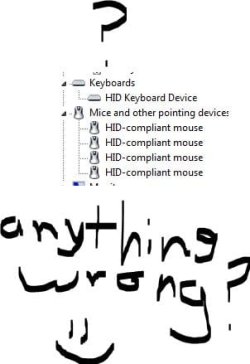
Could you also please post an image back here of your keyboards and mice and other pointing devices from the device manager on your system.

To do this:
Windows orb (start button)
Control Panel
View by large icons
Device manager
Expand the keyboards and mouse and other pointing devices sections by clicking the small arrow next to each of these sections
Take a screenshot and post

This will help to determine if there may be a problem with drivers and to give information on where to find a "clean" download to replace them if they are corrupted.

Could you please also provide details about the manufacturer of your system
and what model it is (supply details from any stickers you can find on your system) so as to allow us to find what you require quicker.
 

My Computer My Computer

At a glance

Windows 7 Home Premium 64 Bit OS
OS
Windows 7 Home Premium 64 Bit OS
i have switched items almost 3 times -_-
 

My Computer My Computer

At a glance

Windows 7 Home Premium
OS
Windows 7 Home Premium
Have you tried firefox browser to see
if you have the same problem?
 

My Computer My Computer

At a glance

Windows 7 Home Premium 64 Bit OS
OS
Windows 7 Home Premium 64 Bit OS
yes, i have two other computers with mouses and keyboards. I tried them all and it didn't help. My computer is a gateway. device manager.JPG
 

My Computer My Computer

At a glance

Windows 7 Home Premium
OS
Windows 7 Home Premium
uh sory for the repeats, i didn't see the second page :P it only happens in IE9
 

My Computer My Computer

At a glance

Windows 7 Home Premium
OS
Windows 7 Home Premium
ITS FIXED YES. I clicked ALT, then a toolbar
 

My Computer My Computer

At a glance

Windows 7 Home Premium
OS
Windows 7 Home Premium
ITS FIXED YES!, WHEN I clicked ALT, a menu bar appeared under the adress bar. I pressed view and the second last item, Panning hand was checked. I unchecked it and YAY its fixed:D:D:D:D:D:D:D:D:D:D:D:D:D:D:D:D:D:D:D:D:D:D:D:D:D:D:D:D:D:D:D:D:D:D:D:D:D:D:D:D:D:D:D:D:D:D:D:D:D:D:D:D:D:D:D:D:D:D
 

My Computer My Computer

At a glance

Windows 7 Home Premium
OS
Windows 7 Home Premium
Back
Top