I hope somebody can help me

jvsimo1

New member
Member
Local time
12:38 AM
Messages
73
Location
Carnarvon, North west australia
I have just gone from Vista to Windows 7 on a new computer, I have also installed Microsoft Works Task Launcher so that I can read my transferred info from Vista. However all my Spreadsheet Documents come up in Abode Reader and I keep getting a message, saying "Abode Reader could not open the document because it is either not a supported file, or because the file has been damaged". If I uninstall Abode Reader will that solve my problem? Or it there an easier way around the problem?
 

My Computer My Computer

At a glance

Windows 7 Home Premium 32 bit500 GB Sata4 GB ( 4X 1 GB)
Computer Manufacturer/Model Number
Dell inspiron 560 MT desktop
OS
Windows 7 Home Premium 32 bit
CPU
500 GB Sata
Memory
4 GB ( 4X 1 GB)
Hard Drives
One Sata
Try an uninstall, first.
 

My Computer My Computer

At a glance

Windows 7 Home Premium 64 bitIntel Core i7-4790G.SKILL 8GB (2 x 4GB) DDR3 F3-10666CL9D-8GBNTAMD Radeon R7 250
Computer type
PC/Desktop
Computer Manufacturer/Model Number
Custom Build
OS
Windows 7 Home Premium 64 bit
CPU
Intel Core i7-4790
Motherboard
GA-Z87X-D3H
Memory
G.SKILL 8GB (2 x 4GB) DDR3 F3-10666CL9D-8GBNT
Graphics Card(s)
AMD Radeon R7 250
Sound Card
Realtek ALC892
Monitor(s) Displays
Samsung UN32EH5000, Dell 1703FPT
Screen Resolution
1920 x 1080, 1280 x 1024
Hard Drives
WD5003AZEX
WD10EZEX
Samsung HD103SJ
Samsung 128 GB 840 PRO
PSU
SeaSonic M12II SS-500GM
Case
Fractal Design Define R4
Cooling
Zalman CNPS9900ALED
Keyboard
Logitech K800
Mouse
Logitech M705
Internet Speed
16 Mbps
Antivirus
Avast
Browser
Firefox
Other Info
Bose Companion 2 Multimedia Speakers
"all my Spreadsheet Documents"

silly question--but--is the program that created these spreadsheets installed on your new machine?
 

My Computer My Computer

At a glance

win7 ultimate 32bitcore2 Extreme QX6850-OCd to 3.15 GHz4 GBNVidia 8600 GT
Computer Manufacturer/Model Number
SALEON model 2.2b
OS
win7 ultimate 32bit
CPU
core2 Extreme QX6850-OCd to 3.15 GHz
Motherboard
ASUS P5G41-M LE
Memory
4 GB
Graphics Card(s)
NVidia 8600 GT
Monitor(s) Displays
23" acer
Hard Drives
one SATA 250GB partitioned equally in half
one SATA 160GB-internal storage
PSU
500W Thermaltake
Case
mini tower
p5bdkw, tried that, but no joy.

tman69, Yes I have installed Microsoft Works Task Launcher
 

My Computer My Computer

At a glance

Windows 7 Home Premium 32 bit500 GB Sata4 GB ( 4X 1 GB)
Computer Manufacturer/Model Number
Dell inspiron 560 MT desktop
OS
Windows 7 Home Premium 32 bit
CPU
500 GB Sata
Memory
4 GB ( 4X 1 GB)
Hard Drives
One Sata

My Computer My Computer

At a glance

Windows 7 Home Premium 64 bitIntel Core i7-4790G.SKILL 8GB (2 x 4GB) DDR3 F3-10666CL9D-8GBNTAMD Radeon R7 250
Computer type
PC/Desktop
Computer Manufacturer/Model Number
Custom Build
OS
Windows 7 Home Premium 64 bit
CPU
Intel Core i7-4790
Motherboard
GA-Z87X-D3H
Memory
G.SKILL 8GB (2 x 4GB) DDR3 F3-10666CL9D-8GBNT
Graphics Card(s)
AMD Radeon R7 250
Sound Card
Realtek ALC892
Monitor(s) Displays
Samsung UN32EH5000, Dell 1703FPT
Screen Resolution
1920 x 1080, 1280 x 1024
Hard Drives
WD5003AZEX
WD10EZEX
Samsung HD103SJ
Samsung 128 GB 840 PRO
PSU
SeaSonic M12II SS-500GM
Case
Fractal Design Define R4
Cooling
Zalman CNPS9900ALED
Keyboard
Logitech K800
Mouse
Logitech M705
Internet Speed
16 Mbps
Antivirus
Avast
Browser
Firefox
Other Info
Bose Companion 2 Multimedia Speakers
p5bdkw, as you suggested I uninstalled Abode Reader, I assume it is (was) the lastest version as my new Dell computer is only 2 weeks old
 

My Computer My Computer

At a glance

Windows 7 Home Premium 32 bit500 GB Sata4 GB ( 4X 1 GB)
Computer Manufacturer/Model Number
Dell inspiron 560 MT desktop
OS
Windows 7 Home Premium 32 bit
CPU
500 GB Sata
Memory
4 GB ( 4X 1 GB)
Hard Drives
One Sata
p5bdkw, I have now reinstalled Abode Reader X(10.0.1), which I assume is the latest, but still no joy.
 

My Computer My Computer

At a glance

Windows 7 Home Premium 32 bit500 GB Sata4 GB ( 4X 1 GB)
Computer Manufacturer/Model Number
Dell inspiron 560 MT desktop
OS
Windows 7 Home Premium 32 bit
CPU
500 GB Sata
Memory
4 GB ( 4X 1 GB)
Hard Drives
One Sata
jvsimo1
What's the extension on the end of the spreadsheet?
 

My Computer My Computer

At a glance

Windows 7 Home Premium 64 bitIntel Core i7-4790G.SKILL 8GB (2 x 4GB) DDR3 F3-10666CL9D-8GBNTAMD Radeon R7 250
Computer type
PC/Desktop
Computer Manufacturer/Model Number
Custom Build
OS
Windows 7 Home Premium 64 bit
CPU
Intel Core i7-4790
Motherboard
GA-Z87X-D3H
Memory
G.SKILL 8GB (2 x 4GB) DDR3 F3-10666CL9D-8GBNT
Graphics Card(s)
AMD Radeon R7 250
Sound Card
Realtek ALC892
Monitor(s) Displays
Samsung UN32EH5000, Dell 1703FPT
Screen Resolution
1920 x 1080, 1280 x 1024
Hard Drives
WD5003AZEX
WD10EZEX
Samsung HD103SJ
Samsung 128 GB 840 PRO
PSU
SeaSonic M12II SS-500GM
Case
Fractal Design Define R4
Cooling
Zalman CNPS9900ALED
Keyboard
Logitech K800
Mouse
Logitech M705
Internet Speed
16 Mbps
Antivirus
Avast
Browser
Firefox
Other Info
Bose Companion 2 Multimedia Speakers
Not sure what the extension is, can you repeat the question in kindergaten language as I have been around since 1940
 

My Computer My Computer

At a glance

Windows 7 Home Premium 32 bit500 GB Sata4 GB ( 4X 1 GB)
Computer Manufacturer/Model Number
Dell inspiron 560 MT desktop
OS
Windows 7 Home Premium 32 bit
CPU
500 GB Sata
Memory
4 GB ( 4X 1 GB)
Hard Drives
One Sata
OK
At the top of the explorer, click on Organize, Folder and search options, View.
Uncheck the "Hide extensions for known file types" box.
Hit apply and OK.

If you go to where your spreadsheets are located, they should have an extension on the end.
Examples---- .rtf .exe .bak

Capture.JPG
 

My Computer My Computer

At a glance

Windows 7 Home Premium 64 bitIntel Core i7-4790G.SKILL 8GB (2 x 4GB) DDR3 F3-10666CL9D-8GBNTAMD Radeon R7 250
Computer type
PC/Desktop
Computer Manufacturer/Model Number
Custom Build
OS
Windows 7 Home Premium 64 bit
CPU
Intel Core i7-4790
Motherboard
GA-Z87X-D3H
Memory
G.SKILL 8GB (2 x 4GB) DDR3 F3-10666CL9D-8GBNT
Graphics Card(s)
AMD Radeon R7 250
Sound Card
Realtek ALC892
Monitor(s) Displays
Samsung UN32EH5000, Dell 1703FPT
Screen Resolution
1920 x 1080, 1280 x 1024
Hard Drives
WD5003AZEX
WD10EZEX
Samsung HD103SJ
Samsung 128 GB 840 PRO
PSU
SeaSonic M12II SS-500GM
Case
Fractal Design Define R4
Cooling
Zalman CNPS9900ALED
Keyboard
Logitech K800
Mouse
Logitech M705
Internet Speed
16 Mbps
Antivirus
Avast
Browser
Firefox
Other Info
Bose Companion 2 Multimedia Speakers
OK, I did the top part with no improvement.
The extension is XLR.
It's 4.30 pm over here and I am just about ready to go out under the Gum tree for happy hour, don't let that stop you, as I realy appreciate your help.
 

My Computer My Computer

At a glance

Windows 7 Home Premium 32 bit500 GB Sata4 GB ( 4X 1 GB)
Computer Manufacturer/Model Number
Dell inspiron 560 MT desktop
OS
Windows 7 Home Premium 32 bit
CPU
500 GB Sata
Memory
4 GB ( 4X 1 GB)
Hard Drives
One Sata
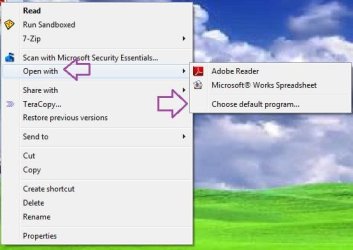
Right click on the .xlr file.

xlr1.JPG

xl2.JPG
 

My Computer My Computer

At a glance

Windows 7 Home Premium 64 bitIntel Core i7-4790G.SKILL 8GB (2 x 4GB) DDR3 F3-10666CL9D-8GBNTAMD Radeon R7 250
Computer type
PC/Desktop
Computer Manufacturer/Model Number
Custom Build
OS
Windows 7 Home Premium 64 bit
CPU
Intel Core i7-4790
Motherboard
GA-Z87X-D3H
Memory
G.SKILL 8GB (2 x 4GB) DDR3 F3-10666CL9D-8GBNT
Graphics Card(s)
AMD Radeon R7 250
Sound Card
Realtek ALC892
Monitor(s) Displays
Samsung UN32EH5000, Dell 1703FPT
Screen Resolution
1920 x 1080, 1280 x 1024
Hard Drives
WD5003AZEX
WD10EZEX
Samsung HD103SJ
Samsung 128 GB 840 PRO
PSU
SeaSonic M12II SS-500GM
Case
Fractal Design Define R4
Cooling
Zalman CNPS9900ALED
Keyboard
Logitech K800
Mouse
Logitech M705
Internet Speed
16 Mbps
Antivirus
Avast
Browser
Firefox
Other Info
Bose Companion 2 Multimedia Speakers
I have been through this routine a couple of times but only get the choice of Abode and Word Pad, how can I change Word Pad for Microsoft Works Spreadsheet on the "open with" window?. When I open it with word Pad I only get pages of a million Ys and symbols like a coded message.
 

My Computer My Computer

At a glance

Windows 7 Home Premium 32 bit500 GB Sata4 GB ( 4X 1 GB)
Computer Manufacturer/Model Number
Dell inspiron 560 MT desktop
OS
Windows 7 Home Premium 32 bit
CPU
500 GB Sata
Memory
4 GB ( 4X 1 GB)
Hard Drives
One Sata
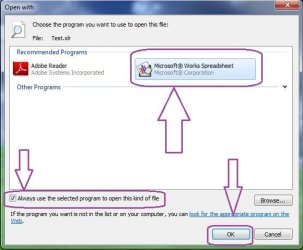
OK...
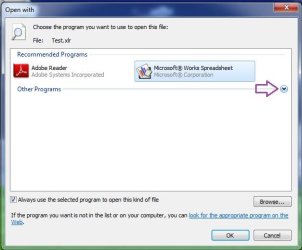
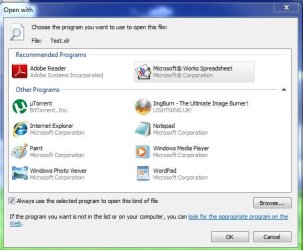
Follow the next step to see if the Microsoft Works Spreadsheet is included.
If so, select it and follow the previous steps.

If you cannot restore the file association, you should reinstall MS works.

s1.JPG

s2.JPG
 
Last edited:

My Computer My Computer

At a glance

Windows 7 Home Premium 64 bitIntel Core i7-4790G.SKILL 8GB (2 x 4GB) DDR3 F3-10666CL9D-8GBNTAMD Radeon R7 250
Computer type
PC/Desktop
Computer Manufacturer/Model Number
Custom Build
OS
Windows 7 Home Premium 64 bit
CPU
Intel Core i7-4790
Motherboard
GA-Z87X-D3H
Memory
G.SKILL 8GB (2 x 4GB) DDR3 F3-10666CL9D-8GBNT
Graphics Card(s)
AMD Radeon R7 250
Sound Card
Realtek ALC892
Monitor(s) Displays
Samsung UN32EH5000, Dell 1703FPT
Screen Resolution
1920 x 1080, 1280 x 1024
Hard Drives
WD5003AZEX
WD10EZEX
Samsung HD103SJ
Samsung 128 GB 840 PRO
PSU
SeaSonic M12II SS-500GM
Case
Fractal Design Define R4
Cooling
Zalman CNPS9900ALED
Keyboard
Logitech K800
Mouse
Logitech M705
Internet Speed
16 Mbps
Antivirus
Avast
Browser
Firefox
Other Info
Bose Companion 2 Multimedia Speakers
Spreadsheets should have xls extensions no? If your spreadsheet extension shows "pdf" then you can manually change it as shown by p5bdkw:

At the top of the explorer, click on Organize, Folder and search options, View.
Uncheck the "Hide extensions for known file types" box.
Hit apply and OK.

Now look at your spreadsheet file again. The three letters following the period should be "xls."
[which is what Microsoft Excel spreadsheets show.] If your spreadsheet shows "pdf" or something else then carefully overwrite that extension to xls.

To be safe, I'd then go back into View Folder options (above) and check "hide known file extensions."

Adobe Reader is too intrusive, imho. Foxit Reader (and there are other open source readers too) will not take over your computer in the same way. When Adobe installed it probably associated itself with a bunch of file types.

You can manually "un-associate" Adobe from various file types by using "Open With" but first see if this will open your spreadsheet.
 

My Computer My Computer

At a glance

Windows 7 Home Premium 64 bitIntel Pentium E5700640GB HDDIntegrated Graphics
Computer Manufacturer/Model Number
Acer Aspire AX3910-U3012 PT
OS
Windows 7 Home Premium 64 bit
CPU
Intel Pentium E5700
Memory
640GB HDD
Graphics Card(s)
Integrated Graphics
Sound Card
Integrated Audio
Monitor(s) Displays
Acer
Ambimom - Whoa, don't get confused: Microsoft Office (Excel) spreadsheets are .xls or .xlsx but Microsoft Works is a different program - that's why the extension is, as I'm told, .xlr. And for example, an Open Office Calc file is .ods.

One workaraound is delete the file type (not the file itself!) from the folder options -> view -> file types, then when you double click the file, being as it is now unknown to Windows, you should be prompted which program to open it with. Just navigate to the install directory and it *should* open...
 

My Computer My Computer

At a glance

Windows 7 Home Premium x64 OEM --> RTM clean ...Intel T44004Gb? - Mobile Intel(R) 4 Series Express Chipset ...
Computer Manufacturer/Model Number
Toshiba Satellite L500
OS
Windows 7 Home Premium x64 OEM --> RTM clean install
CPU
Intel T4400
Motherboard
? - laptop inbuilt ?
Memory
4Gb
Graphics Card(s)
? - Mobile Intel(R) 4 Series Express Chipset Family ?
Sound Card
Realtek
Monitor(s) Displays
? + extended to a 42" LG55PC plasma tele!
Screen Resolution
1366 * 768
Hard Drives
320Gb 5500rpm
PSU
?
Case
?
Cooling
?
Internet Speed
3Meg, when it works.
Other Info
A LOWLY LAPTOP!
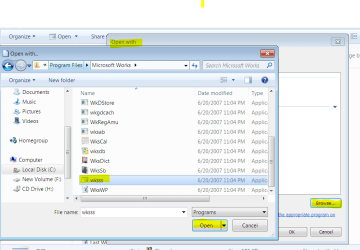
Rightclick on the Works Spreadsheet file which needs to have default Program set, select Open With.

If the Open With window is not showing Works Spreadsheet as a choice, click Browse.

Browse to the Microsoft Works Program file, select the file shown below which is the Works Spreadsheet executable, it will populate the list with Works Spreadsheet. Then highlight that choice and tick the box to have it open all files of that type with that program.
 

Attachments

  • Capture.PNG
    Capture.PNG
    36.5 KB · Views: 7
Last edited:
Rightclick on the Works Spreadsheet file which needs to have default Program set, select Open With.

If the Open With window is not showing Works Spreadsheet as a choice, click Browse.

Browse to the Microsoft Works Program file, select the file shown below which is the Works Spreadsheet executable, it will populate the list with Works Spreadsheet. Then highlight that choice and tick the box to have it open all files of that type with that program.

Spot on!!
That should do it for him!!
 

My Computer My Computer

At a glance

Windows 7 Home Premium 64 bitIntel Core i7-4790G.SKILL 8GB (2 x 4GB) DDR3 F3-10666CL9D-8GBNTAMD Radeon R7 250
Computer type
PC/Desktop
Computer Manufacturer/Model Number
Custom Build
OS
Windows 7 Home Premium 64 bit
CPU
Intel Core i7-4790
Motherboard
GA-Z87X-D3H
Memory
G.SKILL 8GB (2 x 4GB) DDR3 F3-10666CL9D-8GBNT
Graphics Card(s)
AMD Radeon R7 250
Sound Card
Realtek ALC892
Monitor(s) Displays
Samsung UN32EH5000, Dell 1703FPT
Screen Resolution
1920 x 1080, 1280 x 1024
Hard Drives
WD5003AZEX
WD10EZEX
Samsung HD103SJ
Samsung 128 GB 840 PRO
PSU
SeaSonic M12II SS-500GM
Case
Fractal Design Define R4
Cooling
Zalman CNPS9900ALED
Keyboard
Logitech K800
Mouse
Logitech M705
Internet Speed
16 Mbps
Antivirus
Avast
Browser
Firefox
Other Info
Bose Companion 2 Multimedia Speakers
Thanks everybody for your advice, unfortunately nothing seemed to work, ( of course it could be me). Anyway by taking the long road and going in the back door I have had some success. Does this make sense?
Rt click the file
Click open with
Click Microsoft Task Launcher
Click Spread Sheet
Click File
Dbl Click My docs
Click required file
Click open.
I finally have the page in front of me, and click print preview and only get half the page, I think I will stick with beach fishing, any dumby can do that.;)
 

My Computer My Computer

At a glance

Windows 7 Home Premium 32 bit500 GB Sata4 GB ( 4X 1 GB)
Computer Manufacturer/Model Number
Dell inspiron 560 MT desktop
OS
Windows 7 Home Premium 32 bit
CPU
500 GB Sata
Memory
4 GB ( 4X 1 GB)
Hard Drives
One Sata
In saying what I did during this adventure, I must respond and say thanks to all the people who have contributed. I think these forums are a fabulous way for people all around the World to help total strangers, and that makes us different to Big fish that eat Little fish.
 

My Computer My Computer

At a glance

Windows 7 Home Premium 32 bit500 GB Sata4 GB ( 4X 1 GB)
Computer Manufacturer/Model Number
Dell inspiron 560 MT desktop
OS
Windows 7 Home Premium 32 bit
CPU
500 GB Sata
Memory
4 GB ( 4X 1 GB)
Hard Drives
One Sata
Back
Top