I need help for install windows 7

adsladsl100

New member
Local time
2:06 PM
Messages
18
hello
I have problem in install windows 7 in my new laptop
I have ASUS FX504GE with windows 10

I need to chenge it to windows 7 please help me

I try every thing but nothing work

last thing i try to install windows 7 with usb 3.0 but it stacked in windows login after every thing is done in format

i have windows 10 installed in ssd 240 gb and 16 gbs ram and harddisk 1 tb

i need to install windows 7 in G

please any Solution
 

Attachments

  • Untitled.jpg
    Untitled.jpg
    86.8 KB · Views: 0

My Computer

Computer type
Laptop
Computer Manufacturer/Model Number
asus fx504ge
OS
windows 10 64 bit
CPU
i7-8750
Memory
16 gb ddr4
Graphics Card(s)
GeForce GTX 1050 Ti
Welcome to the forum. Your disk is using UEFI so to install 7 you would have to turn secure boot set it to boot legacy you would then have to delete all partitions on the drive you may need drivers for the HD. Your best disconnect the second drive while you install. You loose a lot of security and speed reverting to an old system it's not recommend
 

My Computer

Computer type
PC/Desktop
OS
win 8 32 bit

My Computers

System One System Two

  • Computer type
    PC/Desktop
    OS
    7 X64
    CPU
    i5 8400
    Motherboard
    gigabyte b365m ds3h
    Memory
    2x8gb 3200mhz
    Hard Drives
    various
    PSU
    pure power 11 400w cm
    Case
    Coolermaster
    Cooling
    cryorig m9i
  • Computer type
    PC/Desktop
    OS
    7x64
    CPU
    g5400
    Motherboard
    ga b365m ds3h
    Memory
    8gb ddr4 2400
    PSU
    xfx pro 450w
Welcome to the forum. Your disk is using UEFI so to install 7 you would have to turn secure boot set it to boot legacy you would then have to delete all partitions on the drive you may need drivers for the HD. Your best disconnect the second drive while you install. You loose a lot of security and speed reverting to an old system it's not recommend


I don't need windows 10 if possible i can install windows 7 i will remove windows 10 but tell me how
 

My Computer

Computer type
Laptop
Computer Manufacturer/Model Number
asus fx504ge
OS
windows 10 64 bit
CPU
i7-8750
Memory
16 gb ddr4
Graphics Card(s)
GeForce GTX 1050 Ti

Attachments

  • 4469721743027933.jpg
    4469721743027933.jpg
    363.6 KB · Views: 0
  • 96369477031036838.jpg
    96369477031036838.jpg
    363.5 KB · Views: 0

My Computer

Computer type
Laptop
Computer Manufacturer/Model Number
asus fx504ge
OS
windows 10 64 bit
CPU
i7-8750
Memory
16 gb ddr4
Graphics Card(s)
GeForce GTX 1050 Ti
Your Laptop has Kaby Lake Core i7-8750H CPU.
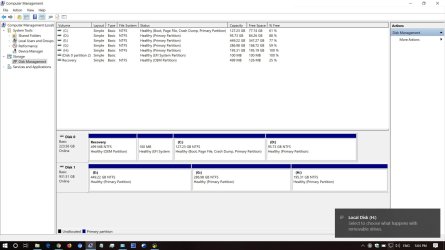
Your main drive (Disk 0 - ssd) is UEFI-GPT as it has a EFI partition.
The second drive (Disk 1) I'm not sure if it's a UEFI-GPT or Legacy-MBR.
If it's a GPT disk, to install win 7 on disk 1, you will need to create another partition (EFI - 100M).

To find out, on disk management, View - TOP - List disk you will see if it's a UEFI-GPT or Legacy-MBR.

To have the speed of the SSD you can shrink partition C: , create a new partition and install Win 7 on it.
We can guide you. How much free space you have in C:?
 
Last edited:

My Computers

System One System Two

  • Computer type
    PC/Desktop
    Computer Manufacturer/Model Number
    custom build
    OS
    Windows 7 HP 64
    CPU
    i5 6600K - 800MHz to 4200MHz
    Motherboard
    GA-Z170-HD3P
    Memory
    4+4G GSkill DDR4 3000
    Graphics Card(s)
    IG - Intel 530
    Monitor(s) Displays
    Samsung 226BW
    Screen Resolution
    1680x1050
    Hard Drives
    (1) -1 SM951 – 128GB M.2 AHCI PCIe SSD drive for Windows 7 and Lubuntu
    (2) -1 WD SATA 3 - 1T for Data
    (3) -1 WD SATA 3 - 1T for backup
    PSU
    Thermaltake 450W TR2 gold
    Keyboard
    Old and good Chicony mechanical keyboard
    Mouse
    Logitech mX performance - 9 buttons (had to disable some)
    Internet Speed
    500Mb/s
    Browser
    Firefox 64
    Other Info
    TinyWall firewall
  • Computer type
    Laptop
    System Manufacturer/Model Number
    Asus Q550LF
    OS
    Windows 7 Pro
    CPU
    i7-4500U 800MHz to 3.0GHz
    Motherboard
    Asus Q550LF
    Memory
    (4+4)G DDR3 1600
    Graphics Card(s)
    IG intel 4400 + NVIDIA GeForce GT 745M
    Sound Card
    Realtek
    Monitor(s) Displays
    LG Display LP156WF4-SPH1
    Screen Resolution
    1920 x 1080
    Hard Drives
    BX500 120G SSD for Windows and programs +
    1T HDD for data
    Internet Speed
    500 Mb/s
    Browser
    Firefox
    Other Info
    TinyWall firewall
Your Laptop has Kaby Lake Core i7-8750H CPU.
Your main drive (Disk 0 - ssd) is UEFI-GPT as it has a EFI partition.
The second drive (Disk 1) I'm not sure if it's a UEFI-GPT or Legacy-MBR.
If it's a GPT disk, to install win 7 on disk 1, you will need to create another partition (EFI - 100M).

To find out, on disk management, View - TOP - List disk you will see if it's a UEFI-GPT or Legacy-MBR.

To have the speed of the SSD you can shrink partition C: , create a new partition and install Win 7 on it.
We can guide you. How much free space you have in C:?


i do as you told me but it still stack in windows login after format
 

Attachments

  • Untitled.jpg
    Untitled.jpg
    125 KB · Views: 4

My Computer

Computer type
Laptop
Computer Manufacturer/Model Number
asus fx504ge
OS
windows 10 64 bit
CPU
i7-8750
Memory
16 gb ddr4
Graphics Card(s)
GeForce GTX 1050 Ti
You're moving too fast and skipping safety procedures. Please don't try to install. Follow my instructions.
- Fist of all, under Win 10, install Macrium Reflect free and make an image of disk 0 and save the image on disk 1, partition E: or H:
Macrium Software | Macrium Reflect Free
- Where does your win 7 installation is? On a DVD or a USB flash disk?

The disk 0 isn't a conventional SSD. It's a M.2 MVMe SSD. We have to find out what is the brand and model of it.
 

My Computers

System One System Two

  • Computer type
    PC/Desktop
    Computer Manufacturer/Model Number
    custom build
    OS
    Windows 7 HP 64
    CPU
    i5 6600K - 800MHz to 4200MHz
    Motherboard
    GA-Z170-HD3P
    Memory
    4+4G GSkill DDR4 3000
    Graphics Card(s)
    IG - Intel 530
    Monitor(s) Displays
    Samsung 226BW
    Screen Resolution
    1680x1050
    Hard Drives
    (1) -1 SM951 – 128GB M.2 AHCI PCIe SSD drive for Windows 7 and Lubuntu
    (2) -1 WD SATA 3 - 1T for Data
    (3) -1 WD SATA 3 - 1T for backup
    PSU
    Thermaltake 450W TR2 gold
    Keyboard
    Old and good Chicony mechanical keyboard
    Mouse
    Logitech mX performance - 9 buttons (had to disable some)
    Internet Speed
    500Mb/s
    Browser
    Firefox 64
    Other Info
    TinyWall firewall
  • Computer type
    Laptop
    System Manufacturer/Model Number
    Asus Q550LF
    OS
    Windows 7 Pro
    CPU
    i7-4500U 800MHz to 3.0GHz
    Motherboard
    Asus Q550LF
    Memory
    (4+4)G DDR3 1600
    Graphics Card(s)
    IG intel 4400 + NVIDIA GeForce GT 745M
    Sound Card
    Realtek
    Monitor(s) Displays
    LG Display LP156WF4-SPH1
    Screen Resolution
    1920 x 1080
    Hard Drives
    BX500 120G SSD for Windows and programs +
    1T HDD for data
    Internet Speed
    500 Mb/s
    Browser
    Firefox
    Other Info
    TinyWall firewall
Thanks Megahertz07

i do what you told and save imge to the second hard


yes the disk 0 is M.2 MVMe SSD


how can i find the borand and model of it ?
 

My Computer

Computer type
Laptop
Computer Manufacturer/Model Number
asus fx504ge
OS
windows 10 64 bit
CPU
i7-8750
Memory
16 gb ddr4
Graphics Card(s)
GeForce GTX 1050 Ti

My Computers

System One System Two

  • Computer type
    PC/Desktop
    OS
    7 X64
    CPU
    i5 8400
    Motherboard
    gigabyte b365m ds3h
    Memory
    2x8gb 3200mhz
    Hard Drives
    various
    PSU
    pure power 11 400w cm
    Case
    Coolermaster
    Cooling
    cryorig m9i
  • Computer type
    PC/Desktop
    OS
    7x64
    CPU
    g5400
    Motherboard
    ga b365m ds3h
    Memory
    8gb ddr4 2400
    PSU
    xfx pro 450w
You didn't answer my question:- Where does your win 7 installation is? On a DVD or a USB flash disk?

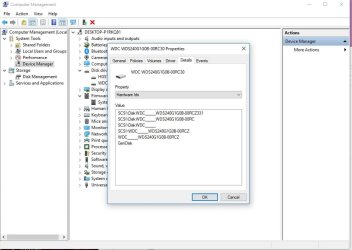
As SIW2 said, you can see the brand of disk 0 on BIOS. You can also, under Win 10, open explorer, right click on C: drive - Properties - Hardware Tab. You'll see all drives by name.

Did you already added USB 3, SATA and MVMe drivers into Win 7 installation disk?
 
Last edited:

My Computers

System One System Two

  • Computer type
    PC/Desktop
    Computer Manufacturer/Model Number
    custom build
    OS
    Windows 7 HP 64
    CPU
    i5 6600K - 800MHz to 4200MHz
    Motherboard
    GA-Z170-HD3P
    Memory
    4+4G GSkill DDR4 3000
    Graphics Card(s)
    IG - Intel 530
    Monitor(s) Displays
    Samsung 226BW
    Screen Resolution
    1680x1050
    Hard Drives
    (1) -1 SM951 – 128GB M.2 AHCI PCIe SSD drive for Windows 7 and Lubuntu
    (2) -1 WD SATA 3 - 1T for Data
    (3) -1 WD SATA 3 - 1T for backup
    PSU
    Thermaltake 450W TR2 gold
    Keyboard
    Old and good Chicony mechanical keyboard
    Mouse
    Logitech mX performance - 9 buttons (had to disable some)
    Internet Speed
    500Mb/s
    Browser
    Firefox 64
    Other Info
    TinyWall firewall
  • Computer type
    Laptop
    System Manufacturer/Model Number
    Asus Q550LF
    OS
    Windows 7 Pro
    CPU
    i7-4500U 800MHz to 3.0GHz
    Motherboard
    Asus Q550LF
    Memory
    (4+4)G DDR3 1600
    Graphics Card(s)
    IG intel 4400 + NVIDIA GeForce GT 745M
    Sound Card
    Realtek
    Monitor(s) Displays
    LG Display LP156WF4-SPH1
    Screen Resolution
    1920 x 1080
    Hard Drives
    BX500 120G SSD for Windows and programs +
    1T HDD for data
    Internet Speed
    500 Mb/s
    Browser
    Firefox
    Other Info
    TinyWall firewall
You can install the MS nvme updates and any relevant oem drivers.

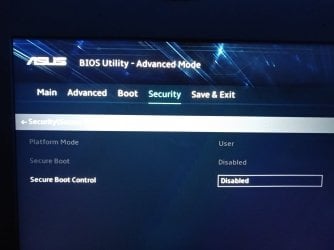
View attachment 405229

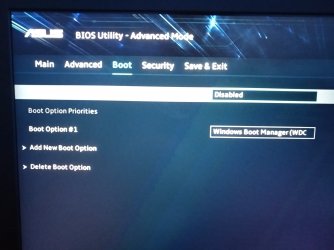
View attachment 405230


What does it say in bios?


i can't install anything and windows update services i stoped it becuse it update driver and the keyboard does not run and frimework of driver make windows unbootable so i reformatting one more time so now how can i format windows 7 inside ms nvme ssd or merge installed driver in windows 7 usb format tools
 

My Computer

Computer type
Laptop
Computer Manufacturer/Model Number
asus fx504ge
OS
windows 10 64 bit
CPU
i7-8750
Memory
16 gb ddr4
Graphics Card(s)
GeForce GTX 1050 Ti
You didn't answer my question:- Where does your win 7 installation is? On a DVD or a USB flash disk?

As SIW2 said, you can see the brand of disk 0 on BIOS. You can also, under Win 10, open explorer, right click on C: drive - Properties - Hardware Tab. You'll see all drives by name.

Did you already added USB 3, SATA and MVMe drives into Win 7 installation disk?

my win 7 installation in usb

i don't know how but my windows 7 install disk with usb 3 driver
 

My Computer

Computer type
Laptop
Computer Manufacturer/Model Number
asus fx504ge
OS
windows 10 64 bit
CPU
i7-8750
Memory
16 gb ddr4
Graphics Card(s)
GeForce GTX 1050 Ti
i realy don't need windows 10 OS it's unstable and alot of blue died screen so i will do any thing to install win 7
 

My Computer

Computer type
Laptop
Computer Manufacturer/Model Number
asus fx504ge
OS
windows 10 64 bit
CPU
i7-8750
Memory
16 gb ddr4
Graphics Card(s)
GeForce GTX 1050 Ti
this is the name of ssd nvme it's WD 240
 

Attachments

  • Untitled.jpg
    Untitled.jpg
    59.9 KB · Views: 2

My Computer

Computer type
Laptop
Computer Manufacturer/Model Number
asus fx504ge
OS
windows 10 64 bit
CPU
i7-8750
Memory
16 gb ddr4
Graphics Card(s)
GeForce GTX 1050 Ti
My friend, we have a time difference of 11 hours so it's very difficult to us exchange posts.
Don't try to install. There are some steps to follow to be ready to install. Be patience and answer my questions.
And you're not helping as you don't read my posts and answer my questions.

Once again, did you already added USB 3, SATA and MVMe drivers into Win 7 installation disk?

How did you transfer Win 7 from a iso or from a DVD to the USB flash disk? Did you use a program like Rufus?
 
Last edited:

My Computers

System One System Two

  • Computer type
    PC/Desktop
    Computer Manufacturer/Model Number
    custom build
    OS
    Windows 7 HP 64
    CPU
    i5 6600K - 800MHz to 4200MHz
    Motherboard
    GA-Z170-HD3P
    Memory
    4+4G GSkill DDR4 3000
    Graphics Card(s)
    IG - Intel 530
    Monitor(s) Displays
    Samsung 226BW
    Screen Resolution
    1680x1050
    Hard Drives
    (1) -1 SM951 – 128GB M.2 AHCI PCIe SSD drive for Windows 7 and Lubuntu
    (2) -1 WD SATA 3 - 1T for Data
    (3) -1 WD SATA 3 - 1T for backup
    PSU
    Thermaltake 450W TR2 gold
    Keyboard
    Old and good Chicony mechanical keyboard
    Mouse
    Logitech mX performance - 9 buttons (had to disable some)
    Internet Speed
    500Mb/s
    Browser
    Firefox 64
    Other Info
    TinyWall firewall
  • Computer type
    Laptop
    System Manufacturer/Model Number
    Asus Q550LF
    OS
    Windows 7 Pro
    CPU
    i7-4500U 800MHz to 3.0GHz
    Motherboard
    Asus Q550LF
    Memory
    (4+4)G DDR3 1600
    Graphics Card(s)
    IG intel 4400 + NVIDIA GeForce GT 745M
    Sound Card
    Realtek
    Monitor(s) Displays
    LG Display LP156WF4-SPH1
    Screen Resolution
    1920 x 1080
    Hard Drives
    BX500 120G SSD for Windows and programs +
    1T HDD for data
    Internet Speed
    500 Mb/s
    Browser
    Firefox
    Other Info
    TinyWall firewall
If your Win 7 installation USB flash disk has the USB 3 driver, maybe it already has the MVMe driver.
To install on the M.2 driver, you must:
- Disable, on BIOS, Secure boot and fast boot.
- Boot the Win 7 installation USB flash disk in UEFI mode.

To boot Win 7 installation USB flash disk in UEFI mode you must launch Boot Menu during POST. In Asus is normally is F8.
Insert the Win 7 installation USB flash disk and start the laptop. When you hear the beep, press F8. A window will open with the boot options. Choose UEFI USB flash disk.
Go to install. If your USB flash disk has the MVMe driver, you will see the M.2 drive. Go to advanced, format the last partition (the one you created by shrinking Win 10 C: drive). Then choose to install on that partition.
You will end with a boot loader with two options: Win 7 and Win 10.
 

My Computers

System One System Two

  • Computer type
    PC/Desktop
    Computer Manufacturer/Model Number
    custom build
    OS
    Windows 7 HP 64
    CPU
    i5 6600K - 800MHz to 4200MHz
    Motherboard
    GA-Z170-HD3P
    Memory
    4+4G GSkill DDR4 3000
    Graphics Card(s)
    IG - Intel 530
    Monitor(s) Displays
    Samsung 226BW
    Screen Resolution
    1680x1050
    Hard Drives
    (1) -1 SM951 – 128GB M.2 AHCI PCIe SSD drive for Windows 7 and Lubuntu
    (2) -1 WD SATA 3 - 1T for Data
    (3) -1 WD SATA 3 - 1T for backup
    PSU
    Thermaltake 450W TR2 gold
    Keyboard
    Old and good Chicony mechanical keyboard
    Mouse
    Logitech mX performance - 9 buttons (had to disable some)
    Internet Speed
    500Mb/s
    Browser
    Firefox 64
    Other Info
    TinyWall firewall
  • Computer type
    Laptop
    System Manufacturer/Model Number
    Asus Q550LF
    OS
    Windows 7 Pro
    CPU
    i7-4500U 800MHz to 3.0GHz
    Motherboard
    Asus Q550LF
    Memory
    (4+4)G DDR3 1600
    Graphics Card(s)
    IG intel 4400 + NVIDIA GeForce GT 745M
    Sound Card
    Realtek
    Monitor(s) Displays
    LG Display LP156WF4-SPH1
    Screen Resolution
    1920 x 1080
    Hard Drives
    BX500 120G SSD for Windows and programs +
    1T HDD for data
    Internet Speed
    500 Mb/s
    Browser
    Firefox
    Other Info
    TinyWall firewall
My friend, we have a time difference of 11 hours so it's very difficult to us exchange posts.
Don't try to install. There are some steps to follow to be ready to install. Be patience and answer my questions.
And you're not helping as you don't read my posts and answer my questions.

Once again, did you already added USB 3, SATA and MVMe drives into Win 7 installation disk?

How did you transfer Win 7 from a iso or from a DVD to the USB flash disk? Did you use a program like Rufus?


no there is no sata driver and MVMe in win 7 installation


my windows iso is Windows 7 Ultimate Sp1 x64 En-US Aug2018 (USB3.0)


yes i use Rufus to transfar to usb driver
 

My Computer

Computer type
Laptop
Computer Manufacturer/Model Number
asus fx504ge
OS
windows 10 64 bit
CPU
i7-8750
Memory
16 gb ddr4
Graphics Card(s)
GeForce GTX 1050 Ti
My friend, there is no Sp1 x64 En-US Aug2018 (USB3.0). Someone has added the USB 3 to the installation disk.
Did you tried to boot to the boot Win 7 installation USB flash disk in UEFI mode? If you boot the Win 7 installation USB flash disk in UEFI mode and if you can see the M.2 drive, the Win 7 installation has the MVMe drivers.
 

My Computers

System One System Two

  • Computer type
    PC/Desktop
    Computer Manufacturer/Model Number
    custom build
    OS
    Windows 7 HP 64
    CPU
    i5 6600K - 800MHz to 4200MHz
    Motherboard
    GA-Z170-HD3P
    Memory
    4+4G GSkill DDR4 3000
    Graphics Card(s)
    IG - Intel 530
    Monitor(s) Displays
    Samsung 226BW
    Screen Resolution
    1680x1050
    Hard Drives
    (1) -1 SM951 – 128GB M.2 AHCI PCIe SSD drive for Windows 7 and Lubuntu
    (2) -1 WD SATA 3 - 1T for Data
    (3) -1 WD SATA 3 - 1T for backup
    PSU
    Thermaltake 450W TR2 gold
    Keyboard
    Old and good Chicony mechanical keyboard
    Mouse
    Logitech mX performance - 9 buttons (had to disable some)
    Internet Speed
    500Mb/s
    Browser
    Firefox 64
    Other Info
    TinyWall firewall
  • Computer type
    Laptop
    System Manufacturer/Model Number
    Asus Q550LF
    OS
    Windows 7 Pro
    CPU
    i7-4500U 800MHz to 3.0GHz
    Motherboard
    Asus Q550LF
    Memory
    (4+4)G DDR3 1600
    Graphics Card(s)
    IG intel 4400 + NVIDIA GeForce GT 745M
    Sound Card
    Realtek
    Monitor(s) Displays
    LG Display LP156WF4-SPH1
    Screen Resolution
    1920 x 1080
    Hard Drives
    BX500 120G SSD for Windows and programs +
    1T HDD for data
    Internet Speed
    500 Mb/s
    Browser
    Firefox
    Other Info
    TinyWall firewall
If your Win 7 installation USB flash disk has the USB 3 driver, maybe it already has the MVMe driver.
To install on the M.2 driver, you must:
- Disable, on BIOS, Secure boot and fast boot.
- Boot the Win 7 installation USB flash disk in UEFI mode.

To boot Win 7 installation USB flash disk in UEFI mode you must launch Boot Menu during POST. In Asus is normally is F8.
Insert the Win 7 installation USB flash disk and start the laptop. When you hear the beep, press F8. A window will open with the boot options. Choose UEFI USB flash disk.
Go to install. If your USB flash disk has the MVMe driver, you will see the M.2 drive. Go to advanced, format the last partition (the one you created by shrinking Win 10 C: drive). Then choose to install on that partition.
You will end with a boot loader with two options: Win 7 and Win 10.


There is no problem in installation it end normally and in the last of completed windows stack in login

what i do
 

My Computer

Computer type
Laptop
Computer Manufacturer/Model Number
asus fx504ge
OS
windows 10 64 bit
CPU
i7-8750
Memory
16 gb ddr4
Graphics Card(s)
GeForce GTX 1050 Ti
Back
Top