
Solved I need help knowing which partitons I can delete to make a new one.

Alexander145

Banned
Local time
4:01 AM
Messages
2
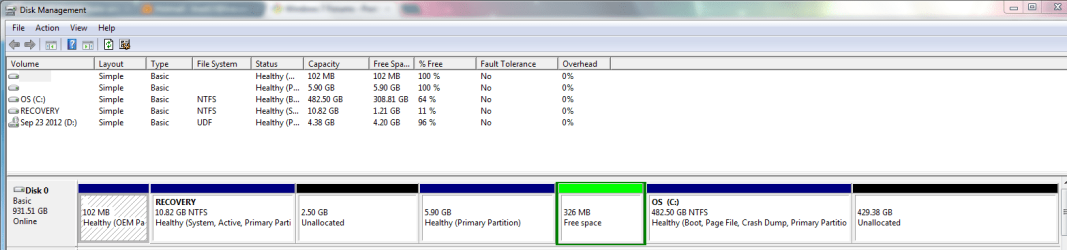
So I have a problem and can't make a new partition with an Unallocated one. Since I do not have room for another partition I want to know which I can delete to create a new one. The reason I want a new one is to run another OS on my computer without interfering with Windows 7.

If you can see the photo I attached those are my partitions and I want to make the 429.38GB into free space but like I said I can't due to having the full amount of partitions.
So if you can tell me what to do it'll be helpful, and if you don't understand me I'll provide further information.
 

Attachments
  • PartionError.PNG
    PartionError.PNG
    26 KB · Views: 17

My Computer My Computer

At a glance

Windows 7 Home Premium 64 bit8gb ram1gb of video memory
OS
Windows 7 Home Premium 64 bit
Memory
8gb ram
Graphics Card(s)
1gb of video memory
Hard Drives
1TB of hard drive memory
Internet Speed
0.1mbps
I'm assuming that at this point you have only 1 operating system, Windows 7. It needs C and the 102 MB partition to run.

If that is true, you need to keep the small OEM partition on the far left, Recovery, and C.

The 2.50 GB unallocated space is not a partition.

The 5.90 GB partition appears to be completely empty and unneeded.

The 326 MB space outlined in green appears to be pointless.

The large 429 GB space on the far right is not a partition. It's just unallocated space.

I'd download Partition Wizard bootable disk from the bottom choice at this link. Burn it to a disk.

Free download Magic Partition Manager Software, partition magic alternative, free partition magic, partition magic Windows 7 and server partition software - Partition Wizard Online

It will allow you to delete partitions, move them around, partition as necessary, etc. It should be all you need.

AVOID dynamic partitions if they are ever offered to you.

I'd use Partition Wizard to try to end up with these 3 partitions, from left to right: 102 MB partition, Recovery partition, and C.

To the right of C you would want one big chunk of "unallocated space". When you get to that point, reconsider your plans and post a new picture. You might then want to go to a logical partition.

But, unless they have something on them you need, get rid of: 2.50 GB partition, 5.90 GB partition, and the 326 MB free space in green. That will generate a bunch more "unallocated space". Add that to the 429 GB of unallocated space you now have.
 

My Computer My Computer

At a glance

Windows 7 Home Premium SP1, 64-bitIntel Skylake i5-6600K, not overclocked8 GB HyperX DDR4-2666 (2 x 4 GB)none; graphics are integrated on CPU
Computer type
PC/Desktop
Computer Manufacturer/Model Number
Ignatz Special; 4 speed manual gearbox; factory air conditioning; one of one
OS
Windows 7 Home Premium SP1, 64-bit
CPU
Intel Skylake i5-6600K, not overclocked
Motherboard
AsRock Z170M Extreme 4, micro ATX
Memory
8 GB HyperX DDR4-2666 (2 x 4 GB)
Graphics Card(s)
none; graphics are integrated on CPU
Sound Card
onboard: Realtek ALC1150; external: USB Behringer UF0-202
Monitor(s) Displays
Dell S2340M 23 inch IPS
Screen Resolution
1600 x 900
Hard Drives
System: Crucial MX100 series SSD, 128 GB;
Data: Samsung Spinpoint 103SJ, 1 TB;
Backup: WD Caviar Green WD30EZRX-00D8PB0, 3 TB
PSU
Rosewill SilentNight 500 watt fanless, semi-modular
Case
Antec Solo II
Cooling
Noctua NH-U12S; Noctua F12 intake, Noctua S12A exhaust
Keyboard
Microsoft 200 6JH-00001 USB
Mouse
Dell or Microsoft optical wired; USB
Antivirus
Microsoft Security Essentials and Malwarebytes Premium
Browser
Pale Moon
Other Info
All fans PWM; speeds at idle: CPU circa 500 rpm; intake circa 600 rpm; exhaust circa 600 rpm; CPU temps 27 idle and 47 C load in a warm room (27 C/81 F) when running Intel Extreme Tuning Utility stress test.
Thanks it worked just need help with the OS now which doesn't have anything to do with this forum.
 

My Computer My Computer

At a glance

Windows 7 Home Premium 64 bit8gb ram1gb of video memory
OS
Windows 7 Home Premium 64 bit
Memory
8gb ram
Graphics Card(s)
1gb of video memory
Hard Drives
1TB of hard drive memory
Internet Speed
0.1mbps
Back
Top