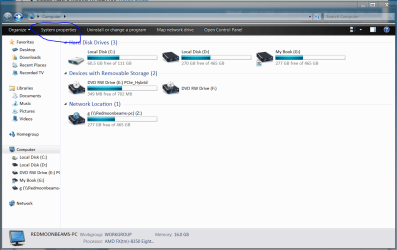
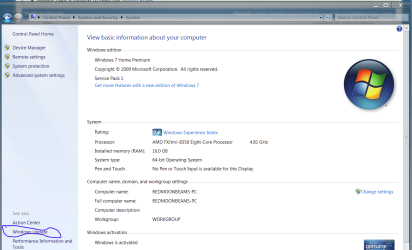
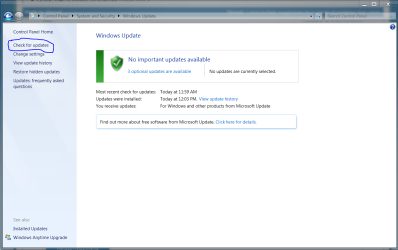
I need multiple suggestions for a couple of problems that i have.

Executable Beep

New member
Member
Local time
12:28 PM
Messages
40
1. I just installed windows 7 on a new build (Check specs), and i want to know if everythings okay and running well, but i dont know how to do that, is there a specific way or is there any kind of program that i can download, that tells me what my FULL system specs are and if they are running okay?

2. COOLING: The stock fans from the C70 come in a really slow speed, i want to crank them up but, same problem, i dont know how, is there any special software that i can use to change the fan speeds? or do i need to buy an external controller?

3. The motherboard has a little screen that has 2 characters, every time i turn it on it gives me a LOT of characters, and finally it stays in A0, what does that mean?

4. I installed all the drivers from the motherboard, gpu and cpu i think, is there anything else i need to install? apart from antivirus?

5. STARTUP TAKES LIKE 5 MINUTES. also does shutdown. I press the ON button, then it goes through all the gigabyte motherboard stuff, then the WINDOWS IS STARTING thing comes up and it stays there for like 5 or 10 minutes, dont know why, but when it finally gets everything going on, it runs like butter on a hot pan, i can run crysis 3 at high settings no problem, i just dont know why it takes SO LONG on the boot secuence. i have another PC with exactly the same version of windows, its not nearly as fast as this one and it takes about 15 seconds to boot, i dont know whats happening:/

that is all, if i get any more problems ill probably ask you guys again, but until then, thank you:D
 

My Computer My Computer

At a glance

Windows 7 Ultimate 64-biti5 - 3570k 3.4GHzCorsair Vengeance 8gb (2x4) @ 1600MhzGeforce GTX 670 MSI OC Power Edition
Computer type
PC/Desktop
Computer Manufacturer/Model Number
Various
OS
Windows 7 Ultimate 64-bit
CPU
i5 - 3570k 3.4GHz
Motherboard
GA-Z77X-UD3H
Memory
Corsair Vengeance 8gb (2x4) @ 1600Mhz
Graphics Card(s)
Geforce GTX 670 MSI OC Power Edition
Sound Card
None.
Monitor(s) Displays
HP 2009m 5ms @ 60Hz
Screen Resolution
1600x900
Hard Drives
1TB WD WD10EZEX-00R
Samsung 840 120gb SSD
PSU
Seasonic G-Series 550 Watt 80 PLUS Gold
Case
Corsair Vengeance C70 [Gunmetal Black]
Cooling
Default Coolers.
Keyboard
Razer Blackwidow Ultimate 2013 Elite
Mouse
R.A.T. 7
Internet Speed
4mbps
Antivirus
Norton Internet Security
Browser
Google Chrome
Other Info
This build needs extra cooling for overclocking but i dont know what to get :c
1. I just installed windows 7 on a new build (Check specs), and i want to know if everythings okay and running well, but i dont know how to do that, is there a specific way or is there any kind of program that i can download, that tells me what my FULL system specs are and if they are running okay?

2. COOLING: The stock fans from the C70 come in a really slow speed, i want to crank them up but, same problem, i dont know how, is there any special software that i can use to change the fan speeds? or do i need to buy an external controller?

3. The motherboard has a little screen that has 2 characters, every time i turn it on it gives me a LOT of characters, and finally it stays in A0, what does that mean?

4. I installed all the drivers from the motherboard, gpu and cpu i think, is there anything else i need to install? apart from antivirus?

5. STARTUP TAKES LIKE 5 MINUTES. also does shutdown. I press the ON button, then it goes through all the gigabyte motherboard stuff, then the WINDOWS IS STARTING thing comes up and it stays there for like 5 or 10 minutes, dont know why, but when it finally gets everything going on, it runs like butter on a hot pan, i can run crysis 3 at high settings no problem, i just dont know why it takes SO LONG on the boot secuence. i have another PC with exactly the same version of windows, its not nearly as fast as this one and it takes about 15 seconds to boot, i dont know whats happening:/

that is all, if i get any more problems ill probably ask you guys again, but until then, thank you:D

My first thought is the PSU probably on the border for a GTX670 But you have a 550w Seasonic a hell of a good brand

You can tweek some of the windows settings to allow faster boot and you might need to update chipset driver for the Motherboard

A0 in the corner is probably bios version you can also go into bios and tweek boot settings as well
 

My Computer My Computer

At a glance

Windows 10 Home Premium 64bit sp1Intel I7-6700K @ 4.6 Ghz 1.344 volts everyday OC32GB G-Skill TridentZ 3200mhz 16-18-18-38 DDR4Sli Gigabyte Windforce GTX 980 G1
Computer type
PC/Desktop
Computer Manufacturer/Model Number
CoreI7-6700K MrFingerIII Special Builds
OS
Windows 10 Home Premium 64bit sp1
CPU
Intel I7-6700K @ 4.6 Ghz 1.344 volts everyday OC
Motherboard
Asrock Fatality K6 Z170 Socket 1151
Memory
32GB G-Skill TridentZ 3200mhz 16-18-18-38 DDR4
Graphics Card(s)
Sli Gigabyte Windforce GTX 980 G1
Sound Card
AC97 Creative Rage Tactic 3D Headphones Bluetooth
Monitor(s) Displays
27" Asus ROG Swift PG278Q G-Sync 48" Vizio Smart HD TV
Screen Resolution
2560x1440p 27"- 48" Currently Gaming at 2560x1440p Res 2K
Hard Drives
250GB Samsung Evo840SSD Seagate baracuda 500 GB WD Mybook 500Gb 1TB Seagate Barracuda
PSU
HX1050w Corsair Silver 80plus certified crosfire/sli
Case
Enthod Pro Full Tower
Cooling
Corsair H110i GT 280 mm High Performance WaterBlock
Keyboard
Logitech wireless keyboard
Mouse
Logitech wireless mouse
Internet Speed
Cox Cable 100+ mb
Antivirus
WebRoot Spysweeper with Antivirus
Browser
IE-10, Chrome, Opera
Other Info
My Other Rig is a AMD FX8320E @4.6Ghz 16GB Ballistic Sport Ram
Mobo Asrock Fatality 990FX 120GB OCZ SSD 1TB Seagate Barracuda Corsair H75 Cooling PSU Corsair CX750
GPU GTX Gigabyte 970G1
Press your windows key then type in "msconfig." When that comes up go to the "Startup Tab" and click on the different programs to turn them off (be careful what you turn off). You may need to do this several times to get the desired result you are looking for. A good deal of the programs you install have the tendency to load up your Startup process with trash that is not needed to run your OS.
 

My Computer My Computer

At a glance

Win 7 Pro x64, VM Win XP, Win7 Pro Sandbox, K...AMD Athlon(tm) II X4 640 @ 3.0 Gbz12GB 1066MHz DDR3 SDRAM - 2x4GB, 2x2GBATI Radeon HD 4350 HD Graphics/Audio with 512MB
Computer Manufacturer/Model Number
HP Pavilion a4302f
OS
Win 7 Pro x64, VM Win XP, Win7 Pro Sandbox, Kubuntu 11
CPU
AMD Athlon(tm) II X4 640 @ 3.0 Gbz
Memory
12GB 1066MHz DDR3 SDRAM - 2x4GB, 2x2GB
Graphics Card(s)
ATI Radeon HD 4350 HD Graphics/Audio with 512MB
Sound Card
Realtek High Definition Audio
Monitor(s) Displays
1. Dell 23" SP2307, 2. Mitsublishi 40" HDTV, Hannspree 25"
Screen Resolution
1. 2048x1152, 2. 1920-1080, 3. 1920x1200
Hard Drives
Int: 1 120 Gig SSD i
1 - 2.5" 500 USB External HDD
1 -1 Tb USB External HDD
Case
Mid Tower
Cooling
Standard Fans - 5 fans (very quiet)
Keyboard
Microsoft Wireless 2000
Mouse
Microsoft Wireless Mouse 5000
Internet Speed
10 Mbit (realistically 500 Kbit - 1.2 Mbit)
Other Info
Speakers - Bose Desktop (Excellent Sound)
1 external CD|DVD\Blue-ray Recorders/Players (Sony)
As far as your system specs, http://www.sevenforums.com/tutorials/180324-system-info-see-your-system-specs.html

The motherboard screen you referrred to is probably a diagnostic screen. It displays what the motherboard is checking, and will show if it gets stopped on something in particular. It's purpose is to help you diagnose problems. The codes should be in your motherboard manual. AO, is typical for OK, meaning POST went well.

As Lee suggested, hold the windows key (the one with the flag on it) and press "R". It will bring up a run box. type msconfig and go to the startup tab. The ones with the check by them are the ones that start with windows. The more programs that start with windows, the longer it takes, but should not take as long as you mentioned. Uncheck any program you do not need to start with Windows, which is about all of them. I have Windows sidebar and Microsoft Security Essentials start with windows and that's all.

As far as the fans go. If you have them connected to the motherboard, most motherboards allow you to control them through a motherboard utility or in BIOS. You can connect them to a power connector from the PSU and they will run full speed all the time, or you can purchase a fan controller to allow you to control them as you want at any time.

As far as software, there is no reliable software that I know of that will tell you if your computer is running ok. I always stay away from the utilities made to 'fix' windows. They will cause you more problems than they will solve. Try clicking the start button, in the search box type cmd, in the cmd entry that appears right click it and select 'run as administrator'. Copy/paste this into the window and hit the enter key sfc /scannow it is a system file checker which will check system files and attempt to repair any corrupted or missing files. After finishing those, check back and let us know your progress.

One more thing everyone should do, but few do, is create a system repair disk. It is easy and fairly quick, but can save you many problems down the road. http://www.sevenforums.com/tutorials/2083-system-repair-disc-create.html
 

My Computers My Computers

  • At a glance

    Windows 11 ProRyzen 9 5900X32GB G Skill DDR4-3600EVGA RTX 3080 FTW 3 Ultra
    Computer type
    PC/Desktop
    Computer Manufacturer/Model Number
    ALWAYS UNDER CONSTRUCTION
    OS
    Windows 11 Pro
    CPU
    Ryzen 9 5900X
    Motherboard
    Asus X570 Crosshair Viii Hero
    Memory
    32GB G Skill DDR4-3600
    Graphics Card(s)
    EVGA RTX 3080 FTW 3 Ultra
    Sound Card
    On Board/Sennheiser PC37X Headset
    Monitor(s) Displays
    3 X Asus 27"
    Screen Resolution
    2560x1440
    Hard Drives
    2 X 1 TB NVME drives
    PSU
    EVGA 850
    Case
    Phanteks Eclipse P400A
    Cooling
    EVGA 280 AIO
    Keyboard
    Logitech G510s/ Logitech G13
    Mouse
    Logitech G502
    Internet Speed
    24/1
    Antivirus
    ESET/MBAM Pro/SAS Pro
    Browser
    Chrome/ Firefox/ Edge
  • At a glance

    Windows 11 ProIntel Ultra 9 288V32 GB LPDDR5X 8533
    Computer type
    Laptop
    System Manufacturer/Model Number
    Dell 16 Plus
    OS
    Windows 11 Pro
    CPU
    Intel Ultra 9 288V
    Memory
    32 GB LPDDR5X 8533
    Monitor(s) Displays
    16" Mini-LED HDR600 Touch 90 Hz
    Screen Resolution
    2560X1600
    Hard Drives
    1 TB NVME
Your PC should boot and get to the desktop in no more than 30 or 40 seconds with an SSD.

When Windows starts there are 2 parts: a black screen with coalescing squares and "Starting Windows", then it switches to a blue screen. If the delay happens during the black screen it usually means that Windows is choking on some piece of hardware or it's driver. If it stalls on the blue screen it usually means that it is some Windows setting, file, startup program, or registry error.
Usually means often, but not always.

Be sure to check Device Manager. Look for any items with a yellow /!\ , or items listed as Unknown. If you have any that means you need to install (or reinstall) the driver for that device.
Under the Properties of each device it will tell you if the "Device is working properly".

Did you align your SSD before installing Window?
Did you install Windows with the SATA controller set on AHCI in the UEFI (BIOS) settings?
When you installed Windows, did you do so with the spinning hard disk disconnected?

Let us know.
 

My Computer My Computer

At a glance

Windows 7 64 Bit Home Premium SP1i7-3820GSkill F3-14900CL9Q - 16GBEVGA GeForce GTX660 - Driver 352.86
Computer type
PC/Desktop
Computer Manufacturer/Model Number
Home Built - Jan 2013
OS
Windows 7 64 Bit Home Premium SP1
CPU
i7-3820
Motherboard
Asus P9X79-PRO - Bios 4608
Memory
GSkill F3-14900CL9Q - 16GB
Graphics Card(s)
EVGA GeForce GTX660 - Driver 352.86
Sound Card
On board Realtek ALC898
Monitor(s) Displays
Acer S271HL
Screen Resolution
1920 x 1080
Hard Drives
#1- Samsung 840 Pro Series
#2- Western Digital WD1002FAEX Sata3 Black
#3- Western Digital WD1002FAEX Sata3 Black
PSU
Corsair CMPSU-850TX-V2 - 850 watt (by Seasonic)
Case
Corsair Obsidian 550D
Cooling
Standard 3 120mm case fans, Cooler Master Hyper 212 EVO
Keyboard
MS KC-0405
Mouse
Intellimouse 5-button
Internet Speed
56 Mbits/Sec (on a good day)
Antivirus
Avast & Malwarebytes
Browser
Firefox
Other Info
Asus DVD - DRW-24B1ST 24X
could be a hardware or firmware issue

I would start by checking the firmware levels of all of your components. From MB bios right through any other firmware your MB may have. Then do the same for all of your other components. Then move on to the various drivers for the different hardware you have installed and get them to the latest level, this may take care of things for you.
In the past I had a system that while it ran took forever to startup it turned out to be a firmware issue with a component once that was updated what was taking 10 minutes went to a minute.
If this does not solve the problem it will be time to start removing components. Start by removing everything that you do not need to boot and see if this changes things, if it does not then the problem is isolated down to the installed components. If this improves the situation add the components back 1 at a time and measure the results, you are doing this to find the problem component.
Back to what to do if the problem still exists after you take everything not needed to boot out you then should try replacing what you can. This depends on what you have available to work with.
I have seen firmware updates fix many weird things recently a machine that had been working for 18 months started to fail hourly (every 60 minutes). A firmware update to the SSD fixed the problem note this was the 1st time the firmware on the drive was updated.
 

My Computer My Computer

At a glance

Win 7 pro 64 bit and win 7 enterprise 64 bit
Computer type
PC/Desktop
OS
Win 7 pro 64 bit and win 7 enterprise 64 bit
1. I just installed windows 7 on a new build (Check specs), and i want to know if everythings okay and running well, but i dont know how to do that, is there a specific way or is there any kind of program that i can download, that tells me what my FULL system specs are and if they are running okay?

2. COOLING: The stock fans from the C70 come in a really slow speed, i want to crank them up but, same problem, i dont know how, is there any special software that i can use to change the fan speeds? or do i need to buy an external controller?

3. The motherboard has a little screen that has 2 characters, every time i turn it on it gives me a LOT of characters, and finally it stays in A0, what does that mean?

4. I installed all the drivers from the motherboard, gpu and cpu i think, is there anything else i need to install? apart from antivirus?

5. STARTUP TAKES LIKE 5 MINUTES. also does shutdown. I press the ON button, then it goes through all the gigabyte motherboard stuff, then the WINDOWS IS STARTING thing comes up and it stays there for like 5 or 10 minutes, dont know why, but when it finally gets everything going on, it runs like butter on a hot pan, i can run crysis 3 at high settings no problem, i just dont know why it takes SO LONG on the boot secuence. i have another PC with exactly the same version of windows, its not nearly as fast as this one and it takes about 15 seconds to boot, i dont know whats happening:/

that is all, if i get any more problems ill probably ask you guys again, but until then, thank you:D

My first thought is the PSU probably on the border for a GTX670 But you have a 550w Seasonic a hell of a good brand

You can tweek some of the windows settings to allow faster boot and you might need to update chipset driver for the Motherboard

A0 in the corner is probably bios version you can also go into bios and tweek boot settings as well

What do you mean by "the PSU probably on the border for a GTX670 But you have a 550w Seasonic a hell of a good brand"?? (sorry, my english still needs a lot of improvement cx)

and yeah, ive tried updating the motherboard's cdrivers and everything but it still takes like 5 or 10 minutos on the boot time, but after that, everythings okay:/ don't know why
 

My Computer My Computer

At a glance

Windows 7 Ultimate 64-biti5 - 3570k 3.4GHzCorsair Vengeance 8gb (2x4) @ 1600MhzGeforce GTX 670 MSI OC Power Edition
Computer type
PC/Desktop
Computer Manufacturer/Model Number
Various
OS
Windows 7 Ultimate 64-bit
CPU
i5 - 3570k 3.4GHz
Motherboard
GA-Z77X-UD3H
Memory
Corsair Vengeance 8gb (2x4) @ 1600Mhz
Graphics Card(s)
Geforce GTX 670 MSI OC Power Edition
Sound Card
None.
Monitor(s) Displays
HP 2009m 5ms @ 60Hz
Screen Resolution
1600x900
Hard Drives
1TB WD WD10EZEX-00R
Samsung 840 120gb SSD
PSU
Seasonic G-Series 550 Watt 80 PLUS Gold
Case
Corsair Vengeance C70 [Gunmetal Black]
Cooling
Default Coolers.
Keyboard
Razer Blackwidow Ultimate 2013 Elite
Mouse
R.A.T. 7
Internet Speed
4mbps
Antivirus
Norton Internet Security
Browser
Google Chrome
Other Info
This build needs extra cooling for overclocking but i dont know what to get :c
Press your windows key then type in "msconfig." When that comes up go to the "Startup Tab" and click on the different programs to turn them off (be careful what you turn off). You may need to do this several times to get the desired result you are looking for. A good deal of the programs you install have the tendency to load up your Startup process with trash that is not needed to run your OS.

Already tried doing that:/ i thought it could actually be a program failure or something, but it wasnt, im thinking its a piece of hardware but i dont know wich one
 

My Computer My Computer

At a glance

Windows 7 Ultimate 64-biti5 - 3570k 3.4GHzCorsair Vengeance 8gb (2x4) @ 1600MhzGeforce GTX 670 MSI OC Power Edition
Computer type
PC/Desktop
Computer Manufacturer/Model Number
Various
OS
Windows 7 Ultimate 64-bit
CPU
i5 - 3570k 3.4GHz
Motherboard
GA-Z77X-UD3H
Memory
Corsair Vengeance 8gb (2x4) @ 1600Mhz
Graphics Card(s)
Geforce GTX 670 MSI OC Power Edition
Sound Card
None.
Monitor(s) Displays
HP 2009m 5ms @ 60Hz
Screen Resolution
1600x900
Hard Drives
1TB WD WD10EZEX-00R
Samsung 840 120gb SSD
PSU
Seasonic G-Series 550 Watt 80 PLUS Gold
Case
Corsair Vengeance C70 [Gunmetal Black]
Cooling
Default Coolers.
Keyboard
Razer Blackwidow Ultimate 2013 Elite
Mouse
R.A.T. 7
Internet Speed
4mbps
Antivirus
Norton Internet Security
Browser
Google Chrome
Other Info
This build needs extra cooling for overclocking but i dont know what to get :c
As far as your system specs, http://www.sevenforums.com/tutorials/180324-system-info-see-your-system-specs.html

The motherboard screen you referrred to is probably a diagnostic screen. It displays what the motherboard is checking, and will show if it gets stopped on something in particular. It's purpose is to help you diagnose problems. The codes should be in your motherboard manual. AO, is typical for OK, meaning POST went well.

As Lee suggested, hold the windows key (the one with the flag on it) and press "R". It will bring up a run box. type msconfig and go to the startup tab. The ones with the check by them are the ones that start with windows. The more programs that start with windows, the longer it takes, but should not take as long as you mentioned. Uncheck any program you do not need to start with Windows, which is about all of them. I have Windows sidebar and Microsoft Security Essentials start with windows and that's all.

As far as the fans go. If you have them connected to the motherboard, most motherboards allow you to control them through a motherboard utility or in BIOS. You can connect them to a power connector from the PSU and they will run full speed all the time, or you can purchase a fan controller to allow you to control them as you want at any time.

As far as software, there is no reliable software that I know of that will tell you if your computer is running ok. I always stay away from the utilities made to 'fix' windows. They will cause you more problems than they will solve. Try clicking the start button, in the search box type cmd, in the cmd entry that appears right click it and select 'run as administrator'. Copy/paste this into the window and hit the enter key sfc /scannow it is a system file checker which will check system files and attempt to repair any corrupted or missing files. After finishing those, check back and let us know your progress.

One more thing everyone should do, but few do, is create a system repair disk. It is easy and fairly quick, but can save you many problems down the road. http://www.sevenforums.com/tutorials/2083-system-repair-disc-create.html

Well, where could i find such motherboard utility to crank up the fans?:/ as far as everything else, just tried them a couple of minutes ago, pc is still taking 6+ minutes to boot up:/ but thanks anyway, this was really helpful n-n
 

My Computer My Computer

At a glance

Windows 7 Ultimate 64-biti5 - 3570k 3.4GHzCorsair Vengeance 8gb (2x4) @ 1600MhzGeforce GTX 670 MSI OC Power Edition
Computer type
PC/Desktop
Computer Manufacturer/Model Number
Various
OS
Windows 7 Ultimate 64-bit
CPU
i5 - 3570k 3.4GHz
Motherboard
GA-Z77X-UD3H
Memory
Corsair Vengeance 8gb (2x4) @ 1600Mhz
Graphics Card(s)
Geforce GTX 670 MSI OC Power Edition
Sound Card
None.
Monitor(s) Displays
HP 2009m 5ms @ 60Hz
Screen Resolution
1600x900
Hard Drives
1TB WD WD10EZEX-00R
Samsung 840 120gb SSD
PSU
Seasonic G-Series 550 Watt 80 PLUS Gold
Case
Corsair Vengeance C70 [Gunmetal Black]
Cooling
Default Coolers.
Keyboard
Razer Blackwidow Ultimate 2013 Elite
Mouse
R.A.T. 7
Internet Speed
4mbps
Antivirus
Norton Internet Security
Browser
Google Chrome
Other Info
This build needs extra cooling for overclocking but i dont know what to get :c
Your PC should boot and get to the desktop in no more than 30 or 40 seconds with an SSD.

When Windows starts there are 2 parts: a black screen with coalescing squares and "Starting Windows", then it switches to a blue screen. If the delay happens during the black screen it usually means that Windows is choking on some piece of hardware or it's driver. If it stalls on the blue screen it usually means that it is some Windows setting, file, startup program, or registry error.
Usually means often, but not always.

Be sure to check Device Manager. Look for any items with a yellow /!\ , or items listed as Unknown. If you have any that means you need to install (or reinstall) the driver for that device.
Under the Properties of each device it will tell you if the "Device is working properly".

Did you align your SSD before installing Window?
Did you install Windows with the SATA controller set on AHCI in the UEFI (BIOS) settings?
When you installed Windows, did you do so with the spinning hard disk disconnected?

Let us know.
Yeah, it should be booting in like 30 or even 20 seconds with an ssd but thats my point, its taking like 6+ minutes and i dont know how to fix that ;_; and yes, the enormous delay happens when the black screen is on, where it says 'Windows is starting' and the windows flag is sparkling on top.

Already checked device manager, everything seems to be okay, no error or warning messages so i guess everythings fine...?

No, i did not align the ssd before installing windows, i dont know what i did, i just put the flash drive and forced the boot secquence on it, thats how i've done it before, if this could be the problem, would you tell me how to check if i did any of those things correct? or how to install windows all over again but with those settings enabled?
 

My Computer My Computer

At a glance

Windows 7 Ultimate 64-biti5 - 3570k 3.4GHzCorsair Vengeance 8gb (2x4) @ 1600MhzGeforce GTX 670 MSI OC Power Edition
Computer type
PC/Desktop
Computer Manufacturer/Model Number
Various
OS
Windows 7 Ultimate 64-bit
CPU
i5 - 3570k 3.4GHz
Motherboard
GA-Z77X-UD3H
Memory
Corsair Vengeance 8gb (2x4) @ 1600Mhz
Graphics Card(s)
Geforce GTX 670 MSI OC Power Edition
Sound Card
None.
Monitor(s) Displays
HP 2009m 5ms @ 60Hz
Screen Resolution
1600x900
Hard Drives
1TB WD WD10EZEX-00R
Samsung 840 120gb SSD
PSU
Seasonic G-Series 550 Watt 80 PLUS Gold
Case
Corsair Vengeance C70 [Gunmetal Black]
Cooling
Default Coolers.
Keyboard
Razer Blackwidow Ultimate 2013 Elite
Mouse
R.A.T. 7
Internet Speed
4mbps
Antivirus
Norton Internet Security
Browser
Google Chrome
Other Info
This build needs extra cooling for overclocking but i dont know what to get :c
The little "screen" that eventually posts A0 is a debug LED (definitely not the BIOS version). It reports what state the board is in and can be used to determine if there is a problem or not and, if there is, what the problem may be. Check the user manual for your MOBO to see what the various codes mean.

The fans on that case appear to be fixed speed. If the connectors on the fan cables are three wire, then they are probably fixed speed. The only way to get more speed and/or variable speed is to replace them with PWM four wire fans connected to the MOBO fan ports or to a separate fan controller. I suggest running the stock fans for a while to see if cooling is a problem or not. They may not need replacing. Keep in mind faster fans don't always cool better and will most likely be noisier.
 

My Computer My Computer

At a glance

Win 7 Ultimate 64 bitIntel i7-3930KKingston HyperX Genesis 32GB Kit (8x4GB Modul...MSI R7850 Twin Frozr 2GD5/OC Radeon HD 7850 2...
Computer type
PC/Desktop
Computer Manufacturer/Model Number
Custom Build
OS
Win 7 Ultimate 64 bit
CPU
Intel i7-3930K
Motherboard
ASUS P9X79 WS
Memory
Kingston HyperX Genesis 32GB Kit (8x4GB Modules) 1600MHz DDR
Graphics Card(s)
MSI R7850 Twin Frozr 2GD5/OC Radeon HD 7850 2GB 256-bit GDDR
Sound Card
Asus Xonar Essence STX
Monitor(s) Displays
3x Asus VG248QE 24", Vizio 32" TV
Screen Resolution
1920 x 1080, ?
Hard Drives
Samsung 128GB 840 Pro SSD (1),
Samsung 4TB 850 EVO SSDs (4)
Samsung 4TB 850 EVO SSDs (16) external backup drives used in 2.5" hot swap bays in the computer.
PSU
Corsair HX750w
Case
Antec Two Hundred v2 (modified)
Cooling
Cooler Master GeminII S524 120mm (fan replaced with a 140mm)
Keyboard
Logitech G510s
Mouse
Logitech M525 (two in use)
Internet Speed
=< 32Mbps down, 8Mbps up
Antivirus
AVAST!, MBAM, SAS, Spybot S&D (all but MBAM free) Glary Util
Browser
IE11
Other Info
LSI 9211-8i HBA card (8 SATA III ports), 2.5" & 3.5" Hot Swap Bays, HooToo HT-CR001 PCI-E to USB 3.0 Internal Hub + 6 Slot Card Reader, and LG Model CH12LS28 BD-ROM Optical Drive. Also, ScanSnap S1500 ADF duplexing scanner, Canon 9000F flat bed scanner, Corsair SP2500 2.1 speakers, Samsung CLP 415nw laser color printer, Cyberpower PP2200SW UPS
As far as your system specs, http://www.sevenforums.com/tutorials/180324-system-info-see-your-system-specs.html

The motherboard screen you referrred to is probably a diagnostic screen. It displays what the motherboard is checking, and will show if it gets stopped on something in particular. It's purpose is to help you diagnose problems. The codes should be in your motherboard manual. AO, is typical for OK, meaning POST went well.

As Lee suggested, hold the windows key (the one with the flag on it) and press "R". It will bring up a run box. type msconfig and go to the startup tab. The ones with the check by them are the ones that start with windows. The more programs that start with windows, the longer it takes, but should not take as long as you mentioned. Uncheck any program you do not need to start with Windows, which is about all of them. I have Windows sidebar and Microsoft Security Essentials start with windows and that's all.

As far as the fans go. If you have them connected to the motherboard, most motherboards allow you to control them through a motherboard utility or in BIOS. You can connect them to a power connector from the PSU and they will run full speed all the time, or you can purchase a fan controller to allow you to control them as you want at any time.

As far as software, there is no reliable software that I know of that will tell you if your computer is running ok. I always stay away from the utilities made to 'fix' windows. They will cause you more problems than they will solve. Try clicking the start button, in the search box type cmd, in the cmd entry that appears right click it and select 'run as administrator'. Copy/paste this into the window and hit the enter key sfc /scannow it is a system file checker which will check system files and attempt to repair any corrupted or missing files. After finishing those, check back and let us know your progress.

One more thing everyone should do, but few do, is create a system repair disk. It is easy and fairly quick, but can save you many problems down the road. http://www.sevenforums.com/tutorials/2083-system-repair-disc-create.html

Well, where could i find such motherboard utility to crank up the fans?:/ as far as everything else, just tried them a couple of minutes ago, pc is still taking 6+ minutes to boot up:/ but thanks anyway, this was really helpful n-n

I trust this was not a sarcastic response. Most modern motherboards come with system utilities that include among other things, a fan control that is supposed to control fans. Mine does. Some work better than others, but they are there. If not there are bios settings that almost always are designed to control fans connected to your motherboard. Your digital read out on the board that reads AO is a debug read out to help in case there are problems with posting. If you read your motherboard manual, those things will be explained to you. You have received some very good suggestions in this thread. If it were me I would at least investigate them and see if they help you. If not, start troubleshooting hardware, beginning with your hard drive or SSD. Update firmware and see where the problem lies.
http://www.sevenforums.com/tutorials/433-disk-check.html
http://www.sevenforums.com/tutorials/105647-ram-test-memtest86.html
http://www.sevenforums.com/tutorials/100356-video-card-stress-test-furmark.html
http://www.sevenforums.com/tutorials/226084-event-viewer-open-use-windows-7-a.html
http://www.sevenforums.com/tutorials/220165-troubleshooting-steps-windows-7-a.html
 

My Computers My Computers

  • At a glance

    Windows 11 ProRyzen 9 5900X32GB G Skill DDR4-3600EVGA RTX 3080 FTW 3 Ultra
    Computer type
    PC/Desktop
    Computer Manufacturer/Model Number
    ALWAYS UNDER CONSTRUCTION
    OS
    Windows 11 Pro
    CPU
    Ryzen 9 5900X
    Motherboard
    Asus X570 Crosshair Viii Hero
    Memory
    32GB G Skill DDR4-3600
    Graphics Card(s)
    EVGA RTX 3080 FTW 3 Ultra
    Sound Card
    On Board/Sennheiser PC37X Headset
    Monitor(s) Displays
    3 X Asus 27"
    Screen Resolution
    2560x1440
    Hard Drives
    2 X 1 TB NVME drives
    PSU
    EVGA 850
    Case
    Phanteks Eclipse P400A
    Cooling
    EVGA 280 AIO
    Keyboard
    Logitech G510s/ Logitech G13
    Mouse
    Logitech G502
    Internet Speed
    24/1
    Antivirus
    ESET/MBAM Pro/SAS Pro
    Browser
    Chrome/ Firefox/ Edge
  • At a glance

    Windows 11 ProIntel Ultra 9 288V32 GB LPDDR5X 8533
    Computer type
    Laptop
    System Manufacturer/Model Number
    Dell 16 Plus
    OS
    Windows 11 Pro
    CPU
    Intel Ultra 9 288V
    Memory
    32 GB LPDDR5X 8533
    Monitor(s) Displays
    16" Mini-LED HDR600 Touch 90 Hz
    Screen Resolution
    2560X1600
    Hard Drives
    1 TB NVME
1. I just installed windows 7 on a new build (Check specs), and i want to know if everythings okay and running well, but i dont know how to do that, is there a specific way or is there any kind of program that i can download, that tells me what my FULL system specs are and if they are running okay?

2. COOLING: The stock fans from the C70 come in a really slow speed, i want to crank them up but, same problem, i dont know how, is there any special software that i can use to change the fan speeds? or do i need to buy an external controller?

3. The motherboard has a little screen that has 2 characters, every time i turn it on it gives me a LOT of characters, and finally it stays in A0, what does that mean?

4. I installed all the drivers from the motherboard, gpu and cpu i think, is there anything else i need to install? apart from antivirus?

5. STARTUP TAKES LIKE 5 MINUTES. also does shutdown. I press the ON button, then it goes through all the gigabyte motherboard stuff, then the WINDOWS IS STARTING thing comes up and it stays there for like 5 or 10 minutes, dont know why, but when it finally gets everything going on, it runs like butter on a hot pan, i can run crysis 3 at high settings no problem, i just dont know why it takes SO LONG on the boot secuence. i have another PC with exactly the same version of windows, its not nearly as fast as this one and it takes about 15 seconds to boot, i dont know whats happening:/

that is all, if i get any more problems ill probably ask you guys again, but until then, thank you:D

My first thought is the PSU probably on the border for a GTX670 But you have a 550w Seasonic a hell of a good brand

You can tweek some of the windows settings to allow faster boot and you might need to update chipset driver for the Motherboard

A0 in the corner is probably bios version you can also go into bios and tweek boot settings as well

What do you mean by "the PSU probably on the border for a GTX670 But you have a 550w Seasonic a hell of a good brand"?? (sorry, my english still needs a lot of improvement cx)

and yeah, ive tried updating the motherboard's cdrivers and everything but it still takes like 5 or 10 minutos on the boot time, but after that, everythings okay:/ don't know why
means your PSU is not a problem and very solid :cool:
 

My Computer My Computer

At a glance

Windows 10 Home Premium 64bit sp1Intel I7-6700K @ 4.6 Ghz 1.344 volts everyday OC32GB G-Skill TridentZ 3200mhz 16-18-18-38 DDR4Sli Gigabyte Windforce GTX 980 G1
Computer type
PC/Desktop
Computer Manufacturer/Model Number
CoreI7-6700K MrFingerIII Special Builds
OS
Windows 10 Home Premium 64bit sp1
CPU
Intel I7-6700K @ 4.6 Ghz 1.344 volts everyday OC
Motherboard
Asrock Fatality K6 Z170 Socket 1151
Memory
32GB G-Skill TridentZ 3200mhz 16-18-18-38 DDR4
Graphics Card(s)
Sli Gigabyte Windforce GTX 980 G1
Sound Card
AC97 Creative Rage Tactic 3D Headphones Bluetooth
Monitor(s) Displays
27" Asus ROG Swift PG278Q G-Sync 48" Vizio Smart HD TV
Screen Resolution
2560x1440p 27"- 48" Currently Gaming at 2560x1440p Res 2K
Hard Drives
250GB Samsung Evo840SSD Seagate baracuda 500 GB WD Mybook 500Gb 1TB Seagate Barracuda
PSU
HX1050w Corsair Silver 80plus certified crosfire/sli
Case
Enthod Pro Full Tower
Cooling
Corsair H110i GT 280 mm High Performance WaterBlock
Keyboard
Logitech wireless keyboard
Mouse
Logitech wireless mouse
Internet Speed
Cox Cable 100+ mb
Antivirus
WebRoot Spysweeper with Antivirus
Browser
IE-10, Chrome, Opera
Other Info
My Other Rig is a AMD FX8320E @4.6Ghz 16GB Ballistic Sport Ram
Mobo Asrock Fatality 990FX 120GB OCZ SSD 1TB Seagate Barracuda Corsair H75 Cooling PSU Corsair CX750
GPU GTX Gigabyte 970G1
Did you complete all Windows 7 updates and including SP-1 if you didn't have it already.
 

My Computer My Computer

At a glance

Windows 10 Pro. 64/ version 1709 Windows 7 Pr...Intel i7-6800K @ 4.3Corsair Platinum 16 gig @2400EVGA GTX 1070 OC
Computer type
PC/Desktop
Computer Manufacturer/Model Number
Home made Desktop
OS
Windows 10 Pro. 64/ version 1709 Windows 7 Pro/64
CPU
Intel i7-6800K @ 4.3
Motherboard
ASUS X-99 Deluxe II
Memory
Corsair Platinum 16 gig @2400
Graphics Card(s)
EVGA GTX 1070 OC
Monitor(s) Displays
Asus 27" LED LCD/VE278Q
Screen Resolution
1920-1080 or 1280-720 HDMI
Hard Drives
INTEL SSD 730-240 Gb Sata 3.0/
PSU
EVGA Platium 1200W
Case
Phanteks Luxe Tempered Glass 8 fans/ one radiator
Cooling
XSPC/ Water Cooled CPU
Keyboard
Das 4 Professional
Mouse
Logitech M705/MX Anywhere 2-S
Internet Speed
100 mbits
Antivirus
Microsoft Security Essentials/ Malwarebytes Premium 3.0/ SAS
Browser
I.E. 11 default/Firefox/ ISP Time Warner Cable/Spectrum
Other Info
LG BluRay Burner/
Sound system-KLipsch-THX/
Icy Dock ssd Hot Swap bays.
If you installed W7 fresh onto a blank (unformatted) SSD then the alignment is probably OK.
http://www.sevenforums.com/tutorials/113967-ssd-alignment.html

How about these questions:
Did you install Windows with the SATA controller set on AHCI in the UEFI (BIOS) settings?
When you installed Windows, did you do so with the spinning hard disk disconnected?

Try this anyway:
Disconnect the hard drive and optical drive, and any USB attached devices except keyboard and mouse and try to start up that way.
Tell us what happens.
 

My Computer My Computer

At a glance

Windows 7 64 Bit Home Premium SP1i7-3820GSkill F3-14900CL9Q - 16GBEVGA GeForce GTX660 - Driver 352.86
Computer type
PC/Desktop
Computer Manufacturer/Model Number
Home Built - Jan 2013
OS
Windows 7 64 Bit Home Premium SP1
CPU
i7-3820
Motherboard
Asus P9X79-PRO - Bios 4608
Memory
GSkill F3-14900CL9Q - 16GB
Graphics Card(s)
EVGA GeForce GTX660 - Driver 352.86
Sound Card
On board Realtek ALC898
Monitor(s) Displays
Acer S271HL
Screen Resolution
1920 x 1080
Hard Drives
#1- Samsung 840 Pro Series
#2- Western Digital WD1002FAEX Sata3 Black
#3- Western Digital WD1002FAEX Sata3 Black
PSU
Corsair CMPSU-850TX-V2 - 850 watt (by Seasonic)
Case
Corsair Obsidian 550D
Cooling
Standard 3 120mm case fans, Cooler Master Hyper 212 EVO
Keyboard
MS KC-0405
Mouse
Intellimouse 5-button
Internet Speed
56 Mbits/Sec (on a good day)
Antivirus
Avast & Malwarebytes
Browser
Firefox
Other Info
Asus DVD - DRW-24B1ST 24X
As far as your system specs, http://www.sevenforums.com/tutorials/180324-system-info-see-your-system-specs.html

The motherboard screen you referrred to is probably a diagnostic screen. It displays what the motherboard is checking, and will show if it gets stopped on something in particular. It's purpose is to help you diagnose problems. The codes should be in your motherboard manual. AO, is typical for OK, meaning POST went well.

As Lee suggested, hold the windows key (the one with the flag on it) and press "R". It will bring up a run box. type msconfig and go to the startup tab. The ones with the check by them are the ones that start with windows. The more programs that start with windows, the longer it takes, but should not take as long as you mentioned. Uncheck any program you do not need to start with Windows, which is about all of them. I have Windows sidebar and Microsoft Security Essentials start with windows and that's all.

As far as the fans go. If you have them connected to the motherboard, most motherboards allow you to control them through a motherboard utility or in BIOS. You can connect them to a power connector from the PSU and they will run full speed all the time, or you can purchase a fan controller to allow you to control them as you want at any time.

As far as software, there is no reliable software that I know of that will tell you if your computer is running ok. I always stay away from the utilities made to 'fix' windows. They will cause you more problems than they will solve. Try clicking the start button, in the search box type cmd, in the cmd entry that appears right click it and select 'run as administrator'. Copy/paste this into the window and hit the enter key sfc /scannow it is a system file checker which will check system files and attempt to repair any corrupted or missing files. After finishing those, check back and let us know your progress.

One more thing everyone should do, but few do, is create a system repair disk. It is easy and fairly quick, but can save you many problems down the road. http://www.sevenforums.com/tutorials/2083-system-repair-disc-create.html

Well, where could i find such motherboard utility to crank up the fans?:/ as far as everything else, just tried them a couple of minutes ago, pc is still taking 6+ minutes to boot up:/ but thanks anyway, this was really helpful n-n

I trust this was not a sarcastic response. Most modern motherboards come with system utilities that include among other things, a fan control that is supposed to control fans. Mine does. Some work better than others, but they are there. If not there are bios settings that almost always are designed to control fans connected to your motherboard. Your digital read out on the board that reads AO is a debug read out to help in case there are problems with posting. If you read your motherboard manual, those things will be explained to you. You have received some very good suggestions in this thread. If it were me I would at least investigate them and see if they help you. If not, start troubleshooting hardware, beginning with your hard drive or SSD. Update firmware and see where the problem lies.
http://www.sevenforums.com/tutorials/433-disk-check.html
http://www.sevenforums.com/tutorials/105647-ram-test-memtest86.html
http://www.sevenforums.com/tutorials/100356-video-card-stress-test-furmark.html
http://www.sevenforums.com/tutorials/226084-event-viewer-open-use-windows-7-a.html
http://www.sevenforums.com/tutorials/220165-troubleshooting-steps-windows-7-a.html

Wow, well now that i think about it, it does sound really sarcastic, sorry, i meant thanks for your time or something like that cx

Yes, i did check on my bios and there seem to be some fan controlling options, but it wont let me change them for some reason-- is there anything specific i need to do? (sorry for all these questions, its my first build and im really not into this, thanks to the fact that my last pc was really weak, and ran off of an nvidia 9800gt so... yeah)

Also, when i run programs like speccy, it tells me that my ram is clocked at 667MHz, when its suppossedly 1600MHz (see system specs), do i need to change that inthe bios also? or what?D: im really, really confused cx
 

My Computer My Computer

At a glance

Windows 7 Ultimate 64-biti5 - 3570k 3.4GHzCorsair Vengeance 8gb (2x4) @ 1600MhzGeforce GTX 670 MSI OC Power Edition
Computer type
PC/Desktop
Computer Manufacturer/Model Number
Various
OS
Windows 7 Ultimate 64-bit
CPU
i5 - 3570k 3.4GHz
Motherboard
GA-Z77X-UD3H
Memory
Corsair Vengeance 8gb (2x4) @ 1600Mhz
Graphics Card(s)
Geforce GTX 670 MSI OC Power Edition
Sound Card
None.
Monitor(s) Displays
HP 2009m 5ms @ 60Hz
Screen Resolution
1600x900
Hard Drives
1TB WD WD10EZEX-00R
Samsung 840 120gb SSD
PSU
Seasonic G-Series 550 Watt 80 PLUS Gold
Case
Corsair Vengeance C70 [Gunmetal Black]
Cooling
Default Coolers.
Keyboard
Razer Blackwidow Ultimate 2013 Elite
Mouse
R.A.T. 7
Internet Speed
4mbps
Antivirus
Norton Internet Security
Browser
Google Chrome
Other Info
This build needs extra cooling for overclocking but i dont know what to get :c

My Computer My Computer

At a glance

Windows 7 Ultimate 64-biti5 - 3570k 3.4GHzCorsair Vengeance 8gb (2x4) @ 1600MhzGeforce GTX 670 MSI OC Power Edition
Computer type
PC/Desktop
Computer Manufacturer/Model Number
Various
OS
Windows 7 Ultimate 64-bit
CPU
i5 - 3570k 3.4GHz
Motherboard
GA-Z77X-UD3H
Memory
Corsair Vengeance 8gb (2x4) @ 1600Mhz
Graphics Card(s)
Geforce GTX 670 MSI OC Power Edition
Sound Card
None.
Monitor(s) Displays
HP 2009m 5ms @ 60Hz
Screen Resolution
1600x900
Hard Drives
1TB WD WD10EZEX-00R
Samsung 840 120gb SSD
PSU
Seasonic G-Series 550 Watt 80 PLUS Gold
Case
Corsair Vengeance C70 [Gunmetal Black]
Cooling
Default Coolers.
Keyboard
Razer Blackwidow Ultimate 2013 Elite
Mouse
R.A.T. 7
Internet Speed
4mbps
Antivirus
Norton Internet Security
Browser
Google Chrome
Other Info
This build needs extra cooling for overclocking but i dont know what to get :c

Attachments

  • system.PNG
    system.PNG
    63.4 KB · Views: 5
  • system1.PNG
    system1.PNG
    79.1 KB · Views: 5
  • system2.PNG
    system2.PNG
    55.3 KB · Views: 3

My Computer My Computer

At a glance

Windows 10 Home Premium 64bit sp1Intel I7-6700K @ 4.6 Ghz 1.344 volts everyday OC32GB G-Skill TridentZ 3200mhz 16-18-18-38 DDR4Sli Gigabyte Windforce GTX 980 G1
Computer type
PC/Desktop
Computer Manufacturer/Model Number
CoreI7-6700K MrFingerIII Special Builds
OS
Windows 10 Home Premium 64bit sp1
CPU
Intel I7-6700K @ 4.6 Ghz 1.344 volts everyday OC
Motherboard
Asrock Fatality K6 Z170 Socket 1151
Memory
32GB G-Skill TridentZ 3200mhz 16-18-18-38 DDR4
Graphics Card(s)
Sli Gigabyte Windforce GTX 980 G1
Sound Card
AC97 Creative Rage Tactic 3D Headphones Bluetooth
Monitor(s) Displays
27" Asus ROG Swift PG278Q G-Sync 48" Vizio Smart HD TV
Screen Resolution
2560x1440p 27"- 48" Currently Gaming at 2560x1440p Res 2K
Hard Drives
250GB Samsung Evo840SSD Seagate baracuda 500 GB WD Mybook 500Gb 1TB Seagate Barracuda
PSU
HX1050w Corsair Silver 80plus certified crosfire/sli
Case
Enthod Pro Full Tower
Cooling
Corsair H110i GT 280 mm High Performance WaterBlock
Keyboard
Logitech wireless keyboard
Mouse
Logitech wireless mouse
Internet Speed
Cox Cable 100+ mb
Antivirus
WebRoot Spysweeper with Antivirus
Browser
IE-10, Chrome, Opera
Other Info
My Other Rig is a AMD FX8320E @4.6Ghz 16GB Ballistic Sport Ram
Mobo Asrock Fatality 990FX 120GB OCZ SSD 1TB Seagate Barracuda Corsair H75 Cooling PSU Corsair CX750
GPU GTX Gigabyte 970G1
You should run Windows update and download and install all the updates, as Solar showed. You will reboot, and go back to the same page and click check for updates,download and install them, keep doing that until it says it can find no updates.

In bios you will need to set your ram timings, frequency and voltage to the manufacturers specs. The timings will be on the package and on a tag on the ram sticks themselves. Just the first 4 timings. Those settings should be in the tweeking or overclocking section of bios. I don't know the terminology for Gigabyte boards.

Download AS SSD, un zip it and open it select your SSD at the top and post a screenshot (http://www.sevenforums.com/tutorials/9733-screenshots-files-upload-post-seven-forums.html) you do not need to run the test unless you want to.
Also post a screenshot of Disk Management http://www.sevenforums.com/tutorials/274797-disk-management-post-screen-capture-image.html
 

My Computers My Computers

  • At a glance

    Windows 11 ProRyzen 9 5900X32GB G Skill DDR4-3600EVGA RTX 3080 FTW 3 Ultra
    Computer type
    PC/Desktop
    Computer Manufacturer/Model Number
    ALWAYS UNDER CONSTRUCTION
    OS
    Windows 11 Pro
    CPU
    Ryzen 9 5900X
    Motherboard
    Asus X570 Crosshair Viii Hero
    Memory
    32GB G Skill DDR4-3600
    Graphics Card(s)
    EVGA RTX 3080 FTW 3 Ultra
    Sound Card
    On Board/Sennheiser PC37X Headset
    Monitor(s) Displays
    3 X Asus 27"
    Screen Resolution
    2560x1440
    Hard Drives
    2 X 1 TB NVME drives
    PSU
    EVGA 850
    Case
    Phanteks Eclipse P400A
    Cooling
    EVGA 280 AIO
    Keyboard
    Logitech G510s/ Logitech G13
    Mouse
    Logitech G502
    Internet Speed
    24/1
    Antivirus
    ESET/MBAM Pro/SAS Pro
    Browser
    Chrome/ Firefox/ Edge
  • At a glance

    Windows 11 ProIntel Ultra 9 288V32 GB LPDDR5X 8533
    Computer type
    Laptop
    System Manufacturer/Model Number
    Dell 16 Plus
    OS
    Windows 11 Pro
    CPU
    Intel Ultra 9 288V
    Memory
    32 GB LPDDR5X 8533
    Monitor(s) Displays
    16" Mini-LED HDR600 Touch 90 Hz
    Screen Resolution
    2560X1600
    Hard Drives
    1 TB NVME
Thank you Solarstarshines. Me and my cat went and had a well deserve nap. She made me.
 
Last edited:

My Computer My Computer

At a glance

Windows 10 Pro. 64/ version 1709 Windows 7 Pr...Intel i7-6800K @ 4.3Corsair Platinum 16 gig @2400EVGA GTX 1070 OC
Computer type
PC/Desktop
Computer Manufacturer/Model Number
Home made Desktop
OS
Windows 10 Pro. 64/ version 1709 Windows 7 Pro/64
CPU
Intel i7-6800K @ 4.3
Motherboard
ASUS X-99 Deluxe II
Memory
Corsair Platinum 16 gig @2400
Graphics Card(s)
EVGA GTX 1070 OC
Monitor(s) Displays
Asus 27" LED LCD/VE278Q
Screen Resolution
1920-1080 or 1280-720 HDMI
Hard Drives
INTEL SSD 730-240 Gb Sata 3.0/
PSU
EVGA Platium 1200W
Case
Phanteks Luxe Tempered Glass 8 fans/ one radiator
Cooling
XSPC/ Water Cooled CPU
Keyboard
Das 4 Professional
Mouse
Logitech M705/MX Anywhere 2-S
Internet Speed
100 mbits
Antivirus
Microsoft Security Essentials/ Malwarebytes Premium 3.0/ SAS
Browser
I.E. 11 default/Firefox/ ISP Time Warner Cable/Spectrum
Other Info
LG BluRay Burner/
Sound system-KLipsch-THX/
Icy Dock ssd Hot Swap bays.
Back
Top