I need some help on searching for a specific .avi file

Thanks Kari for your posts. Even being a Windows Search person can learn more about Windows Search just like I have. Thank you.
 

My Computer My Computer

At a glance

Windows 10 Pro. 64/ version 1709 Windows 7 Pr...Intel i7-6800K @ 4.3Corsair Platinum 16 gig @2400EVGA GTX 1070 OC
Computer type
PC/Desktop
Computer Manufacturer/Model Number
Home made Desktop
OS
Windows 10 Pro. 64/ version 1709 Windows 7 Pro/64
CPU
Intel i7-6800K @ 4.3
Motherboard
ASUS X-99 Deluxe II
Memory
Corsair Platinum 16 gig @2400
Graphics Card(s)
EVGA GTX 1070 OC
Monitor(s) Displays
Asus 27" LED LCD/VE278Q
Screen Resolution
1920-1080 or 1280-720 HDMI
Hard Drives
INTEL SSD 730-240 Gb Sata 3.0/
PSU
EVGA Platium 1200W
Case
Phanteks Luxe Tempered Glass 8 fans/ one radiator
Cooling
XSPC/ Water Cooled CPU
Keyboard
Das 4 Professional
Mouse
Logitech M705/MX Anywhere 2-S
Internet Speed
100 mbits
Antivirus
Microsoft Security Essentials/ Malwarebytes Premium 3.0/ SAS
Browser
I.E. 11 default/Firefox/ ISP Time Warner Cable/Spectrum
Other Info
LG BluRay Burner/
Sound system-KLipsch-THX/
Icy Dock ssd Hot Swap bays.
You are welcome, Layback.

Windows Search on Seven and Eight has never failed me. I find everything I'm searching, fast and effortless, using this marvelous flexible search tool.

Now I want to see something from my sci-fi collection. Not Star Trek, though.
Search:
Code:
[COLOR="DarkRed"]kind:video[/COLOR] [COLOR="DarkGreen"]genre:sci-fi[/COLOR] [COLOR="Navy"]name:~!"Star Trek"[/COLOR]

Kari
 

My Computer My Computer

At a glance

Windows 10 Pro x64 EN-GB1.6 GHz Intel Core i7-720QM Processor6 GBATI Mobility Radeon HD 5850 Graphics
Computer type
Laptop
Computer Manufacturer/Model Number
HP ENVY 17-1150eg
OS
Windows 10 Pro x64 EN-GB
CPU
1.6 GHz Intel Core i7-720QM Processor
Memory
6 GB
Graphics Card(s)
ATI Mobility Radeon HD 5850 Graphics
Sound Card
Beats sound system with integrated subwoofer
Monitor(s) Displays
17" laptop display, 22" LED and 32" Full HD TV through HDMI
Screen Resolution
1600*900 (1), 1920*1080 (2&3)
Hard Drives
Internal: 2 x 500 GB SATA Hard Disk Drive 7200 rpm
External: 2TB for backups, 3TB USB3 network drive for media
Cooling
As Envy runs a bit warm, I have it on a Cooler Master pad
Keyboard
Logitech diNovo Media Desktop Laser (bluetooth)
Mouse
Logitech Performance Mouse MX
Internet Speed
50/10 Mbps VDSL
Antivirus
Windows Defender 4.3.9431.0
Browser
Maxthon 3.5.2., IE11
I have looked on my computer for
kind:video genre:sci-fi name:~!"Star Trek" Can't find it on my computer. Maybe it is behind the inviable black planet.
 

My Computer My Computer

At a glance

Windows 10 Pro. 64/ version 1709 Windows 7 Pr...Intel i7-6800K @ 4.3Corsair Platinum 16 gig @2400EVGA GTX 1070 OC
Computer type
PC/Desktop
Computer Manufacturer/Model Number
Home made Desktop
OS
Windows 10 Pro. 64/ version 1709 Windows 7 Pro/64
CPU
Intel i7-6800K @ 4.3
Motherboard
ASUS X-99 Deluxe II
Memory
Corsair Platinum 16 gig @2400
Graphics Card(s)
EVGA GTX 1070 OC
Monitor(s) Displays
Asus 27" LED LCD/VE278Q
Screen Resolution
1920-1080 or 1280-720 HDMI
Hard Drives
INTEL SSD 730-240 Gb Sata 3.0/
PSU
EVGA Platium 1200W
Case
Phanteks Luxe Tempered Glass 8 fans/ one radiator
Cooling
XSPC/ Water Cooled CPU
Keyboard
Das 4 Professional
Mouse
Logitech M705/MX Anywhere 2-S
Internet Speed
100 mbits
Antivirus
Microsoft Security Essentials/ Malwarebytes Premium 3.0/ SAS
Browser
I.E. 11 default/Firefox/ ISP Time Warner Cable/Spectrum
Other Info
LG BluRay Burner/
Sound system-KLipsch-THX/
Icy Dock ssd Hot Swap bays.
LOL!

Sci-Fi genre must not be a real one, that last search string & filters were to show how to leave something out from results.

Normally it is done with operator NOT, as for instance in kind:image name:Angie NOT name:Kari which would search for images with partial filename Angie, leaving however out files with partial filename Kari so it would find images like Angie in bath.jpg and Angie last Christmas.png but not a file Angie and Kari in bath.bmp ;)

However, sometimes it is better to use operator ~! (tilde & exclamation mark). It can be connected to any filter known to Windows: kind:image name:~!Layback would find all images except those with partial filename Layback, or kind:image created:~!2011 would find all images except those made in year 2011 and so on.

Kari
 

My Computer My Computer

At a glance

Windows 10 Pro x64 EN-GB1.6 GHz Intel Core i7-720QM Processor6 GBATI Mobility Radeon HD 5850 Graphics
Computer type
Laptop
Computer Manufacturer/Model Number
HP ENVY 17-1150eg
OS
Windows 10 Pro x64 EN-GB
CPU
1.6 GHz Intel Core i7-720QM Processor
Memory
6 GB
Graphics Card(s)
ATI Mobility Radeon HD 5850 Graphics
Sound Card
Beats sound system with integrated subwoofer
Monitor(s) Displays
17" laptop display, 22" LED and 32" Full HD TV through HDMI
Screen Resolution
1600*900 (1), 1920*1080 (2&3)
Hard Drives
Internal: 2 x 500 GB SATA Hard Disk Drive 7200 rpm
External: 2TB for backups, 3TB USB3 network drive for media
Cooling
As Envy runs a bit warm, I have it on a Cooler Master pad
Keyboard
Logitech diNovo Media Desktop Laser (bluetooth)
Mouse
Logitech Performance Mouse MX
Internet Speed
50/10 Mbps VDSL
Antivirus
Windows Defender 4.3.9431.0
Browser
Maxthon 3.5.2., IE11
Quote for Kari:

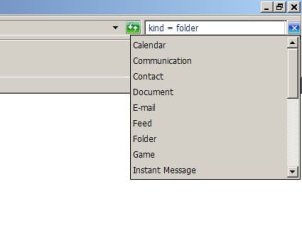
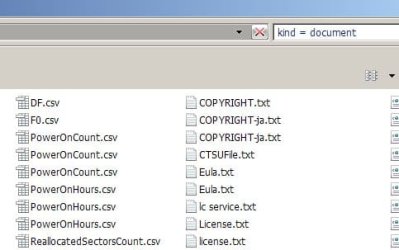
Wrong. Windows does not automatically put that kind of string on search field.
I does. Sorry to contradict an opinion with a fact. Clicking on any of the available options automatically generates "that kind of string".
 

Attachments

  • kind.jpg
    kind.jpg
    9.9 KB · Views: 2
  • kind3.jpg
    kind3.jpg
    19.4 KB · Views: 2

My Computer My Computer

At a glance

W7, W8.1
Computer type
Laptop
Computer Manufacturer/Model Number
Dell \ Lenovo\ HP \ Toshiba
OS
W7, W8.1
Antivirus
MSE, Malwarebytes
Browser
FF
Quote for Kari:

Wrong. Windows does not automatically put that kind of string on search field.
I does. Sorry to contradict an opinion with a fact. Clicking on any of the available options automatically generates "that kind of string".
I was not telling an opinion, I was telling a fact. However, your "facts" become more and more odd.

You are most probably using a modified Windows shell. The syntax kind = XXXXX is simply wrong. I am of course talking default, native command syntax in unmodified Windows.

For those reading this thread later, trying to fix a similar issue or learn something: Please do not let wrong advice, purposely given to advertise a third party solution to confuse you. Of course you will fail in your attempts to use Windows Search if you are using wrong command syntax.

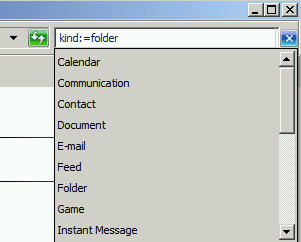
You can test it yourself. Simply write kind:=folder to search field (equal sign not necessary, also kind:folder is OK). Notice how the search argument turns blue (default color) to mark correct syntax:

2.png

This search by the way finds all folders on search location, and because of the syntax being correct it should also open the drop down selection of possible search types ("kind").

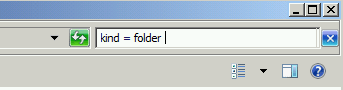
Then try this wrong syntax 4wd is offering to "show" how bad Windows Search is, writing kind = folder to search field. You notice the text remains black because Windows does not recognize it as a search argument:

1.png

Nothing more to say.

Kari
 

My Computer My Computer

At a glance

Windows 10 Pro x64 EN-GB1.6 GHz Intel Core i7-720QM Processor6 GBATI Mobility Radeon HD 5850 Graphics
Computer type
Laptop
Computer Manufacturer/Model Number
HP ENVY 17-1150eg
OS
Windows 10 Pro x64 EN-GB
CPU
1.6 GHz Intel Core i7-720QM Processor
Memory
6 GB
Graphics Card(s)
ATI Mobility Radeon HD 5850 Graphics
Sound Card
Beats sound system with integrated subwoofer
Monitor(s) Displays
17" laptop display, 22" LED and 32" Full HD TV through HDMI
Screen Resolution
1600*900 (1), 1920*1080 (2&3)
Hard Drives
Internal: 2 x 500 GB SATA Hard Disk Drive 7200 rpm
External: 2TB for backups, 3TB USB3 network drive for media
Cooling
As Envy runs a bit warm, I have it on a Cooler Master pad
Keyboard
Logitech diNovo Media Desktop Laser (bluetooth)
Mouse
Logitech Performance Mouse MX
Internet Speed
50/10 Mbps VDSL
Antivirus
Windows Defender 4.3.9431.0
Browser
Maxthon 3.5.2., IE11
Wonder if the OP expected all this when he started lol Anyway,

You are most probably using a modified Windows shell.
Wrong, 2 pc's, stock Ultimate & Home Pro.

The syntax kind = XXXXX is simply wrong.
Was mentioning windows is seen generating such a syntax automatically (as shown in the screenshots). Fact.

Now, why is it so? Ok, a clue: try ticking "use natural..." in Folder > Search.
You may not be familiar with the natural language setting and the way it has implications on the displayed search syntax.

I am of course talking default, native command syntax in unmodified Windows.
Using the 'natural' setting may be seen as modfying windows or the search function, but not in my opinion, it's just an existing and available option.

Meanwhile, am happily finding everything needed, using w7 for some kinds of search, and a dedicated search program at other times. Have a fine day, and let's hope the OP has found his avi's after all this lol
 

My Computer My Computer

At a glance

W7, W8.1
Computer type
Laptop
Computer Manufacturer/Model Number
Dell \ Lenovo\ HP \ Toshiba
OS
W7, W8.1
Antivirus
MSE, Malwarebytes
Browser
FF
You get at least half a point there, I admit I have been talking about default Windows settings.

Seems I can also learn something new. I openly admit I have never used natural language search simply because Windows Search works for me perfectly "out-of-the-box", with default settings.

The syntax will in fact be written as you told when you switch to natural language search. I repeat: In this syntax issue 4wd was right if and when the natural language search is enabled. If it is disabled as is by default, the syntax does not work.

Interesting fact is that this natural language search makes the Windows Search even better!

Kari
 

My Computer My Computer

At a glance

Windows 10 Pro x64 EN-GB1.6 GHz Intel Core i7-720QM Processor6 GBATI Mobility Radeon HD 5850 Graphics
Computer type
Laptop
Computer Manufacturer/Model Number
HP ENVY 17-1150eg
OS
Windows 10 Pro x64 EN-GB
CPU
1.6 GHz Intel Core i7-720QM Processor
Memory
6 GB
Graphics Card(s)
ATI Mobility Radeon HD 5850 Graphics
Sound Card
Beats sound system with integrated subwoofer
Monitor(s) Displays
17" laptop display, 22" LED and 32" Full HD TV through HDMI
Screen Resolution
1600*900 (1), 1920*1080 (2&3)
Hard Drives
Internal: 2 x 500 GB SATA Hard Disk Drive 7200 rpm
External: 2TB for backups, 3TB USB3 network drive for media
Cooling
As Envy runs a bit warm, I have it on a Cooler Master pad
Keyboard
Logitech diNovo Media Desktop Laser (bluetooth)
Mouse
Logitech Performance Mouse MX
Internet Speed
50/10 Mbps VDSL
Antivirus
Windows Defender 4.3.9431.0
Browser
Maxthon 3.5.2., IE11
Thank you + peace and understanding, :) and hope readers will find lots of stuff of interest in this thread.
 

My Computer My Computer

At a glance

W7, W8.1
Computer type
Laptop
Computer Manufacturer/Model Number
Dell \ Lenovo\ HP \ Toshiba
OS
W7, W8.1
Antivirus
MSE, Malwarebytes
Browser
FF
Ok. I still haven't solved my problem, LOOL

I've tried what everyone was trying to say. First, the file is accessible via mplayer.exe through cmd.

Can anyone solve it? I still can't find the avi file
 

My Computer My Computer

At a glance

Windows 7 Home Premium 32bit
OS
Windows 7 Home Premium 32bit
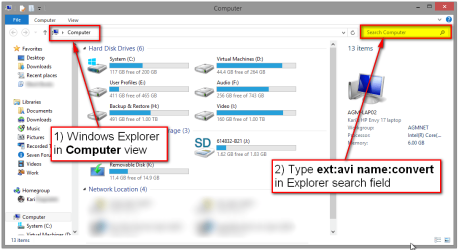
Type ext:avi name:convert on Explorer search field (Explorer in Computer view), press Enter, when search finishes post a screenshot here showing Explorer window with search results.

Search_Computer_1.png

Notice please: I have understood you are searching a file called convert.avi. If that is not correct please replace convert in above instructions with the actual file we are looking for without its extension, for example name:ThisFile.

Tutorials to show you how to make good screenshots and post them here:
http://www.sevenforums.com/tutorials/9717-screenshot-paint.html
http://www.sevenforums.com/tutorials/9733-screenshots-files-upload-post-seven-forums.html
 

My Computer My Computer

At a glance

Windows 10 Pro x64 EN-GB1.6 GHz Intel Core i7-720QM Processor6 GBATI Mobility Radeon HD 5850 Graphics
Computer type
Laptop
Computer Manufacturer/Model Number
HP ENVY 17-1150eg
OS
Windows 10 Pro x64 EN-GB
CPU
1.6 GHz Intel Core i7-720QM Processor
Memory
6 GB
Graphics Card(s)
ATI Mobility Radeon HD 5850 Graphics
Sound Card
Beats sound system with integrated subwoofer
Monitor(s) Displays
17" laptop display, 22" LED and 32" Full HD TV through HDMI
Screen Resolution
1600*900 (1), 1920*1080 (2&3)
Hard Drives
Internal: 2 x 500 GB SATA Hard Disk Drive 7200 rpm
External: 2TB for backups, 3TB USB3 network drive for media
Cooling
As Envy runs a bit warm, I have it on a Cooler Master pad
Keyboard
Logitech diNovo Media Desktop Laser (bluetooth)
Mouse
Logitech Performance Mouse MX
Internet Speed
50/10 Mbps VDSL
Antivirus
Windows Defender 4.3.9431.0
Browser
Maxthon 3.5.2., IE11
I've tried that already as well. It's not showing up. It is accessible via mplayer.exe when I run this command in cmd

cd c:\
mplayer convert.avi

then it would run as I have posted on post number 5, but whenever I search for it. The file is nowhere to be found
 

My Computer My Computer

At a glance

Windows 7 Home Premium 32bit
OS
Windows 7 Home Premium 32bit

My Computer My Computer

At a glance

Windows 10 Pro x64 EN-GB1.6 GHz Intel Core i7-720QM Processor6 GBATI Mobility Radeon HD 5850 Graphics
Computer type
Laptop
Computer Manufacturer/Model Number
HP ENVY 17-1150eg
OS
Windows 10 Pro x64 EN-GB
CPU
1.6 GHz Intel Core i7-720QM Processor
Memory
6 GB
Graphics Card(s)
ATI Mobility Radeon HD 5850 Graphics
Sound Card
Beats sound system with integrated subwoofer
Monitor(s) Displays
17" laptop display, 22" LED and 32" Full HD TV through HDMI
Screen Resolution
1600*900 (1), 1920*1080 (2&3)
Hard Drives
Internal: 2 x 500 GB SATA Hard Disk Drive 7200 rpm
External: 2TB for backups, 3TB USB3 network drive for media
Cooling
As Envy runs a bit warm, I have it on a Cooler Master pad
Keyboard
Logitech diNovo Media Desktop Laser (bluetooth)
Mouse
Logitech Performance Mouse MX
Internet Speed
50/10 Mbps VDSL
Antivirus
Windows Defender 4.3.9431.0
Browser
Maxthon 3.5.2., IE11
I've done that already, it still doesn't work
 

My Computer My Computer

At a glance

Windows 7 Home Premium 32bit
OS
Windows 7 Home Premium 32bit

My Computer My Computer

At a glance

Windows 10 Pro x64 EN-GB1.6 GHz Intel Core i7-720QM Processor6 GBATI Mobility Radeon HD 5850 Graphics
Computer type
Laptop
Computer Manufacturer/Model Number
HP ENVY 17-1150eg
OS
Windows 10 Pro x64 EN-GB
CPU
1.6 GHz Intel Core i7-720QM Processor
Memory
6 GB
Graphics Card(s)
ATI Mobility Radeon HD 5850 Graphics
Sound Card
Beats sound system with integrated subwoofer
Monitor(s) Displays
17" laptop display, 22" LED and 32" Full HD TV through HDMI
Screen Resolution
1600*900 (1), 1920*1080 (2&3)
Hard Drives
Internal: 2 x 500 GB SATA Hard Disk Drive 7200 rpm
External: 2TB for backups, 3TB USB3 network drive for media
Cooling
As Envy runs a bit warm, I have it on a Cooler Master pad
Keyboard
Logitech diNovo Media Desktop Laser (bluetooth)
Mouse
Logitech Performance Mouse MX
Internet Speed
50/10 Mbps VDSL
Antivirus
Windows Defender 4.3.9431.0
Browser
Maxthon 3.5.2., IE11
try one or the other:
when it plays in media player - open he object properties - that will tell you where it "lives"

or
in cmd
cd \
dir /p /s /a convert.avi

/p = pause
/s = subdirectories
/a = all

If you have your drive partitioned or more than one drive, the files might "live" on another partition

cd to each prtition in a cmd prompt and execute the dir cmd until you locate it.

Windows search is very powerful, but it's more akin to a structured query.
1st make sure you open Computer
then enter
type:avi convert
into the search window - youcan use ext: or type: - both work for extentions

Windows Search - advanced tips

Bill
.
 

My Computer My Computer

At a glance

x64 (6.3.9600) Win8.1 Pro & soon dual boot x6...AMD A6-3420M APU with Radeon(tm) HD Graphics6.00 GBAMD Radeon(TM) HD 6520G
Computer type
Laptop
Computer Manufacturer/Model Number
HP Pavilion dv6-6c10us
OS
x64 (6.3.9600) Win8.1 Pro & soon dual boot x64 (6.1.7601) Win7_SP1 HomePrem
CPU
AMD A6-3420M APU with Radeon(tm) HD Graphics
Motherboard
Hewlett-Packard 1805
Memory
6.00 GB
Graphics Card(s)
AMD Radeon(TM) HD 6520G
Sound Card
(1) AMD High Definition Audio Device (2) IDT High Definiti
Monitor(s) Displays
HP W2072a 20" LCD (1600 x 900) @ 60 Hz
Screen Resolution
1366 x 768 x 32 bits (4294967296 colors) @ 60 Hz
Hard Drives
ST640LM0 00 HM641JI SATA Disk Device
Keyboard
Logitech k520 wireless KB
Mouse
Logitech m320 wireless mouse (bundled with KB)
Internet Speed
15/5 | 54 MB Wireless 'n'
Antivirus
Realtime: Defender or Avast | On-demand: Malwarebytes, ESET
Browser
IE 11 on Win8, IE 10 on win 7
Other Info
Media: [Gimp, Audacity, VLC] || Comm: [WEmail 2012, Skype] || Productivity: [OpenOffice,| Textpad] || Utils: [Sysinternals, cCleaner, Speccy, Defraggler]
Back
Top