
I need some reassuring on SSDs

I've just had a read on Gibibytes and Gigabytes, I suppose that's the mathematics you were talking about - rather confusing :S
Yeah, that's what you get when you fall asleep in school when they teach binary - lol.
Well, we learned binary but in traditional bits and bytes as opposed to IEC. I suppose this means that Windows is displaying the drive data capacity in GiB instead of GB am I right?

This is what I've read http://www.brettbits.com/Text/MissingHardDriveSpace/
 

My Computer My Computer

Computer Manufacturer/Model Number
Myself
OS
Windows 7 Home-Premium 64bit
CPU
AMD Phenom II x4 955 Black Edition 3.2GHz (stock) with CM V8
Motherboard
Gigabyte GA-MA790XT-UD4P (AM3)
Memory
8GB Corsair Red Vengeance @1333MHz 9-9-9-24 Dual-Channel
Graphics Card(s)
XFX AMD Radeon HD 6970 2GB (stock)
Sound Card
Onboard Realtek Azalea 8.1 Channel
Monitor(s) Displays
Samsung Syncmaster P2250 DVI-D
Screen Resolution
1920x1080@60Hz
Hard Drives
1. 60GB (55.7GiB) Corsair Force 3 SSD (firmware 1.3.3) SATA III (in SATA II mode) - contains OS, drivers and non-game programs
2. 500GB (465GiB) Western Digital Caviar Blue 500GB SATA II 7,200rpm 16MB Cache - contains games
3. 250GB (232GiB) Weste
PSU
Corsair TX750W 750W PSU with 4x PCI-E 6+2-pin connectors
Case
Lancool [Lian Li] PC-K62 Dragonlord (originally w/blue fans)
Cooling
Lian Li: 3x140mm, 1x120mm | Bitfenix: 1x140mm - ALL RED LED
Keyboard
Logitech G110
Mouse
Logitech MX518
Internet Speed
BT Infinity Option 2 ~38Mbps download, ~8Mbps upload
Other Info
Also have a Logitech G27 Racing Wheel, Creative Fatal1ty Stereo headset, Logitech X-140 Stereo Speakers, a disused Xbox 360 USB game controller pad and a CM Storm WoC M4 Mouse mat. The *GB of Corsair Red Vengeance DRAM is the CMZ8GX3M2A1600C9R set which can run at 1600MHz at 9-9-9-24 in Intel's XMP but my AMD board doesn't have this and it's not recommended for AMD Phenom II's anyway.

My Computer My Computer

Computer Manufacturer/Model Number
HP, Dell, Gateway, Toshiba - 4 laptops and 2 desktops
OS
Vista, Windows7, Mint Mate, Zorin, Windows 8
CPU
from 1.6GHz Duo to i7
Monitor(s) Displays
2x HP w2207
Hard Drives
5x HDD, 7x SSD, 12x Externals
Keyboard
with trackball - no mices
Mouse
Trackball mice
Internet Speed
DSL 6000
Well I suppose I have enough info to keep me happy. :)

But if you could maybe tell me how to put my user files on a different drive then that would be quite useful :)
 

My Computer My Computer

Computer Manufacturer/Model Number
Myself
OS
Windows 7 Home-Premium 64bit
CPU
AMD Phenom II x4 955 Black Edition 3.2GHz (stock) with CM V8
Motherboard
Gigabyte GA-MA790XT-UD4P (AM3)
Memory
8GB Corsair Red Vengeance @1333MHz 9-9-9-24 Dual-Channel
Graphics Card(s)
XFX AMD Radeon HD 6970 2GB (stock)
Sound Card
Onboard Realtek Azalea 8.1 Channel
Monitor(s) Displays
Samsung Syncmaster P2250 DVI-D
Screen Resolution
1920x1080@60Hz
Hard Drives
1. 60GB (55.7GiB) Corsair Force 3 SSD (firmware 1.3.3) SATA III (in SATA II mode) - contains OS, drivers and non-game programs
2. 500GB (465GiB) Western Digital Caviar Blue 500GB SATA II 7,200rpm 16MB Cache - contains games
3. 250GB (232GiB) Weste
PSU
Corsair TX750W 750W PSU with 4x PCI-E 6+2-pin connectors
Case
Lancool [Lian Li] PC-K62 Dragonlord (originally w/blue fans)
Cooling
Lian Li: 3x140mm, 1x120mm | Bitfenix: 1x140mm - ALL RED LED
Keyboard
Logitech G110
Mouse
Logitech MX518
Internet Speed
BT Infinity Option 2 ~38Mbps download, ~8Mbps upload
Other Info
Also have a Logitech G27 Racing Wheel, Creative Fatal1ty Stereo headset, Logitech X-140 Stereo Speakers, a disused Xbox 360 USB game controller pad and a CM Storm WoC M4 Mouse mat. The *GB of Corsair Red Vengeance DRAM is the CMZ8GX3M2A1600C9R set which can run at 1600MHz at 9-9-9-24 in Intel's XMP but my AMD board doesn't have this and it's not recommended for AMD Phenom II's anyway.
Well I suppose I have enough info to keep me happy. :)

But if you could maybe tell me how to put my user files on a different drive then that would be quite useful :)
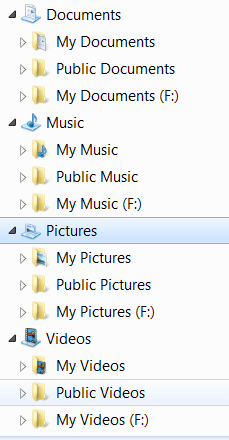
Very simple - rather than changing the default location (which is one option) but can make problems if you don't do it right, I prefer this easy method:

1. Define a partition on your HDD
2. Define those folders in that partition: Documents, Pictures, Music, Videos
3. Right click on each of those folders and INCLUDE it into the corresponding library
4. Move your files to those folders - where they belong

In your library structure you will then find those folders - in F: in my case )see Pic). The big advantage is that all the folders that the system and the programs generate are clearly seperated from your own folders because they go to the default folder - and there will be quite some, especially in Documents.

I also have some additional libraries (which do not show in the Pic) that I defined myself. But that is optional depending on your whim.
 

Attachments

  • 2011-12-11_2121.png
    2011-12-11_2121.png
    6.1 KB · Views: 2

My Computer My Computer

Computer Manufacturer/Model Number
HP, Dell, Gateway, Toshiba - 4 laptops and 2 desktops
OS
Vista, Windows7, Mint Mate, Zorin, Windows 8
CPU
from 1.6GHz Duo to i7
Monitor(s) Displays
2x HP w2207
Hard Drives
5x HDD, 7x SSD, 12x Externals
Keyboard
with trackball - no mices
Mouse
Trackball mice
Internet Speed
DSL 6000

My Computers My Computers

System One System Two

  • Computer type
    PC/Desktop
    Computer Manufacturer/Model Number
    ALWAYS UNDER CONSTRUCTION
    OS
    Windows 11 Pro
    CPU
    Ryzen 9 5900X
    Motherboard
    Asus X570 Crosshair Viii Hero
    Memory
    32GB G Skill DDR4-3600
    Graphics Card(s)
    EVGA RTX 3080 FTW 3 Ultra
    Sound Card
    On Board/Sennheiser PC37X Headset
    Monitor(s) Displays
    3 X Asus 27"
    Screen Resolution
    2560x1440
    Hard Drives
    2 X 1 TB NVME drives
    PSU
    EVGA 850
    Case
    Phanteks Eclipse P400A
    Cooling
    EVGA 280 AIO
    Keyboard
    Logitech G510s/ Logitech G13
    Mouse
    Logitech G502
    Internet Speed
    24/1
    Antivirus
    ESET/MBAM Pro/SAS Pro
    Browser
    Chrome/ Firefox/ Edge
  • Computer type
    Laptop
    System Manufacturer/Model Number
    Dell 16 Plus
    OS
    Windows 11 Pro
    CPU
    Intel Ultra 9 288V
    Memory
    32 GB LPDDR5X 8533
    Monitor(s) Displays
    16" Mini-LED HDR600 Touch 90 Hz
    Screen Resolution
    2560X1600
    Hard Drives
    1 TB NVME
Thanks guys :)
 

My Computer My Computer

Computer Manufacturer/Model Number
Myself
OS
Windows 7 Home-Premium 64bit
CPU
AMD Phenom II x4 955 Black Edition 3.2GHz (stock) with CM V8
Motherboard
Gigabyte GA-MA790XT-UD4P (AM3)
Memory
8GB Corsair Red Vengeance @1333MHz 9-9-9-24 Dual-Channel
Graphics Card(s)
XFX AMD Radeon HD 6970 2GB (stock)
Sound Card
Onboard Realtek Azalea 8.1 Channel
Monitor(s) Displays
Samsung Syncmaster P2250 DVI-D
Screen Resolution
1920x1080@60Hz
Hard Drives
1. 60GB (55.7GiB) Corsair Force 3 SSD (firmware 1.3.3) SATA III (in SATA II mode) - contains OS, drivers and non-game programs
2. 500GB (465GiB) Western Digital Caviar Blue 500GB SATA II 7,200rpm 16MB Cache - contains games
3. 250GB (232GiB) Weste
PSU
Corsair TX750W 750W PSU with 4x PCI-E 6+2-pin connectors
Case
Lancool [Lian Li] PC-K62 Dragonlord (originally w/blue fans)
Cooling
Lian Li: 3x140mm, 1x120mm | Bitfenix: 1x140mm - ALL RED LED
Keyboard
Logitech G110
Mouse
Logitech MX518
Internet Speed
BT Infinity Option 2 ~38Mbps download, ~8Mbps upload
Other Info
Also have a Logitech G27 Racing Wheel, Creative Fatal1ty Stereo headset, Logitech X-140 Stereo Speakers, a disused Xbox 360 USB game controller pad and a CM Storm WoC M4 Mouse mat. The *GB of Corsair Red Vengeance DRAM is the CMZ8GX3M2A1600C9R set which can run at 1600MHz at 9-9-9-24 in Intel's XMP but my AMD board doesn't have this and it's not recommended for AMD Phenom II's anyway.
My ocz 120gb drive has 120.4gb of space lol was expecting 111gb because of the 7% rule lol

Sent from my BlackBerry 9900 using Tapatalk
 

My Computer My Computer

Computer type
PC/Desktop
Computer Manufacturer/Model Number
Built by badgers!!!
OS
Windows 7 Ultimate x64, & Mac OS X 10.9.2
CPU
Intel Core i5 2500k
Motherboard
Asus P8z68 LE
Memory
Corsair Vengence 8gb 1866mhz
Graphics Card(s)
Nvidia GTX 770 OC
Monitor(s) Displays
2x ASUS LED 22" IPS
Screen Resolution
3840x1080
Hard Drives
240GB Crucial M500 SSD
120gb Corsair Force 3 SSD
1TB Western Digital
PSU
Corsair HX650w Modular
Case
Corsair Air 540
Cooling
Corsair H60 Push/Pull
Keyboard
Corsair K70/ Logitech G27 wheel
Mouse
Saitek R.A.T 9
Internet Speed
Too slow!
Other Info
AMD fusion E350N Home server-Windows Home Server 2011 (also made by badgers!)
2011 Macbook 2.4ghz Core2Duo, 4gb ddr3, 120gb Ocz Vertex SSD
I think most concerns with SSD's are unfounded and mostly FUD.
  1. Many things were initially speculated
  2. Many who are concerned are those who haven't purchased one yet
  3. Those with a negative opinion of something are often the loudest on the web.

I have a couple of Intel drives and am 100% satisfied with them.

I agree 100% on the USE of a UPS. These are nowhere near as expensive as some might believe. I can often find 500-550VA APC brand for around $50-$60 like this one.
Newegg.com - APC Back-UPS ES BE550G 550 VA 330 Watts (4) NEMA 5-15R (Battery Backup)
(4) NEMA 5-15R (Surge Protection)
Outlets UPS
 

My Computer My Computer

Computer Manufacturer/Model Number
Self-Built in July 2009
OS
Windows 7 Ultimate x64
CPU
Intel Q9550 2.83Ghz OC'd to 3.40Ghz
Motherboard
Gigabyte GA-EP45-UD3R rev. 1.1, F12 BIOS
Memory
8GB G.Skill PI DDR2-800, 4-4-4-12 timings
Graphics Card(s)
EVGA 1280MB Nvidia GeForce GTX570
Sound Card
Realtek ALC899A 8 channel onboard audio
Monitor(s) Displays
23" Acer x233H
Screen Resolution
1920x1080
Hard Drives
Intel X25-M 80GB Gen 2 SSD
Western Digital 1TB Caviar Black, 32MB cache. WD1001FALS
PSU
Corsair 620HX modular
Case
Antec P182
Cooling
stock
Keyboard
ABS M1 Mechanical
Mouse
Logitech G9 Laser Mouse
Internet Speed
15/2 cable modem
Other Info
Windows and Linux enthusiast. Logitech G35 Headset.
Back
Top