I need your opinion on this tutorial I created.

Lance1

New member
Pro User
VIP
Local time
3:13 PM
Messages
529
Here's some background info. I was working on my old XP box in my office. I only have one LAN cable going to the office and I needed to have my main system online but also I needed to have the XP box online as well! So I decided to setup a bridge. I dug up my old Telus modem I had laying around and started to setup the bridge. I stopped and thought.... Why not create a tutorial on this. But me being me I wanted to do it outside of the 7 Forums box. So I created a Slideshow. So I need your helpful opinion. Is this good way to show how something is done??

YES=

NO=

Check Out my slideshow. Your opinions mean a lot. Positive or Negative...


My Computer My Computer

Computer type
PC/Desktop
Computer Manufacturer/Model Number
Custom Built By Me.
OS
Windows 10 Pro 64 bit
CPU
AMD FX 9590 8 Core Black Edition
Motherboard
MSI 990FXA GAMING (MS-7893)
Memory
Corsair Vengeance 16GB DDR3
Graphics Card(s)
AMD Radeon (TM) R9 380 Gaming Series
Sound Card
AMD High Definition
Monitor(s) Displays
Samsung 32" 60Hz 4ms Curved PLS LED
Screen Resolution
1920 X 1080
Hard Drives
C: 223 GB SSD = E: 465 GB HDD = F: 931 GB HDD = G: 149 GB HDD = H: 931 GB HDD
PSU
EVGA Supernova NEX750B 750W ATX EPS12V 80PLUS Bronze
Case
Cool Master
Cooling
Noctua NH-D15 Premium Cooler with 2x NF-A15 PWM 140mm Fan
Internet Speed
Fiber Optic: Download 332.7 Mbps / Upload 331.5 Mbps
Antivirus
Windows Defender
Browser
Slimjet (64bit)
Thanks. I like the balanced mix of photos and screen shots. You taught me through the steps how to build a network bridge. More importantly, you tell me how to run one network card along side another network card.The video is only 6 minutes long, although I confess to a little information overload, so I watched it twice (taking me all of 12 minutes).
 

My Computer My Computer

Computer type
PC/Desktop
OS
Windows 7 x64, Vista x64, 8.1 smartphone
CPU
Intel E8400 65W 64-bit
Motherboard
Gigabyte EP45-UD3LR
Memory
DDR2 2 x 2GB, 1GB x 2
Graphics Card(s)
XFX Radeon HD5750
Sound Card
AMD High Definition Audio; Realtek High Definition Audio
Monitor(s) Displays
iiyama prolite X2377HDS
Screen Resolution
1920 x 1080
Hard Drives
500GB 7200 rpm Seagate ST3500413AS 16MB, 500GB 5400 rpm Toshiba MQ02ABF050H 32MB, 200GB 7200 rpm Seagate ST3200820AS 8MB, 2TB 7200 rpm Western Digital WD20EZRX 64MB
PSU
Enermax Liberty Modular
Case
Antec P193 Midi Tower
Keyboard
Mionix ZIBAL 60
Mouse
Razer USB 2.0 Diamondback Mouse or Huion Graphics Tablet
Browser
Internet Explorer, Lunascape, Firefox, Opera, Avast Safezone
Thanks. I like the balanced mix of photos and screen shots. You taught me through the steps how to build a network bridge. More importantly, you tell me how to run one network card along side another network card.The video is only 6 minutes long, although I confess to a little information overload, so I watched it twice (taking me all of 12 minutes).

"Information Overload" I tried to keep it as low key as I could. At the same time giving enough information to complete the job, and there are advantages to having two network cards onboard. The slideshow was fun to put together, more than I thought it would be. SO! This is a YES??:rolleyes:
 

My Computer My Computer

Computer type
PC/Desktop
Computer Manufacturer/Model Number
Custom Built By Me.
OS
Windows 10 Pro 64 bit
CPU
AMD FX 9590 8 Core Black Edition
Motherboard
MSI 990FXA GAMING (MS-7893)
Memory
Corsair Vengeance 16GB DDR3
Graphics Card(s)
AMD Radeon (TM) R9 380 Gaming Series
Sound Card
AMD High Definition
Monitor(s) Displays
Samsung 32" 60Hz 4ms Curved PLS LED
Screen Resolution
1920 X 1080
Hard Drives
C: 223 GB SSD = E: 465 GB HDD = F: 931 GB HDD = G: 149 GB HDD = H: 931 GB HDD
PSU
EVGA Supernova NEX750B 750W ATX EPS12V 80PLUS Bronze
Case
Cool Master
Cooling
Noctua NH-D15 Premium Cooler with 2x NF-A15 PWM 140mm Fan
Internet Speed
Fiber Optic: Download 332.7 Mbps / Upload 331.5 Mbps
Antivirus
Windows Defender
Browser
Slimjet (64bit)
YES - I am ok with this. I believe iko22 meant the 'information overload' critique to apply to only himself (maybe others too but they will have to state so themselves). I experienced no such phenomenon. For me, icing on this cake would have been some narraration accompaniment.
 

My Computer My Computer

Computer type
PC/Desktop
Computer Manufacturer/Model Number
HP (HP-P6212F)
OS
Microsoft Windows 7 Home Premium 64-bit 7601 Multiprocessor Free Service Pack 1
CPU
Pentium(R) Dual-Core CPU E5300 @ 2.60GHz
Motherboard
PEGATRON CORPORATION Benicia
Memory
6.00 GB
Graphics Card(s)
Intel(R) G33/G31 Express Chipset Family
Sound Card
Realtek High Definition Audio
Monitor(s) Displays
24'' HP WS LCD
Screen Resolution
1920 x 1080 x 32 bits (4294967296 colors) @ 60 Hz
Hard Drives
(1) ATA Hitachi HDT72106 SCSI Disk Device (2) Generic- Compact Flash USB Device (3) Generic- MS/MS-Pro USB Device (4) Generic- SD/MMC USB Device (5) Generic- SM/xD-Picture USB Device (6) Verbatim STORE N GO USB Device
Keyboard
Logitech G510s
Mouse
Logitech Trackball M570
Antivirus
Microsoft Security Essentials / Malwarebytes
Browser
IE / Firefox / Chrome
YES - I am ok with this. I believe iko22 meant the 'information overload' critique to apply to only himself (maybe others too but they will have to state so themselves). I experienced no such phenomenon. For me, icing on this cake would have been some narraration accompaniment.

YA! I thought about narration and my software definitely supports that but... I don't have a microphone... Thanks for posting your opinion. I'm thinking of finding another project to work on. Maybe I should go out and find a mic.
 

My Computer My Computer

Computer type
PC/Desktop
Computer Manufacturer/Model Number
Custom Built By Me.
OS
Windows 10 Pro 64 bit
CPU
AMD FX 9590 8 Core Black Edition
Motherboard
MSI 990FXA GAMING (MS-7893)
Memory
Corsair Vengeance 16GB DDR3
Graphics Card(s)
AMD Radeon (TM) R9 380 Gaming Series
Sound Card
AMD High Definition
Monitor(s) Displays
Samsung 32" 60Hz 4ms Curved PLS LED
Screen Resolution
1920 X 1080
Hard Drives
C: 223 GB SSD = E: 465 GB HDD = F: 931 GB HDD = G: 149 GB HDD = H: 931 GB HDD
PSU
EVGA Supernova NEX750B 750W ATX EPS12V 80PLUS Bronze
Case
Cool Master
Cooling
Noctua NH-D15 Premium Cooler with 2x NF-A15 PWM 140mm Fan
Internet Speed
Fiber Optic: Download 332.7 Mbps / Upload 331.5 Mbps
Antivirus
Windows Defender
Browser
Slimjet (64bit)
"Information Overload" I tried to keep it as low key as I could. At the same time giving enough information to complete the job, and there are advantages to having two network cards onboard. The slideshow was fun to put together, more than I thought it would be. SO! This is a YES??:rolleyes:

Why, that is a resounding YES of course!! I can say that I benefited from your tutorial. I know the theory of network gateways, bridges and routers, but I'd never before benefited from anyone showing me how to build a bridge.

I'm glad that youve enjoyed sharing what youve created. That is the main most accessible thing for me.

Where the actual presentation seemed a "no, no", is that other people may have benefit if you can sequence the slides showing more "before" and "after" slides. For example, at 2 minutes 18 seconds, you get the LAN IP and DHCP Settings screen. It would been nice to have seen this screen, as it is. Then, on the next slide, show your callout boxes, and the changes that youve made at that step. Several places may benefit from seeing this "before" and "after" sequence in the slideshow. It helps train the thinking process, that is all.

I don't know about any microphone. I have seen text only presentations that have also been technical in nature. But these presentations, while they had no audio, more clearly show a change from "before" to "after" between each slide. Do you get it, or am I adding to the confusion?
 

My Computer My Computer

Computer type
PC/Desktop
OS
Windows 7 x64, Vista x64, 8.1 smartphone
CPU
Intel E8400 65W 64-bit
Motherboard
Gigabyte EP45-UD3LR
Memory
DDR2 2 x 2GB, 1GB x 2
Graphics Card(s)
XFX Radeon HD5750
Sound Card
AMD High Definition Audio; Realtek High Definition Audio
Monitor(s) Displays
iiyama prolite X2377HDS
Screen Resolution
1920 x 1080
Hard Drives
500GB 7200 rpm Seagate ST3500413AS 16MB, 500GB 5400 rpm Toshiba MQ02ABF050H 32MB, 200GB 7200 rpm Seagate ST3200820AS 8MB, 2TB 7200 rpm Western Digital WD20EZRX 64MB
PSU
Enermax Liberty Modular
Case
Antec P193 Midi Tower
Keyboard
Mionix ZIBAL 60
Mouse
Razer USB 2.0 Diamondback Mouse or Huion Graphics Tablet
Browser
Internet Explorer, Lunascape, Firefox, Opera, Avast Safezone
Why, that is a resounding YES of course!! I can say that I benefited from your tutorial. I know the theory of network gateways, bridges and routers, but I'd never before benefited from anyone showing me how to build a bridge.

I'm glad that youve enjoyed sharing what youve created. That is the main most accessible thing for me.

Where the actual presentation seemed a "no, no", is that other people may have benefit if you can sequence the slides showing more "before" and "after" slides. For example, at 2 minutes 18 seconds, you get the LAN IP and DHCP Settings screen. It would been nice to have seen this screen, as it is. Then, on the next slide, show your callout boxes, and the changes that youve made at that step. Several places may benefit from seeing this "before" and "after" sequence in the slideshow. It helps train the thinking process, that is all.

I don't know about any microphone. I have seen text only presentations that have also been technical in nature. But these presentations, while they had no audio, more clearly show a change from "before" to "after" between each slide. Do you get it, or am I adding to the confusion?

No! I get it. Those are valid points and very good suggestion. I'm going to print out what you suggested and when I do another tutorial I'll try and put your suggestions into practice. Thank you for pointing the areas out to me I really appreciate it.
 

My Computer My Computer

Computer type
PC/Desktop
Computer Manufacturer/Model Number
Custom Built By Me.
OS
Windows 10 Pro 64 bit
CPU
AMD FX 9590 8 Core Black Edition
Motherboard
MSI 990FXA GAMING (MS-7893)
Memory
Corsair Vengeance 16GB DDR3
Graphics Card(s)
AMD Radeon (TM) R9 380 Gaming Series
Sound Card
AMD High Definition
Monitor(s) Displays
Samsung 32" 60Hz 4ms Curved PLS LED
Screen Resolution
1920 X 1080
Hard Drives
C: 223 GB SSD = E: 465 GB HDD = F: 931 GB HDD = G: 149 GB HDD = H: 931 GB HDD
PSU
EVGA Supernova NEX750B 750W ATX EPS12V 80PLUS Bronze
Case
Cool Master
Cooling
Noctua NH-D15 Premium Cooler with 2x NF-A15 PWM 140mm Fan
Internet Speed
Fiber Optic: Download 332.7 Mbps / Upload 331.5 Mbps
Antivirus
Windows Defender
Browser
Slimjet (64bit)
I thought about narration and my software definitely supports that but... I don't have a microphone... Thanks for posting your opinion. I'm thinking of finding another project to work on. Maybe I should go out and find a mic.
I've used a smartphone and voice recorder app for this. Dictate into the phone while watching the video so you get the basic timing, then export the recording to your computer for processing.

If you do this, experiment to compare speaking directly into the phone with speaking through an earbud/mic system. They'll likely sound different and you may prefer one to the other.

Once you've got it into your computer, play back both audio and video simultaneously to check your timing. I recommend something like Audacity (which even has a portable version) to edit it. There's a ton of features in Audacity, like noise filtering, inserting silence to increase gaps and changing the speed or tempo to fine tune the timing to match your video.

Even if your video app has audio editing capabilities, I generally prefer to edit the audio in Audacity and simply paste it whole into the video without having to edit it further in the video app.
 

My Computer My Computer

Computer type
PC/Desktop
Computer Manufacturer/Model Number
Dell Optiplex 7050
OS
Windows 7/8.1/10 multiboot
CPU
Intel Core i7-7700
Motherboard
Dell, Intel Q270 chipset
Memory
48GB (2x16GB Crucial DDR4-3200 + 2x8GB Hynix DDR4-2400)
Graphics Card(s)
Intel HD630 + AMD Radeon R7 450 PCIe
Monitor(s) Displays
Asus VC279 (27")
Screen Resolution
1920x1080
Hard Drives
Toshiba M.2 NVMe (256GB),
Samsung 960 Evo (500GB),
WD Red Plus 80EFBX (8TB)
I've used a smartphone and voice recorder app for this. Dictate into the phone while watching the video so you get the basic timing, then export the recording to your computer for processing.

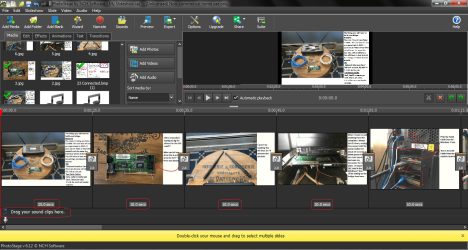
That is a great idea. The pic you see is of my video and slideshow creator. Your idea struck a chord that I never thought of. At the bottom on the image you'll see time frames for each slide. which I can change to any length I want. I have these set at 25 sec, 10 sec, 10 sec 20 sec and so on.That'll be my time frame for narrating each slide. All I do then is drag the file to where it says "Drag Your Sound Clip Here" WOW.. Thank You!
 

Attachments

  • Slideshow Recorder.png
    Slideshow Recorder.png
    191.3 KB · Views: 5

My Computer My Computer

Computer type
PC/Desktop
Computer Manufacturer/Model Number
Custom Built By Me.
OS
Windows 10 Pro 64 bit
CPU
AMD FX 9590 8 Core Black Edition
Motherboard
MSI 990FXA GAMING (MS-7893)
Memory
Corsair Vengeance 16GB DDR3
Graphics Card(s)
AMD Radeon (TM) R9 380 Gaming Series
Sound Card
AMD High Definition
Monitor(s) Displays
Samsung 32" 60Hz 4ms Curved PLS LED
Screen Resolution
1920 X 1080
Hard Drives
C: 223 GB SSD = E: 465 GB HDD = F: 931 GB HDD = G: 149 GB HDD = H: 931 GB HDD
PSU
EVGA Supernova NEX750B 750W ATX EPS12V 80PLUS Bronze
Case
Cool Master
Cooling
Noctua NH-D15 Premium Cooler with 2x NF-A15 PWM 140mm Fan
Internet Speed
Fiber Optic: Download 332.7 Mbps / Upload 331.5 Mbps
Antivirus
Windows Defender
Browser
Slimjet (64bit)
Yeah, the smartphone technique should work perfectly well for your purposes.

It looks like PhotoStage also lets you insert video segments, so for future projects you might want to consider splicing in a few video screen capture clips where appropriate. Play around with the freebie Screen2Avi to get an idea what it might be useful for. That might make sections like what iko22 talks about in post #6 more effective.

For an illustration, here's a tutorial I did putting together smartphone audio and Screen2Avi video clips.
 

My Computer My Computer

Computer type
PC/Desktop
Computer Manufacturer/Model Number
Dell Optiplex 7050
OS
Windows 7/8.1/10 multiboot
CPU
Intel Core i7-7700
Motherboard
Dell, Intel Q270 chipset
Memory
48GB (2x16GB Crucial DDR4-3200 + 2x8GB Hynix DDR4-2400)
Graphics Card(s)
Intel HD630 + AMD Radeon R7 450 PCIe
Monitor(s) Displays
Asus VC279 (27")
Screen Resolution
1920x1080
Hard Drives
Toshiba M.2 NVMe (256GB),
Samsung 960 Evo (500GB),
WD Red Plus 80EFBX (8TB)
Yes.. The information that you are trying to give is quite helpful.
 

My Computer My Computer

Computer type
PC/Desktop
Computer Manufacturer/Model Number
Dell
OS
Windows 10 64 bit
Yeah, the smartphone technique should work perfectly well for your purposes.

It looks like PhotoStage also lets you insert video segments, so for future projects you might want to consider splicing in a few video screen capture clips where appropriate. Play around with the freebie Screen2Avi to get an idea what it might be useful for. That might make sections like what iko22 talks about in post #6 more effective.

For an illustration, here's a tutorial I did putting together smartphone audio and Screen2Avi video clips.

Thanks Dan. I've been to Goodell,s Net, nice site. I like the simplicity of the program compared to Bandicam which is what I am used to. It's minimal and everything is easy to get to. Bandicam is a lot more extensive. But all in all I like it! I love playing with new toys. Thanks! Bandicam
 
Last edited:

My Computer My Computer

Computer type
PC/Desktop
Computer Manufacturer/Model Number
Custom Built By Me.
OS
Windows 10 Pro 64 bit
CPU
AMD FX 9590 8 Core Black Edition
Motherboard
MSI 990FXA GAMING (MS-7893)
Memory
Corsair Vengeance 16GB DDR3
Graphics Card(s)
AMD Radeon (TM) R9 380 Gaming Series
Sound Card
AMD High Definition
Monitor(s) Displays
Samsung 32" 60Hz 4ms Curved PLS LED
Screen Resolution
1920 X 1080
Hard Drives
C: 223 GB SSD = E: 465 GB HDD = F: 931 GB HDD = G: 149 GB HDD = H: 931 GB HDD
PSU
EVGA Supernova NEX750B 750W ATX EPS12V 80PLUS Bronze
Case
Cool Master
Cooling
Noctua NH-D15 Premium Cooler with 2x NF-A15 PWM 140mm Fan
Internet Speed
Fiber Optic: Download 332.7 Mbps / Upload 331.5 Mbps
Antivirus
Windows Defender
Browser
Slimjet (64bit)

My Computer My Computer

Computer type
PC/Desktop
Computer Manufacturer/Model Number
Custom Built By Me.
OS
Windows 10 Pro 64 bit
CPU
AMD FX 9590 8 Core Black Edition
Motherboard
MSI 990FXA GAMING (MS-7893)
Memory
Corsair Vengeance 16GB DDR3
Graphics Card(s)
AMD Radeon (TM) R9 380 Gaming Series
Sound Card
AMD High Definition
Monitor(s) Displays
Samsung 32" 60Hz 4ms Curved PLS LED
Screen Resolution
1920 X 1080
Hard Drives
C: 223 GB SSD = E: 465 GB HDD = F: 931 GB HDD = G: 149 GB HDD = H: 931 GB HDD
PSU
EVGA Supernova NEX750B 750W ATX EPS12V 80PLUS Bronze
Case
Cool Master
Cooling
Noctua NH-D15 Premium Cooler with 2x NF-A15 PWM 140mm Fan
Internet Speed
Fiber Optic: Download 332.7 Mbps / Upload 331.5 Mbps
Antivirus
Windows Defender
Browser
Slimjet (64bit)
Back
Top