I Never store passwords on my computer

phenix

New member
Member
VIP
Local time
5:59 AM
Messages
254
The password confirm window in Windows 7 Pro will come up
the next time I go into a site that I previously clicked on the "Never for this site"
box. This happens over and over again.
How to turn the Password Manager OFFFFFF!
Thanks for your help.
 

My Computer My Computer

Computer type
PC/Desktop
Computer Manufacturer/Model Number
had the system built by PCsandParts
OS
windows 7 Pro 64 bit
CPU
mini tower
Motherboard
h110m-k (lga1151)
Memory
4g
Graphics Card(s)
nvidia geforce gt730 graphics card
Sound Card
high definition audio device
Monitor(s) Displays
19" dell ultra sharp
Screen Resolution
1280 x 800
Hard Drives
Kingston SSD
PSU
?
Case
?
Cooling
?
Keyboard
standard ps/2 keyboard
Mouse
ps/2 compatible optical
Internet Speed
fiber optics
Antivirus
ESET Smart Security
Browser
IE11
Other Info
no Wifi. Bose speakers, optical drive tsstcorp dvd+-RW
What browser are you using?
Whichever one it is,go to the options menu and there should be an option there to turn it off or reset it.
It sounds like either an option was mis-clicked or the browser is corrupt in some way,so maybe a fresh download is in order :)
 

My Computer My Computer

Computer Manufacturer/Model Number
Blue Shards 1.0
OS
Windows 7 Ultimate 64bit
CPU
AMD Phenom II 555 Black Edition Quad Core OC'd to 4.0GHz
Motherboard
ASUS M4A88T-M
Memory
G Skill RipJaw 1333MHz 4GB
Graphics Card(s)
ATI raideon 4250 HD/XFX ATI Radeon 1GB HD4650
Sound Card
Realteck HD Audio
Monitor(s) Displays
2x 22" Widescreen HD Monitors
Hard Drives
500GB Sata 7500RPM
80GB IDE
PSU
850W OCUK Modular
Case
Antec Dark Fleet DF-30
Cooling
Titan Fenrir Pro (CPU)
Keyboard
Logitech Wireless
Mouse
Logitech Wireless
Internet Speed
24Meg
Other Info
Getting soon-
2TB 7200RPM HDD
+8GB RAM
30GB SSD
HD6950/70
Hi,

You'll notice that a lot of "login" based websites have a Keep me logged in checkbox which if checked, creates a cookie that stores your password info for that site. Facebook is an ar$e like that as it randomly checks the box and you have to manually un-check it (which I do).

There are browser settings which can prevent the saving of passwords...

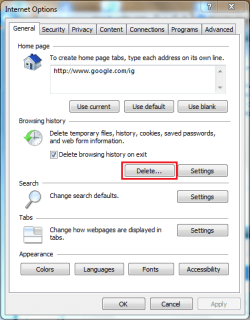
Internet Explorer 8+(Tools, Internet Options)

General Tab
IE Options (General).PNG

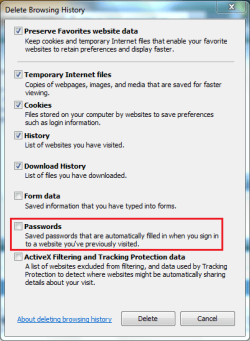
General Tab - Delete History
IE Options (General - Delete History).PNG

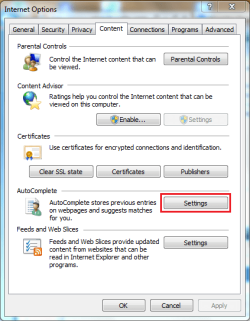
Content Tab
IE Options (Content).PNG

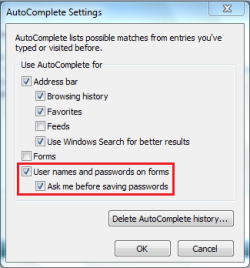
Content Tab - Set AutoComplete settings
IE Options (Content - Autocomplete).PNG

Setting these options (check/un-check) will allow for you to configure IE to not save your username & password details.


OS
 

My Computer My Computer

Computer Manufacturer/Model Number
Compaq Desktop
OS
Windows 7 Ultimate x64
CPU
AMD Sempron Dual Core
Memory
3GB
Graphics Card(s)
NVIDIA GeForce 6150SE nForce 430
Screen Resolution
1024x768
Hard Drives
150GB Sata
Thank you very much for responding.
I am using K-Meleon for my browser.
I think I have fixed the problem.
Time will tell.
There was a box checked in "Preferences"
that saved passwords.
 

My Computer My Computer

Computer type
PC/Desktop
Computer Manufacturer/Model Number
had the system built by PCsandParts
OS
windows 7 Pro 64 bit
CPU
mini tower
Motherboard
h110m-k (lga1151)
Memory
4g
Graphics Card(s)
nvidia geforce gt730 graphics card
Sound Card
high definition audio device
Monitor(s) Displays
19" dell ultra sharp
Screen Resolution
1280 x 800
Hard Drives
Kingston SSD
PSU
?
Case
?
Cooling
?
Keyboard
standard ps/2 keyboard
Mouse
ps/2 compatible optical
Internet Speed
fiber optics
Antivirus
ESET Smart Security
Browser
IE11
Other Info
no Wifi. Bose speakers, optical drive tsstcorp dvd+-RW
Back
Top