i/o device error external hard drive please help me anyone

ppcit

New member
Local time
12:39 PM
Messages
6
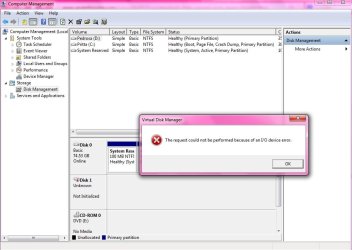
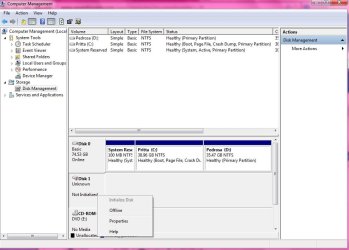
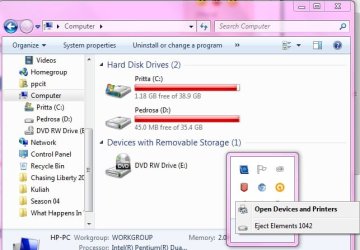
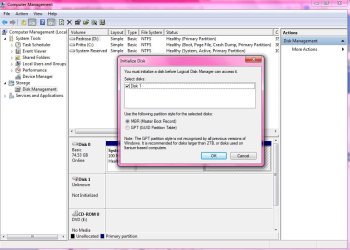
can anyone please help me? I divided 1TB WB Element to 4 part but they're not showing up on 'my computer' but i can safely remove the hardware, still the partition doesn't show up as usual just 'eject elements 1042'. can it get repair without losing the files? 1.jpg
2.jpg

3.jpg

4.jpg

5.jpg


please help me. much appreciated
 

My Computer My Computer

At a glance

Windows 7 Ultimate x32
Computer type
Laptop
Computer Manufacturer/Model Number
HP Compact
OS
Windows 7 Ultimate x32
I dont want to cause panic.. but.. I/o errors are normally always related to knackered hardware.. I.e your hard drive.

theres a few things you can try first.

The standard Microsoft protocol is to first check that windows is fully up to date incase youre missing a key upated system file.
Next you could try uninstalling your usb drivers in device manager and reboot. (youll loose control of any usb device plugged in before the reboot).
It might not seem the most logical thing to try but it was suggested to me once and it did the trick for my issue.

Failing that Microsoft q and a also suggests shrinking the partitions if possible using disc manager.
 

My Computer My Computer

At a glance

Windows 7 Ultimate x64, & Mac OS X 10.9.2Intel Core i5 2500kCorsair Vengence 8gb 1866mhzNvidia GTX 770 OC
Computer type
PC/Desktop
Computer Manufacturer/Model Number
Built by badgers!!!
OS
Windows 7 Ultimate x64, & Mac OS X 10.9.2
CPU
Intel Core i5 2500k
Motherboard
Asus P8z68 LE
Memory
Corsair Vengence 8gb 1866mhz
Graphics Card(s)
Nvidia GTX 770 OC
Monitor(s) Displays
2x ASUS LED 22" IPS
Screen Resolution
3840x1080
Hard Drives
240GB Crucial M500 SSD
120gb Corsair Force 3 SSD
1TB Western Digital
PSU
Corsair HX650w Modular
Case
Corsair Air 540
Cooling
Corsair H60 Push/Pull
Keyboard
Corsair K70/ Logitech G27 wheel
Mouse
Saitek R.A.T 9
Internet Speed
Too slow!
Other Info
AMD fusion E350N Home server-Windows Home Server 2011 (also made by badgers!)
2011 Macbook 2.4ghz Core2Duo, 4gb ddr3, 120gb Ocz Vertex SSD
thank you
i'll give it a try :)
 

My Computer My Computer

At a glance

Windows 7 Ultimate x32
Computer type
Laptop
Computer Manufacturer/Model Number
HP Compact
OS
Windows 7 Ultimate x32
Same problem, didnt work. I trying partition recovery wizard on minitool partition wizard home edition. Still scaning now take 2days to finish.
 

My Computer My Computer

At a glance

windows 7i5 -2410 M 2.3Ghz4GB
Computer type
Laptop
Computer Manufacturer/Model Number
sony E Series VPCEG18FG
OS
windows 7
CPU
i5 -2410 M 2.3Ghz
Memory
4GB
Hard Drives
500GB
That could be a connection problem - especially with the power cable. I have seen these kinds of problems when the disk does not get enough juice.
 

My Computer My Computer

At a glance

Vista, Windows7, Mint Mate, Zorin, Windows 8from 1.6GHz Duo to i7
Computer Manufacturer/Model Number
HP, Dell, Gateway, Toshiba - 4 laptops and 2 desktops
OS
Vista, Windows7, Mint Mate, Zorin, Windows 8
CPU
from 1.6GHz Duo to i7
Monitor(s) Displays
2x HP w2207
Hard Drives
5x HDD, 7x SSD, 12x Externals
Keyboard
with trackball - no mices
Mouse
Trackball mice
Internet Speed
DSL 6000
Whs how to get enought power? Try to use minitool pratition to scan it for 2 days already! The hard disk light is flashing, u sure not enought power?
 

My Computer My Computer

At a glance

windows 7i5 -2410 M 2.3Ghz4GB
Computer type
Laptop
Computer Manufacturer/Model Number
sony E Series VPCEG18FG
OS
windows 7
CPU
i5 -2410 M 2.3Ghz
Memory
4GB
Hard Drives
500GB
Maybe the power cable is somewhat loose or there is a glitch in the PSU. But that is only 1 possible cause. As I said, that was the case I have seen. But that was an external HDD on a USB powered hub. Once that was connected to an outlet powered hub, the problem was resolved.
 

My Computer My Computer

At a glance

Vista, Windows7, Mint Mate, Zorin, Windows 8from 1.6GHz Duo to i7
Computer Manufacturer/Model Number
HP, Dell, Gateway, Toshiba - 4 laptops and 2 desktops
OS
Vista, Windows7, Mint Mate, Zorin, Windows 8
CPU
from 1.6GHz Duo to i7
Monitor(s) Displays
2x HP w2207
Hard Drives
5x HDD, 7x SSD, 12x Externals
Keyboard
with trackball - no mices
Mouse
Trackball mice
Internet Speed
DSL 6000
Hi ppcit,

Hard disks these days have extensive error-correcting capabilities; when you start seeing I/O errors, that means that the built-in error correction is no longer able to correct for the errors. That normally means the disk is very close to outright failing, if it hasn't already failed.

In your description of the problem, you said you partitioned the drive into four. Did the I/O error occur immediately after partitioning or was it partitioned much much earlier?

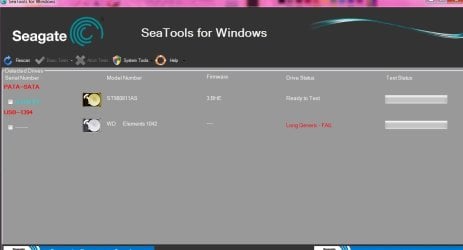
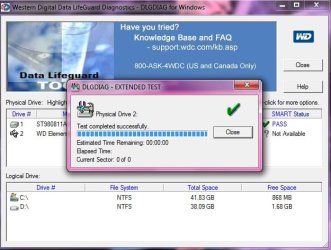
The second point I do not understand is why you used Seagate Seatools diagnostic/repair utility instead of Western Digital Data Life Guard Diagnostic for Windows. WD Support / Downloads / My Cloud Apps + Other Products / Data Lifeguard Diagnostic for Windows Go ahead and check your hard disk with this utility and check whether it is able to repair it. There are better chances with it, rather than SeaTools on a Western Digital.
 

My Computer My Computer

At a glance

Windows 7 Home Premium 32 bit
OS
Windows 7 Home Premium 32 bit
Than you guys for replying

Hi jumanji,
The error was occured long after the partition.
I think it started with bad sector, so everytime I opened one of the partitions, my windows explorer froze for awhile and sometimes restarting itself, and I think that makes the bad sector problem even worse. I did the check now from the properties, but it just kept happening.

And what annoys me the most is the effect of those problem, they make the transfer datas speed so slow,
And at one point when I tried to copy thing to the HD, it just froze and when I tried to reconnect my laptop and the hd, that i/o thing happened

Any by any chance, will the tool you told me delete the files in the hd?
 

My Computer My Computer

At a glance

Windows 7 Ultimate x32
Computer type
Laptop
Computer Manufacturer/Model Number
HP Compact
OS
Windows 7 Ultimate x32
No. That is the Western Digital's official tool to diagnose and repair (if possible) Western Digital HDDs.

That is why I didn't understand why you used the Seagate tool.

So go ahead and check your Western Digital HDD with Data Lifeguard Diagnostic for Windows.
 

My Computer My Computer

At a glance

Windows 7 Home Premium 32 bit
OS
Windows 7 Home Premium 32 bit
i dont think it worked. is there anything else i could try? Untitled.jpg

1.jpg

if I go to professional, is it still possible to get my data back?
 

My Computer My Computer

At a glance

Windows 7 Ultimate x32
Computer type
Laptop
Computer Manufacturer/Model Number
HP Compact
OS
Windows 7 Ultimate x32
If the tests failed, there isn't anything you can do.

I have no idea whether a professional service can extract the data.

You may have to contact such a service in your country and find out.
 

My Computer My Computer

At a glance

Windows 7 Home Premium 32 bit
OS
Windows 7 Home Premium 32 bit
I'm not exactly sure how you got to this point, but if you're referring to Disk 1 - it is initialized and data recovery is questionable.

About the IO error. The easiest thing to do is power off the machine and disconnect teh device.

Give that some thought before doing it though. Another member might be working through somethiing else with you.

Bill
-
 

My Computer My Computer

At a glance

x64 (6.3.9600) Win8.1 Pro & soon dual boot x6...AMD A6-3420M APU with Radeon(tm) HD Graphics6.00 GBAMD Radeon(TM) HD 6520G
Computer type
Laptop
Computer Manufacturer/Model Number
HP Pavilion dv6-6c10us
OS
x64 (6.3.9600) Win8.1 Pro & soon dual boot x64 (6.1.7601) Win7_SP1 HomePrem
CPU
AMD A6-3420M APU with Radeon(tm) HD Graphics
Motherboard
Hewlett-Packard 1805
Memory
6.00 GB
Graphics Card(s)
AMD Radeon(TM) HD 6520G
Sound Card
(1) AMD High Definition Audio Device (2) IDT High Definiti
Monitor(s) Displays
HP W2072a 20" LCD (1600 x 900) @ 60 Hz
Screen Resolution
1366 x 768 x 32 bits (4294967296 colors) @ 60 Hz
Hard Drives
ST640LM0 00 HM641JI SATA Disk Device
Keyboard
Logitech k520 wireless KB
Mouse
Logitech m320 wireless mouse (bundled with KB)
Internet Speed
15/5 | 54 MB Wireless 'n'
Antivirus
Realtime: Defender or Avast | On-demand: Malwarebytes, ESET
Browser
IE 11 on Win8, IE 10 on win 7
Other Info
Media: [Gimp, Audacity, VLC] || Comm: [WEmail 2012, Skype] || Productivity: [OpenOffice,| Textpad] || Utils: [Sysinternals, cCleaner, Speccy, Defraggler]
well if that's the case, i'll try to go to the pro..
thank you guys for helping
 

My Computer My Computer

At a glance

Windows 7 Ultimate x32
Computer type
Laptop
Computer Manufacturer/Model Number
HP Compact
OS
Windows 7 Ultimate x32
Slartybart, i already did the power off and disconnect thing, still no luck but thanks
 

My Computer My Computer

At a glance

Windows 7 Ultimate x32
Computer type
Laptop
Computer Manufacturer/Model Number
HP Compact
OS
Windows 7 Ultimate x32
Back
Top