no space on hard drive!! please help me:(

leewilky

New member
Local time
8:47 AM
Messages
5
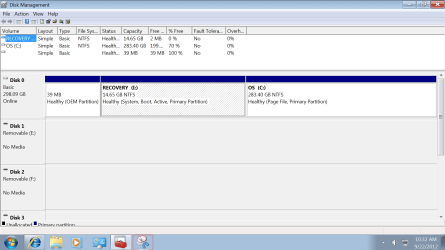
i have been getting the low on space messagemy recovery hard drive is full (red)my C is noti am trying to show a picture so i hope someone can help mei am single mom of 15 yr old and he cant do his homework withoutdownloadingi tried to down load windows 7 again and this happened?i have a dell that is 3 years old
 

Attachments

  • recovery pic.PNG
    recovery pic.PNG
    37 KB · Views: 31
Last edited by a moderator:

My Computer My Computer

At a glance

windows 7, 64 bit
OS
windows 7, 64 bit
Welcome to Seven Forums!

Don't worry about the recovery partition. That is set by the factory and allows you to return your computer to factory specifications so it will be just like the day you brought it home. If you ever have to use the recovery option it would erase everything else on your hard drive (documents, photos, music, other programs, etc) so make sure you've backed up those important personal files or you've made a system image.

The 39MB OEM partition is probably the boot partition. It's what the computer looks for when you first power up the machine (when it first boots.) Again, this is nothing to be concerned about.

Now for the C: partition that's 70% full. The first thing I'd suggest is going through this tutorial.

http://www.sevenforums.com/tutorials/129976-hard-disk-space-free-up-recover.html

Not everything will apply to you. I'd try the following options: 1 (you could substitute TreeSize free), 2, 3, 4, 9, 11, 12, 14, 17, 19, and 21. If any of the other options do apply to you feel free to give them a try, too.

Please post back if you were able to get back any hard drive space and how much.

 

My Computer My Computer

At a glance

Win 7 Pro 64-bitIntel i5 2.4 Ghz8GB DDR3Intel HD 3000
Computer type
Laptop
Computer Manufacturer/Model Number
Sony Vaio VPCEB47GM Laptop
OS
Win 7 Pro 64-bit
CPU
Intel i5 2.4 Ghz
Memory
8GB DDR3
Graphics Card(s)
Intel HD 3000
Sound Card
IDT High Definition
Monitor(s) Displays
15.6 WGXA Anti-Glare LED
Screen Resolution
1280x800
Hard Drives
640Gb 7200rpm
Antivirus
MSE
Browser
Opera (primary) with IE9 backup
Maybe a dumb question, but if the OEM partition is the boot partition, why isn't it marked as active and system? And also why doesn't the C partition show as boot? I noticed that the Recovery partition is marked as all 3, but since I have never dealt with one before, I am not sure whether that is normal, or not. Thanks for bearing with me.
 

My Computer My Computer

At a glance

Windows 7 Home Premium 64bit SP 1Intel i5 2500k8 gigabytes Corsair PC3-12800 DDR3EVGA GeForce GTX 460 superclocked
Computer Manufacturer/Model Number
Customized build from CyberPower
OS
Windows 7 Home Premium 64bit SP 1
CPU
Intel i5 2500k
Motherboard
Asus P8P67 Deluxe
Memory
8 gigabytes Corsair PC3-12800 DDR3
Graphics Card(s)
EVGA GeForce GTX 460 superclocked
Sound Card
Integrated
Monitor(s) Displays
ViewSonic 23" LCD
Screen Resolution
1980 x 1080
Hard Drives
120 Gb Samsung 840 Pro SSD
120 Gb Kingston Hyper X SSD
1 Tb WD Caviar Black HDD
PSU
Coolermaster 1000 watt modular
Case
Coolermaster HAF X full tower
Cooling
Coolermaster Hyper 212 plus
Keyboard
Logitech USB
Mouse
Microsoft 3 button
Internet Speed
download 1.5 Mb/sec upload 300Kb/sec
This must be a Dell system. They always use the recovery partition to store the bootmgr - saves them the extra 100MB system partition.

@leewilky - you should do the following 2 actions:

1. Open the recovery partition and see whether any of your files are in there - e.g. thru data backup. Then move or delete those.

2. For the C partitiom, open an elevated command pompt and run this command:

vssadmin list shadowstorage

Then tell me what is under Allocated and under Maximum.
 

My Computer My Computer

At a glance

Vista, Windows7, Mint Mate, Zorin, Windows 8from 1.6GHz Duo to i7
Computer Manufacturer/Model Number
HP, Dell, Gateway, Toshiba - 4 laptops and 2 desktops
OS
Vista, Windows7, Mint Mate, Zorin, Windows 8
CPU
from 1.6GHz Duo to i7
Monitor(s) Displays
2x HP w2207
Hard Drives
5x HDD, 7x SSD, 12x Externals
Keyboard
with trackball - no mices
Mouse
Trackball mice
Internet Speed
DSL 6000
This must be a Dell system. They always use the recovery partition to store the bootmgr - saves them the extra 100MB system partition.

Thanks for the explanation! I have never owned a Dell before and didn't realize they did that. Like the old saying goes, a person learns something new every day. :D
 

My Computer My Computer

At a glance

Windows 7 Home Premium 64bit SP 1Intel i5 2500k8 gigabytes Corsair PC3-12800 DDR3EVGA GeForce GTX 460 superclocked
Computer Manufacturer/Model Number
Customized build from CyberPower
OS
Windows 7 Home Premium 64bit SP 1
CPU
Intel i5 2500k
Motherboard
Asus P8P67 Deluxe
Memory
8 gigabytes Corsair PC3-12800 DDR3
Graphics Card(s)
EVGA GeForce GTX 460 superclocked
Sound Card
Integrated
Monitor(s) Displays
ViewSonic 23" LCD
Screen Resolution
1980 x 1080
Hard Drives
120 Gb Samsung 840 Pro SSD
120 Gb Kingston Hyper X SSD
1 Tb WD Caviar Black HDD
PSU
Coolermaster 1000 watt modular
Case
Coolermaster HAF X full tower
Cooling
Coolermaster Hyper 212 plus
Keyboard
Logitech USB
Mouse
Microsoft 3 button
Internet Speed
download 1.5 Mb/sec upload 300Kb/sec
thank u

regarding marsimur - i dont know how to get it back to factory?? i would love to just delete everything and start over! i have my wiondows 7 discand yes its a dellwe are simple users and my son being a freshamn is needing this compter, like yesterday and i cant afford to have it fixed.i need more steps of what to do??i dont have pic or anything on here. no files, etc,.i tried to do to much to it and now i would love to reset it. i cant even reset to an earlier time? and it says i have no programs??thanks for the help but i really dont know what to do
 

My Computer My Computer

At a glance

windows 7, 64 bit
OS
windows 7, 64 bit
hi

This must be a Dell system. They always use the recovery partition to store the bootmgr - saves them the extra 100MB system partition.

@leewilky - you should do the following 2 actions:

1. Open the recovery partition and see whether any of your files are in there - e.g. thru data backup. Then move or delete those.

2. For the C partitiom, open an elevated command pompt and run this command:

vssadmin list shadowstorage

Then tell me what is under Allocated and under Maximum.

i am not sure but when i did that it said i had to be the administrator. i am. i have no idea what to do!
 

My Computer My Computer

At a glance

windows 7, 64 bit
OS
windows 7, 64 bit
can someone just walk me thru how to reset to factory?
thank you so much~:D
 

My Computer My Computer

At a glance

windows 7, 64 bit
OS
windows 7, 64 bit
Yes, you have to open Command Prompt in elevated mode. Go to All Programs > Accessories > right click on Command Prompt > run as Admin - now you are in business and can run the command. You can copy it from my post and paste it into the little black window. Then hit Enter.
 

My Computer My Computer

At a glance

Vista, Windows7, Mint Mate, Zorin, Windows 8from 1.6GHz Duo to i7
Computer Manufacturer/Model Number
HP, Dell, Gateway, Toshiba - 4 laptops and 2 desktops
OS
Vista, Windows7, Mint Mate, Zorin, Windows 8
CPU
from 1.6GHz Duo to i7
Monitor(s) Displays
2x HP w2207
Hard Drives
5x HDD, 7x SSD, 12x Externals
Keyboard
with trackball - no mices
Mouse
Trackball mice
Internet Speed
DSL 6000
can someone just walk me thru how to reset to factory?
thank you so much~:D
What make is your PC - procedures differ by make.
 

My Computer My Computer

At a glance

Vista, Windows7, Mint Mate, Zorin, Windows 8from 1.6GHz Duo to i7
Computer Manufacturer/Model Number
HP, Dell, Gateway, Toshiba - 4 laptops and 2 desktops
OS
Vista, Windows7, Mint Mate, Zorin, Windows 8
CPU
from 1.6GHz Duo to i7
Monitor(s) Displays
2x HP w2207
Hard Drives
5x HDD, 7x SSD, 12x Externals
Keyboard
with trackball - no mices
Mouse
Trackball mice
Internet Speed
DSL 6000
hello

Welcome to Seven Forums!

Don't worry about the recovery partition. That is set by the factory and allows you to return your computer to factory specifications so it will be just like the day you brought it home. If you ever have to use the recovery option it would erase everything else on your hard drive (documents, photos, music, other programs, etc) so make sure you've backed up those important personal files or you've made a system image.

The 39MB OEM partition is probably the boot partition. It's what the computer looks for when you first power up the machine (when it first boots.) Again, this is nothing to be concerned about.

Now for the C: partition that's 70% full. The first thing I'd suggest is going through this tutorial.

http://www.sevenforums.com/tutorials/129976-hard-disk-space-free-up-recover.html

Not everything will apply to you. I'd try the following options: 1 (you could substitute TreeSize free), 2, 3, 4, 9, 11, 12, 14, 17, 19, and 21. If any of the other options do apply to you feel free to give them a try, too.

Please post back if you were able to get back any hard drive space and how much.


can you please help me with the steps of the factory reset or do i call dell??
sorry but i dont know what to do, but this is positive that i might be able to do it myself.
 

My Computer My Computer

At a glance

windows 7, 64 bit
OS
windows 7, 64 bit

My Computer My Computer

At a glance

Vista, Windows7, Mint Mate, Zorin, Windows 8from 1.6GHz Duo to i7
Computer Manufacturer/Model Number
HP, Dell, Gateway, Toshiba - 4 laptops and 2 desktops
OS
Vista, Windows7, Mint Mate, Zorin, Windows 8
CPU
from 1.6GHz Duo to i7
Monitor(s) Displays
2x HP w2207
Hard Drives
5x HDD, 7x SSD, 12x Externals
Keyboard
with trackball - no mices
Mouse
Trackball mice
Internet Speed
DSL 6000
Back
Top