
I think Acronis13 blasted me good

idahjo

New member
Member
VIP
Local time
5:34 PM
Messages
165
Long story short as possible. My daughter sent me her "old" i7/intel DB67BG compiter with w-7 x64. I have had only experience with AMD processors on Gigabyte boards. I immediately installed my Acronis13 on it -for security-HAH! It informed me after installing the Acronis default start-up boot (F11) that I had exceeded my use limit. No problem? I uninstalled the Acronis13. THAT IS WHERE THE TROUBLE BEGAN...

Now, when I boot up I get this message STARTING ACRONIS LOADER... ACRONIS LOADER:NO CONFIGURATION FILE PRESENT PRESS <ENTER> TO REBOOT and that just causes it to repeat and repeat. So, I wiped both HDs in another computer and fresh reinstalled the OS. It's still looking for the "ACRONIS LOADER:NO CONFIGURATION FILE PRESENT PRESS <ENTER> TO REBOOT".

I can get it to run by presing the F10 to enter the boot selection and selecting P0 (drive). Seems to me that Acronis is punishing me for attempting to install more than I was allocated. I have lost complete faith in them at this point :sick:

Anyone able to help me get over this 'pot-hole' and point this blasted computer in the direction of its boot files?

THANKS MUCH!
 

My Computer My Computer

At a glance

Microsoft Windows 7 Ultimate 64-bit 7601 Mult...AMD Phenom(tm) II X3 720 Processor4.00 GBATI Radeon HD 4800 Series
Computer type
PC/Desktop
Computer Manufacturer/Model Number
Custom Build
OS
Microsoft Windows 7 Ultimate 64-bit 7601 Multiprocessor Free Service Pack 1
CPU
AMD Phenom(tm) II X3 720 Processor
Motherboard
Gigabyte Technology Co., Ltd. GA-MA785GPMT-UD2H
Memory
4.00 GB
Graphics Card(s)
ATI Radeon HD 4800 Series
Sound Card
(1) AMD High Definition Audio Device (2) Realtech H/D Audio
Screen Resolution
DELL 2405FPW (1920 x 1200 ) @ 75 Hz
Hard Drives
(1) Samsung SSD 840 Series ATA Device (2) WDC WD400BD-75MRA1 ATA Device
PSU
700w Kingwin Mach-1
Antivirus
Avast
Browser
Firefox
no dice!

Thanks for getting back to me.

Tried:
Bootrec.exe /RebuildBcd; then, /FixMbr; /FixBoot; /ScanOs

All respond "successfully scanned" And I also see "Total identified Windows installations:0"

Disc 0 is the (c)System and Disc 1 has the System Reserved. I would assume the '0' means nothing found and not the (Disc) 0 ??

Any more ideas... :confused: ...As both (all) the HDs have been wiped and the System reloaded, the glitch would have to be in the MB memory somewhere wouldn't it?
 

My Computer My Computer

At a glance

Microsoft Windows 7 Ultimate 64-bit 7601 Mult...AMD Phenom(tm) II X3 720 Processor4.00 GBATI Radeon HD 4800 Series
Computer type
PC/Desktop
Computer Manufacturer/Model Number
Custom Build
OS
Microsoft Windows 7 Ultimate 64-bit 7601 Multiprocessor Free Service Pack 1
CPU
AMD Phenom(tm) II X3 720 Processor
Motherboard
Gigabyte Technology Co., Ltd. GA-MA785GPMT-UD2H
Memory
4.00 GB
Graphics Card(s)
ATI Radeon HD 4800 Series
Sound Card
(1) AMD High Definition Audio Device (2) Realtech H/D Audio
Screen Resolution
DELL 2405FPW (1920 x 1200 ) @ 75 Hz
Hard Drives
(1) Samsung SSD 840 Series ATA Device (2) WDC WD400BD-75MRA1 ATA Device
PSU
700w Kingwin Mach-1
Antivirus
Avast
Browser
Firefox
I doubt if installing Acronis would have messed up anything else but the Win 7 install. You don't say where you got the Win 7 to clean install. This is a tutorial on the install. http://www.sevenforums.com/tutorials/1649-clean-install-windows-7-a.html In the first part of it under "Here's How", number 1, it will give you a link to download a Win 7 ISO. Burn the ISO to a DVD and do a clean install. Follow the instructions and it will get you going.
 

My Computer My Computer

At a glance

Windows 7 Home Premium 32-Bit - Build 7600 SP1Intel Core i3-2120 3.30GhzKingston 4 GB DDR3 1333 mhzAMD Radeon HD6670
Computer type
PC/Desktop
Computer Manufacturer/Model Number
Custom Build
OS
Windows 7 Home Premium 32-Bit - Build 7600 SP1
CPU
Intel Core i3-2120 3.30Ghz
Motherboard
Asus P8Z68-V LX Intel Z68 Socket H2 ATX
Memory
Kingston 4 GB DDR3 1333 mhz
Graphics Card(s)
AMD Radeon HD6670
Sound Card
Sound Blaster Audigy SE 24-Bit
Monitor(s) Displays
Asus VE228
Screen Resolution
1440 X 900
Hard Drives
OCZ Vertex 3 120 GB Sata 3 SSD ==
Kingston SH103/S3 120 G Hyper X 120 GB SSD ==
Western Digital 500 GB Caviar Green 7200 RPM ==
PSU
Corsair CX600M == 600 Watt
Case
NZXT Apollo - Silver with Clear Side Panel
Cooling
Three 120 mm Fans
Keyboard
Microsoft Natural 4000
Mouse
Microsoft Custom Optical 3000
Internet Speed
AT&T Fiber Optic Wireless Network
Antivirus
Microsoft Security Essentials
Browser
Chrome
Other Info
120 mm Blue LED Fan -- Three Blue LED Lazer Light Sticks
bigmac- It is an OEM System Builder Pack (W-7 Pro/SP-1). Never fooled with OEM before...
Thanks
 

My Computer My Computer

At a glance

Microsoft Windows 7 Ultimate 64-bit 7601 Mult...AMD Phenom(tm) II X3 720 Processor4.00 GBATI Radeon HD 4800 Series
Computer type
PC/Desktop
Computer Manufacturer/Model Number
Custom Build
OS
Microsoft Windows 7 Ultimate 64-bit 7601 Multiprocessor Free Service Pack 1
CPU
AMD Phenom(tm) II X3 720 Processor
Motherboard
Gigabyte Technology Co., Ltd. GA-MA785GPMT-UD2H
Memory
4.00 GB
Graphics Card(s)
ATI Radeon HD 4800 Series
Sound Card
(1) AMD High Definition Audio Device (2) Realtech H/D Audio
Screen Resolution
DELL 2405FPW (1920 x 1200 ) @ 75 Hz
Hard Drives
(1) Samsung SSD 840 Series ATA Device (2) WDC WD400BD-75MRA1 ATA Device
PSU
700w Kingwin Mach-1
Antivirus
Avast
Browser
Firefox
bigmac- It is an OEM System Builder Pack (W-7 Pro/SP-1). Never fooled with OEM before...
Thanks

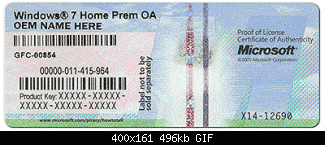
Did a Win 7 disk come with it or was everything in the Recovery Partition and you have no disks to do a Clean Install? If you have no disks, use the info I gave you in the last message to burn a Win 7 disk. An OEM is no different than a Retail Win 7. An OEM just can not be transferred to a different computer. The Win 7 files are exactly the same. You can install Windows from the download I gave you and input your Product Key from the sticker on your PC. It looks like this.
 

Attachments

  • coa-stickers.gif
    coa-stickers.gif
    30.4 KB · Views: 46

My Computer My Computer

At a glance

Windows 7 Home Premium 32-Bit - Build 7600 SP1Intel Core i3-2120 3.30GhzKingston 4 GB DDR3 1333 mhzAMD Radeon HD6670
Computer type
PC/Desktop
Computer Manufacturer/Model Number
Custom Build
OS
Windows 7 Home Premium 32-Bit - Build 7600 SP1
CPU
Intel Core i3-2120 3.30Ghz
Motherboard
Asus P8Z68-V LX Intel Z68 Socket H2 ATX
Memory
Kingston 4 GB DDR3 1333 mhz
Graphics Card(s)
AMD Radeon HD6670
Sound Card
Sound Blaster Audigy SE 24-Bit
Monitor(s) Displays
Asus VE228
Screen Resolution
1440 X 900
Hard Drives
OCZ Vertex 3 120 GB Sata 3 SSD ==
Kingston SH103/S3 120 G Hyper X 120 GB SSD ==
Western Digital 500 GB Caviar Green 7200 RPM ==
PSU
Corsair CX600M == 600 Watt
Case
NZXT Apollo - Silver with Clear Side Panel
Cooling
Three 120 mm Fans
Keyboard
Microsoft Natural 4000
Mouse
Microsoft Custom Optical 3000
Internet Speed
AT&T Fiber Optic Wireless Network
Antivirus
Microsoft Security Essentials
Browser
Chrome
Other Info
120 mm Blue LED Fan -- Three Blue LED Lazer Light Sticks
Have the physical disc

I have the disc and it has a sticker like you show. I have reloaded it from this disc several times and it ends in the same ACRONIS LOADER fault. I would guess that reloading from the source you gave (I have used it before) would result in the same error message. I'm thinking there is a glitch in the bios that ACRONIS stuck into it and did not remove?!? If that is possible, then any system reload would behave similarly wouldn't it? I considered loading a VISTA retail disc that I have just to see if it was present after that but have not as I expect it would be wasted time..
Thanks

UPDATE: I just did a test install of VISTA (Retail) and the SAME "STARTING ACRONIS LOADER... ACRONIS LOADER:NO CONFIGURATION FILE PRESENT PRESS <ENTER> TO REBOOT" results were obtained. With my limited computer knowledge, I would have to guess the 'poison pill' is in the registry or CMOS somewhere?
 
Last edited:

My Computer My Computer

At a glance

Microsoft Windows 7 Ultimate 64-bit 7601 Mult...AMD Phenom(tm) II X3 720 Processor4.00 GBATI Radeon HD 4800 Series
Computer type
PC/Desktop
Computer Manufacturer/Model Number
Custom Build
OS
Microsoft Windows 7 Ultimate 64-bit 7601 Multiprocessor Free Service Pack 1
CPU
AMD Phenom(tm) II X3 720 Processor
Motherboard
Gigabyte Technology Co., Ltd. GA-MA785GPMT-UD2H
Memory
4.00 GB
Graphics Card(s)
ATI Radeon HD 4800 Series
Sound Card
(1) AMD High Definition Audio Device (2) Realtech H/D Audio
Screen Resolution
DELL 2405FPW (1920 x 1200 ) @ 75 Hz
Hard Drives
(1) Samsung SSD 840 Series ATA Device (2) WDC WD400BD-75MRA1 ATA Device
PSU
700w Kingwin Mach-1
Antivirus
Avast
Browser
Firefox
If it was my computer I would clear the CMOS as per motherboard manual.
Then give it another try with the Windows 7 disc.
 

My Computer My Computer

At a glance

Windows 10 Pro. 64/ version 1709 Windows 7 Pr...Intel i7-6800K @ 4.3Corsair Platinum 16 gig @2400EVGA GTX 1070 OC
Computer type
PC/Desktop
Computer Manufacturer/Model Number
Home made Desktop
OS
Windows 10 Pro. 64/ version 1709 Windows 7 Pro/64
CPU
Intel i7-6800K @ 4.3
Motherboard
ASUS X-99 Deluxe II
Memory
Corsair Platinum 16 gig @2400
Graphics Card(s)
EVGA GTX 1070 OC
Monitor(s) Displays
Asus 27" LED LCD/VE278Q
Screen Resolution
1920-1080 or 1280-720 HDMI
Hard Drives
INTEL SSD 730-240 Gb Sata 3.0/
PSU
EVGA Platium 1200W
Case
Phanteks Luxe Tempered Glass 8 fans/ one radiator
Cooling
XSPC/ Water Cooled CPU
Keyboard
Das 4 Professional
Mouse
Logitech M705/MX Anywhere 2-S
Internet Speed
100 mbits
Antivirus
Microsoft Security Essentials/ Malwarebytes Premium 3.0/ SAS
Browser
I.E. 11 default/Firefox/ ISP Time Warner Cable/Spectrum
Other Info
LG BluRay Burner/
Sound system-KLipsch-THX/
Icy Dock ssd Hot Swap bays.
You could look in Program Files (x86) and look for Acronis leftover files and delete them.
The Acronis Loader might be in there.
 

My Computer My Computer

At a glance

Windows 8.1.1 64biti7-4700MQ8.0GB PC3-12800 DDR3L SDRAM 1600 MHzIntel® HD Graphics 4600
Computer type
Laptop
Computer Manufacturer/Model Number
Lenovo Z710 #59400485
OS
Windows 8.1.1 64bit
CPU
i7-4700MQ
Memory
8.0GB PC3-12800 DDR3L SDRAM 1600 MHz
Graphics Card(s)
Intel® HD Graphics 4600
Sound Card
on-board
Monitor(s) Displays
17.3"
Screen Resolution
1920x1080
Hard Drives
1TB 5400 RPM;(OS,programs)


Hitachi, 1Tb external,(B'up)
PSU
4 Cell 41 Watt Hour Lithium-Ion
Case
Lenovo
Cooling
Air in, Air out.
Keyboard
Logitech - Y-UY95 - Illuminated
Mouse
M$ - Arc Touch
Internet Speed
59 Mb down / 25 Mb up
Antivirus
Defender
Browser
Firefox (newest)
Other Info
MBAM Pro, SAS Pro, Revo Pro.

Ext. HP 2311 Monitor
Layback; Sounds like a plan... my next move will be CMOS

Computiac; Understand that I am no computer whiz and make it from one day to the next. But, unless I am missing something after cleaning the hard drives 3-4 times and having loaded two systems (w-7 OM and Vista Retail) how could any residual Acronis files be left on them anywhere?

Thanks guys for the support. Even though I am moved to relegate this whole mess to the corner of the garage I am not one to give up easily... just put it down awhile then go back to chipping away at it!
 

My Computer My Computer

At a glance

Microsoft Windows 7 Ultimate 64-bit 7601 Mult...AMD Phenom(tm) II X3 720 Processor4.00 GBATI Radeon HD 4800 Series
Computer type
PC/Desktop
Computer Manufacturer/Model Number
Custom Build
OS
Microsoft Windows 7 Ultimate 64-bit 7601 Multiprocessor Free Service Pack 1
CPU
AMD Phenom(tm) II X3 720 Processor
Motherboard
Gigabyte Technology Co., Ltd. GA-MA785GPMT-UD2H
Memory
4.00 GB
Graphics Card(s)
ATI Radeon HD 4800 Series
Sound Card
(1) AMD High Definition Audio Device (2) Realtech H/D Audio
Screen Resolution
DELL 2405FPW (1920 x 1200 ) @ 75 Hz
Hard Drives
(1) Samsung SSD 840 Series ATA Device (2) WDC WD400BD-75MRA1 ATA Device
PSU
700w Kingwin Mach-1
Antivirus
Avast
Browser
Firefox
Layback; Sounds like a plan... my next move will be CMOS

Computiac; Understand that I am no computer whiz and make it from one day to the next. But, unless I am missing something after cleaning the hard drives 3-4 times and having loaded two systems (w-7 OM and Vista Retail) how could any residual Acronis files be left on them anywhere?

Thanks guys for the support. Even though I am moved to relegate this whole mess to the corner of the garage I am not one to give up easily... just put it down awhile then go back to chipping away at it!

idahjo, I should not post late at night after taking medications.
I missed the part where you wiped the drives.
I will punish myself by sitting in the corner with my back to the 'puter for 1 hour.
 

My Computer My Computer

At a glance

Windows 8.1.1 64biti7-4700MQ8.0GB PC3-12800 DDR3L SDRAM 1600 MHzIntel® HD Graphics 4600
Computer type
Laptop
Computer Manufacturer/Model Number
Lenovo Z710 #59400485
OS
Windows 8.1.1 64bit
CPU
i7-4700MQ
Memory
8.0GB PC3-12800 DDR3L SDRAM 1600 MHz
Graphics Card(s)
Intel® HD Graphics 4600
Sound Card
on-board
Monitor(s) Displays
17.3"
Screen Resolution
1920x1080
Hard Drives
1TB 5400 RPM;(OS,programs)


Hitachi, 1Tb external,(B'up)
PSU
4 Cell 41 Watt Hour Lithium-Ion
Case
Lenovo
Cooling
Air in, Air out.
Keyboard
Logitech - Y-UY95 - Illuminated
Mouse
M$ - Arc Touch
Internet Speed
59 Mb down / 25 Mb up
Antivirus
Defender
Browser
Firefox (newest)
Other Info
MBAM Pro, SAS Pro, Revo Pro.

Ext. HP 2311 Monitor
No need... Not a problem. :D
 

My Computer My Computer

At a glance

Microsoft Windows 7 Ultimate 64-bit 7601 Mult...AMD Phenom(tm) II X3 720 Processor4.00 GBATI Radeon HD 4800 Series
Computer type
PC/Desktop
Computer Manufacturer/Model Number
Custom Build
OS
Microsoft Windows 7 Ultimate 64-bit 7601 Multiprocessor Free Service Pack 1
CPU
AMD Phenom(tm) II X3 720 Processor
Motherboard
Gigabyte Technology Co., Ltd. GA-MA785GPMT-UD2H
Memory
4.00 GB
Graphics Card(s)
ATI Radeon HD 4800 Series
Sound Card
(1) AMD High Definition Audio Device (2) Realtech H/D Audio
Screen Resolution
DELL 2405FPW (1920 x 1200 ) @ 75 Hz
Hard Drives
(1) Samsung SSD 840 Series ATA Device (2) WDC WD400BD-75MRA1 ATA Device
PSU
700w Kingwin Mach-1
Antivirus
Avast
Browser
Firefox
Did a Work-Around

Cleared the CMOS per manual and still there. Time to move on... Did a work-around in the BIOS by forcing the boot from the C Drive (OS). THAT appears now to having everything setting up properly. I know there is a 'poison pill' implanted in there somewhere but I think this is going to make all appear OK on the surface.
ACRONIS TI-13 is coming off my computers, I have totally lost faith in the program!
Thanks to everyone who responded, Idahjo

*Not marking it SOLVED as it wasn't; It was just ignored :shock:
 

My Computer My Computer

At a glance

Microsoft Windows 7 Ultimate 64-bit 7601 Mult...AMD Phenom(tm) II X3 720 Processor4.00 GBATI Radeon HD 4800 Series
Computer type
PC/Desktop
Computer Manufacturer/Model Number
Custom Build
OS
Microsoft Windows 7 Ultimate 64-bit 7601 Multiprocessor Free Service Pack 1
CPU
AMD Phenom(tm) II X3 720 Processor
Motherboard
Gigabyte Technology Co., Ltd. GA-MA785GPMT-UD2H
Memory
4.00 GB
Graphics Card(s)
ATI Radeon HD 4800 Series
Sound Card
(1) AMD High Definition Audio Device (2) Realtech H/D Audio
Screen Resolution
DELL 2405FPW (1920 x 1200 ) @ 75 Hz
Hard Drives
(1) Samsung SSD 840 Series ATA Device (2) WDC WD400BD-75MRA1 ATA Device
PSU
700w Kingwin Mach-1
Antivirus
Avast
Browser
Firefox
Back
Top