I think I have confirmed we ALL have W7, wi-fi issues

pampum

New member
Local time
4:23 PM
Messages
7
....Just a lot of people may not notice it much or be that bothered by it. Personnaly I cant stand it.

In short, wi-fi latency has gone from consistently under 1ms on XP, and vista AFAIK, to anywhere between 2-50ms. To your own router!

I have done many tests and pretty much isolated its the OS. I have tried it at friends places as well, and their windows 7 x64 does the same, ping's are around 3-8. They dont have that initial spike, but otherwise the same as me.

Give it a go, if you are running 7 preferably 64 bit 7, find your wireless routers IP address, open cmd from the start orb, and in there type

ping "your routers IP adress" -n 100

so bassialy if yor ip is 192.1.1.10 you type

ping 192.1.1.10 -n 100

And watch the pings roll by.

Heres the aboslute best results I have gotten. Pings are worse now, about 3,4 4, 6, 4, 3 etc.

Anything over 1ms consistently is just a joke.

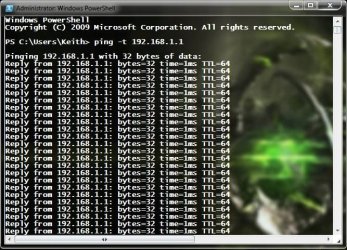
Pinging 192.168.1.1 with 32 bytes of data:
Reply from 192.168.1.1: bytes=32 time=44ms TTL=64
Reply from 192.168.1.1: bytes=32 time=2ms TTL=64

Ping statistics for 192.168.1.1:
Packets: Sent = 4, Received = 4, Lost = 0 (0% loss),
Approximate round trip times in milli-seconds:
Minimum = 2ms, Maximum = 44ms, Average = 12ms

check out my thread as well

Extremely poor Wi-fi performance in 7. Max signal. W7 constantly scanning wi-fi? Is it W7?

Lets try get a fix going. This is ridiculous. Is this the future of computing, laggier networking performance?
 

My Computer My Computer

At a glance

7 x64 U
OS
7 x64 U
I also noticed this right away when I first upgraded. I am guessing it has to do something with IPV6, auto speed/duplex configurations, MTU size, window receive auto tuning or possibly it's WPA implementation. I remember back in the day I had an iMAC G4 that had really slow wifi performance. I shut off WEP at the time and the speed skyrocketed and latency went way down, I found htat the fix was WPA2, but my router didn't support it so I left security off until I upgraded everything includign the iMac.
 

My Computer My Computer

At a glance

Windows 7i5-7504GB DDR3 1600GT220
OS
Windows 7
CPU
i5-750
Motherboard
Asus
Memory
4GB DDR3 1600
Graphics Card(s)
GT220
If you do a ping -t, do you see a pattern of latency spikes? or is it totally random?
 

My Computer My Computer

At a glance

Windows 7i5-7504GB DDR3 1600GT220
OS
Windows 7
CPU
i5-750
Motherboard
Asus
Memory
4GB DDR3 1600
Graphics Card(s)
GT220
Same here and I spent a day trying to fix it. Then I took some bad advice and trashed Win7 with a suggested regedit.
I gave up and reinstalled Win 7. Half a day to re-install and run wiring under the house. I should have done that in the first place.
Win7 gives us many ways that should work to set up networking. But I wind up with the Win7 machine alone in its network neighborhood. The XP machines are able to access all the shares on Win7 and other XP machines. Eventually I will figure it out.

Win7 wireless ping was 7-10, wired >1.
 

My Computer My Computer

At a glance

Win7 32 / 64 and XP 32 / 64 (on various other...Intel 920's @ 3.6 and 4.0 GHz3Gb / 6GbATI 4850 / ATI 4970
Computer Manufacturer/Model Number
Alinor Engineering
OS
Win7 32 / 64 and XP 32 / 64 (on various other computers as well)
CPU
Intel 920's @ 3.6 and 4.0 GHz
Motherboard
Asus P6T
Memory
3Gb / 6Gb
Graphics Card(s)
ATI 4850 / ATI 4970
Sound Card
onboard
Monitor(s) Displays
24 / 27"
Hard Drives
SSD, 1Tb WD
SSD, 3 Raptors raid, 2Tb WD
PSU
PC Power & Cooling 1K
Case
Antec 900 (modded)
Cooling
air / Danger Den water
Keyboard
Logitech G15
Mouse
Logitech Performance MX
Internet Speed
ATT UVerse
Desslok, its certainly not Encryption. I just made my router open with no encryption and it had the same result. Scratch encryption off the list.
The other things you mentioned, I have tried changing too. Does not do a thing. Tried every driver and every possible device setting. Nothing works

Take a look at my notebookforums link for some of my speculation.

Pinging mutilple times results in ping 3-9, average about 4-5. Expect my first ping is always around 50, but others dont seem to have this issue. I dont know why.

Duke of allinor, yes I know the wired windows 7 performance is fine. However I cannot wire up all my devices over Ethernet, though I wish I could.

What is wrong with Microsoft why dont they see this is issue?

Can anyone confirm Vista is not like this so I can go back? Cannot stand games any more.

I would still prefer some kind of fix. Maybe someone could rip the entire wireless programming from vista and overwrite the 7 one within 7? Something like this should be possible.

Homegroups, I cant even get them to work. Windows 7 is nightmare and it was meant to be easier.
 

My Computer My Computer

At a glance

7 x64 U
OS
7 x64 U
Desslok, its certainly not Encryption. I just made my router open with no encryption and it had the same result. Scratch encryption off the list.
The other things you mentioned, I have tried changing too. Does not do a thing. Tried every driver and every possible device setting. Nothing works

Take a look at my notebookforums link for some of my speculation.

Pinging mutilple times results in ping 3-9, average about 4-5. Expect my first ping is always around 50, but others dont seem to have this issue. I dont know why.

Duke of allinor, yes I know the wired windows 7 performance is fine. However I cannot wire up all my devices over Ethernet, though I wish I could.

What is wrong with Microsoft why dont they see this is issue?

Can anyone confirm Vista is not like this so I can go back? Cannot stand games any more.

I would still prefer some kind of fix. Maybe someone could rip the entire wireless programming from vista and overwrite the 7 one within 7? Something like this should be possible.

Homegroups, I cant even get them to work. Windows 7 is nightmare and it was meant to be easier.

Are you sure it works fine wired? For me even a wired connection yields crippling slow download speeds(20kb/s)
 

My Computer My Computer

At a glance

Windows 7
OS
Windows 7
codyr2391, I am sure my friend. Windows 7 over ethernet adapters works perfectly fine.

There isnt a chance in hell a proplery connected gigabit , 100mbit, or even 10mbit ethernet link is limiting your internet speed to 20KB/sec, regardles of how poorly its coded.
Plus I have not noticed any decrease in throughput in windows 7, it is just the latency.

Your issue is unrealted to this, which is good news for you since you can fix it more easily.

WHen you say download speeds, do you mean when transferring files over your ethernet network? OR do you mean downloading files from the internet?

Keep in mind tthe issue we are having is unrelated to any internet service.

Transfer a file over from one wired pc to another to see the speed you get over your network
 

My Computer My Computer

At a glance

7 x64 U
OS
7 x64 U
codyr2391, I am sure my friend. Windows 7 over ethernet adapters works perfectly fine.

There isnt a chance in hell a proplery connected gigabit , 100mbit, or even 10mbit ethernet link is limiting your internet speed to 20KB/sec, regardles of how poorly its coded.
Plus I have not noticed any decrease in throughput in windows 7, it is just the latency.

Your issue is unrealted to this, which is good news for you since you can fix it more easily.

WHen you say download speeds, do you mean when transferring files over your ethernet network? OR do you mean downloading files from the internet?

Keep in mind tthe issue we are having is unrelated to any internet service.

Transfer a file over from one wired pc to another to see the speed you get over your network

Alright, I will check once more wired and make sure the other problem laptop is powered off so it doesn't interfere with the network.

***EDIT I tried a wired connection and the speed went up to .48mb/s the first test but the second test went back down to .20mb/s so even my wired connections are faulty. I used speedtest.net to determine my download and upload speeds btw.
 
Last edited:

My Computer My Computer

At a glance

Windows 7
OS
Windows 7
Mine were all 1ms except for 6 out of a 100 pings
 

My Computer My Computer

At a glance

Windows 7 Pro FullAMD Phenom II X 4 925 Deneb 2.8 ghzCorsair XMS3 DDR3 1333 4gXFX HD-577X-ZNFC
Computer Manufacturer/Model Number
myself
OS
Windows 7 Pro Full
CPU
AMD Phenom II X 4 925 Deneb 2.8 ghz
Motherboard
Gigabyte GA-770T-USB3
Memory
Corsair XMS3 DDR3 1333 4g
Graphics Card(s)
XFX HD-577X-ZNFC
Sound Card
Audigy 2ZS Soundblaster
Monitor(s) Displays
Dell Ultrasharp 24"
Hard Drives
W.D. X150 Raptor 10,000 rpm
W.D. 75g Raptor 10,000 rpm
W.D. 160g 7200 rpm external
PSU
Silvertone ST50F-ES 500w ATX 12V v2.3 80 Plus
Case
Xcilo Windtunnel
Cooling
Koolance EXOS Liquid Coolin System
Mine were all less than 1 ms for 100 pings.

Windows 7 Professional 64bit
 

My Computer My Computer

At a glance

Windows 7 Professional 64 bitIntel Q95508 GBGeForce 7300GT
Computer Manufacturer/Model Number
Custom
OS
Windows 7 Professional 64 bit
CPU
Intel Q9550
Motherboard
ASUS P5Q SE
Memory
8 GB
Graphics Card(s)
GeForce 7300GT
Sound Card
Internal
Monitor(s) Displays
Dell 2002, Acer X223W
Hard Drives
320GB WD
1.5TB Segate Barracuda
PSU
375 W Supercase
Case
Supercase CSX
Cooling
Intel Retail Kit
....Just a lot of people may not notice it much or be that bothered by it. Personnaly I cant stand it.

In short, wi-fi latency has gone from consistently under 1ms on XP, and vista AFAIK, to anywhere between 2-50ms. To your own router!

I have done many tests and pretty much isolated its the OS. I have tried it at friends places as well, and their windows 7 x64 does the same, ping's are around 3-8. They dont have that initial spike, but otherwise the same as me.

Give it a go, if you are running 7 preferably 64 bit 7, find your wireless routers IP address, open cmd from the start orb, and in there type

ping "your routers IP adress" -n 100

so bassialy if yor ip is 192.1.1.10 you type

ping 192.1.1.10 -n 100

And watch the pings roll by.

Heres the aboslute best results I have gotten. Pings are worse now, about 3,4 4, 6, 4, 3 etc.

Anything over 1ms consistently is just a joke.

Pinging 192.168.1.1 with 32 bytes of data:
Reply from 192.168.1.1: bytes=32 time=44ms TTL=64
Reply from 192.168.1.1: bytes=32 time=2ms TTL=64

Ping statistics for 192.168.1.1:
Packets: Sent = 4, Received = 4, Lost = 0 (0% loss),
Approximate round trip times in milli-seconds:
Minimum = 2ms, Maximum = 44ms, Average = 12ms

check out my thread as well

Extremely poor Wi-fi performance in 7. Max signal. W7 constantly scanning wi-fi? Is it W7?

Lets try get a fix going. This is ridiculous. Is this the future of computing, laggier networking performance?

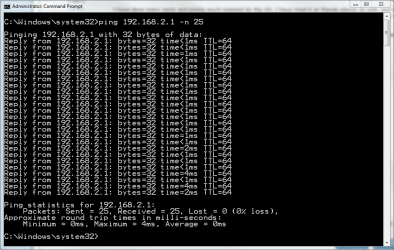
C:\Windows\system32>ping 192.168.0.1 -n 100

Pinging 192.168.0.1 with 32 bytes of data:
Reply from 192.168.0.1: bytes=32 time<1ms TTL=64
Reply from 192.168.0.1: bytes=32 time=1ms TTL=64
Reply from 192.168.0.1: bytes=32 time<1ms TTL=64
Reply from 192.168.0.1: bytes=32 time=3ms TTL=64

Ping statistics for 192.168.0.1:
Packets: Sent = 18, Received = 18, Lost = 0 (0% loss),
Approximate round trip times in milli-seconds:
Minimum = 0ms, Maximum = 3ms, Average = 0ms
Control-C
^C

No issues here. Recipe:
$25 draft-n router
Newegg.com - Rosewill RNX-EasyN400 IEEE 802.11b/g/n Wireless-N Draft 2.0 compatible Broadband Router (1T1R) Up to 150Mbps Data Rates/ WPA Personal and Enterprise, WPA2, 64 & 128 bit WEP, PSK, TKIP, AES, WPS Security with 2 dBi
$17 g wifi pci card
Newegg.com - Rosewill RNX-G300EX IEEE 802.11b/g PCI Wireless Card Up to 54Mbps Data Rates 64/128-Bit WEP, 802.1x, WPA, WPA2, AES, TKIP with 100cm cable external 2 dBi Antenna - Wireless Adapters
54Mbps link, full bars signal from the other side of the house through several walls. See my system info below for more info.
 

My Computer My Computer

At a glance

El Capitan / Windows 10i7-4980HQ16GBIris 5200
Computer type
Laptop
Computer Manufacturer/Model Number
Apple
OS
El Capitan / Windows 10
CPU
i7-4980HQ
Memory
16GB
Graphics Card(s)
Iris 5200
I think I have confirmed we ALL have W7, wi-fi issues
....Just a lot of people may not notice it much or be that bothered by it. Personnaly I cant stand it.
Simply not true. If I have a problem, I would not even think to state 'Because I have a problem, it's confirmed we all have a problem!'.

Kari
 

Attachments

  • ping.PNG
    ping.PNG
    20.1 KB · Views: 29

My Computer My Computer

At a glance

Windows 10 Pro x64 EN-GB1.6 GHz Intel Core i7-720QM Processor6 GBATI Mobility Radeon HD 5850 Graphics
Computer type
Laptop
Computer Manufacturer/Model Number
HP ENVY 17-1150eg
OS
Windows 10 Pro x64 EN-GB
CPU
1.6 GHz Intel Core i7-720QM Processor
Memory
6 GB
Graphics Card(s)
ATI Mobility Radeon HD 5850 Graphics
Sound Card
Beats sound system with integrated subwoofer
Monitor(s) Displays
17" laptop display, 22" LED and 32" Full HD TV through HDMI
Screen Resolution
1600*900 (1), 1920*1080 (2&3)
Hard Drives
Internal: 2 x 500 GB SATA Hard Disk Drive 7200 rpm
External: 2TB for backups, 3TB USB3 network drive for media
Cooling
As Envy runs a bit warm, I have it on a Cooler Master pad
Keyboard
Logitech diNovo Media Desktop Laser (bluetooth)
Mouse
Logitech Performance Mouse MX
Internet Speed
50/10 Mbps VDSL
Antivirus
Windows Defender 4.3.9431.0
Browser
Maxthon 3.5.2., IE11
Well this is good news then it mens there is a possible solution. I assumed everyone has it like this becasue I trried it on 3 sepearte setups, not within my home and 7 always all had these bad results!
Simply trying xp on the same setup worked fine, it seemend imposible for the culprit not to be 7. I think my assumption was reasnable because of so many repeat tests. Plus I said "I THINK"

I have no idea what you guys ahave different and i have tried everything with no luck :( ?

So this is definitely pining the wireless router?


All mine were tested on G. the signal has nothing to do with it btw.

So what settings,for your windows and wirelss drivers are you guys using?

I think the problem is windows is scanning wi-fi networks on the fly, it doesnt connect and lock on like XP does.
 

My Computer My Computer

At a glance

7 x64 U
OS
7 x64 U
Well this is good news then it mens there is a possible solution. I assumed everyone has it like this becasue I trried it on 3 sepearte setups, not within my home and 7 always all had these bad results!
Simply trying xp on the same setup worked fine, it seemend imposible for the culprit not to be 7. I think my assumption was reasnable because of so many repeat tests. Plus I said "I THINK"

I have no idea what you guys ahave different and i have tried everything with no luck :( ?

So this is definitely pining the wireless router?


All mine were tested on G. the signal has nothing to do with it btw.

So what settings,for your windows and wirelss drivers are you guys using?

I think the problem is windows is scanning wi-fi networks on the fly, it doesnt connect and lock on like XP does.

Some drivers default to aggressive channel scans. Lock your router and nic to the same address, usually 11.
 

My Computer My Computer

At a glance

El Capitan / Windows 10i7-4980HQ16GBIris 5200
Computer type
Laptop
Computer Manufacturer/Model Number
Apple
OS
El Capitan / Windows 10
CPU
i7-4980HQ
Memory
16GB
Graphics Card(s)
Iris 5200
Everything is good here.
 

Attachments

  • ping.JPG
    ping.JPG
    94.6 KB · Views: 14

My Computer My Computer

At a glance

Windows 7 64xAMD Turion II Dual-Core Mobile M520 2.30 GHz4GBATI Radeon HD 4200
Computer Manufacturer/Model Number
Toshiba L505
OS
Windows 7 64x
CPU
AMD Turion II Dual-Core Mobile M520 2.30 GHz
Memory
4GB
Graphics Card(s)
ATI Radeon HD 4200
baarod, i have set everything to full 54g, locked onto it. Nothing is set to auto or scan. Speed is full 54g max signal.

My wirelss laptop card is 4965AGN. Roaming agrresiveness etc have treid from low to high makes no diff.

Actually to all those not having problems, are you guys trying it on laptops?

I even installed

Home-WLAN Optimizer - Optimize wireless gaming, audio and video streaming...

with no help.
 

My Computer My Computer

At a glance

7 x64 U
OS
7 x64 U

My Computer My Computer

At a glance

El Capitan / Windows 10i7-4980HQ16GBIris 5200
Computer type
Laptop
Computer Manufacturer/Model Number
Apple
OS
El Capitan / Windows 10
CPU
i7-4980HQ
Memory
16GB
Graphics Card(s)
Iris 5200
It is just hard to see you having the same issue on 3 different machines on various networks as well. Do these machines all share something in common like a certain application (like a wireless utility) installed. Have you tried testing in safe mode?
 

My Computer My Computer

At a glance

Windows 7 64xAMD Turion II Dual-Core Mobile M520 2.30 GHz4GBATI Radeon HD 4200
Computer Manufacturer/Model Number
Toshiba L505
OS
Windows 7 64x
CPU
AMD Turion II Dual-Core Mobile M520 2.30 GHz
Memory
4GB
Graphics Card(s)
ATI Radeon HD 4200
No safe mode. I have tried on two different routers within my home, with 2 different installations of win 7 on different machines. I Then try do it running xp and its 1ms always.

I then went to my freinds house who also has win 7 on his HP laptop ( high specced new lappy) and he was getting 3, 4 ,5, 4, 3, 8, etc as well. He has nothing of mine, I dont touch his comps one bit. I dont know what else to tell you.

What do you mean its just hard to see... You think I am joking around?

This is a massive problem for me, it means I may have to go back to vista and I dont want to. It might even mean I have to skip 7 altogether, and who knows if the next version will be any better.
There's a lot doing down the drain if I cant fix this. but threes no way I will put up with above 1ms ping's.
 

My Computer My Computer

At a glance

7 x64 U
OS
7 x64 U
Pampum, don't give up, Win7 networking is a known problem. I think they will fix most, if not all the mechanical problems (high latency compared to XP on some systems). Probably not the interface problems (confusing and with many screens), but there will eventually be a way to make this work.
 

My Computer My Computer

At a glance

Win7 32 / 64 and XP 32 / 64 (on various other...Intel 920's @ 3.6 and 4.0 GHz3Gb / 6GbATI 4850 / ATI 4970
Computer Manufacturer/Model Number
Alinor Engineering
OS
Win7 32 / 64 and XP 32 / 64 (on various other computers as well)
CPU
Intel 920's @ 3.6 and 4.0 GHz
Motherboard
Asus P6T
Memory
3Gb / 6Gb
Graphics Card(s)
ATI 4850 / ATI 4970
Sound Card
onboard
Monitor(s) Displays
24 / 27"
Hard Drives
SSD, 1Tb WD
SSD, 3 Raptors raid, 2Tb WD
PSU
PC Power & Cooling 1K
Case
Antec 900 (modded)
Cooling
air / Danger Den water
Keyboard
Logitech G15
Mouse
Logitech Performance MX
Internet Speed
ATT UVerse
Back
Top