
Solved I upgraded from Vista to Win 7 with upgrade disk, Now a problem

chrstdvd

New member
Member
Local time
9:47 PM
Messages
34
Location
McKenney, Va.
I did the upgrade about 3 years ago and have since become a Alpha/Beta tester for Quicken 2014. One of the requirements to be a tester this year was to not test 2014 on same computer that 2013 in installed on by using a different computer or installing a VM on your current computer; that is what I did using VMFusion software. Everything works great and I am really impressed with the VM running Win 7 Home.

Now it asks me to Register my product which I tried to do, but the message comes back, "This product is licensed for Upgrade, not full install". I noticed today I have 11 days left to register.

Anyway I can get a special product key to have this installed on the same computer in a VM as the original conversion install?

If not will it work if I make a new VM install every 30 days until testing is over in Sept.?
 

My Computer My Computer

At a glance

Microsoft Windows 7 Professional 64-bit 7601 ...Intel(R) Core(TM)2 Quad CPU Q8200 @ 2.33GHz6.00 GB(1) Intel(R) G45/G43 Express Chipset (Microso...
Computer type
PC/Desktop
Computer Manufacturer/Model Number
Dell Studio
OS
Microsoft Windows 7 Professional 64-bit 7601 Multiprocessor Free Service Pack 1
CPU
Intel(R) Core(TM)2 Quad CPU Q8200 @ 2.33GHz
Motherboard
Dell Inc. 0M017G
Memory
6.00 GB
Graphics Card(s)
(1) Intel(R) G45/G43 Express Chipset (Microsoft Corporation
Sound Card
(1) High Definition Audio Device (2) High Definition Audio
Monitor(s) Displays
HP2009m
Screen Resolution
1600 x 900 x 32 bits (4294967296 colors) @ 60 Hz
Hard Drives
(1) SAMSUNG HD642JJ ATA Device (2) Generic- Compact Flash USB Device (3) Generic- MS/MS-Pro USB Device (4) Generic- SD/MMC USB Device (5) Generic- SM/xD Picture USB Device
Problem solved.
Well now, I am the lucky one. I called Microsoft Tech Support and the lady walked my through some steps and now my VM Win 7 Home Premium is activated. [lot of number entering, though]
 

My Computer My Computer

At a glance

Microsoft Windows 7 Professional 64-bit 7601 ...Intel(R) Core(TM)2 Quad CPU Q8200 @ 2.33GHz6.00 GB(1) Intel(R) G45/G43 Express Chipset (Microso...
Computer type
PC/Desktop
Computer Manufacturer/Model Number
Dell Studio
OS
Microsoft Windows 7 Professional 64-bit 7601 Multiprocessor Free Service Pack 1
CPU
Intel(R) Core(TM)2 Quad CPU Q8200 @ 2.33GHz
Motherboard
Dell Inc. 0M017G
Memory
6.00 GB
Graphics Card(s)
(1) Intel(R) G45/G43 Express Chipset (Microsoft Corporation
Sound Card
(1) High Definition Audio Device (2) High Definition Audio
Monitor(s) Displays
HP2009m
Screen Resolution
1600 x 900 x 32 bits (4294967296 colors) @ 60 Hz
Hard Drives
(1) SAMSUNG HD642JJ ATA Device (2) Generic- Compact Flash USB Device (3) Generic- MS/MS-Pro USB Device (4) Generic- SD/MMC USB Device (5) Generic- SM/xD Picture USB Device
I thank you for that link and the advice. You are correct the upgrade was from Vista to Win 7 Home Premium on a factory installed Dell, and I sure as heck did not loose the Dell Bloat.

Notice above in OP I said that I was really happy with the Clean Win 7 install on the VM. I went to Install and Remove programs and that thing is empty, basically. The VM with 2 Meg of RAM allocated runs faster than the PC with 8 Gig RAM and and Quad processors. Of course only install on it is the Quicken 2014 Alpha.

I think with the Registration Number/Product Key that I got today, it could be used to register the PC should I decide to follow the link instructions after Testing. I do not want to take any chances till then.

Reason I say that, is I could have had a hard drive crash and installed a new hard drive and installed with my upgrade Disc and probably registered it like I did today with the VM copy.
 

My Computer My Computer

At a glance

Microsoft Windows 7 Professional 64-bit 7601 ...Intel(R) Core(TM)2 Quad CPU Q8200 @ 2.33GHz6.00 GB(1) Intel(R) G45/G43 Express Chipset (Microso...
Computer type
PC/Desktop
Computer Manufacturer/Model Number
Dell Studio
OS
Microsoft Windows 7 Professional 64-bit 7601 Multiprocessor Free Service Pack 1
CPU
Intel(R) Core(TM)2 Quad CPU Q8200 @ 2.33GHz
Motherboard
Dell Inc. 0M017G
Memory
6.00 GB
Graphics Card(s)
(1) Intel(R) G45/G43 Express Chipset (Microsoft Corporation
Sound Card
(1) High Definition Audio Device (2) High Definition Audio
Monitor(s) Displays
HP2009m
Screen Resolution
1600 x 900 x 32 bits (4294967296 colors) @ 60 Hz
Hard Drives
(1) SAMSUNG HD642JJ ATA Device (2) Generic- Compact Flash USB Device (3) Generic- MS/MS-Pro USB Device (4) Generic- SD/MMC USB Device (5) Generic- SM/xD Picture USB Device
You'd want to activate the OS reinstall with the Product Key on COA sticker, on bottom of laptop or under battery. Use the licensed version which you own for life of that machine to reinstall however you want.
 
Ok thanks. I have been reading the links that are at the bottom of the link you provided and have decided to to a clean install.

It will take some time to insure that I have copies of programs that I paid for and downloaded, like AVG and other programs I like to use.

I will come back to this thread or post a request for help asking for you because I already have questions, but they can wait until I understand more about this and have everything ready.

I sure am glad I asked about this. There are a lot of Super Testers at Quicken who will enjoy this information, and I have posted the link on the Testers forums for them to check out. Did not know if you would appreciate me linking this forum to them. We are some cantankerous people and tend to yell at each other from time to time about our opinions.
 

My Computer My Computer

At a glance

Microsoft Windows 7 Professional 64-bit 7601 ...Intel(R) Core(TM)2 Quad CPU Q8200 @ 2.33GHz6.00 GB(1) Intel(R) G45/G43 Express Chipset (Microso...
Computer type
PC/Desktop
Computer Manufacturer/Model Number
Dell Studio
OS
Microsoft Windows 7 Professional 64-bit 7601 Multiprocessor Free Service Pack 1
CPU
Intel(R) Core(TM)2 Quad CPU Q8200 @ 2.33GHz
Motherboard
Dell Inc. 0M017G
Memory
6.00 GB
Graphics Card(s)
(1) Intel(R) G45/G43 Express Chipset (Microsoft Corporation
Sound Card
(1) High Definition Audio Device (2) High Definition Audio
Monitor(s) Displays
HP2009m
Screen Resolution
1600 x 900 x 32 bits (4294967296 colors) @ 60 Hz
Hard Drives
(1) SAMSUNG HD642JJ ATA Device (2) Generic- Compact Flash USB Device (3) Generic- MS/MS-Pro USB Device (4) Generic- SD/MMC USB Device (5) Generic- SM/xD Picture USB Device
Please invite your fellow membes of Super Testers at Quicken to join our Forum just like you did.
 

My Computer My Computer

At a glance

Windows 10 Pro. 64/ version 1709 Windows 7 Pr...Intel i7-6800K @ 4.3Corsair Platinum 16 gig @2400EVGA GTX 1070 OC
Computer type
PC/Desktop
Computer Manufacturer/Model Number
Home made Desktop
OS
Windows 10 Pro. 64/ version 1709 Windows 7 Pro/64
CPU
Intel i7-6800K @ 4.3
Motherboard
ASUS X-99 Deluxe II
Memory
Corsair Platinum 16 gig @2400
Graphics Card(s)
EVGA GTX 1070 OC
Monitor(s) Displays
Asus 27" LED LCD/VE278Q
Screen Resolution
1920-1080 or 1280-720 HDMI
Hard Drives
INTEL SSD 730-240 Gb Sata 3.0/
PSU
EVGA Platium 1200W
Case
Phanteks Luxe Tempered Glass 8 fans/ one radiator
Cooling
XSPC/ Water Cooled CPU
Keyboard
Das 4 Professional
Mouse
Logitech M705/MX Anywhere 2-S
Internet Speed
100 mbits
Antivirus
Microsoft Security Essentials/ Malwarebytes Premium 3.0/ SAS
Browser
I.E. 11 default/Firefox/ ISP Time Warner Cable/Spectrum
Other Info
LG BluRay Burner/
Sound system-KLipsch-THX/
Icy Dock ssd Hot Swap bays.
Ok, I will post a link to this thread. Thanks.
 

My Computer My Computer

At a glance

Microsoft Windows 7 Professional 64-bit 7601 ...Intel(R) Core(TM)2 Quad CPU Q8200 @ 2.33GHz6.00 GB(1) Intel(R) G45/G43 Express Chipset (Microso...
Computer type
PC/Desktop
Computer Manufacturer/Model Number
Dell Studio
OS
Microsoft Windows 7 Professional 64-bit 7601 Multiprocessor Free Service Pack 1
CPU
Intel(R) Core(TM)2 Quad CPU Q8200 @ 2.33GHz
Motherboard
Dell Inc. 0M017G
Memory
6.00 GB
Graphics Card(s)
(1) Intel(R) G45/G43 Express Chipset (Microsoft Corporation
Sound Card
(1) High Definition Audio Device (2) High Definition Audio
Monitor(s) Displays
HP2009m
Screen Resolution
1600 x 900 x 32 bits (4294967296 colors) @ 60 Hz
Hard Drives
(1) SAMSUNG HD642JJ ATA Device (2) Generic- Compact Flash USB Device (3) Generic- MS/MS-Pro USB Device (4) Generic- SD/MMC USB Device (5) Generic- SM/xD Picture USB Device
There are many tips in the tutorial about what tools and methods work best with Win7 based on countless installs we've helped with here since before Win7 was even released. The closer you stick with them the more perfect your install will be and remain.
 
I am almost ready to do a clean install of W 7 on my computer. But I am totally confused. Let me give the facts of my usage and ask a few questions and you'll advise me.

Security Programs I pay for and use.
AVG Internet Security
PC Matic

Programs I use the most:
Free Cell
Quicken
Chrome Browser, Do not like IE, but can not say why. I do normal Google Searches to fine answers to questions I may have about any subject.
Excel - I write Macros in VB for applications, but only for Excel. I have the original disk, and plan on only installing Excel on the new set up, as it is all I use. Also do not use Outlook.

VM: VMFusion for a Virtual Machine to test Quicken and other programs in Alpha and Beta.

Attachment 1 is the properties of my computer. Note the Registration number at bottom is the new one that I received the other day when registering my VM Machine copy. Is that going to be the number I need when I wipe the computer and re-install from my W7 Up Grade disk? It is different than the one on my computer sticker which is for Vista [factory installed] or the one for my Win 7 upgrade.

Questions: I have a drive C and a drive D: D is just where I keep old files and a ton of family Pictures, as well as, my Income tax filings. Will a fresh install wipe D:? Do I need to put it on a stick?

This computer got set up with me being called "a". So if I copy C:users\a to a stick, will I have all my stuff, I should be able to put what I want on the new install under the Users:\My Name [this time]

I have screen shots stored externally of all my paid programs like AVG and PC Matic with my registration numbers stored on a stick.

About the links:

With my limited use, why do I need SP1 or any of the other Kb's? [I know that is a Billy Boot Camp question, but the VM works great without any of that stuff.] Would it just be OK to install from my 64k disk and worry about updates at a different time?

Thank you for not yelling about how dumb this sounds and for your contributions and advice.
David Christopher

And God forbid that I screw up my Network! As long as I run my Router Disk again after re-install I WILL have my WIFI network? I use Hughes Net Gen 4 for ISP and everything works great now. Will I screw up that with a re-nstall. Network is the scariest thing for me to mess with, 'cause I know nothing about it. Right now I can connect to IPV 4 & 6 sites.
 

Attachments

  • Registration.png
    Registration.png
    23.3 KB · Views: 5
Last edited:

My Computer My Computer

At a glance

Microsoft Windows 7 Professional 64-bit 7601 ...Intel(R) Core(TM)2 Quad CPU Q8200 @ 2.33GHz6.00 GB(1) Intel(R) G45/G43 Express Chipset (Microso...
Computer type
PC/Desktop
Computer Manufacturer/Model Number
Dell Studio
OS
Microsoft Windows 7 Professional 64-bit 7601 Multiprocessor Free Service Pack 1
CPU
Intel(R) Core(TM)2 Quad CPU Q8200 @ 2.33GHz
Motherboard
Dell Inc. 0M017G
Memory
6.00 GB
Graphics Card(s)
(1) Intel(R) G45/G43 Express Chipset (Microsoft Corporation
Sound Card
(1) High Definition Audio Device (2) High Definition Audio
Monitor(s) Displays
HP2009m
Screen Resolution
1600 x 900 x 32 bits (4294967296 colors) @ 60 Hz
Hard Drives
(1) SAMSUNG HD642JJ ATA Device (2) Generic- Compact Flash USB Device (3) Generic- MS/MS-Pro USB Device (4) Generic- SD/MMC USB Device (5) Generic- SM/xD Picture USB Device
PC Matic is joke TV crapware. AVG hasn't been favored by techies for about 10 years. What's recommended and works best is in Clean Reinstall - Factory OEM Windows 7 based on countless thousands of installs we've helped with here since before Win7 was still in beta.

You'll use the Product Key on the COA sticker which came in the Win7 Upgrade packaging. When you reinstall boot the installer and it will see an OS on the HD to allow use of Upgrade verison key during install - even though you should then go on to delete all partitions to create New one(s) as shown in Step 7 of Clean Install Windows 7.

If you wipe the HD or use another or new HD and no OS is seen by the installer then leave the Product Key blank during install and after install do the quick workaround in Option 3 of Clean Install with a Upgrade Windows 7 Version to activate Win7 Upgrade on a new or wiped HD.

You do not have Win7 without SP1. These are like a car overhaul: they become the engine.

You don't need to mess with your modem or router at all. Just put your wireless driver in your backup so that if Win7 doesn't provide its driver during install you can install it yourself, connect to your network from bottom-right System Tray connection icon (or rightclick it to run Troubleshooter to find out why not), get online to run all rounds of Important and Optional Windows Updates which will provide almost all other drivers as well as important performance and security updates.

You can also plug in by wire and have a greater likelihood of being online after install, have the wireless driver come in on Updates. About 50% of wireless drivers are in the installer, while about 70% of ethernet drivers are. You'll know if the installer asks you information about your network if it's going to start up connected. Otherwise install the driver yourself first thing to run your Updates. You can set up your desktop while the Updates are running. After required reboots come right back to run Windows Updates again until exhausted.

You can find your wireless driver on the Dell Support Downloads webpage for your tag number, which is where you'll get any drivers still missing in Device Manager after all Updates are done.
 
Ok, I have totally messed up my computer and had to upgrade to Professional. Not a big deal, but I want not to screw up again blindly uninstalling programs in the step that says "uninstall programs you do not use" step 3 of "Clean up Factory Bloatware, windows 7 help Forums"

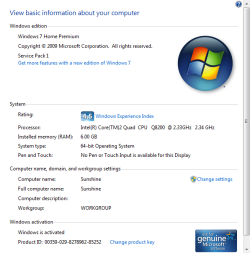
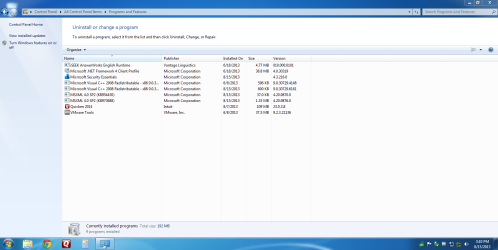
I just downloaded all the security updates to my Win Home Premium installation on my Virtual Machine. It is attachment 1.

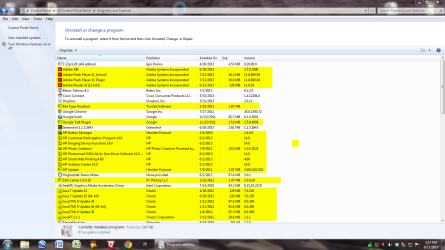
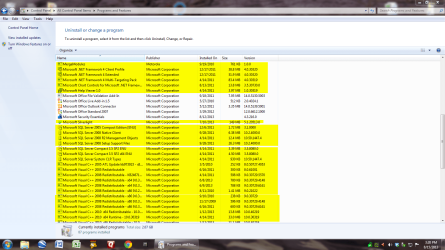
The following three attachments are what is in my PC Programs and Features section on the PC itself. Could someone tell me what I can uninstall safely. Like, I do not know if I need Adobe Air and the Adobe programs except for the Adobe Reader, which, I think, lets me read PDF files.

The C++ programs I have no Idea where they came from unless they were required when I was using doing Programming for Android and had the CG??? program on here to write Linux scripts.

Java, blows me away, I have no Idea what Java I need for every day use. When I was scripting for Android, I had to use an older version of it, so no idea which one to keep or get rid of.

I do not use Windows Live, so I guess I could uninstall that.

I uninstalled AVG and PC Matic and use the recommended MS Security Essentials with the Windows Firewall.
Actually I can not uninstall PC Matic because some file is missing, I am tempted to just delete the folder in x64.

I do not have a recovery disk, or any disk at all. A program Something Shield blocked my DVD/CD drive and now it does not work. It is uninstalled now but the drive does not work. [Most likes I screwed up uninstalling it before finding out how to unblock it]

I know I would consider this request a pain in the ass, were it not me, but what can I uninstall.

As far as downloading the ISO, I use Hughes Net, so it is mission impossible downloading a 3 gig file. I will take the PC to local shop to have it installed clean after Quicken Beta Testing. Or as soon as I screw up again and the computer freezes because I uninstall something I should not have.

Thanks.
David
 

Attachments

  • 1. HomePremimumonVM.png
    1. HomePremimumonVM.png
    68.1 KB · Views: 3
  • ProfessionalonMachine1.png
    ProfessionalonMachine1.png
    103.7 KB · Views: 4
  • ProfessionalonMach2.png
    ProfessionalonMach2.png
    98.4 KB · Views: 5
  • Professonial on PC3.png
    Professonial on PC3.png
    116 KB · Views: 4

My Computer My Computer

At a glance

Microsoft Windows 7 Professional 64-bit 7601 ...Intel(R) Core(TM)2 Quad CPU Q8200 @ 2.33GHz6.00 GB(1) Intel(R) G45/G43 Express Chipset (Microso...
Computer type
PC/Desktop
Computer Manufacturer/Model Number
Dell Studio
OS
Microsoft Windows 7 Professional 64-bit 7601 Multiprocessor Free Service Pack 1
CPU
Intel(R) Core(TM)2 Quad CPU Q8200 @ 2.33GHz
Motherboard
Dell Inc. 0M017G
Memory
6.00 GB
Graphics Card(s)
(1) Intel(R) G45/G43 Express Chipset (Microsoft Corporation
Sound Card
(1) High Definition Audio Device (2) High Definition Audio
Monitor(s) Displays
HP2009m
Screen Resolution
1600 x 900 x 32 bits (4294967296 colors) @ 60 Hz
Hard Drives
(1) SAMSUNG HD642JJ ATA Device (2) Generic- Compact Flash USB Device (3) Generic- MS/MS-Pro USB Device (4) Generic- SD/MMC USB Device (5) Generic- SM/xD Picture USB Device
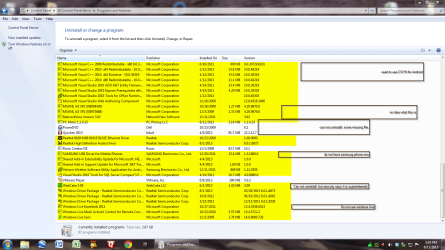
What do you mean you "had to Upgrade to Professional?" Why and how?

Upgrade within Win7 is done only by Windows Anytime Upgrade - How to which only unlocks the few extra features in the exact same OS so has no bearing on performance problems.

Unless you specifically need one of those features it is a waste of an expensive OS since you already own Home Premium on the PC.

Since you couldn't have upgraded from Home Premium to Professional, you must have clean reinstalled in which case none of these other issues would be there. So perhaps first its best to clarify exactly what you've done and why because what you have said makes no sense.
 
Why and How
I Uninstalled many, many programs in Programs and Features of the Control Panel. Then I went thorough Program Files and Program Files (x86) and deleted any folders that were associated with the Uninstalled programs.

In the following days the Beta of Quicken 2014 running in a VM started locking up. Could not Control Alt Del out of it, so I pulled the plug. Then the VM locked up, pulled the plug, then the VM would not boot up at all and the PC locked up, I pulled the plug. After that the PC would boot up, but when I clicked on any Icon all that happened was the spinning wheel for a while, then nothing.

After many boots into safe mode, I finally got PC to boot up and work almost like normal, but I figured this might be the last time. I debated with myself about what to do and went into Control Panel looking for some help on recovery. When I saw the Any Time Update, I jumped on it. I read about it, and decided it would be cheaper to pay $89.95 to upgrade than taking the PC to the shop. I bought it, Microsoft took control of the PC and installed Professional.

That fixed what ever I had broken. The VM worked again, Quicken did not crash, and I had all my original files were in tact [the ones I did not Uninstall or delete].

My daughter has been bugging me for years to get her childhood VHS tapes converted to digital. So I boxed them up and sent them off to be put on CD's, thinking I could copy them onto My Computer and make copies for other family members that wanted them. I used Daniusoft Video Converter Ultimate to convert them. On the final step of the conversion of the first disk, PC Matic's Super Shield Blocked Daniusoft for some reason, and I could not convert any more or find out how to undo the block. Now sometimes the CD player works and sometimes it does not, even after all PC Matic is wiped from the PC.

My Daniusoft program will not boot anymore. I figured, I should just uninstall it and re-install it. But now it is changed to Aimersoft and I am in a contest with them about the licence from the old program working on the new program, so it still does not work until that is resolved.

I was able to make a recovery CD yesterday for the Win 7 Professional. I do not know what to do with it, but I have it and since it has a Boot folder, I assume it will Boot.

Everything about the PC is faster, cleaner, more robust now and I want to know what programs I have on here that can be eliminated.
 

My Computer My Computer

At a glance

Microsoft Windows 7 Professional 64-bit 7601 ...Intel(R) Core(TM)2 Quad CPU Q8200 @ 2.33GHz6.00 GB(1) Intel(R) G45/G43 Express Chipset (Microso...
Computer type
PC/Desktop
Computer Manufacturer/Model Number
Dell Studio
OS
Microsoft Windows 7 Professional 64-bit 7601 Multiprocessor Free Service Pack 1
CPU
Intel(R) Core(TM)2 Quad CPU Q8200 @ 2.33GHz
Motherboard
Dell Inc. 0M017G
Memory
6.00 GB
Graphics Card(s)
(1) Intel(R) G45/G43 Express Chipset (Microsoft Corporation
Sound Card
(1) High Definition Audio Device (2) High Definition Audio
Monitor(s) Displays
HP2009m
Screen Resolution
1600 x 900 x 32 bits (4294967296 colors) @ 60 Hz
Hard Drives
(1) SAMSUNG HD642JJ ATA Device (2) Generic- Compact Flash USB Device (3) Generic- MS/MS-Pro USB Device (4) Generic- SD/MMC USB Device (5) Generic- SM/xD Picture USB Device
There is nothing about unlocking the few extra expensive features in Professional that could have affected performance. You still have the exact same OS in its exact same condition. It was not reinstalled or even touched except to unlock those features. Did you really need them? Compare Windows 7 Editions - Windows 7 Forums

I avoid telling users which programs to uninstall because it's rearranging the deck chairs on the Titanic, as useless as Anytime Upgrading to work in the direction of a perfect install since any factory preinstalled Win7 is the worst possible install of Win7 you can have by definition. That's why no tech enthusiast would run such an install but instead get and keep a perfect Clean Reinstall - Factory OEM Windows 7 which I advised you to do in July and was ignored.

Only you know which programs you use or can do without. If you don't then open and study them to see if it's something you use or want. Then there are other steps if you're going to settle to Clean Up Factory Bloatwareto try to mitigate the bloatware's impact on Win7 performance. At best you'll still have the worst possible install of Win7 one can have.
 
Last edited:
I am sorry that you feel I ignored your clean install. In fact I purchased an external hard drive and have all my "stuff" on it for re-install on the Clean Install, when I am ready to do that. I just want to wait until after Beta testing Oct 1.

In addition I have been reading and testing all the links you have provided me. To you, it may seem simple to do, to me it is daunting. All I really have to do is download a copy of the program ISO and do it. But, I have Hughes Net Satellite as an ISP and downloading a 3 gig file would severely deplete my monthly download allowance. I tried the other day, and my "up To" download speed was to slow to complete in allotted time for the 15 Gig a month I get to use from 2 AM to 8 AM.

I plan on having my daughter go to the local library with her Mac and download the ISO onto a stick and then making a Disk from that. The Library has free WIFI and way faster speeds that we get here.

As far as Any Time Upgrade not being able to do more than unlock features for the next level up go. All I can think of is that the Windows Home Premium Disk I purchased to convert from Vista, did not have the entirety of what a real Install disk would have on it. All I know is the computer did not work, now it does. And a lot better thanks to your advice.

I do need Professional BTW because Home Premium does not have the capability to Remotely connect. I have found work abounds, but they are cumbersome, because of the lag of my Satellite ISP.

Thanks for your help. I will post about the clean install, when I get it done.
 

My Computer My Computer

At a glance

Microsoft Windows 7 Professional 64-bit 7601 ...Intel(R) Core(TM)2 Quad CPU Q8200 @ 2.33GHz6.00 GB(1) Intel(R) G45/G43 Express Chipset (Microso...
Computer type
PC/Desktop
Computer Manufacturer/Model Number
Dell Studio
OS
Microsoft Windows 7 Professional 64-bit 7601 Multiprocessor Free Service Pack 1
CPU
Intel(R) Core(TM)2 Quad CPU Q8200 @ 2.33GHz
Motherboard
Dell Inc. 0M017G
Memory
6.00 GB
Graphics Card(s)
(1) Intel(R) G45/G43 Express Chipset (Microsoft Corporation
Sound Card
(1) High Definition Audio Device (2) High Definition Audio
Monitor(s) Displays
HP2009m
Screen Resolution
1600 x 900 x 32 bits (4294967296 colors) @ 60 Hz
Hard Drives
(1) SAMSUNG HD642JJ ATA Device (2) Generic- Compact Flash USB Device (3) Generic- MS/MS-Pro USB Device (4) Generic- SD/MMC USB Device (5) Generic- SM/xD Picture USB Device
Ask back any questions you have to get it done correctly.

Had you asked we could have recommended TeamViewer which is infinitely better and more reliable that Remote Disconnect.
 
One needs to be smart enough to ask for an answer to a question he does not know.
 

My Computer My Computer

At a glance

Microsoft Windows 7 Professional 64-bit 7601 ...Intel(R) Core(TM)2 Quad CPU Q8200 @ 2.33GHz6.00 GB(1) Intel(R) G45/G43 Express Chipset (Microso...
Computer type
PC/Desktop
Computer Manufacturer/Model Number
Dell Studio
OS
Microsoft Windows 7 Professional 64-bit 7601 Multiprocessor Free Service Pack 1
CPU
Intel(R) Core(TM)2 Quad CPU Q8200 @ 2.33GHz
Motherboard
Dell Inc. 0M017G
Memory
6.00 GB
Graphics Card(s)
(1) Intel(R) G45/G43 Express Chipset (Microsoft Corporation
Sound Card
(1) High Definition Audio Device (2) High Definition Audio
Monitor(s) Displays
HP2009m
Screen Resolution
1600 x 900 x 32 bits (4294967296 colors) @ 60 Hz
Hard Drives
(1) SAMSUNG HD642JJ ATA Device (2) Generic- Compact Flash USB Device (3) Generic- MS/MS-Pro USB Device (4) Generic- SD/MMC USB Device (5) Generic- SM/xD Picture USB Device
If in the interim from July since we last heard from you it had been brought up at all that you were considering spending $90 on Anytime Upgrade, we would have helped you do the feature analysis and pointed you to TeamViewer since it's the only apparent reason you wasted the money.

We can be relied upon to help with those kinds of things because we deal with them every day here since before Win7 was released. So don't hesitate to ask.
 
Well Grocker, I had to bust down the back door, go down the hall, into kitchen, down to cellar and out the cellar window, but I have a clean install now.

I went to local library with my daughters laptop. Said it would take 6 hrs to down load the file. I cancelled. Went home took my Windows 7 Home Premium x64 disk and stuck it in and chose Custom. It took forever, but finally booted up into Windows 7 Home Premium, no updates at all.

I checked the Programs and Features and it said there were no programs installed on this computer. I think that qualifies as a clean install.

I downloaded Chrome, my browser of choice.

I installed Greenshot, my favorite screen capture tool.

I installed Microsoft Security Essentials and downloaded the definitions.

Then I registered with the number that came with the CD, surprisingly it worked. Then I went to anytime upgrade and chose I have a Product Key to get Professional. I entered the Key, and now she is to the point of downloading 99 updates. Do not know how long that will take, but I will keep you posted. Wont be long until I have a clean install with Win 7 Pro and all the updates.

Then I will install Quicken Beta, and get the Data folder into Documents.

I will check it out and make sure all is well.

Then I have questions for you.

Like, can I custom Install Microsoft Office with just Excel from an old CD I have? I am sure I will need Adobe Reader, then I have to go find 7zip and a few other little programs I use.

Then I want to do an ISO of just this basic setup. I used Norton Ghost for XP to do this. What can I use in Win 7?

Thanks
 

My Computer My Computer

At a glance

Microsoft Windows 7 Professional 64-bit 7601 ...Intel(R) Core(TM)2 Quad CPU Q8200 @ 2.33GHz6.00 GB(1) Intel(R) G45/G43 Express Chipset (Microso...
Computer type
PC/Desktop
Computer Manufacturer/Model Number
Dell Studio
OS
Microsoft Windows 7 Professional 64-bit 7601 Multiprocessor Free Service Pack 1
CPU
Intel(R) Core(TM)2 Quad CPU Q8200 @ 2.33GHz
Motherboard
Dell Inc. 0M017G
Memory
6.00 GB
Graphics Card(s)
(1) Intel(R) G45/G43 Express Chipset (Microsoft Corporation
Sound Card
(1) High Definition Audio Device (2) High Definition Audio
Monitor(s) Displays
HP2009m
Screen Resolution
1600 x 900 x 32 bits (4294967296 colors) @ 60 Hz
Hard Drives
(1) SAMSUNG HD642JJ ATA Device (2) Generic- Compact Flash USB Device (3) Generic- MS/MS-Pro USB Device (4) Generic- SD/MMC USB Device (5) Generic- SM/xD Picture USB Device
Back
Top